
hairycactus
New member
- Local time
- 6:26 AM
- Messages
- 4
30,716 files in C:\Windows\winsxs\Temp\PendingRenames
Consecutive repeated reboots clears the "PendingRenames" files ? I don't dare to reboot unless absolutely necessary, because my post-09 Dec 2014 weirdly-behaving (& falling-apart) system might not be able to startup again (see issue 2 below). This is my only computer, & I have no other device to work on or access the internet for research.
The "PendingRenames" files for all episodes (except the anomalous 19 Dec 2014) were generated continuously every minute within a tight timeframe (eg. 15–20 minute episode once per affected day — see examples provided for 09 Dec & 25 Dec).
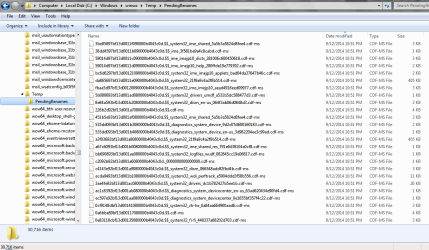
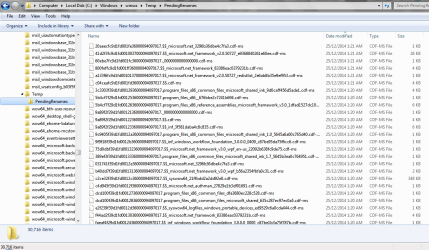
C:\Windows\winsxs\Temp\PendingRenames:
Attached at the bottom: 2 screenshots showing some sample files that were created.
1) I ran sfc /scannow 4 or 5 times between 09 Dec & 21 Dec 2014. The last attempt was on 21 Dec (no integrity violations). However, there are a total of 5,340 "PendingRenames" files (92.8 MB) generated on 22 Dec, 23 Dec & 25 Dec 2014. So these files might not be the result of sfc /scannow ... unless the system ran its own sfc/ scannow w/o me knowing.
2) On 18 Dec 2014, I experienced an unsuccessful system restore (it was stuck at "Removing temporary files" even after 6–7 hrs), followed immediately by an unexpected bootup failure. I recovered the system the next day by repeatedly running Startup Repair.
Since then, I'd only rebooted only once, on 22 Dec (I think). Between then & now, I hibernated the system once or twice a day. So it seems that the "PendingRenames" files are probably not created by reboots.
3) I don't think the current 30,716 files in "PendingRenames" are caused by Win 7 SP1 upgrade (successfully done in Oct 2014, no error msgs). These "PendingRenames" files all date between 09 Dec & 25 Dec 2014. Moreover, I had run CleanMgr dozens of times since Oct 2014.
There were only 2 odd things related to the SP1 upgrade:-
a) The upgrade process took a really long time (is 4+ hrs normal ?);
b) Win Explorer suddenly stopping displaying the metadata (eg. bitrate, length, artist, album) of all my mp3 files. Such metadata remain visible in Winamp & mp3 tag-editors. Installing AudioShell made the metadata visible again in Win Explorer, but AudioShell kept crashing Win Explorer, so I uninstalled it sometime ago. Upon which, all mp3 metadata reverted to post-SP1 "invisibility" in Win Explorer. To date, this is not resolved, even though I'd also tried the registry patch to restore mp3 keys to default values.
Mine clears after a boot or two, after running SFC, to 0 files.
Consecutive repeated reboots clears the "PendingRenames" files ? I don't dare to reboot unless absolutely necessary, because my post-09 Dec 2014 weirdly-behaving (& falling-apart) system might not be able to startup again (see issue 2 below). This is my only computer, & I have no other device to work on or access the internet for research.
The "PendingRenames" files for all episodes (except the anomalous 19 Dec 2014) were generated continuously every minute within a tight timeframe (eg. 15–20 minute episode once per affected day — see examples provided for 09 Dec & 25 Dec).
C:\Windows\winsxs\Temp\PendingRenames:
- 09 Dec 2014 (10:50–11:09pm): 1,780 files (30.9 MB)
- 10 Dec 2014: 9,971 files (174 MB)
- 11 Dec 2014: 709 files (11.3 MB)
- 17 Dec 2014: 2 files (3.97 KB)
- 18 Dec 2014: No files generated; System Restore failure, Bootup failure (1st ever in laptop's 4-year history), ran Startup Repair several times
- 19 Dec 2014 (10:24–10:39am, 4:39–5:42pm, 11:25–11:39pm): System recovered from bootup failure; 9,354 files (249 MB)
- 21 Dec 2014: 3,560 files (61.9 MB)
- 22 Dec 2014: 1,071 files (19.6 MB); Rebooted system once
- 23 Dec 2014: 2,489 files (42.3 MB)
- 25 Dec 2014 (1:04–1:21 am): 1,780 files (30.9 MB)
Attached at the bottom: 2 screenshots showing some sample files that were created.
1) I ran sfc /scannow 4 or 5 times between 09 Dec & 21 Dec 2014. The last attempt was on 21 Dec (no integrity violations). However, there are a total of 5,340 "PendingRenames" files (92.8 MB) generated on 22 Dec, 23 Dec & 25 Dec 2014. So these files might not be the result of sfc /scannow ... unless the system ran its own sfc/ scannow w/o me knowing.
2) On 18 Dec 2014, I experienced an unsuccessful system restore (it was stuck at "Removing temporary files" even after 6–7 hrs), followed immediately by an unexpected bootup failure. I recovered the system the next day by repeatedly running Startup Repair.
Since then, I'd only rebooted only once, on 22 Dec (I think). Between then & now, I hibernated the system once or twice a day. So it seems that the "PendingRenames" files are probably not created by reboots.
3) I don't think the current 30,716 files in "PendingRenames" are caused by Win 7 SP1 upgrade (successfully done in Oct 2014, no error msgs). These "PendingRenames" files all date between 09 Dec & 25 Dec 2014. Moreover, I had run CleanMgr dozens of times since Oct 2014.
There were only 2 odd things related to the SP1 upgrade:-
a) The upgrade process took a really long time (is 4+ hrs normal ?);
b) Win Explorer suddenly stopping displaying the metadata (eg. bitrate, length, artist, album) of all my mp3 files. Such metadata remain visible in Winamp & mp3 tag-editors. Installing AudioShell made the metadata visible again in Win Explorer, but AudioShell kept crashing Win Explorer, so I uninstalled it sometime ago. Upon which, all mp3 metadata reverted to post-SP1 "invisibility" in Win Explorer. To date, this is not resolved, even though I'd also tried the registry patch to restore mp3 keys to default values.
Attachments
My Computer
At a glance
Windows 7 Home Premium SP1 (64-bit)Intel Core i5-450M (2.40 GHz, 3MB L3 Cache, u...4 GB DDR3ATI Mobility Radeon HD5650 (v8.772.0.0) + Int...
- Computer type
- Laptop
- Computer Manufacturer/Model Number
- Lenovo Y460
- OS
- Windows 7 Home Premium SP1 (64-bit)
- CPU
- Intel Core i5-450M (2.40 GHz, 3MB L3 Cache, up to 2.53 GHz)
- Memory
- 4 GB DDR3
- Graphics Card(s)
- ATI Mobility Radeon HD5650 (v8.772.0.0) + Intel HD Graphics
- Sound Card
- Realtek High Definition Audio + High Defintion Audio Device
- Monitor(s) Displays
- 14-inch WXGA (1366x768) LED
- Screen Resolution
- 1366 x 768 x 60 Hz
- Hard Drives
- 500 GB 5400 RPM harddrive (Seagate 5400.6)
- Mouse
- Lenovo Standard Optical Wired Mouse
- Internet Speed
- ADSL
- Antivirus
- Avira Free Antivirus, Malwarebytes
- Browser
- Firefox
- Other Info
- Comodo Internet Security (Firewall)


