- Local time
- 10:52 AM
- Messages
- 892
I have two different DVD burners. It's not likely that since I encode video from time to time and have used both for loading a clone program.
There is a guide from Macrium and I'm following that. If I have to do a long download which the link is supposed to avoid, I'll follow the guide along.
At setup of Macrium I used all the defaults. I saw no long download to do.
The one process of writing (what mbr etc?) to a dvd disk was brief. I used a dvd expecting a load of what you've given-- a portable Win 7 but I'm not finding that through the program.
Perhaps there is an alternate .iso site?
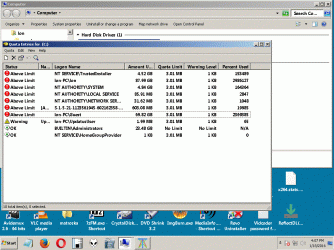
I'm still not clear as to how performing the image operation will _negate_ the VSS problem in conflicting with Restore.
Would a chkdsk /f/r do a repair?
Or run the sfc (System File Checker) fix routine?
There is a guide from Macrium and I'm following that. If I have to do a long download which the link is supposed to avoid, I'll follow the guide along.
At setup of Macrium I used all the defaults. I saw no long download to do.
The one process of writing (what mbr etc?) to a dvd disk was brief. I used a dvd expecting a load of what you've given-- a portable Win 7 but I'm not finding that through the program.
Perhaps there is an alternate .iso site?
I'm still not clear as to how performing the image operation will _negate_ the VSS problem in conflicting with Restore.
Would a chkdsk /f/r do a repair?
Or run the sfc (System File Checker) fix routine?
My Computer
At a glance
Windows 7 x64 UltimateAMD Athlon II x3 4502 GB
- Computer type
- PC/Desktop
- Computer Manufacturer/Model Number
- custom
- OS
- Windows 7 x64 Ultimate
- CPU
- AMD Athlon II x3 450
- Motherboard
- MSI 880GM
- Memory
- 2 GB
- Hard Drives
- various
- Browser
- Firefox, Opera