Network is setup as a Workgroup...Homegroup is disabled.
Administrators can print but standard users cannot!
Shared printer is visible in Control Panel->Hardware and Sound->Devices and Printers
for Administrators but not standard users.
Shared printer is visible Network->Computer->BEDROOMCOMPUTER->HP LaserJet P2015 PC16
Standard user cannot add shared printer in Control Panel (I know...just thought I'd try)
From Notepad->File->Print...->Find Printer...
I select BEDROOMCOMPUTER->HP LaserJet P2015 PC16
"Connect to BEDROOMCOMPUTER" dialog pops up ?????? (This I don't understand!)
At this point I am lost. I get an error if I try to supply credentials but,
I shouldn't need to supply credentials. The errors are:
1) "The credentials supplied conflict..." if I use Administrators credentials or,
2) "The credentials supplied are no sufficient..." if I use standard users credentials (no password)
Standard user can access shared folders without being asked for credentials.
---------Network Setup------------------------
Two Windows 7 Pro machines
- one a desktop
- one a laptop
Printer attached to desktop machine
Printer connected to USB port USB001
Printer properties->Sharing->Share this printer
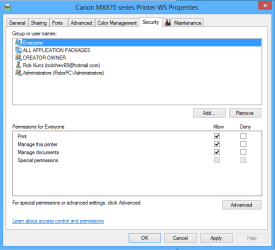
Printer properties->Security
- Everyone->Print
- CREATOR OWNER->Manage documents
- Administrators (BedroomComputer\Administrators->Print
->Manage this printer
->Manage documents
Advanced sharing settings (same on both machines)
- current profile is "Home"
- all options set to "on" except password protected sharing
- file sharing connections "128-bit"
- HomeGroup connections "use user accounts and passwords..."
- Both HomeGroup services are disabled
Administrators can print but standard users cannot!
Shared printer is visible in Control Panel->Hardware and Sound->Devices and Printers
for Administrators but not standard users.
Shared printer is visible Network->Computer->BEDROOMCOMPUTER->HP LaserJet P2015 PC16
Standard user cannot add shared printer in Control Panel (I know...just thought I'd try)
From Notepad->File->Print...->Find Printer...
I select BEDROOMCOMPUTER->HP LaserJet P2015 PC16
"Connect to BEDROOMCOMPUTER" dialog pops up ?????? (This I don't understand!)
At this point I am lost. I get an error if I try to supply credentials but,
I shouldn't need to supply credentials. The errors are:
1) "The credentials supplied conflict..." if I use Administrators credentials or,
2) "The credentials supplied are no sufficient..." if I use standard users credentials (no password)
Standard user can access shared folders without being asked for credentials.
---------Network Setup------------------------
Two Windows 7 Pro machines
- one a desktop
- one a laptop
Printer attached to desktop machine
Printer connected to USB port USB001
Printer properties->Sharing->Share this printer
Printer properties->Security
- Everyone->Print
- CREATOR OWNER->Manage documents
- Administrators (BedroomComputer\Administrators->Print
->Manage this printer
->Manage documents
Advanced sharing settings (same on both machines)
- current profile is "Home"
- all options set to "on" except password protected sharing
- file sharing connections "128-bit"
- HomeGroup connections "use user accounts and passwords..."
- Both HomeGroup services are disabled
Last edited:
My Computer
At a glance
Windows 7 Professional 64 bitIntel I5-2500k16GB1GB NVIDIA FeForce GTX 560Ti
- Computer Manufacturer/Model Number
- Velocity Z40
- OS
- Windows 7 Professional 64 bit
- CPU
- Intel I5-2500k
- Motherboard
- Asus P8Z68-V LX
- Memory
- 16GB
- Graphics Card(s)
- 1GB NVIDIA FeForce GTX 560Ti
- Sound Card
- ALC892 8-Channel Audio
- Monitor(s) Displays
- Samsung 4003
- Hard Drives
- 1 120 GB Intel 520 Series MLC Solid State
1 1 TB 720rpm SATA 300 w/NCQ
4 1 TB Toshiba Canvio USB drives
- PSU
- 700 Watt
- Case
- Tower
- Cooling
- Heatsink/Fasn