Sharing a laptop's wireless connection with a desktop

Comicsnut

New member
Member
Local time
8:43 AM
Messages
73
Hello all!

So, I've done this in the past but I can't seem to get the magic configuration down correctly in order to get this done.

My setup is: I live in a two family house, I have a laptop upstairs which uses my friend's wireless network downstairs.

I also have a desktop PC that has no connection so I would like to use the laptop's ICS functionality in order to use the desktop from time to time.

I have the laptop, an Ethernet cable and a good, working wireless connection.

How do I achieve this?

Thanks!
 

My Computer My Computer

Computer type
PC/Desktop
Computer Manufacturer/Model Number
Specced Out
OS
Win 7 Home Premium x64
CPU
AMD Phenom II X4 955 Black Edition Deneb Quad-Core 3.2GHz
Motherboard
ASUSTeK Computer INC. M4A77TD
Memory
20GB G.SKILL Ripjaws DDR3 1600 (PC3 12800)
Graphics Card(s)
SAPPHIRE Radeon HD 5750 (1GB)
Sound Card
Sound Blaster Audigy
Monitor(s) Displays
Dual Monitors
Hard Drives
128GB OCZ Vertex 3 SSD
1TB Hitachi HDS721010CLA332
1TB Western Digital WD1001FALS
3TB Toshiba DT01ACA300
3x1TB External Seagate
PSU
Corsair TX CMPSU-750TX 750W ATX12V - SLI & Crossfire Ready
Case
Cooler Master Elite 310 ATX
Ur laptop connects to the friend's computer through lan or through wireless?
 

My Computer My Computer

Computer type
Laptop
OS
Windows 7 Home Premium
Wireless.
 

My Computer My Computer

Computer type
PC/Desktop
Computer Manufacturer/Model Number
Specced Out
OS
Win 7 Home Premium x64
CPU
AMD Phenom II X4 955 Black Edition Deneb Quad-Core 3.2GHz
Motherboard
ASUSTeK Computer INC. M4A77TD
Memory
20GB G.SKILL Ripjaws DDR3 1600 (PC3 12800)
Graphics Card(s)
SAPPHIRE Radeon HD 5750 (1GB)
Sound Card
Sound Blaster Audigy
Monitor(s) Displays
Dual Monitors
Hard Drives
128GB OCZ Vertex 3 SSD
1TB Hitachi HDS721010CLA332
1TB Western Digital WD1001FALS
3TB Toshiba DT01ACA300
3x1TB External Seagate
PSU
Corsair TX CMPSU-750TX 750W ATX12V - SLI & Crossfire Ready
Case
Cooler Master Elite 310 ATX
You can do this
Go into Network and sharing
Right click on you wireless connection and select properties
click on the sharing tab
check the box " Allow other network users to connect threw this computers internet connection "

Just below that you can select your lan card from the drop down menu to share the WiFi with it

I use this setup with my computer and it works very well I have even setup an old router to it and set it up with static ip of 192,168,137.2 and a gateway of 192,168.137.1 to have a wireless access or wired access to other computers

:NOTE
Although it say's Wireless in the pic you should pick Ethernet
 

Attachments

  • ICS3.png
    ICS3.png
    10.4 KB · Views: 18
Last edited:

My Computer My Computer

Computer type
PC/Desktop
Computer Manufacturer/Model Number
Compac
OS
Microsoft Windows 7 Ultimate 32-bit 7601
CPU
Intel(R) Pentium(R) Dual CPU E2160 @ 1.80GHz
Motherboard
MSI Boston
Memory
4.00 GB
Graphics Card(s)
(1) VNC Mirror Driver (2) Intel(R) G33/G31 Express Chipset
Sound Card
Disabled
Monitor(s) Displays
Headless
Screen Resolution
1280 x 960 x 32 bits (4294967296 colors) @ 60 Hz
Hard Drives
ST3320820AS ATA Device
Keyboard
Headless
Mouse
Headless
Antivirus
Malwarebytes pro
Other Info
Also
Windows 8.1 Laptop and Desktop both Acer
If I should I be sharing the ethernet why am I sharing the wireless adapter?

Also, I don't have that drop down list in my adapter properties sheet (even when checked).

65wpcp.jpg
 

My Computer My Computer

Computer type
PC/Desktop
Computer Manufacturer/Model Number
Specced Out
OS
Win 7 Home Premium x64
CPU
AMD Phenom II X4 955 Black Edition Deneb Quad-Core 3.2GHz
Motherboard
ASUSTeK Computer INC. M4A77TD
Memory
20GB G.SKILL Ripjaws DDR3 1600 (PC3 12800)
Graphics Card(s)
SAPPHIRE Radeon HD 5750 (1GB)
Sound Card
Sound Blaster Audigy
Monitor(s) Displays
Dual Monitors
Hard Drives
128GB OCZ Vertex 3 SSD
1TB Hitachi HDS721010CLA332
1TB Western Digital WD1001FALS
3TB Toshiba DT01ACA300
3x1TB External Seagate
PSU
Corsair TX CMPSU-750TX 750W ATX12V - SLI & Crossfire Ready
Case
Cooler Master Elite 310 ATX
If you want to share the internet through lan..then go to lan adapters properties..and sharing ane ..'allow other users to..'
 

My Computer My Computer

Computer type
Laptop
OS
Windows 7 Home Premium
That's what I've done, not working.
 

My Computer My Computer

Computer type
PC/Desktop
Computer Manufacturer/Model Number
Specced Out
OS
Win 7 Home Premium x64
CPU
AMD Phenom II X4 955 Black Edition Deneb Quad-Core 3.2GHz
Motherboard
ASUSTeK Computer INC. M4A77TD
Memory
20GB G.SKILL Ripjaws DDR3 1600 (PC3 12800)
Graphics Card(s)
SAPPHIRE Radeon HD 5750 (1GB)
Sound Card
Sound Blaster Audigy
Monitor(s) Displays
Dual Monitors
Hard Drives
128GB OCZ Vertex 3 SSD
1TB Hitachi HDS721010CLA332
1TB Western Digital WD1001FALS
3TB Toshiba DT01ACA300
3x1TB External Seagate
PSU
Corsair TX CMPSU-750TX 750W ATX12V - SLI & Crossfire Ready
Case
Cooler Master Elite 310 ATX
ICS is basically made to share either a wired connection, wired to wired, or a wireless connection, wireless to wireless.

When sharing a wireless connection, Windows will typically add the gateway using the IP 192.168.137.1 so it may also help to add a valid IP to the Ethernet connection static settings of 192.168.137.2 so as the place the Ethernet within the subnet created by sharing the wireless connection.

The Ethernet port might also work if you try bridging the connections.
 

My Computer My Computer

Computer type
PC/Desktop
Computer Manufacturer/Model Number
Home built
OS
Windows 7 Ult, Windows 8.1 Pro,
CPU
Q9650-4.275GHz, E8600 4.5GHz, E6750-3.8GHz
Motherboard
Evga 780i FTW
Memory
G.Skill PC2 9600 1200Mhz 5 5 5 15 2T
Graphics Card(s)
GTX480
Sound Card
Asus Xonar D2
Monitor(s) Displays
HannsG
Screen Resolution
1680X1050
Hard Drives
GSkill Phoenix Pro 120GB SSD
PSU
ThermalTake Toughpower 1000Watt modular
Case
ThermalTake XaserV
Cooling
Xigmatek S1283
Keyboard
Logitech G15
Mouse
Logitech G9
Internet Speed
T1
If I should I be sharing the ethernet why am I sharing the wireless adapter?

Also, I don't have that drop down list in my adapter properties sheet (even when checked).

65wpcp.jpg

What happens if you click the checkbox
 

My Computer My Computer

Computer type
PC/Desktop
Computer Manufacturer/Model Number
Compac
OS
Microsoft Windows 7 Ultimate 32-bit 7601
CPU
Intel(R) Pentium(R) Dual CPU E2160 @ 1.80GHz
Motherboard
MSI Boston
Memory
4.00 GB
Graphics Card(s)
(1) VNC Mirror Driver (2) Intel(R) G33/G31 Express Chipset
Sound Card
Disabled
Monitor(s) Displays
Headless
Screen Resolution
1280 x 960 x 32 bits (4294967296 colors) @ 60 Hz
Hard Drives
ST3320820AS ATA Device
Keyboard
Headless
Mouse
Headless
Antivirus
Malwarebytes pro
Other Info
Also
Windows 8.1 Laptop and Desktop both Acer
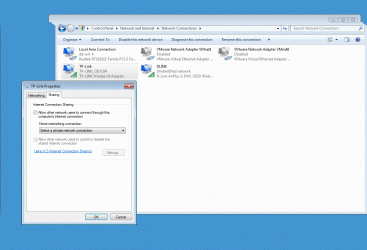
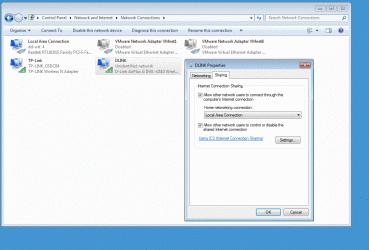
Make sure you Wifi is connected to the internet before trying this.

I just noticed you are running Windows 7 home I am running Windows 7 Ultimate Maybe the home version is not capable of doing this. I have two wireless cards One is a USB and the other is inside the computer
 

Attachments

  • Tplink USB WiFi.GIF
    Tplink USB WiFi.GIF
    216.4 KB · Views: 1
  • Dlink Wifi card.GIF
    Dlink Wifi card.GIF
    178 KB · Views: 1
Last edited:

My Computer My Computer

Computer type
PC/Desktop
Computer Manufacturer/Model Number
Compac
OS
Microsoft Windows 7 Ultimate 32-bit 7601
CPU
Intel(R) Pentium(R) Dual CPU E2160 @ 1.80GHz
Motherboard
MSI Boston
Memory
4.00 GB
Graphics Card(s)
(1) VNC Mirror Driver (2) Intel(R) G33/G31 Express Chipset
Sound Card
Disabled
Monitor(s) Displays
Headless
Screen Resolution
1280 x 960 x 32 bits (4294967296 colors) @ 60 Hz
Hard Drives
ST3320820AS ATA Device
Keyboard
Headless
Mouse
Headless
Antivirus
Malwarebytes pro
Other Info
Also
Windows 8.1 Laptop and Desktop both Acer
Back
Top