Sharing internet using new Hub with Win 7,error no connectivity

sexykiller

New member
Local time
11:39 AM
Messages
6
Hello there
I have just bought another pc which my sister is going to use in her room the problem is that i am running windows 7 ultimate on my pc and i took the RJ-45 put it in the hub and took another wire from there and put it in my pc...there is internet running in my pc nice..but i connect my sister's pc along side with mine and she is currently running a windows xp in her pc but there is no internet connection in her's. Can anyone please explain me what to do and how can i share the internet with her...

I am so frustrated trying and i just came in this forum for a source of light. Thanks everyone who can help me in advance.
 

My Computer My Computer

Computer Manufacturer/Model Number
AMD
OS
Windows 7 ultimate 32bit
CPU
AMD
Motherboard
AMD
Memory
KINGSTON
Graphics Card(s)
RADEON
Sound Card
CREATIVE
Monitor(s) Displays
ACER
Hard Drives
HITACHI

My Computer My Computer

Computer Manufacturer/Model Number
HP Pavilion Elite 495UK
OS
Windows 7 Ultimate SP1 64-Bit
CPU
Intel Core i7 870 @ 2.93GHz
Motherboard
MSI 2A9C (CPU1)
Memory
8Gb Dual-Channel DDR3 @ 664MHz
Graphics Card(s)
nVidia GeForce GTX 460 1024MB dedicated RAM
Sound Card
Realtek HD Audio
Monitor(s) Displays
HP2310i
Screen Resolution
1920 x 1080
Hard Drives
1x1954GB Hitachi HDS22020ALA 330 (RAID), 1x1954GB Hitachi External for backup and storage
PSU
460W
Case
HP Elite
Cooling
Air cooled
Keyboard
Logitech K750 solar-powered keyboard
Mouse
Logitech Wireless M180 mouse
Internet Speed
2Mb
Other Info
Pure Avanti Flow Internet Radio with iPod Dock, 64Gb iPod, HP USB Speakers, Sony MDR-V500 Headphones, Sony Vaio F-Series Laptop
Hiya pal, and welcome to the forums :)
Am I right in saying that you have and Ethernet cable(RJ45) running from the hub to your PC and another Ethernet cable from the hub to your sisters PC ?
Or do both PC's connect directly to the router ?
Is the hub connected to your router or is the "hub" the actual router ?

Sorry for the confusion, I'm just trying to get a clearer picture. Because you shouldn't have to do internet sharing if both PC's are connected independently and it shouldn't matter what OS you are running for both PC's to access the internet ;)
 

My Computer My Computer

Computer type
PC/Desktop
Computer Manufacturer/Model Number
Self Built
OS
Windows 7 Ultimate 64bit
CPU
AMD Phenom Quad core 9950 black edition
Motherboard
Gigabyte
Memory
16Gb
Graphics Card(s)
2x XFX Radeon 5850
Sound Card
PCI Express X-Fi Titanium / Logitech G35
Monitor(s) Displays
2x HP 2410i
Screen Resolution
1920x1080
Hard Drives
2x 500Gb Seagate
1x 300Gb Seagate
1x 1Tb Seagate
2x 1Tb Hitatchi
PSU
Jean Tech Storm 700W
Case
Cooler Master COSMOS S
Cooling
Akasa Evo Blue Pro
Keyboard
Logitech G15
Mouse
Mad Catz M.M.O. 7
Internet Speed
12mb
Hiya pal, and welcome to the forums :)
Am I right in saying that you have and Ethernet cable(RJ45) running from the hub to your PC and another Ethernet cable from the hub to your sisters PC ?
Or do both PC's connect directly to the router ?
Is the hub connected to your router or is the "hub" the actual router ?

Sorry for the confusion, I'm just trying to get a clearer picture. Because you shouldn't have to do internet sharing if both PC's are connected independently and it shouldn't matter what OS you are running for both PC's to access the internet ;)


thanks for a prompt reply well i have an ethernet cable connected is running from the hub to my pc and another ethernet from the bug to my sister pc and the last ethernet is connected from the hub to the ADSL modem which support only 1 port.
 

My Computer My Computer

Computer Manufacturer/Model Number
AMD
OS
Windows 7 ultimate 32bit
CPU
AMD
Motherboard
AMD
Memory
KINGSTON
Graphics Card(s)
RADEON
Sound Card
CREATIVE
Monitor(s) Displays
ACER
Hard Drives
HITACHI
Welcome to Windows Seven Forums.

Have a look at this tutorial, which I hope should be of help to you.

http://www.sevenforums.com/tutorials/76617-internet-connection-sharing-enable.html

An important point to remember is that when sharing between Windows 7 and Windows XP, you need to use a Workgroup and not a Homegroup.

Hello there, i tried your advice and read upon this with your precious guidance but it seems to me that it is for wireless one and i tried it but mine is a wired connection thus i am not seeing this option.....any other suggestion would be great
 

My Computer My Computer

Computer Manufacturer/Model Number
AMD
OS
Windows 7 ultimate 32bit
CPU
AMD
Motherboard
AMD
Memory
KINGSTON
Graphics Card(s)
RADEON
Sound Card
CREATIVE
Monitor(s) Displays
ACER
Hard Drives
HITACHI

My Computer My Computer

Computer Manufacturer/Model Number
HP Pavilion Elite 495UK
OS
Windows 7 Ultimate SP1 64-Bit
CPU
Intel Core i7 870 @ 2.93GHz
Motherboard
MSI 2A9C (CPU1)
Memory
8Gb Dual-Channel DDR3 @ 664MHz
Graphics Card(s)
nVidia GeForce GTX 460 1024MB dedicated RAM
Sound Card
Realtek HD Audio
Monitor(s) Displays
HP2310i
Screen Resolution
1920 x 1080
Hard Drives
1x1954GB Hitachi HDS22020ALA 330 (RAID), 1x1954GB Hitachi External for backup and storage
PSU
460W
Case
HP Elite
Cooling
Air cooled
Keyboard
Logitech K750 solar-powered keyboard
Mouse
Logitech Wireless M180 mouse
Internet Speed
2Mb
Other Info
Pure Avanti Flow Internet Radio with iPod Dock, 64Gb iPod, HP USB Speakers, Sony MDR-V500 Headphones, Sony Vaio F-Series Laptop

My Computer My Computer

Computer Manufacturer/Model Number
AMD
OS
Windows 7 ultimate 32bit
CPU
AMD
Motherboard
AMD
Memory
KINGSTON
Graphics Card(s)
RADEON
Sound Card
CREATIVE
Monitor(s) Displays
ACER
Hard Drives
HITACHI
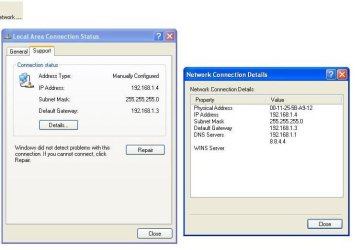
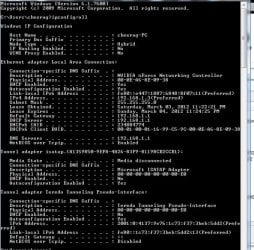
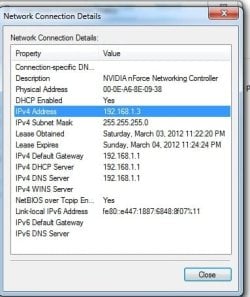
i tried to change some setting by myself but in vain...i upload the screen shot so that you may have an idea:
 

Attachments

  • untitled.JPG
    untitled.JPG
    39.2 KB · Views: 7
  • Untitled2.jpg
    Untitled2.jpg
    80.7 KB · Views: 7
  • Untitled3.jpg
    Untitled3.jpg
    31.5 KB · Views: 5

My Computer My Computer

Computer Manufacturer/Model Number
AMD
OS
Windows 7 ultimate 32bit
CPU
AMD
Motherboard
AMD
Memory
KINGSTON
Graphics Card(s)
RADEON
Sound Card
CREATIVE
Monitor(s) Displays
ACER
Hard Drives
HITACHI
Looks like your gateway on the XP machine is pointing to 192.168.1.3 where on the Win7 machine it's pointing to 192.168.1.1

Change the gateway on the XP machine to 192.168.1.1
 

My Computer My Computer

Computer type
PC/Desktop
Computer Manufacturer/Model Number
Self Built
OS
Windows 7 Ultimate 64bit
CPU
AMD Phenom Quad core 9950 black edition
Motherboard
Gigabyte
Memory
16Gb
Graphics Card(s)
2x XFX Radeon 5850
Sound Card
PCI Express X-Fi Titanium / Logitech G35
Monitor(s) Displays
2x HP 2410i
Screen Resolution
1920x1080
Hard Drives
2x 500Gb Seagate
1x 300Gb Seagate
1x 1Tb Seagate
2x 1Tb Hitatchi
PSU
Jean Tech Storm 700W
Case
Cooler Master COSMOS S
Cooling
Akasa Evo Blue Pro
Keyboard
Logitech G15
Mouse
Mad Catz M.M.O. 7
Internet Speed
12mb
Looks like your gateway on the XP machine is pointing to 192.168.1.3 where on the Win7 machine it's pointing to 192.168.1.1

Change the gateway on the XP machine to 192.168.1.1

tried....:confused: without success.....
 

My Computer My Computer

Computer Manufacturer/Model Number
AMD
OS
Windows 7 ultimate 32bit
CPU
AMD
Motherboard
AMD
Memory
KINGSTON
Graphics Card(s)
RADEON
Sound Card
CREATIVE
Monitor(s) Displays
ACER
Hard Drives
HITACHI
Back
Top