

Cold booted PC after overnight shutdown.
My one and only custom Windows shortcut (Ctrl+Alt+C) on Start menu, opened.
While I moved the mouse (no clicking), the window closed and windows alert appeared.
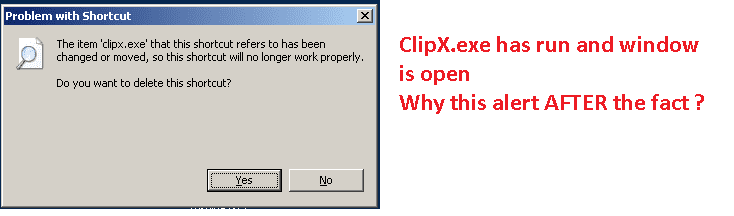
Rebooted -- now the shortcut has failed.
App is ClipX (clipboard tool). Normally ClipX assigns each clip entry to a list. But the list is empty.
ClipX settings are unchanged
I have done a Bitdefender "Quick Scan" all is OK. (I have not done a malware check, yet!)
Q1: How could the Win shortcut work once (it shows the ClipX configuration window) and then fail as outlined above?
Q2: Any ideas ?
Its 7:30am here I have a big day ahead of me here, I need ClipX.
While typing this thread a very quick flash on the screen (a tiny dialog) disappeared as quickly as it appeared.
-----
Computer Type:= Laptop
Manufacturer:= Toshiba Satellite C665
OS:= Windows 7 Home Premium, sp1 (Build 7601)
CPU:= Intel(R) Core(TM) i5-2410M CPU @ 2.30GHz
Motherboard:= TOSHIBA Portable PC
Memory:= 2,806 MB
Graphics:= NVIDIA GeForce 315M *
Sound Card:= Speakers (Conexant SmartAudio H |
Monitors:= x1, Generic PnP
Screen Resolution:= 1366 X 768 - 32 bit
Hard Drives:= C: 585.4GB
PSU:=
Case:= Toshiba Satellite
Cooling:= default fan
Keyboard:= default + Logitech K260
Mouse:= default pad + Logitech M210
Internet Speed:= ADSL2
Antivirus:= Bitdefender Internet Security 2013
Browser:= IE-9.10, PaleMoon, Firefox 20.0
Others:= USB Safely Remove, Metapad, ClipX,
7Zip, Classic Shell Start, Explorer++, FileSearchEX, KeyboardLEDS, CapsLock,
MalwareBytes, MyDefrag, PostBox, ClipX
My one and only custom Windows shortcut (Ctrl+Alt+C) on Start menu, opened.
While I moved the mouse (no clicking), the window closed and windows alert appeared.
Rebooted -- now the shortcut has failed.
App is ClipX (clipboard tool). Normally ClipX assigns each clip entry to a list. But the list is empty.
ClipX settings are unchanged
I have done a Bitdefender "Quick Scan" all is OK. (I have not done a malware check, yet!)
Q1: How could the Win shortcut work once (it shows the ClipX configuration window) and then fail as outlined above?
Q2: Any ideas ?
Its 7:30am here I have a big day ahead of me here, I need ClipX.
While typing this thread a very quick flash on the screen (a tiny dialog) disappeared as quickly as it appeared.
-----
Computer Type:= Laptop
Manufacturer:= Toshiba Satellite C665
OS:= Windows 7 Home Premium, sp1 (Build 7601)
CPU:= Intel(R) Core(TM) i5-2410M CPU @ 2.30GHz
Motherboard:= TOSHIBA Portable PC
Memory:= 2,806 MB
Graphics:= NVIDIA GeForce 315M *
Sound Card:= Speakers (Conexant SmartAudio H |
Monitors:= x1, Generic PnP
Screen Resolution:= 1366 X 768 - 32 bit
Hard Drives:= C: 585.4GB
PSU:=
Case:= Toshiba Satellite
Cooling:= default fan
Keyboard:= default + Logitech K260
Mouse:= default pad + Logitech M210
Internet Speed:= ADSL2
Antivirus:= Bitdefender Internet Security 2013
Browser:= IE-9.10, PaleMoon, Firefox 20.0
Others:= USB Safely Remove, Metapad, ClipX,
7Zip, Classic Shell Start, Explorer++, FileSearchEX, KeyboardLEDS, CapsLock,
MalwareBytes, MyDefrag, PostBox, ClipX
Last edited:
My Computer
- Computer type
- PC/Desktop
- Computer Manufacturer/Model Number
- Toshiba, Lenovo (laptops) + 4 rigs
- OS
- XP Pro (x86) | 7 HP (x86) & (x64) | 7 Pro (x64)


 -- but will I get good cell-phone reception ?
