

Hi to all 
With a shortcut ...
- to simply move through the navigation pane with the up/down-keys cannot happen until 'Computer" or a drive has the focus/selected (not just hi-lighted), with mouse click or multiple tapping of the Tab key.
- at first the default focus is not obvious ... then Tab-key ... address bar (nope ... don't want that)
- the only way to apply focus is to mouse LClick Computer or C BUT that expands the nav.pane
Navigation keys behave differently to mouse clicks in navigation-pane

BUT these examples all open in C:\ but with C expanded in Navigation pane
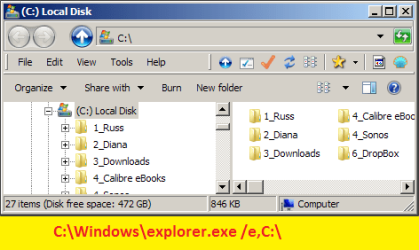
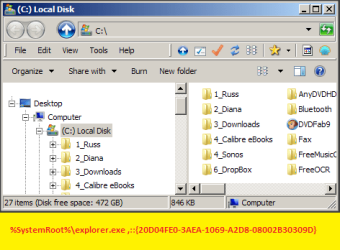
How can Explorer be opened in "Computer" but with first drive selected but not expanded in the Navigation pane
- or even Computer with focus (not just highlighted)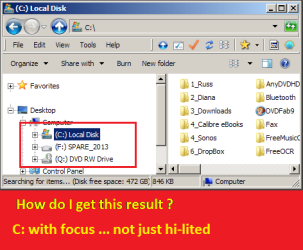
Third party Explorers are OK -- I use XPlore2 ($$) unfortunately MS WinExp is the ONLY way to do some rare tasks eg, Folder Options, and others (that I cannot recall right now)
I would appreciate your advice ... thank you
With a shortcut ...
Target:- %SystemRoot%\explorer.exe ,::{20D04FE0-3AEA-1069-A2D8-08002B30309D}
Start in:- C:\Windows
- opens with "Computer" hilited but not with focus/selected ...Start in:- C:\Windows
- to simply move through the navigation pane with the up/down-keys cannot happen until 'Computer" or a drive has the focus/selected (not just hi-lighted), with mouse click or multiple tapping of the Tab key.
- at first the default focus is not obvious ... then Tab-key ... address bar (nope ... don't want that)
- the only way to apply focus is to mouse LClick Computer or C BUT that expands the nav.pane
Navigation keys behave differently to mouse clicks in navigation-pane
I have tried modifying the two colons and the results pane result is unrelated
- ie, results-pane bares no resemblance to the nav.pane hi-light
- mostly nav-pane is 'Favorites" and results pane is a pandora's box of results.
- ie, results-pane bares no resemblance to the nav.pane hi-light
- mostly nav-pane is 'Favorites" and results pane is a pandora's box of results.
BUT these examples all open in C:\ but with C expanded in Navigation pane
How can Explorer be opened in "Computer" but with first drive selected but not expanded in the Navigation pane
- or even Computer with focus (not just highlighted)
I open WinExp with a keyboard shortcut and want to navigate to any drive just by using the down-key (which doesn't work while Navigation pane does not have focus)
- I am trying to reduce mouse-clicks (screen sweeping) because the keyboard is far quicker and simpler than multiple mouse clicks
- I am trying to reduce mouse-clicks (screen sweeping) because the keyboard is far quicker and simpler than multiple mouse clicks
Third party Explorers are OK -- I use XPlore2 ($$) unfortunately MS WinExp is the ONLY way to do some rare tasks eg, Folder Options, and others (that I cannot recall right now)
I would appreciate your advice ... thank you
Last edited:
My Computer
At a glance
XP Pro (x86) | 7 HP (x86) & (x64) | 7 Pro (x64)
- Computer type
- PC/Desktop
- Computer Manufacturer/Model Number
- Toshiba, Lenovo (laptops) + 4 rigs
- OS
- XP Pro (x86) | 7 HP (x86) & (x64) | 7 Pro (x64)


