Should I change the router if I want more speed in wifi connecttion

jraju

New member
Member
VIP
Local time
8:00 AM
Messages
759
Hi, Now I am using dlink wireless router that supports 2.4ghz speed, at maximum 40 mhz bandwidth.
Really I do not know much about this wireless speed technique.
Now I set this to 2.4 ghz b+g+n and set 40mhz.
Does the wireless speed depend on internet speed or is it a separate one.
should I change the wifi router to one that supports 5ghz, and If i do that will I get more wifi speed in wiifi
please let me know.
the broad band speed is almost fixed at 12495kbps download 621 kbps.
This I cannot change with present broadband provider and settings.
As it is a cable connected telephonic connection
If you say, that wifi is diferent then I will buy a new router that support 5ghz
What is 802.n .
 

My Computer My Computer

At a glance

Microsoft Windows 7 Ultimate 64-bit 7601 Mult...Intel(R) Core(TM)2 Duo CPU E7200 @ 2.53GHz4.00 GBNVIDIA GeForce 210
Computer type
PC/Desktop
Computer Manufacturer/Model Number
custom build
OS
Microsoft Windows 7 Ultimate 64-bit 7601 Multiprocessor Free Service Pack 1
CPU
Intel(R) Core(TM)2 Duo CPU E7200 @ 2.53GHz
Motherboard
To be filled by O.E.M. To be filled by O.E.M.
Memory
4.00 GB
Graphics Card(s)
NVIDIA GeForce 210
Sound Card
(1) NVIDIA High Definition Audio (2) Realtek High Definiti
Screen Resolution
1920 x 1080 x 32 bits (4294967296 colors) @ 60 Hz
Hard Drives
ST3500312CS ATA Device
Hi

your wireless speed will be dependent on your Wifi card. Doesnt matter if the router can handle 300, if the cards max is 54 thats all youll get.
(if its 54mps that means ABSOLUTELY NO POINT in having a contract that provides higher internet speeds)
open device manager, post Wifi/Ethernet details and router make/model

That all changes if you use an Ethernet cable between the router and the comp, its generally allways faster
note if your wifi card is low end, instead of buying a new 1, an Ethernet cable will be cheaper
 

Attachments

  • netw.PNG
    netw.PNG
    2 KB · Views: 23
Last edited:

My Computer My Computer

At a glance

W7 home premium 32bit/W7HP 64bit/w10 tp insid...E5300 dual core3gbNvidia Geforce 7100 Nforce 630i
Computer type
PC/Desktop
Computer Manufacturer/Model Number
medionl/Aspire 6930G/acer x55a
OS
W7 home premium 32bit/W7HP 64bit/w10 tp insider ring
CPU
E5300 dual core
Motherboard
medion MS7366
Memory
3gb
Graphics Card(s)
Nvidia Geforce 7100 Nforce 630i
Monitor(s) Displays
avixc
Internet Speed
n (isp resticted to 72)
Antivirus
mse/pands
Browser
palemoon
Other Info
Belkin Fd7050 n USB using Railink RT2870 drivers, more upto date
In the described scenario (a very common one), there are quite a few factors that influence the final internet speed.
- The computer, operating system, network card drivers and the like
- The computer hardware, how good is your network card.
- The computer-router link speed, determined by both the router and the computer.
- The router itself and its capabilities.
- Your ISP and how much speed they're giving to you.

Your real internet speed will be the lowest of all those factors.

Now, back to the question itself. Windows 7 is more than capable of handling a decent wifi connection, of much more than the 12Mbps of your ISP. Check the network card as Torchwood said. A wifi connection over a 2.4Ghz link support up to a theoretical 54Mbps, and in real life it caps on about 24Mbps or so.
As a quick test, try connecting though cable instead of wifi (wired connections are always much faster and reliable) and see if that improves.

All of those values are well above your ISP contract, which makes me think that your ISP is the bottleneck, specially if it doesn't improve with a wired connection. My guess is that your only way to increase speed is to upgrade your ISP plan or switch to a new one.
 

My Computer My Computer

At a glance

Windows 7 Ultimate x64Intel Core i7-740QM8 GB DDR3NVIDIA GeForce 330GT
Computer type
Laptop
Computer Manufacturer/Model Number
Toshiba Sattelite A665-S6092
OS
Windows 7 Ultimate x64
CPU
Intel Core i7-740QM
Memory
8 GB DDR3
Graphics Card(s)
NVIDIA GeForce 330GT
Screen Resolution
1366x768
Hard Drives
Samsung 840 SSD 500GB
1TB USB3 external HD
Cooling
Coolermaster Notepal U3 notebook cooling pad
Internet Speed
3mbps ASDL
Antivirus
ClamWin 0.98.7
Browser
Opera 12.17 x86 (main), Firefox 38 (sec), IE11 (last resort)
Hi, My internet speed is fixed for the plan. I am happy about that.
What I want to know, is if i buy a 5 ghz router, would the wifi speed increase
Is the wifi speed depends on the card. Yes . Ofcourse, I checked the speed once in laptop, and it shows 54mbps speed when i use a samsung mobile and the same changes to 72 mbps when I use a moto g4 phone.
I will furnish the particulars of the ethernet card
i am ofcourse having ethernet connection for my pc but for use of wifi in laptop.
can i buy a 5ghz wifi router, so that i get more speed in my laptop over wifi . Is that possible.
Is wifi speed also governed by router.
network adapter is realtek pcle fe family controller only.
My router is dlink dsl 2700u model
who gives us wifi. Is it free . can I use a dlink wifi dongle to get wifi,
I heard that it is a radio signal.

- - - Updated - - -

Wish to clarify that my bb is Ethernet connected and it slso support wifi thro ssid, password protection gives wifi access to my other devices.
if I change bb wireless router to 5 hhz, then can I experience, more speed than at present
 

My Computer My Computer

At a glance

Microsoft Windows 7 Ultimate 64-bit 7601 Mult...Intel(R) Core(TM)2 Duo CPU E7200 @ 2.53GHz4.00 GBNVIDIA GeForce 210
Computer type
PC/Desktop
Computer Manufacturer/Model Number
custom build
OS
Microsoft Windows 7 Ultimate 64-bit 7601 Multiprocessor Free Service Pack 1
CPU
Intel(R) Core(TM)2 Duo CPU E7200 @ 2.53GHz
Motherboard
To be filled by O.E.M. To be filled by O.E.M.
Memory
4.00 GB
Graphics Card(s)
NVIDIA GeForce 210
Sound Card
(1) NVIDIA High Definition Audio (2) Realtek High Definiti
Screen Resolution
1920 x 1080 x 32 bits (4294967296 colors) @ 60 Hz
Hard Drives
ST3500312CS ATA Device
What's your theoretical ISP speed?
And what do you measure when connecting though cable?

It's not entirely clear for me if the limiting factor of your connection is your network card/router or the ISP. I'm guessing to be the ISP as per the first post and if that's the case, changing the router will give you no improvement on that speed.
 

My Computer My Computer

At a glance

Windows 7 Ultimate x64Intel Core i7-740QM8 GB DDR3NVIDIA GeForce 330GT
Computer type
Laptop
Computer Manufacturer/Model Number
Toshiba Sattelite A665-S6092
OS
Windows 7 Ultimate x64
CPU
Intel Core i7-740QM
Memory
8 GB DDR3
Graphics Card(s)
NVIDIA GeForce 330GT
Screen Resolution
1366x768
Hard Drives
Samsung 840 SSD 500GB
1TB USB3 external HD
Cooling
Coolermaster Notepal U3 notebook cooling pad
Internet Speed
3mbps ASDL
Antivirus
ClamWin 0.98.7
Browser
Opera 12.17 x86 (main), Firefox 38 (sec), IE11 (last resort)
your isp provider gives you your maximum throughput value so it doesn't matter if your modem/router/wifi and ethernet have higher values -- the maximum you can get is what you've paid for
 

My Computer My Computer

At a glance

W7 home premium 32bit/W7HP 64bit/w10 tp insid...E5300 dual core3gbNvidia Geforce 7100 Nforce 630i
Computer type
PC/Desktop
Computer Manufacturer/Model Number
medionl/Aspire 6930G/acer x55a
OS
W7 home premium 32bit/W7HP 64bit/w10 tp insider ring
CPU
E5300 dual core
Motherboard
medion MS7366
Memory
3gb
Graphics Card(s)
Nvidia Geforce 7100 Nforce 630i
Monitor(s) Displays
avixc
Internet Speed
n (isp resticted to 72)
Antivirus
mse/pands
Browser
palemoon
Other Info
Belkin Fd7050 n USB using Railink RT2870 drivers, more upto date
Still there is a doubt for me.
I pay for bb connection and I want to know, if everybody pays for wifi separately.
There is a provision in the router, not connected with the ISP, to enable wifi with wifi settings.
I get wifi access to the devices that i connect through ssid and pw.
I also noticed that when I just connect the wifi dongle from Dlink, and try the connection it is not working. I have a spare dlink wifi dongle.
So, I am able to get the bb and wifi through the router , the wifi to which My ISP has any connection.
So, from what torchwood says, I pay for my bb aswell as wifi. is it not.
My router has 4 lan ports, to which i could just connect with wire to get the connection across the devices, is it not correct
How the service provider gives access thro bb , please tell
Do they also have specific bandwidth ,not denoted by the router wifi settings.
please clarify
 

My Computer My Computer

At a glance

Microsoft Windows 7 Ultimate 64-bit 7601 Mult...Intel(R) Core(TM)2 Duo CPU E7200 @ 2.53GHz4.00 GBNVIDIA GeForce 210
Computer type
PC/Desktop
Computer Manufacturer/Model Number
custom build
OS
Microsoft Windows 7 Ultimate 64-bit 7601 Multiprocessor Free Service Pack 1
CPU
Intel(R) Core(TM)2 Duo CPU E7200 @ 2.53GHz
Motherboard
To be filled by O.E.M. To be filled by O.E.M.
Memory
4.00 GB
Graphics Card(s)
NVIDIA GeForce 210
Sound Card
(1) NVIDIA High Definition Audio (2) Realtek High Definiti
Screen Resolution
1920 x 1080 x 32 bits (4294967296 colors) @ 60 Hz
Hard Drives
ST3500312CS ATA Device
1)
your ISP broadband contract, via your router covers >>ALL<< your connections whether they are ethernet or Wifi.
(ethernet connects automatically - wifi requires you to select the SSID then enter/use the password on the label fixed to the router)
2)
all routers have this dual connection option
3)
if your comp has an inbuilt wifi card, on first/replacement ISP it will be required to connect to the router using the ISP connection name, SSID, and the password on the router label -- the same is true if you plug in a new dongle
4)
Your ISP gives you the ability to connect NOT the bandwidth behind it, thats router defined
(You can put petrol in a car but you still have to turn the engine on and change gear to get the best speed)
(petrol = ISP engine = router gears = bandwidth)
most modern routers have the ability to broadcast both >> WIFI<< bandwidths, 2.4 & 5.0, this is a user option - either/or/both
(selection is made via the admin panel in the router, generally reached by using the 192.168.0.0 url in your browser)
The bandwidth setting for Wifi will be determined by your weakest wireless card, either inbuilt or dongle
you will need to look at the specs for them to see if they are 5.0 compatible
if ANY of your wifi cards is only 2.4 then you will need to enable both bandwidths in the router
(5.0 requires dual antennas - spec will show 2.2)
At my house i have to enable both as 1 of my comps has a wifi cards that is only 2.4ghz -

bottom line
Use your LAN ports, ethernet is your best option
wifi reliable second choice, but
2.4 is used by more devices and therfor can cause a slowdown between the router and your wifi
more info here
What’s the Difference Between 2.4 and 5-Ghz Wi-Fi (and Which Should I Use)?
 

My Computer My Computer

At a glance

W7 home premium 32bit/W7HP 64bit/w10 tp insid...E5300 dual core3gbNvidia Geforce 7100 Nforce 630i
Computer type
PC/Desktop
Computer Manufacturer/Model Number
medionl/Aspire 6930G/acer x55a
OS
W7 home premium 32bit/W7HP 64bit/w10 tp insider ring
CPU
E5300 dual core
Motherboard
medion MS7366
Memory
3gb
Graphics Card(s)
Nvidia Geforce 7100 Nforce 630i
Monitor(s) Displays
avixc
Internet Speed
n (isp resticted to 72)
Antivirus
mse/pands
Browser
palemoon
Other Info
Belkin Fd7050 n USB using Railink RT2870 drivers, more upto date
Hi, torchwood,
excellent reply covering all aspects .
Now I have a threoritical speed of 23 mbps download speed and 1mb upload as per the plan.
Except , ffth, all bb plan only concentrate on download and not upload, which may also be needed if you have to upload something fast video or wfh
the actual speed always shown in my router download 12495kbps or 12 mb and 621kbps upload .
the 621 kbps is nearly comes to 50 kbps in speed.
My router old one dlilnk 2700u only supports 2.4 ghz, so the wifi speed, which i cannot measure may be half of the download and upload speed , say 6mbps and 310 kbps upload speed , a dismal figure in connection with the speed;
Your linked article says , the speed from router will increase wifi speed if I use 5ghz with 2 antenna.
what would be the speed that the access point of router gives to wifi connections.
the bb speed is regulated with selection of plan.
Say, if my wifi download and upload speed will get increase by atleasat 2 to 3mbps speed, then I will buy 5ghz router.
But if there is no improvement, then i think there is no use in buying another router
the article in the link also says , that 2.4ghz gets crowded wifi signals , whereas 5 ghz is not that much crowded.
what you say torchwood.I once read that my ethernet card supports 10/100mbps speed.
I also read about dsl settings in my dlink router, by choosing adsl2+ and annex M, which are available to increase my upload speed as annex M reduces the download speed and correspondingly increase upload speed. But I find there is no change in the fixed 12 mbps and 621kbps speed .
So, router settings do not actually change the download and upload speed
is it. there are so many settings, in which I have chosen this two.
 
Last edited:

My Computer My Computer

At a glance

Microsoft Windows 7 Ultimate 64-bit 7601 Mult...Intel(R) Core(TM)2 Duo CPU E7200 @ 2.53GHz4.00 GBNVIDIA GeForce 210
Computer type
PC/Desktop
Computer Manufacturer/Model Number
custom build
OS
Microsoft Windows 7 Ultimate 64-bit 7601 Multiprocessor Free Service Pack 1
CPU
Intel(R) Core(TM)2 Duo CPU E7200 @ 2.53GHz
Motherboard
To be filled by O.E.M. To be filled by O.E.M.
Memory
4.00 GB
Graphics Card(s)
NVIDIA GeForce 210
Sound Card
(1) NVIDIA High Definition Audio (2) Realtek High Definiti
Screen Resolution
1920 x 1080 x 32 bits (4294967296 colors) @ 60 Hz
Hard Drives
ST3500312CS ATA Device
Hi

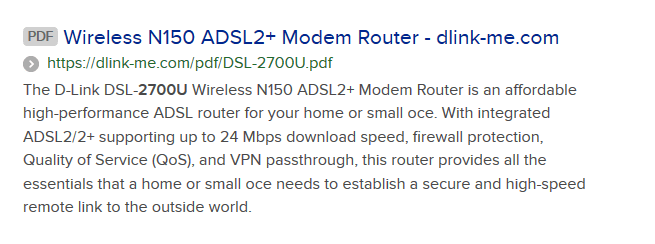
looked up the Router specs, see screenshot for quick info,
Based on your comment
Now I have a threoritical speed of 23 mbps download speed and 1mb upload as per the plan.
Your router has the capacity, to handle your current internet plan speeds, An increase of 2 or 3 mps will not show any drastic improvement
your computers internet equipement can EASILY cope with your current plans speeds
(ethernet >100mbs, and i know of no Wifi card that cant cope with 54mbs)
Your router is the weakest link, its capped at 24mbs
so if you upgrade your plan thats when you buy a new router.
as for running it at optimum levels. they would likely be the factory default levels it was supplied with
the screenshot shows a link for the manual, have a read
 

Attachments

  • dlink.PNG
    dlink.PNG
    14 KB · Views: 17

My Computer My Computer

At a glance

W7 home premium 32bit/W7HP 64bit/w10 tp insid...E5300 dual core3gbNvidia Geforce 7100 Nforce 630i
Computer type
PC/Desktop
Computer Manufacturer/Model Number
medionl/Aspire 6930G/acer x55a
OS
W7 home premium 32bit/W7HP 64bit/w10 tp insider ring
CPU
E5300 dual core
Motherboard
medion MS7366
Memory
3gb
Graphics Card(s)
Nvidia Geforce 7100 Nforce 630i
Monitor(s) Displays
avixc
Internet Speed
n (isp resticted to 72)
Antivirus
mse/pands
Browser
palemoon
Other Info
Belkin Fd7050 n USB using Railink RT2870 drivers, more upto date
hi, thank you very much. I just downloaded the realtek diagnostic and found that the link speed is 100mbps.
So, from what you say, that if i change the router to a latest version,by buying , then I may able to get more speed than at present.can i take it like that.
I do not find bold underline to specific the words
for academic interest, your quote
Your router is the weakest link, its capped at 24mbs

how did you find that.
I have net connection through telephonic round wire that gives the maximum speed of 1.2mbps.
I know that ffth connection would give me more speed in download and upload , but I am postponing it.
Moreover , a private party is giving connection which is not reliable as I am now having direct connection by my ISP.
Thank you so much for your time and links .
that is almost 7years that I started using this router and I find no problem at all , except that it is older version.
I only want to know, any new buy would be beneficial to me or not.
If you know well about technical details, then you buy the best and latest. But if you do not know, then, the technician just replace with the available latest hardware in his possession.
Moreover, fth connection, fibre connection involves more money and rental
 

My Computer My Computer

At a glance

Microsoft Windows 7 Ultimate 64-bit 7601 Mult...Intel(R) Core(TM)2 Duo CPU E7200 @ 2.53GHz4.00 GBNVIDIA GeForce 210
Computer type
PC/Desktop
Computer Manufacturer/Model Number
custom build
OS
Microsoft Windows 7 Ultimate 64-bit 7601 Multiprocessor Free Service Pack 1
CPU
Intel(R) Core(TM)2 Duo CPU E7200 @ 2.53GHz
Motherboard
To be filled by O.E.M. To be filled by O.E.M.
Memory
4.00 GB
Graphics Card(s)
NVIDIA GeForce 210
Sound Card
(1) NVIDIA High Definition Audio (2) Realtek High Definiti
Screen Resolution
1920 x 1080 x 32 bits (4294967296 colors) @ 60 Hz
Hard Drives
ST3500312CS ATA Device
Guys, Gals, since we are mentioning routers and speed, awhile back, I upped my Spectrum from 200 to 400, not because such will give me faster internet, rather, I was wanting more "lanes on the highway for the same cars on the highway". Was I thinking aok?
 

My Computer My Computer

At a glance

Windows 7 Professional 64-bitDesktop i5; Acers i5 & i7desktop 16GB; 1 Acer 8GB & 1 Acer 16GB
Computer type
PC/Desktop
Computer Manufacturer/Model Number
Antec desktop; Acer Aspire laptops
OS
Windows 7 Professional 64-bit
CPU
Desktop i5; Acers i5 & i7
Memory
desktop 16GB; 1 Acer 8GB & 1 Acer 16GB
Hard Drives
1TB split into 2 equal partitions [OS and data] usable by RJS
Internet Speed
AT&T DSL
Browser
FF, GChrome, msIE
Other Info
Windows 7 Firewall, Emsisoft AM/AV, MSE [scan-only], SpywareBlaster, Ruiware/BillP combine
Hi

The diagnostic tool you ran will give you the maximum theoretical values that piece of equipement can handle, its not looking at real life operation.

the max capability of 24mbps is shown in my last post screenshot - basic description of that router.

for real life figures, you need to look at and compare ----
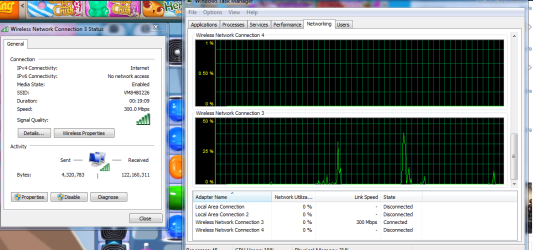
the network usage and your wifi connection status

here's mine
my wifi has a max of 300, my ISP has a max of 200
(i just ran a game on facebook that requires downloading)

wifi status shows my max of 300, now the second pic shows the actual activity, in a perfect world i should hit 200, remember thats my max isp contract figure, but as you can see i dont get anywhere near that,( *1), its less than 50%, 150mbps of my wifi capability


buying the best is NOT actually the ideal solution in your situation, opt for mid range. You will base your choice on the slowest link in your chain, suspect that will be the contract speed.

*1
check your isp contract, at times of high usage some are known to throttle your connection, so you get a reduced service


pics details can be found in Network & Sharing and Task manager

- - - Updated - - -

Roland,

yes and no, it really depends on your surrounding competition, and the Advanced options available for your wifi adapter and router. not looked at the diffs between them, but a dual channel router will give you more lanes
if you only use Ethernet its irrelevent
just a quick overview of my setup
wifi adapter choices, both bands available, preferred 5ghz, roaming mid/high, bluetooth enabled, mode a/b/g
router - 2/5 both enabled, channel selection auto not much competition around, but i can preset it
(im lucky i've got a decent router that came with my ISP contract)
dont take this as gospel but i dont think any router actively seeks the quietest lane, manual intervention required using a wifi network "sniffer" tool, it uses its standard default channell or user defined

note
for both of you, if you have a wifi printer its likely 2.4 mine is
 

Attachments

  • dls.PNG
    dls.PNG
    55 KB · Views: 0

My Computer My Computer

At a glance

W7 home premium 32bit/W7HP 64bit/w10 tp insid...E5300 dual core3gbNvidia Geforce 7100 Nforce 630i
Computer type
PC/Desktop
Computer Manufacturer/Model Number
medionl/Aspire 6930G/acer x55a
OS
W7 home premium 32bit/W7HP 64bit/w10 tp insider ring
CPU
E5300 dual core
Motherboard
medion MS7366
Memory
3gb
Graphics Card(s)
Nvidia Geforce 7100 Nforce 630i
Monitor(s) Displays
avixc
Internet Speed
n (isp resticted to 72)
Antivirus
mse/pands
Browser
palemoon
Other Info
Belkin Fd7050 n USB using Railink RT2870 drivers, more upto date
jraju:

If I remember correctly when I was trying to help you several months ago, you have an abysmally slow speed with your ISP.

It doesn't matter if you have the most modern and fastest equipment or if you're using an ethernet or a wireless connection.

You cannot coax more speed from your ISP than what it can provide you.
 

My Computer My Computer

At a glance

Windows 7 Professional SP1 64-bitIntel Core i7-4790 3.60 GHz32 GB DDR3-1600 MHzIntegrated Intel HD Graphics 4600
Computer type
PC/Desktop
Computer Manufacturer/Model Number
Dell OptiPlex 9020
OS
Windows 7 Professional SP1 64-bit
CPU
Intel Core i7-4790 3.60 GHz
Memory
32 GB DDR3-1600 MHz
Graphics Card(s)
Integrated Intel HD Graphics 4600
Monitor(s) Displays
Viewsonic 32" LCD
Hard Drives
Kingston SATA 3 240 GB SSD
Internet Speed
Spectrum Internet 1000 Mbps
Thanks Torchwood! I will continue watching this thread and learning from all others, including the OP! :)
 

My Computer My Computer

At a glance

Windows 7 Professional 64-bitDesktop i5; Acers i5 & i7desktop 16GB; 1 Acer 8GB & 1 Acer 16GB
Computer type
PC/Desktop
Computer Manufacturer/Model Number
Antec desktop; Acer Aspire laptops
OS
Windows 7 Professional 64-bit
CPU
Desktop i5; Acers i5 & i7
Memory
desktop 16GB; 1 Acer 8GB & 1 Acer 16GB
Hard Drives
1TB split into 2 equal partitions [OS and data] usable by RJS
Internet Speed
AT&T DSL
Browser
FF, GChrome, msIE
Other Info
Windows 7 Firewall, Emsisoft AM/AV, MSE [scan-only], SpywareBlaster, Ruiware/BillP combine
Hi, thanks all.
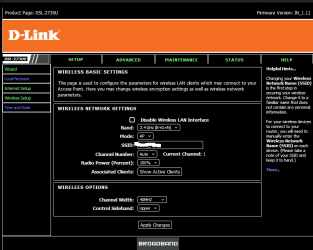
My router has provision for selecting the channel, but it is set to auto, because, some of the times, the channel you select may give only low signals then, I have to go to the router page to set the channel.

Hope that my router auto selects it to choose the best channel in 2.4 ghz model
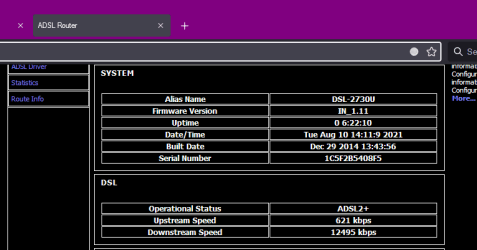
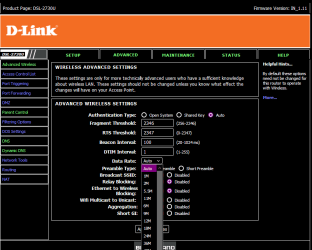
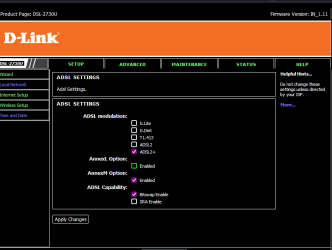
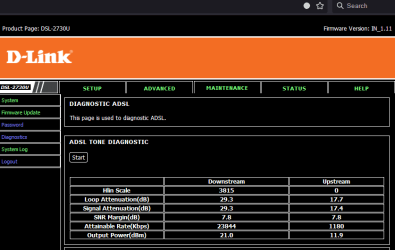
here I supply , the actual speed as captured from my router .
the dl and ul speed never changes now, as I have no problem with the connection.
the theoriticl or maximum mbps capapility and all , I will give details.
If suppose, the router has to be changed, then I need double sure that the replacement is worthwhile.
1. Is the download speed is both download and upload speed for my ISP, as mere a 621 kbps is allotted to the upload speed , while the download speed is about 12 mbps.
2.Does the wifi speed also shared in the download speed I get from my bb connection.
3. In otherwords, the wifi speed of the devices I use get the speed from this 12 mb download speed or is that separate one given by the ISP. I
4. I also read that annex M dsl signal if enabled in dsl settings, it will get some more upload speed than prescribed by the ISP. But, I never find any change in the download figures as captured.
What are channels in wifi.
Do these channels get controlled by ISP in our getting wifi speed and connection.
There are so many queries, I have . enough for this post

- - - Updated - - -

In continuation of the above two more enclosures.
the contract speed for my bb plan is given below
My doubt is when I reached a max of 700gb the download speed becomes 2 mbps and i shudder to think about the wifi speed in the devices may furher get reduced . This is the best bb plan available
the adsl configuration is as follows, which i do not understand
Adsl Line Status SHOWTIME.L0
Adsl Mode ADSL2+
Channel Mode Interleave
Up Stream 621 kbps
Down Stream 12495 kbps
Attenuation Down Stream 29
Attenuation Up Stream 17
SNR Margin Down Stream 15.0
SNR Margin Up Stream 22.2
Vendor ID RETK
Firmware Version 4926e708
CRC Errors 235
Up Stream BER 0e-7
Down Stream BER 0e-7
Up Output Power 12
Down Output Power 19.5
ES 168
SES 0
UAS 0
[TABLE="class: apriezt-table"]
[TR]
[TD]BBG Combo ULD 699 CS243[/TD]
[TD]699[/TD]
[TD]Upto 20Mbps till 700GB [/TD]
[TD]
2Mbps beyond 700GB


[/TD]
[/TR]
[/TABLE]
 

Attachments

  • status of actual download speed.png
    status of actual download speed.png
    7.4 KB · Views: 0
  • wireless network settings.png
    wireless network settings.png
    19.9 KB · Views: 0
  • wireless data rate.png
    wireless data rate.png
    20.6 KB · Views: 0
  • status of adsl settings.png
    status of adsl settings.png
    11 KB · Views: 0
  • status of the diagnostic adsl settings.png
    status of the diagnostic adsl settings.png
    11 KB · Views: 0
Last edited:

My Computer My Computer

At a glance

Microsoft Windows 7 Ultimate 64-bit 7601 Mult...Intel(R) Core(TM)2 Duo CPU E7200 @ 2.53GHz4.00 GBNVIDIA GeForce 210
Computer type
PC/Desktop
Computer Manufacturer/Model Number
custom build
OS
Microsoft Windows 7 Ultimate 64-bit 7601 Multiprocessor Free Service Pack 1
CPU
Intel(R) Core(TM)2 Duo CPU E7200 @ 2.53GHz
Motherboard
To be filled by O.E.M. To be filled by O.E.M.
Memory
4.00 GB
Graphics Card(s)
NVIDIA GeForce 210
Sound Card
(1) NVIDIA High Definition Audio (2) Realtek High Definiti
Screen Resolution
1920 x 1080 x 32 bits (4294967296 colors) @ 60 Hz
Hard Drives
ST3500312CS ATA Device
Hi, Today, I contacted my service provider and asked about the upload speed of my plan.
He says, that my plan is having 20 mbps speed download up to 700 gb , and then it will get reduced to 2 mbps in months time.
i asked about upload speed to which he says, the upload and download speed contains in the 20 mbps speed. He clarifies that when you download, it is also uploading and the speed is the same or a little less.

Is that true

Then why there is a separate upload speed is shown in the router .
Not only in the router but also in the speed test sites like ookla, speedtest net etc.
I think so much details in the previous post did not evinced a response.
I learnt a lot from this topic, and so i have furnished all the particulars.
I do not know any theoritical speed etc. Then after reading that, i went in to the router pages and found so many details, which was not known to me earlier
 

My Computer My Computer

At a glance

Microsoft Windows 7 Ultimate 64-bit 7601 Mult...Intel(R) Core(TM)2 Duo CPU E7200 @ 2.53GHz4.00 GBNVIDIA GeForce 210
Computer type
PC/Desktop
Computer Manufacturer/Model Number
custom build
OS
Microsoft Windows 7 Ultimate 64-bit 7601 Multiprocessor Free Service Pack 1
CPU
Intel(R) Core(TM)2 Duo CPU E7200 @ 2.53GHz
Motherboard
To be filled by O.E.M. To be filled by O.E.M.
Memory
4.00 GB
Graphics Card(s)
NVIDIA GeForce 210
Sound Card
(1) NVIDIA High Definition Audio (2) Realtek High Definiti
Screen Resolution
1920 x 1080 x 32 bits (4294967296 colors) @ 60 Hz
Hard Drives
ST3500312CS ATA Device
Back
Top