
Show Desktop icons disapeared

greenlink23

Hero of Time
Member
Local time
10:08 PM
Messages
44
the icons in desktop icons settings have all disapeared. there are still icons on my desktop. i enabled them last night. and when i booted this morning they had disapeared. can anyone help me.
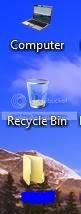
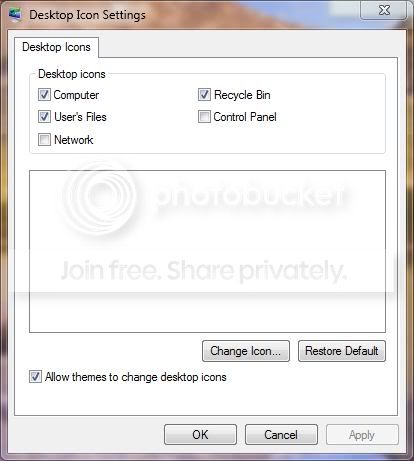
desktop3.jpg


desktop1.jpg


here is what the registry looks like
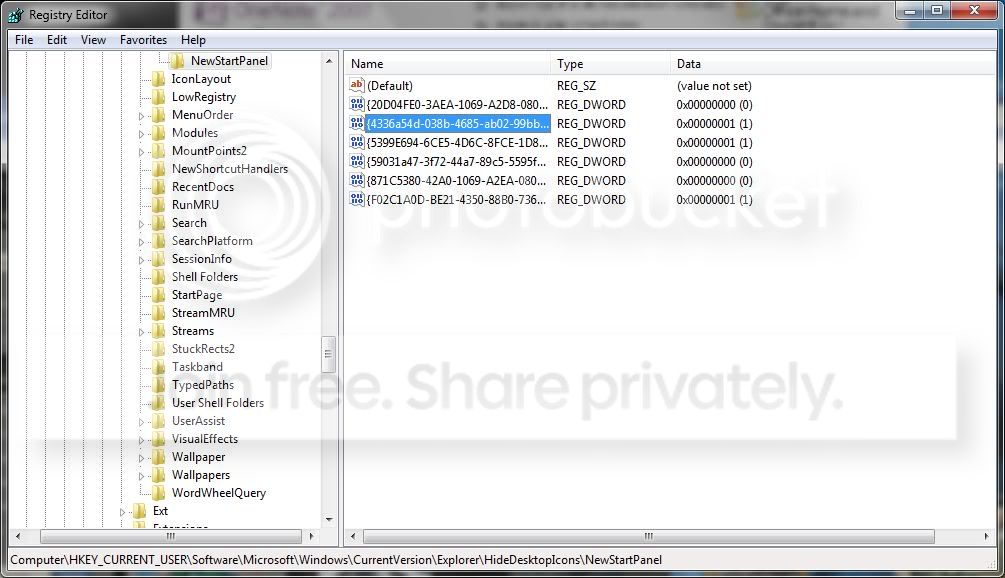
desktop2.jpg


i am running win7 beta build 7000
 

My Computer My Computer

OS
Vista & Win 7
CPU
AMD Turion 64X2
Memory
2GB
Screen Resolution
1280x800
So you can re enable them but they are gone every time you restart, is that what you are saying or has this only happened once, has it ever remembered the desktop or has it just started to happen?
 

My Computer My Computer

Computer Manufacturer/Model Number
Home Brew
OS
Windows 7 Ultimate Vista Ultimate x64
CPU
Core 2 Duo E8500 3.16Ghz @ 3.8Ghz
Motherboard
eVGA 750i FTW
Memory
2x2Gigs Patriot PC2-6400 LL
Graphics Card(s)
Inno3D GeForce GTX260 216 SP
Monitor(s) Displays
ASUS VW222U 22" 2ms Response time
Screen Resolution
1680x1050
Hard Drives
SATA 150GB
SATA II 250GB
USB IDE 750GB Ext.
PSU
HYTEC 600W & Thermaltake 650W Toughpower Power Exp
Case
Thermaltake Armor LCS (Liquid Cooling System)
Cooling
Liquid Cooling System
Keyboard
Logitech G15 Gaming Keyboard
Mouse
Logitech G9 Gaming Mouse
i can enable/re-enable them, i just can't change the icons. as you can see in the first image i have changed the computer icon and i want to change the user folder icon.
this has only happened once, i upgraded last night. and it just started to happen
 

My Computer My Computer

OS
Vista & Win 7
CPU
AMD Turion 64X2
Memory
2GB
Screen Resolution
1280x800
Try changing a theme under Personalize. See if it brings back the default theme icons.
 

My Computer My Computer

Computer Manufacturer/Model Number
ENIAC
OS
Windows 7 RC 7100 32bit/64bit
CPU
Intel Core2Duo E4500 2.20 GHz
Motherboard
ASUS P5LD2-X/1333
Memory
2x1GB Kinsgston DDR2 800MHz
Graphics Card(s)
Nvidia 8500GT
Sound Card
Onboard High Definition Audio Device
Monitor(s) Displays
Sony Bravia 42"
Case
LINKW 2222
Cooling
Standard Intel
Keyboard
Some cheap one
Mouse
Microsoft Intellimouse something
Internet Speed
24MBps ADSL
OMG that worked. Thank You very much limneos.
 

My Computer My Computer

OS
Vista & Win 7
CPU
AMD Turion 64X2
Memory
2GB
Screen Resolution
1280x800
What The.... I thought you were trying to get the custom icons to stick, not get your default icons back.
 

My Computer My Computer

Computer Manufacturer/Model Number
Home Brew
OS
Windows 7 Ultimate Vista Ultimate x64
CPU
Core 2 Duo E8500 3.16Ghz @ 3.8Ghz
Motherboard
eVGA 750i FTW
Memory
2x2Gigs Patriot PC2-6400 LL
Graphics Card(s)
Inno3D GeForce GTX260 216 SP
Monitor(s) Displays
ASUS VW222U 22" 2ms Response time
Screen Resolution
1680x1050
Hard Drives
SATA 150GB
SATA II 250GB
USB IDE 750GB Ext.
PSU
HYTEC 600W & Thermaltake 650W Toughpower Power Exp
Case
Thermaltake Armor LCS (Liquid Cooling System)
Cooling
Liquid Cooling System
Keyboard
Logitech G15 Gaming Keyboard
Mouse
Logitech G9 Gaming Mouse
What The.... I thought you were trying to get the custom icons to stick, not get your default icons back.

no i was trying to get the icons back in the window

this was what i wanted:
desktop4.jpg


and this was my problem:
desktop1.jpg


sorry if that was confusing. i could have been a little more specific
 

My Computer My Computer

OS
Vista & Win 7
CPU
AMD Turion 64X2
Memory
2GB
Screen Resolution
1280x800
OK no worries glad you have it sorted.
 

My Computer My Computer

Computer Manufacturer/Model Number
Home Brew
OS
Windows 7 Ultimate Vista Ultimate x64
CPU
Core 2 Duo E8500 3.16Ghz @ 3.8Ghz
Motherboard
eVGA 750i FTW
Memory
2x2Gigs Patriot PC2-6400 LL
Graphics Card(s)
Inno3D GeForce GTX260 216 SP
Monitor(s) Displays
ASUS VW222U 22" 2ms Response time
Screen Resolution
1680x1050
Hard Drives
SATA 150GB
SATA II 250GB
USB IDE 750GB Ext.
PSU
HYTEC 600W & Thermaltake 650W Toughpower Power Exp
Case
Thermaltake Armor LCS (Liquid Cooling System)
Cooling
Liquid Cooling System
Keyboard
Logitech G15 Gaming Keyboard
Mouse
Logitech G9 Gaming Mouse
Back
Top