
On startup and for three minutes at the most, the show hidden icons button is giving me an odd glitch upon being clicked.
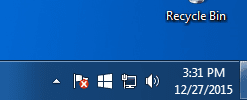
If you don't know what I mean by 'show hidden icons button' it's the furthest left button on the taskbar in this picture below.
Basically, whenever I click that button from anywhere up to 3 minutes after startup, the icons start flickering and they are highlighted in a cycle to the left and the tray can't be opened. The problem seems to also be occurring in other situations as well such as when I click the button next to shutdown in the start menu in order to expand the options to 'restart' and 'sleep' among other things. These options are rapidly cycled through making it impossible to click anything. Lastly, I noticed that if I try to left-click and drag something like a web page or the steam page on my desktop, the page immediately begins moving to the left across the screen.
Again, all of this only happens for about 3 minutes after startup at the most and then everything operates as it should. This just began happening again (it happened several months ago for a short period of time and then stopped) and I haven't made any changes to windows.
If you don't know what I mean by 'show hidden icons button' it's the furthest left button on the taskbar in this picture below.
Basically, whenever I click that button from anywhere up to 3 minutes after startup, the icons start flickering and they are highlighted in a cycle to the left and the tray can't be opened. The problem seems to also be occurring in other situations as well such as when I click the button next to shutdown in the start menu in order to expand the options to 'restart' and 'sleep' among other things. These options are rapidly cycled through making it impossible to click anything. Lastly, I noticed that if I try to left-click and drag something like a web page or the steam page on my desktop, the page immediately begins moving to the left across the screen.
Again, all of this only happens for about 3 minutes after startup at the most and then everything operates as it should. This just began happening again (it happened several months ago for a short period of time and then stopped) and I haven't made any changes to windows.
Attachments
My Computer
- Computer type
- PC/Desktop
- OS
- Windows 7 Home Premium 64bit
- CPU
- Intel i7 4790k
- Motherboard
- ASUS Maximus VII Hero
- Memory
- CORSAIR Vengeance Pro 16GB (2 x 8GB) 240-Pin DDR3 SDRAM DDR3
- Graphics Card(s)
- 2x EVGA 980 SC
- Hard Drives
- 1.) 500gb Samsung 840 EVO SSD
2.) 1TB Western Digital Black HDD (7200 rpm)
- PSU
- EVGA SuperNOVA 1000 G2 80 PLUS GOLD Certified 1000W
- Case
- Corsair Obsidian Series 750D Performance Full Tower Case
- Cooling
- Corsair H110
- Browser
- Chrome
