show/hide hidden files from menu or icon?

conticreative

New member
Local time
4:04 AM
Messages
29
I made the jump to Win 7 and finally I am leaving Vista behind (so to speak, since it is still vista).

I like the new OS much better and my old vista got very clunky with age. I am a web developer and I run multiple power applications so I have several rigs, all of them maxed out on RAM and available disk space.

Now that I have a shiny new OS I'd like to know if there is a shortcut I could create for one of the things that has been bugging me about all versions of Windows:

In the course of my day, I often need to visit the "Hidden" files in my computer. Normally, I have to go to Win Expl. and choose "display hidden files".
It's not a strenuous task, but I would much rather have a single button or menu item to do the same task. Can it be that hard to do?

The reason is that I often have to customize system files (mostly program files) and usually I keep the hidden files visible by default. If I could have an accessible switch to turn it on and off at will that did not require 4 steps to accomplish it would be certainly nicer. Otherwise I forget and I have to look at all the ugly files on my system.

Where should I look for such a functionality?

Thanks.
 

My Computer My Computer

OS
Win 7 - Mac OS X - Linux
Memory
8GB
Graphics Card(s)
Nvidia 8600
Sound Card
Many (pro)
Monitor(s) Displays
Viewsonic
Hard Drives
Seagate Velociraptor (350gb, 10000rpm OS)
MyBook (WD) 2TB
Seagate Velociraptor 500gb
Seagate Velociraptor 500GB
its in the control panels now look for "folder options". I'm not sure which category its under, but right next to the "folder options" link, there'll be a "show / hide hidden" link you can click on to toggle it.
 

My Computer My Computer

OS
Windows 7

My Computer My Computer

Computer type
PC/Desktop
Computer Manufacturer/Model Number
Alienware Aurora ALX R4
OS
Windows 10 Pro (x64)
CPU
Intel Core i7-3930K (3.2GHz - 4.5GHz)
Motherboard
Alienware Aurora-R4 x79
Memory
4x Samsung 4GB PC3-12800 DDR3 (16GB 1600MHz)
Graphics Card(s)
Nvidia Geforce GTX 690
Sound Card
SteelSeries Siberia Elite
Monitor(s) Displays
Dell UltraSharp U3011
Screen Resolution
2560x1600
Hard Drives
Samsung 850 Pro 256 GB, Seagate 1TB Desktop Hybrid HDD, 2x Western Digital 4TB Green HDD
PSU
875W Some Dell PSU <.<
Case
Alienware Aurora ALX
Cooling
Custom Liquid Cooling (EK CPU & GPU blocks) dual EK 480RAD
Keyboard
Logitech G710+ Mechanical
Mouse
Logitech G700s
Internet Speed
Verizon Fios (50 mbps average)
Other Info
Server: Intel NUC D54250WYK: i5-4250U, 16GB, 256 GB mSATA, Windows Server 2012 R2
Hello conticreative & welcome to SevenForums :D

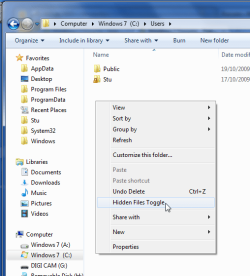
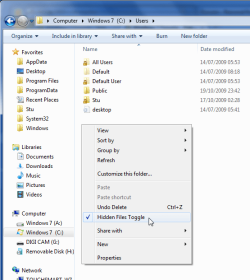
Here you go, the handy tick is a god send, it'll also remember if you have super hidden files set or show or not.!!
View attachment HiddenFilesToggle_3.0_Setup.zip

@ logicearth
I didn't have luck with that one myself, it was a bit hit & miss. How did you find it?
 

My Computer My Computer

Computer Manufacturer/Model Number
HP Touchsmart IQ771.uk
OS
Windows 7 Ultimate x64
CPU
AMD Turion(tm) 64 X2 Mobile Technology TL-56
Motherboard
ASUS Pheonix
Memory
3GB Nanya PC2-6400 DDR2-SDRAM SO-DIM (400MHz)
Graphics Card(s)
NVIDIA GeForce Go 7600 256MB GDDR3 SDRAM
Sound Card
High Definition Intergrated NVIDIA MCP51
Monitor(s) Displays
46" Sony Bravia HDTV
Screen Resolution
1600x1200
Hard Drives
1.5TB Samsug
320GB Seagate ST3320820AS - SATA 3Gb/s 8MB
500GB Maxtor Basics STM305003EHD301-RK
Internet Speed
↓6.32 Mb/s ↑0.35 Mb/s ↔26ms
Other Info
BIOS - American Megatrends Inc. 5.07
Ethernet Port - NVIDIA nForce 10/100/1000 Mbps
DVD Drive - TSSTcorp DVDR/RW TS-T632L

My Computer My Computer

Computer type
PC/Desktop
Computer Manufacturer/Model Number
Bruce ... somewhere in his 40's
OS
Windows 7 Ultimate 32bit SP1
CPU
Intel(R) Core(TM)2 Quad CPU @ 2.40GHz, 2400 MHz
Motherboard
INTEL/D975XBX2
Memory
4 GB
Graphics Card(s)
ATI Radeon HD 2600 Pro
Monitor(s) Displays
Samsung SyncMaster 914v
Screen Resolution
1280 x 1024
Hard Drives
2/500GB each ... ST3500630AS ATA Device.
One is not connected
PSU
Rocketfish 700 W
Case
G.Skill Gigabyte Chassis
Keyboard
Standard PS/2 Keyboard
Mouse
Microsoft PS/2 Mouse
Internet Speed
DSL
Antivirus
Avira Internet Security
Browser
IE 11
Other Info
ATI HDMI Audio
Thanks for the tps

Thank you for the responses. Busy forum isn't it?

Incidentally, I did find the link in the control panel, but it's almost as cumbersome as using the folder options. What I would like is to have shortcut somewhere that toggles the view easily. A 1 click operation, 2 at the most.

I'll download the file another poster offered (Thanks) and I'll read the otehr posts carefully. Hopefully I'll find a good solution and I'll post back.

Thanks.
 

My Computer My Computer

OS
Win 7 - Mac OS X - Linux
Memory
8GB
Graphics Card(s)
Nvidia 8600
Sound Card
Many (pro)
Monitor(s) Displays
Viewsonic
Hard Drives
Seagate Velociraptor (350gb, 10000rpm OS)
MyBook (WD) 2TB
Seagate Velociraptor 500gb
Seagate Velociraptor 500GB
Mmmm... I tried all of them, hiddenfilestoggle 3.0 and the togglehiddenfiles but neither worked. The former did not create a Contextual menu entry I could find, the latter simply did not do a thing.

But I'll keep on working on it. It would be nice if the geniuses at MS would just give us the option of a graphical toggle in the windows UI.

In fact, while I am dreaming, how about making it folder specific or global? Am I asking too much?

Well, since I am dreaming, please Microsoft, place a toggle in the UI, buy me a new sports' car and a Ducati motorcycle, take care of that Darfur mess and tell Iran to stop messing around with nukes. Thanks.
 

My Computer My Computer

OS
Win 7 - Mac OS X - Linux
Memory
8GB
Graphics Card(s)
Nvidia 8600
Sound Card
Many (pro)
Monitor(s) Displays
Viewsonic
Hard Drives
Seagate Velociraptor (350gb, 10000rpm OS)
MyBook (WD) 2TB
Seagate Velociraptor 500gb
Seagate Velociraptor 500GB
Is there a specific reason you need it toggled? I just have mine set to showing my hidden folders/files always.
 

My Computer My Computer

OS
Windows 7 Ultimate x86
CPU
36750 @ 3.16ghz
Motherboard
DFI DK p35
Memory
Corsair XMS 4gb (2x2)
Graphics Card(s)
evga 8800gt @ 697/947
Case
TT Tsunami
Mmmm... I tried all of them, hiddenfilestoggle 3.0 and the togglehiddenfiles but neither worked. The former did not create a Contextual menu entry I could find, the latter simply did not do a thing.

But I'll keep on working on it. It would be nice if the geniuses at MS would just give us the option of a graphical toggle in the windows UI.

In fact, while I am dreaming, how about making it folder specific or global? Am I asking too much?

Well, since I am dreaming, please Microsoft, place a toggle in the UI, buy me a new sports' car and a Ducati motorcycle, take care of that Darfur mess and tell Iran to stop messing around with nukes. Thanks.

That's odd, i have it installed myself and it works perfectly :?

1.png
2.png
 

My Computer My Computer

Computer Manufacturer/Model Number
HP Touchsmart IQ771.uk
OS
Windows 7 Ultimate x64
CPU
AMD Turion(tm) 64 X2 Mobile Technology TL-56
Motherboard
ASUS Pheonix
Memory
3GB Nanya PC2-6400 DDR2-SDRAM SO-DIM (400MHz)
Graphics Card(s)
NVIDIA GeForce Go 7600 256MB GDDR3 SDRAM
Sound Card
High Definition Intergrated NVIDIA MCP51
Monitor(s) Displays
46" Sony Bravia HDTV
Screen Resolution
1600x1200
Hard Drives
1.5TB Samsug
320GB Seagate ST3320820AS - SATA 3Gb/s 8MB
500GB Maxtor Basics STM305003EHD301-RK
Internet Speed
↓6.32 Mb/s ↑0.35 Mb/s ↔26ms
Other Info
BIOS - American Megatrends Inc. 5.07
Ethernet Port - NVIDIA nForce 10/100/1000 Mbps
DVD Drive - TSSTcorp DVDR/RW TS-T632L
It is odd, but then again there is something odd about my computer. Since I installed Win 7 every night I find the computer turned off (I usually leave it on overnight). Each morning there is a crash report. Yet, during the day it works well and it's not prone to crashing.

I uninstalled a sound card driver that may be the culprit for that, but if it it's not I may have to redo the installation.

I'll try again to install the script today to see how it goes. Thanks anyway.
 

My Computer My Computer

OS
Win 7 - Mac OS X - Linux
Memory
8GB
Graphics Card(s)
Nvidia 8600
Sound Card
Many (pro)
Monitor(s) Displays
Viewsonic
Hard Drives
Seagate Velociraptor (350gb, 10000rpm OS)
MyBook (WD) 2TB
Seagate Velociraptor 500gb
Seagate Velociraptor 500GB
HiddenFilesToggle worked for me when i was using Windows 7 32 Ultimate. I have just recently upgraded to Win7 64 since i bought a SSD. it seems it's not compatible with the 64 bit version. this is driving me nuts. i used this toggle several times a day.

if anyone finds a solution, i would greatly appreciate it.
 

My Computer My Computer

Computer Manufacturer/Model Number
meanhoe, inc. / model# 01
OS
Windows 7 Ultimate 64 Bit RTM
CPU
Q6600 C2Q G0 - OC'ed 3.4GHz @ 1.328V
Motherboard
Asus P5K Deluxe
Memory
G.Skill 4GB (2 x 2GB) DDR2 800 4-4-4-12 1.8V
Graphics Card(s)
Sapphire ATI HD 5770
Sound Card
Sound Blaster X-Fi XtremeGamer 7.1
Monitor(s) Displays
Apple Cinema Display 23"
Screen Resolution
1920x1200
Hard Drives
OCZ Vertex Turbo 60GB SSD . WD Raptor 150GB . WD 500GB x 2 RAID1 . WD 1TB x2 RAID1 . WD 1TB My Passport External
PSU
Corsair HX620W PSU
Case
Lian-li G75B
Cooling
Thermalright U120 Extreme (lapped) + Scythe S-FLEX 120MM x 3
Keyboard
Logitech DiNovo Laser
Mouse
Logitech DiNovo Laser
Internet Speed
Verizon FiOS
Other Info
Apple MacBook Air 11" - 1.6GHz . 4GB Ram . 128GB SSD / OS X 10.5.6 & Win 7 U 64
Back
Top