
Hello,
I have several questions as I could not find the answers after I read all available info about it.
I made the Show desktop button invisible by changing its icon to taskbar background color in imageres.dll. However, the space that the button occupied is the same. Is there any way to permanently shrink the button to a width of 1 pixel? (Show Desktop Button Remover does not work for it as it does not fully shrink the button, and after taskbar update/reset the button restores again)
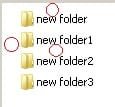
Is it possible to format the location of files in folders – i.e. decrease the space from the edge and the distance between the files/folders?
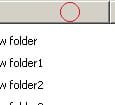
Is it possible to adjust the height of the field in the column name in the table mapping files?
[FONT="]
[/FONT]Is it possible to reduce the distance between the elements of the Start menu? (Classic Shell is installed but there is no option for it in settings)
I have several questions as I could not find the answers after I read all available info about it.
I made the Show desktop button invisible by changing its icon to taskbar background color in imageres.dll. However, the space that the button occupied is the same. Is there any way to permanently shrink the button to a width of 1 pixel? (Show Desktop Button Remover does not work for it as it does not fully shrink the button, and after taskbar update/reset the button restores again)
Is it possible to format the location of files in folders – i.e. decrease the space from the edge and the distance between the files/folders?
Is it possible to adjust the height of the field in the column name in the table mapping files?
[FONT="]
[/FONT]Is it possible to reduce the distance between the elements of the Start menu? (Classic Shell is installed but there is no option for it in settings)
Attachments
My Computer
At a glance
Windows 7 Ultimate x64
- Computer type
- PC/Desktop
- OS
- Windows 7 Ultimate x64


