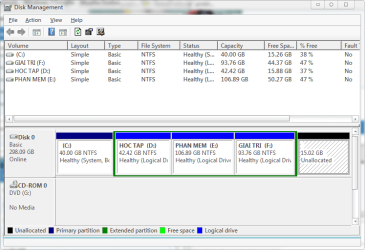
My OS is Win 7 Ultimate 32bit with SP1 and all updates installed. 320 GB HDD with 4 partitions : C:\ (System partition-Primary) and 3 partition (Logical) use to save my data! Now I want to create new partitions for my various data from F drive (last partition) but I can't shrink this volume. It have warning :
"You cannot shrink a volume beyond the point where any unmovable files are located. See the "defrag" event in the Application log for detailed information about the
operation when it has completed."
"See 'Shrink a Basic Volume' in Disk Management help for more information.
Help in Disk Management says:
When you shrink a partition, certain files (for example, the paging file or the shadow copy storage area) cannot be automatically relocated and you cannot decrease the
allocated space beyond the point where the unmovable files are located. If the shrink operation fails, check the Application Log for Event 259, which will identify the
unmovable file. If you know the cluster or clusters associated with the file that is preventing the shrink operation, you can also use the fsutil command at a command
prompt (type fsutil volume querycluster/? for usage). When you provide the querycluster parameter, the command output will identify the unmovable file that is preventing
the shrink operation from succeeding."
"In some cases, you can relocate the file temporarily. For example, if the unmovable file is the paging file, you can use Control Panel to move it to another disk, shrink
the volume, and then move the page file back to the disk."
I used to Acronis Disk Director, EaseUS, Wondeshare...but I cant.
So can I do to increase the size by which I can shrink my F drive?
Advice would be appreciated.
Thanks and regards, Hien.
"You cannot shrink a volume beyond the point where any unmovable files are located. See the "defrag" event in the Application log for detailed information about the
operation when it has completed."
"See 'Shrink a Basic Volume' in Disk Management help for more information.
Help in Disk Management says:
When you shrink a partition, certain files (for example, the paging file or the shadow copy storage area) cannot be automatically relocated and you cannot decrease the
allocated space beyond the point where the unmovable files are located. If the shrink operation fails, check the Application Log for Event 259, which will identify the
unmovable file. If you know the cluster or clusters associated with the file that is preventing the shrink operation, you can also use the fsutil command at a command
prompt (type fsutil volume querycluster/? for usage). When you provide the querycluster parameter, the command output will identify the unmovable file that is preventing
the shrink operation from succeeding."
"In some cases, you can relocate the file temporarily. For example, if the unmovable file is the paging file, you can use Control Panel to move it to another disk, shrink
the volume, and then move the page file back to the disk."
I used to Acronis Disk Director, EaseUS, Wondeshare...but I cant.
So can I do to increase the size by which I can shrink my F drive?
Advice would be appreciated.
Thanks and regards, Hien.
My Computer
- OS
- Windows 7 Ultimate 32bit