Sigmatel STAC 92xx No Recording Devices (Windows 7 x64)

SevenPRX

New member
Local time
11:13 PM
Messages
3
Hi there.

I have a Dell XPS 420, which comes with an onboard Sigmatel Stac 92xx audio chip.

Sound itself is working fine, but it doesn't recognise any Recording Devices (Audio IN). So, I can't use my Mic; which is a problem when I play online games and want to use Ventrilo.

I'm use Windows 7 Ultimate RC x64. I tried installing the latest Windows Vista x64 drivers from the Dell website, but unfortunately this doesn't solve my problems.

Does anybody know of a Sigmatel driver that I can install and hopefully solve the problem with?

Thnx,

-7
 

My Computer My Computer

At a glance

Windows 7 Ultimate RC x64
OS
Windows 7 Ultimate RC x64
Audio in and mic inputs are two separate things. Are you sure you're not just confusing the two? Make sure to plug the mic into the mic jack and take it from there.

Right click the system tray icon for sound. Choose recording devices. Right click microphone and there should be options in there to check as well.
 

My Computer My Computer

At a glance

7600.20510 x86P4 550 3.4 GHz HT running at 3.5 GHzOCZ 2 GB(2x1GB) DDR400mHz running @ 414 mHzHIS Radeon HD 3850 IceQ 3 Turbo HDMI Dual DL-...
Computer Manufacturer/Model Number
self built
OS
7600.20510 x86
CPU
P4 550 3.4 GHz HT running at 3.5 GHz
Motherboard
MSI PM8M3-V (MS-7211 v1.x) Micro-ATX mainboard
Memory
OCZ 2 GB(2x1GB) DDR400mHz running @ 414 mHz
Graphics Card(s)
HIS Radeon HD 3850 IceQ 3 Turbo HDMI Dual DL-DVI AGP
Sound Card
MOTU Traveler firewire studio interface 192 kHz 24 bit
Monitor(s) Displays
22" widescreen Acer X223W LCD, 17" Compaq P75 CRT
Screen Resolution
1680x1050 and 1280x1024
Hard Drives
SATA I x2 WD, 400 GB and 120 GB, SATA 2 WD Caviar Black 1 TB
PSU
350W generic
Case
Cybertronpc, it glows blue
Cooling
stock cpu fan, Ice-Q 3 gpu and system, many case fans
Keyboard
Logitch Classical Keyboard 200
Mouse
Logitech Mediaplay cordless
Internet Speed
1792/448 kbits/sec
Other Info
SATA II PCI fake RAID adapter, 1 GB Readyboost, original ATI Remote Wonder (even works with WMC perfectly), Logitech Rumblepad 2 game controller x2
No, there is no 'hardware' recognised by Windows 7 which can provide any IN capability (either line, mic). So there is nothing under the Recording tab in CTRL Panel > Sound.
 

My Computer My Computer

At a glance

Windows 7 Ultimate RC x64
OS
Windows 7 Ultimate RC x64
No, there is no 'hardware' recognised by Windows 7 which can provide any IN capability (either line, mic). So there is nothing under the Recording tab in CTRL Panel > Sound.

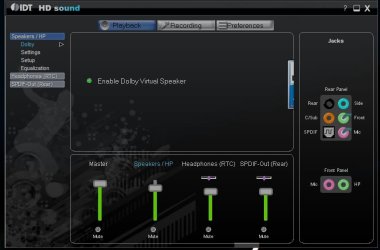
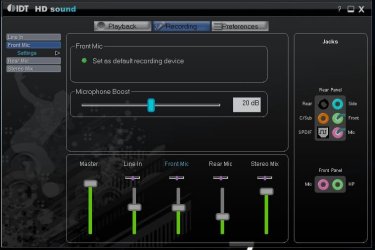
I have the same Audio chip on my Badaxe 2 mobo & my mic works perfectly fine with the "New" drivers I installed for it! :p

Check them out as they may just work for your chip as well. The new control panel looks cool too, matches the W7 aero themes!
Make sure to have Jack Monitoring enabled! ;)
Here's the link to the download.
English: AUD_allOS_D20001.0x_PV_IDTGUI_v105_Legacy.exe
 

Attachments

  • Image 0.jpg
    Image 0.jpg
    33.2 KB · Views: 929
  • Image 3.jpg
    Image 3.jpg
    35.9 KB · Views: 957
  • Image 1.jpg
    Image 1.jpg
    6 KB · Views: 183

My Computer My Computer

At a glance

Windows® 7 Ultimate x64 SP1Intel Core 2 Duo E8400 (E0) @ 4.0GHzG.SKILL-F2-8500CL5D-4GBPK (2x2Gbs) (5-5-5-15)...EVGA GTX 470 SC (845/1690/2000) 160Gbs
Computer Manufacturer/Model Number
ABS Tech Ultimate X9
OS
Windows® 7 Ultimate x64 SP1
CPU
Intel Core 2 Duo E8400 (E0) @ 4.0GHz
Motherboard
ASUS P5Q Pro Turbo / 1780 FSB
Memory
G.SKILL-F2-8500CL5D-4GBPK (2x2Gbs) (5-5-5-15) @ 1067Mhz
Graphics Card(s)
EVGA GTX 470 SC (845/1690/2000) 160Gbs
Sound Card
VIA HD Audio / Boston Acoustics
Monitor(s) Displays
Acer X222W HD 22" LCD 2500:1 / 5ms
Screen Resolution
1680x1050
Hard Drives
Seagate Barracuda SATAII 2 x 320GB
Seagate Barracuda SATAII 1Tb
Intel® Rapid Storage Technology v10.1.0.1008
AHCI-NCQ Enabled
PSU
Silent Pro GOLD 80 PLUS 800w /95% efficiency / SLI-Crossfire
Case
ABS Stealth Black-Custom
Cooling
CoolerMaster V6GT 6 Heatpipe 200w CPU Cooler
Keyboard
Logitech G15 Gaming Keyboard (Old Style Blue!)
Mouse
Logitech MX518 Gaming Mouse
Internet Speed
1Mbs-up/ 6Mbs-down
Same thing

I'm having the same problem as the initial post..he's right..I hate how people automatically assume that whomever is describing the problem is wrong ..heck. if they're running a cracked copy of windows 7 then they must have enough knowledge to tell whether their hardware is configured wrong or if it jsut isnt working as it should...I have just downloaded the drivers suggested in the thread. hopefully they will solve the issue. I suppose I just wanted something to complain about.. no harm intended
 

My Computer My Computer

At a glance

Windows 7
OS
Windows 7
no luck

The driver portion of the install works just as it did. I still have no support for a microphone or line-in. Also, the GUI for the drivers wasn't compatible with my hardware (just as I predicted). I'm not sure what to do I'm trying to get my mic up and running so I can try my hand at some multiplayer games. Is there anyone who might be able to help?
 

My Computer My Computer

At a glance

Windows 7
OS
Windows 7
Sound driver

In a case of I couldn't leave well enough alone, I managed to break my audio driver. I went to dell and downloaded theirs (vista 32bit) and of course it didn't work. Its a sigmatel stac9200 and here is a snip. device manager says it working but its not. It fails on playing a test tone or any system sound. Any ideas on which driver?

Ken

Nevermind Solved with MS driver
 
Last edited:

My Computer My Computer

At a glance

Win 8 Release candidate 8400[email protected]4 gigsNvidia 9600M
Computer Manufacturer/Model Number
HP Pavillion dv-7 1005 Tx
OS
Win 8 Release candidate 8400
CPU
[email protected]
Memory
4 gigs
Graphics Card(s)
Nvidia 9600M
Sound Card
HD built-in
Monitor(s) Displays
17" Wxga
Screen Resolution
1440x900
Cooling
none
Internet Speed
45Mb down 5Mb up
I had the same problem in win 7 Ultimate.......here is what worked for me: Go to Device Manager, then your sound/video game tab. Uninstall your sound driver..........reboot........Windows will download the correct driver automatically for you. It worked for me, Hope it works for you! I now have a recording device!
 

My Computer My Computer

At a glance

Windows 7 Ultimate
Computer Manufacturer/Model Number
Dell XPS 420
OS
Windows 7 Ultimate
I have this exact same issue, also have a Dell XPS420. My sound and mic was working perfectly on Vista 32-bit, now I've switched up to Windows 7 64-bit and my mic is no longer working. It doesn't show up in 'Recording Devices'. I tried uninstalling the drivers and rebooting, but it did not fix the problem. Anyone got an answer?
 

My Computer My Computer

At a glance

Windows 7Intel Core 2 Duo CPU E8400 3.00GHzNVidia GeForce 8800GT
Computer Manufacturer/Model Number
Dell XPS420
OS
Windows 7
CPU
Intel Core 2 Duo CPU E8400 3.00GHz
Graphics Card(s)
NVidia GeForce 8800GT
Soultion

Here you go - a working windows 7 Driver

With this driver the external mic will work.
 

My Computer My Computer

At a glance

win 7
OS
win 7
I had the same problem in win 7 Ultimate.......here is what worked for me: Go to Device Manager, then your sound/video game tab. Uninstall your sound driver..........reboot........Windows will download the correct driver automatically for you. It worked for me, Hope it works for you! I now have a recording device!


THIS WORKED. Thanks a Million!:D
 

My Computer My Computer

At a glance

W7 ultimate3 gb
Computer Manufacturer/Model Number
dell dimension E520
OS
W7 ultimate
Memory
3 gb
Hard Drives
320g, 500g
Back
Top