Single-partition W7 install fouls up BCDEdit

timmy2

New member
Local time
10:54 AM
Messages
4
I pre-formatted my boot drive so Windows 7 would install in a single partition and not create the hidden partition. When I boot, an OS selection screen appears listing two installs of Windows 7 when there is really only one. Some reading revealed that BCDEdit is the tool to fix this but when I try running it in an elevated command box I get:

The boot configuration data store could not be opened.
The system cannot find the file specified.

BCDEdit must be looking for its data in the non-existent hidden boot partition. While I could leave this as-is I'd like to know if there's a way to use BCDEdit with a single-partition W7 install.

Thank you.
 

My Computer My Computer

At a glance

Windows 7
OS
Windows 7
Hello timmy2 Welcome to the Seven Forums!

That's an easy fix there to see if you have more then one entry in the 7 BCD store. There's two immediate options for this.

The first is opening up the boot tab found in the System Configuration Ultility also known as the msconfig utility as seen with the image attached below. The second is a free download with a gui that allows you to rename boot entries as well as set the default OS when having a planned dual boot or in your situation deletion of any unintentional additional entry on the singe OS system called BellaVista

If you were already working with a dual boot the other option not needed would be the use of the free program EasyBCD which can add as well as remove entries. That's a second BCD editing program available for custom set ups found at Download EasyBCD 2.0.2 - NeoSmart Technologies

The msconfig boot tab can be used easy enough for checking up on this. The other two are gui methods availabel for editing the BCD store with BellaVista originally having been named BCD Editor when first available for Vista.
 

Attachments

  • System Configuration Utility Boot Tab.jpg
    System Configuration Utility Boot Tab.jpg
    33 KB · Views: 61

My Computers My Computers

  • At a glance

    W7 Ultimate x64/W10 Pro x64/W11 Pro Triple Bo...AMD Phenom II X4 975 Deneb 3.6ghz - 965 2nd r...Kingston Hyper X DDR3 1600 1.5v 16gb - Hyper ...MSI HD Radeon 5750 1gb - MSI HD Radeon 6450 o...
    Computer type
    PC/Desktop
    Computer Manufacturer/Model Number
    Custom builds = 2
    OS
    W7 Ultimate x64/W10 Pro x64/W11 Pro Triple Boot - Main PC W7 Remote PC Micro ATX W7 Pro x64/W11 Pro
    CPU
    AMD Phenom II X4 975 Deneb 3.6ghz - 965 2nd remote pc
    Motherboard
    Gigabyte GA-790XTA-UD4-Gigabyte GA-880GM-D2H remote pc
    Memory
    Kingston Hyper X DDR3 1600 1.5v 16gb - Hyper X Fury 8gb 2nd
    Graphics Card(s)
    MSI HD Radeon 5750 1gb - MSI HD Radeon 6450 on mini tower
    Sound Card
    Creative Labs X-Fi Xtreme Audio P - Realtek onooard 2nd case
    Monitor(s) Displays
    ASUS VW199T-P 19" HP 2082a Main-HP 2082a 20" remote pc
    Screen Resolution
    Asus 1440x900 - HP 1600x900
    Hard Drives
    WD Black 1TB HD per OS W7, W10, and pending W11 presently on 500gb OS Drive - Pending Triple 1TB HDs for Spanned Storage/backup volume
    Single 2TB external USB enclosure, single 1TB System 7 Host/Boot drive, Pending 8TB external HD for system image b
    PSU
    Corsair 750TX - primary / Corsair CX600 - second
    Case
    Antec 900-2 - SSD compatible / NZXT Vulcan mini tower
    Cooling
    Zalman CNPS9900A
    Keyboard
    AZIO L70 Backlit Letters Gaming - ONN Cordless/USB
    Mouse
    MSI DS200 Programmable, Logitech Cordless
    Internet Speed
    30mbps upgrade - primary hard wired - mini tower usb WiFi
    Antivirus
    GFI VIPRE Internet Security 2014 on W7 2016 beta on W10,
    Browser
    Cyberfox, WaterFox 64bit FF variants, FireFox x64, Pale Moon
    Other Info
    Accomdata fan cooled usb 2.0 PIDE/Sata II, III external enclosure.
    Sambient usb/eSata PATA/Sata II, III external enclosure.
  • At a glance

    W7 Pro x64/W11 ProAMD Deneb 3.6ghz - 965Kingston Hyper X Fury 8gbMSI HD Radeon 6450 DVI Output
    Computer type
    PC/Desktop
    System Manufacturer/Model Number
    CUSTOM ASSEMBLY
    OS
    W7 Pro x64/W11 Pro
    CPU
    AMD Deneb 3.6ghz - 965
    Motherboard
    Gigabyte GA-880GM-D2H remote pc
    Memory
    Kingston Hyper X Fury 8gb
    Graphics Card(s)
    MSI HD Radeon 6450 DVI Output
    Sound Card
    Realtek onooard Creative or Other separate PENDING
    Monitor(s) Displays
    VIZIO 32" LCD TV Separate LCD Pending
    Screen Resolution
    1600x1080
    Hard Drives
    WD 500GB OS Host/Boot WD Green 1TB Storage/Backup
    PSU
    Corsair 600W - THERMALTAKE 600W spare case
    Case
    NZXT Vulcan mini tower
    Cooling
    Twin 120mm Top Fans - 240mm Side Cover
    Keyboard
    ONN Cordless/USB Logitech Cordless
    Mouse
    ONN USB/Cordless - Logitech Cordless
    Internet Speed
    DSL 5G
    Browser
    MS Edge, FireFox, WaterFox x64, FireFox Nightly
    Other Info
    OS Testing-Remote Access to Main TeamViewer
Nothing in the Boot tab

Thank you for replying Night Hawk. I looked in the boot tab and the area where your screen cap shows text is empty on my PC. Note also that in System Properties | Advanced Tab | Startup and Recovery there are no default operating systems listed and I unticked the delay times. I'm thoroughly puzzled.

I'm afraid to install either of the GUI apps you suggest because I suspect they, like BCDEdit, expect to find the hidden W7 boot partition and either won't run or will corrupt my system.

You might wonder why I forced W7 to install in a single partition and avoided the hidden partition?

I've used BootIt NG for years and because of that I don't like "wasting" primary partitions (although BING is not currently on this PC). When I was reading up in anticipation of installing W7 after its release, I learned about the hidden partition, which at the time sounded like a needless appendage, a complication when using and imaging app, and would reduce my available primary partitions to 2 if I want to use Bootit and keep the number of primaries to 4, so... I took the seemingly popular approach of pre-formatting the W7 partition. Sounded great then; now I wonder.

I'm hoping someone here who is familiar with single-partition installs can address the issue of BCDEDit. I suspect the file that BCDEdit is looking for is in a folder somewhere on the drive and I just need to issue the right command in BCDEdit to make it fully useable. THEN, I'll consider trying one of the gui's.

Thank you again for the informative answer.
 

My Computer My Computer

At a glance

Windows 7
OS
Windows 7
Please post back a screenshot of your full Disk Mgmt drive map with listings, using Snipping Tool in Start Menu.
 
Since you are not seeing any boot entry try using the startup repair option found in the repair tools when going to install 7. Right under the Install Now button seen on the second screen following the language selection you see the repair tools link.

When clicking on that the automatic detection for any existing installations takes place where you would click the one shown on the first screen and the next button to move onto the next screen where the Startup tepair is at the top of the options list. The command prompt is last at the bottom.

If you see immediate results or need to repeat it a few times the new boot entry will see "(recovered)" added after Windows 7 for the entry. That will mean the repair worked and that can be renamed using one of the two free programs to simply show Windows 7 or "Windows 7 edition" depending on which one you are running.

The best and usually most reliable partitioning programs by the way are those that run booted from a live cd rather then installed onto Windows! They run totally independent of any OS avoiding problems for various reasons. GParted was used extensively here while others prefer Partition Wizard live also another free partitioning program.

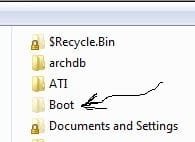
When a drive is Raw and you use the 7 installer's drive tools that's when the 100mb system reserved partition is created for the "bootmgr" file and BCD store contained in the boot folder that would otherwise be hidden on C. When going into the "menu bar>Tools>Folder options>View" tab in any Windows Explorer window and unchecking the option for hiding the protected OS/system files you should see the "boot" folder on C without the 100mb present. If that's missing like removing the 100mb partition after 7 is installed... ut ooooo....

Try running the Startup repair tool before either needing to perform a repair install of 7 or even a clean install on a prepreped C primary. You should have found a single entry for 7 in order to see 7 load on it's own.
 

Attachments

  • Vista 7 Boot Folder.jpg
    Vista 7 Boot Folder.jpg
    11.6 KB · Views: 1,131

My Computers My Computers

  • At a glance

    W7 Ultimate x64/W10 Pro x64/W11 Pro Triple Bo...AMD Phenom II X4 975 Deneb 3.6ghz - 965 2nd r...Kingston Hyper X DDR3 1600 1.5v 16gb - Hyper ...MSI HD Radeon 5750 1gb - MSI HD Radeon 6450 o...
    Computer type
    PC/Desktop
    Computer Manufacturer/Model Number
    Custom builds = 2
    OS
    W7 Ultimate x64/W10 Pro x64/W11 Pro Triple Boot - Main PC W7 Remote PC Micro ATX W7 Pro x64/W11 Pro
    CPU
    AMD Phenom II X4 975 Deneb 3.6ghz - 965 2nd remote pc
    Motherboard
    Gigabyte GA-790XTA-UD4-Gigabyte GA-880GM-D2H remote pc
    Memory
    Kingston Hyper X DDR3 1600 1.5v 16gb - Hyper X Fury 8gb 2nd
    Graphics Card(s)
    MSI HD Radeon 5750 1gb - MSI HD Radeon 6450 on mini tower
    Sound Card
    Creative Labs X-Fi Xtreme Audio P - Realtek onooard 2nd case
    Monitor(s) Displays
    ASUS VW199T-P 19" HP 2082a Main-HP 2082a 20" remote pc
    Screen Resolution
    Asus 1440x900 - HP 1600x900
    Hard Drives
    WD Black 1TB HD per OS W7, W10, and pending W11 presently on 500gb OS Drive - Pending Triple 1TB HDs for Spanned Storage/backup volume
    Single 2TB external USB enclosure, single 1TB System 7 Host/Boot drive, Pending 8TB external HD for system image b
    PSU
    Corsair 750TX - primary / Corsair CX600 - second
    Case
    Antec 900-2 - SSD compatible / NZXT Vulcan mini tower
    Cooling
    Zalman CNPS9900A
    Keyboard
    AZIO L70 Backlit Letters Gaming - ONN Cordless/USB
    Mouse
    MSI DS200 Programmable, Logitech Cordless
    Internet Speed
    30mbps upgrade - primary hard wired - mini tower usb WiFi
    Antivirus
    GFI VIPRE Internet Security 2014 on W7 2016 beta on W10,
    Browser
    Cyberfox, WaterFox 64bit FF variants, FireFox x64, Pale Moon
    Other Info
    Accomdata fan cooled usb 2.0 PIDE/Sata II, III external enclosure.
    Sambient usb/eSata PATA/Sata II, III external enclosure.
  • At a glance

    W7 Pro x64/W11 ProAMD Deneb 3.6ghz - 965Kingston Hyper X Fury 8gbMSI HD Radeon 6450 DVI Output
    Computer type
    PC/Desktop
    System Manufacturer/Model Number
    CUSTOM ASSEMBLY
    OS
    W7 Pro x64/W11 Pro
    CPU
    AMD Deneb 3.6ghz - 965
    Motherboard
    Gigabyte GA-880GM-D2H remote pc
    Memory
    Kingston Hyper X Fury 8gb
    Graphics Card(s)
    MSI HD Radeon 6450 DVI Output
    Sound Card
    Realtek onooard Creative or Other separate PENDING
    Monitor(s) Displays
    VIZIO 32" LCD TV Separate LCD Pending
    Screen Resolution
    1600x1080
    Hard Drives
    WD 500GB OS Host/Boot WD Green 1TB Storage/Backup
    PSU
    Corsair 600W - THERMALTAKE 600W spare case
    Case
    NZXT Vulcan mini tower
    Cooling
    Twin 120mm Top Fans - 240mm Side Cover
    Keyboard
    ONN Cordless/USB Logitech Cordless
    Mouse
    ONN USB/Cordless - Logitech Cordless
    Internet Speed
    DSL 5G
    Browser
    MS Edge, FireFox, WaterFox x64, FireFox Nightly
    Other Info
    OS Testing-Remote Access to Main TeamViewer
Please post back a screenshot of your full Disk Mgmt drive map with listings, using Snipping Tool in Start Menu.


This will help us help you.
 

My Computer My Computer

At a glance

W 7 64-bit UltimateIntel Q9550 Yorkfield8GB Dominator 8500C5DATI : XFX 5870
Computer Manufacturer/Model Number
* BFK Customs *
OS
W 7 64-bit Ultimate
CPU
Intel Q9550 Yorkfield
Motherboard
ASUS P5Q Pro
Memory
8GB Dominator 8500C5D
Graphics Card(s)
ATI : XFX 5870
Sound Card
Realtek HD Audio 7-1
Monitor(s) Displays
1x 47" LCD HDMI & 3x 26" LCD HDMI
Screen Resolution
1920x1080P & 1920x1200
Hard Drives
1x 80GB Intel X25-M G2 SSD : 1x 500GB & 1x 640GB WD Caviar Black(s)
PSU
Corsair 620HX
Case
Cooler Master RC-690
Cooling
Tuniq Tower 120, 2x 140mm and 3x 120mm case fans
Keyboard
Microsoft 500
Mouse
Razer Diamondback 3G
Internet Speed
14 Mb/s
Other Info
1x Koutech 3Gb/s SATA HDD Hot Swap Rack
Drive map from Disk Mgmt

Please post back a screenshot of your full Disk Mgmt drive
map with listings, using Snipping Tool in Start Menu.

First, I apologize for being such an idiot. My policy is to usually pre-format a boot drive before installing W7, but apparently in this case I let W7 create the 100MB hidden partition! That doesn't fix my problem of an OS selection screen appearing during bootup with two W7's listed (only one is valid) or the absence of anything in System Configuration | Boot tab. Here's a screen cap of the boot drive. I appreciate your help.
 

Attachments

  • DiskMap.png
    DiskMap.png
    3.8 KB · Views: 27
  • sysconfigboot.png
    sysconfigboot.png
    12.2 KB · Views: 17

My Computer My Computer

At a glance

Windows 7
OS
Windows 7
It looks correct to me.

Having the 100mb boot partition is beneficial because it puts the Win7 Repair console found on the DVD or Repair CD on your Advanced Boot Tools menu accessed by clicking F8 at bootup.

Install EasyBCD 2.0 to see if it shows two listings, then remove the one which is not active on the Edit Boot Menu tab.
 
That's a weird one alright unless you somehow managed to delete the entry without realizing it. It is possible to preserve the present installation however!

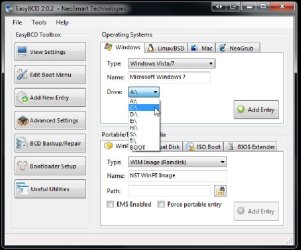
Fortunately someone wrote an excellent BCD editing program called EasyBCD 2.0.2 That will allow you to add a new default entry for 7 into the BCD store so you won't go without since that is essential to start with.
 

Attachments

  • EasyBCD Add New Entry for C.jpg
    EasyBCD Add New Entry for C.jpg
    66.9 KB · Views: 23

My Computers My Computers

  • At a glance

    W7 Ultimate x64/W10 Pro x64/W11 Pro Triple Bo...AMD Phenom II X4 975 Deneb 3.6ghz - 965 2nd r...Kingston Hyper X DDR3 1600 1.5v 16gb - Hyper ...MSI HD Radeon 5750 1gb - MSI HD Radeon 6450 o...
    Computer type
    PC/Desktop
    Computer Manufacturer/Model Number
    Custom builds = 2
    OS
    W7 Ultimate x64/W10 Pro x64/W11 Pro Triple Boot - Main PC W7 Remote PC Micro ATX W7 Pro x64/W11 Pro
    CPU
    AMD Phenom II X4 975 Deneb 3.6ghz - 965 2nd remote pc
    Motherboard
    Gigabyte GA-790XTA-UD4-Gigabyte GA-880GM-D2H remote pc
    Memory
    Kingston Hyper X DDR3 1600 1.5v 16gb - Hyper X Fury 8gb 2nd
    Graphics Card(s)
    MSI HD Radeon 5750 1gb - MSI HD Radeon 6450 on mini tower
    Sound Card
    Creative Labs X-Fi Xtreme Audio P - Realtek onooard 2nd case
    Monitor(s) Displays
    ASUS VW199T-P 19" HP 2082a Main-HP 2082a 20" remote pc
    Screen Resolution
    Asus 1440x900 - HP 1600x900
    Hard Drives
    WD Black 1TB HD per OS W7, W10, and pending W11 presently on 500gb OS Drive - Pending Triple 1TB HDs for Spanned Storage/backup volume
    Single 2TB external USB enclosure, single 1TB System 7 Host/Boot drive, Pending 8TB external HD for system image b
    PSU
    Corsair 750TX - primary / Corsair CX600 - second
    Case
    Antec 900-2 - SSD compatible / NZXT Vulcan mini tower
    Cooling
    Zalman CNPS9900A
    Keyboard
    AZIO L70 Backlit Letters Gaming - ONN Cordless/USB
    Mouse
    MSI DS200 Programmable, Logitech Cordless
    Internet Speed
    30mbps upgrade - primary hard wired - mini tower usb WiFi
    Antivirus
    GFI VIPRE Internet Security 2014 on W7 2016 beta on W10,
    Browser
    Cyberfox, WaterFox 64bit FF variants, FireFox x64, Pale Moon
    Other Info
    Accomdata fan cooled usb 2.0 PIDE/Sata II, III external enclosure.
    Sambient usb/eSata PATA/Sata II, III external enclosure.
  • At a glance

    W7 Pro x64/W11 ProAMD Deneb 3.6ghz - 965Kingston Hyper X Fury 8gbMSI HD Radeon 6450 DVI Output
    Computer type
    PC/Desktop
    System Manufacturer/Model Number
    CUSTOM ASSEMBLY
    OS
    W7 Pro x64/W11 Pro
    CPU
    AMD Deneb 3.6ghz - 965
    Motherboard
    Gigabyte GA-880GM-D2H remote pc
    Memory
    Kingston Hyper X Fury 8gb
    Graphics Card(s)
    MSI HD Radeon 6450 DVI Output
    Sound Card
    Realtek onooard Creative or Other separate PENDING
    Monitor(s) Displays
    VIZIO 32" LCD TV Separate LCD Pending
    Screen Resolution
    1600x1080
    Hard Drives
    WD 500GB OS Host/Boot WD Green 1TB Storage/Backup
    PSU
    Corsair 600W - THERMALTAKE 600W spare case
    Case
    NZXT Vulcan mini tower
    Cooling
    Twin 120mm Top Fans - 240mm Side Cover
    Keyboard
    ONN Cordless/USB Logitech Cordless
    Mouse
    ONN USB/Cordless - Logitech Cordless
    Internet Speed
    DSL 5G
    Browser
    MS Edge, FireFox, WaterFox x64, FireFox Nightly
    Other Info
    OS Testing-Remote Access to Main TeamViewer
Back
Top