
Slow internet in Win7

hockeyman96

New member
I have a brand new system build with very slow internet. This one is using Win7 Home premium 64-bit. I have a laptop running XP and a netbook running Win7 Starter with no problems at all. I have read many forums and posts about this and tried most of the fixes mentioned but nothing has worked.


I have reset my router which is the one that I got from Verizon. My other machines are running fine so I doubt it is that anyway.


I am using a brand new ASUS PCE-N13 wireless card and updated to the latest driver.


Below I posted the results of my speed and ping tests.

Any help wpuld be appreciated. If you need anymore info, please ask and I will happily provide. Thanks in advance!
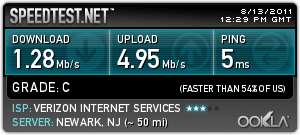


1431011416.png


Here is my system info:

Windows 7 Home Premium 64bit
Intel Core i5 2500K
Asus P8P67LE Motherboard
8gb G.Skill Ripjaws DDR3-1600 PC3-12800 8gb
NVIDIA GEforce 9500gt 1024mb
ASUS PCE-N13 wireless card


Here are the tests from my laptop running XP


Last edited:

My Computer

OS
Windows 7 Home Premium 64bit
CPU
Intel Core i5 2500K
Motherboard
Asus P8P67LE
Memory
8gb G.Skill Ripjaws DDR3-1600 PC3-12800
Graphics Card(s)
NVIDIA GEforce 9500gt 1024mb
Have you tried using firefox as your brouser
 

My Computer

Computer type
PC/Desktop
OS
windows 7 64bit sp1
CPU
I7 2700K @3.5GHz
Motherboard
GA-Z68XP-UD3P
Memory
Corsair 16GB PC3-12800 1600 MHz (4x4GB)
Graphics Card(s)
ATI Radeon HD 6450 - 1 GB - (XFX) - Silent - (PCI-E)
Sound Card
none
Monitor(s) Displays
lg 23"
Hard Drives
90GB Corsair Force Series 3 SATA 6Gb/s SSD 1 TB Seagate ST31000524AS Barracuda SATA-III 7200RPM and 3tb seagate
PSU
Corsair 600W (CMPSU-600CX)
Case
Cooler Master Sileo 500 - Silent
Antivirus
mcafee

My Computer

OS
Windows 7 Home Premium 64bit
CPU
Intel Core i5 2500K
Motherboard
Asus P8P67LE
Memory
8gb G.Skill Ripjaws DDR3-1600 PC3-12800
Graphics Card(s)
NVIDIA GEforce 9500gt 1024mb
I'm no expert but i would try changing all cables and filters one at a time.or try connecting your laptop to the router with a cable see what speed you get.
 

My Computer

Computer type
PC/Desktop
OS
windows 7 64bit sp1
CPU
I7 2700K @3.5GHz
Motherboard
GA-Z68XP-UD3P
Memory
Corsair 16GB PC3-12800 1600 MHz (4x4GB)
Graphics Card(s)
ATI Radeon HD 6450 - 1 GB - (XFX) - Silent - (PCI-E)
Sound Card
none
Monitor(s) Displays
lg 23"
Hard Drives
90GB Corsair Force Series 3 SATA 6Gb/s SSD 1 TB Seagate ST31000524AS Barracuda SATA-III 7200RPM and 3tb seagate
PSU
Corsair 600W (CMPSU-600CX)
Case
Cooler Master Sileo 500 - Silent
Antivirus
mcafee
update: for the last week or so I have had a pretty good connection. I have even been getting an A rating on my ping tests. Since yesterday it has been slow and I couldn't even do a test since it was taking too long to load the pingtest page. My other machine as well as my laptop have not been affected and are running like normal so I know it is just on this computer. Any ideas?
 

My Computer

OS
Windows 7 Home Premium 64bit
CPU
Intel Core i5 2500K
Motherboard
Asus P8P67LE
Memory
8gb G.Skill Ripjaws DDR3-1600 PC3-12800
Graphics Card(s)
NVIDIA GEforce 9500gt 1024mb
* 1 Run a virus scan on your computer. If your virus and spyware protection are up-to-date, the scan will detect any offenders and remove them from your computer.

* 2 Unplug your modem and wait a minute. Many times resetting a modem will fix the slow Internet connection.

* 3 Perform a system restore on your computer. This allows you to undo any harmful changes that you have made to your computer that could be causing the slower Internet.

* 4 Free up space on your hard drive. Routinely removing temporary Internet files and programs that you no longer use will help keep your computer running efficiently.

* 5 Test your connection. Many Internet providers will allow you to use their site to check to make sure that there is not a problem with your connection.
 

My Computer

OS
Windows 7 Ultimate x64
* 1 Run a virus scan on your computer. If your virus and spyware protection are up-to-date, the scan will detect any offenders and remove them from your computer.

* 2 Unplug your modem and wait a minute. Many times resetting a modem will fix the slow Internet connection.

* 3 Perform a system restore on your computer. This allows you to undo any harmful changes that you have made to your computer that could be causing the slower Internet.

* 4 Free up space on your hard drive. Routinely removing temporary Internet files and programs that you no longer use will help keep your computer running efficiently.

* 5 Test your connection. Many Internet providers will allow you to use their site to check to make sure that there is not a problem with your connection.

Thanks for the advice but I have already tried all of that and there is over 1TB left on my HD. The system restore didn't do anything either.
 

My Computer

OS
Windows 7 Home Premium 64bit
CPU
Intel Core i5 2500K
Motherboard
Asus P8P67LE
Memory
8gb G.Skill Ripjaws DDR3-1600 PC3-12800
Graphics Card(s)
NVIDIA GEforce 9500gt 1024mb
The wireless card may be dodgy.
See if re-seating it helps.
If no luck, did you try connecting the new system to the router with a wired card and cable, like baccini suggested?

Also, see if shutting down all unnecessary startup programs, services, and tasks running in the background in msconfig, Task Manager, and Task Scheduler respectively helps.
 

My Computer

OS
windows 7
If DSL :

Hello,

Make sure the line-in phone cable is not in the filter side of the modem, did this one time, felt like a fool when the repair guy came out at 85 bucks an hour:cry: to fix it. I didn't get charged which was amazing. :D
 

My Computer

OS
Xp 32bit work/ Windows 7 64-bit
CPU
I-7 920
Motherboard
GIGABITE
Memory
6 GB
Graphics Card(s)
ATI 4670
Sound Card
Onboard
Monitor(s) Displays
24" LED
Cooling
Water
Update: Over the past 2 weeks, I have tried several attempts to fix this but nothing has worked.

I connected using a wire directly into the router - works great!
Ran virus scans - found nothing. This is a new Win 7 install on brand new HD so I didn't think this was the case anyway.
I brought rig into work and connected - wired is fine, wireless still slow. All other machines both at work and at home connect fine via wireless and have great speeds.
I re-seated the wireless card - same thing

Last night I uninstalled the ASUS card and installed a linksys wmp54g card. It connected and worked fine for about 30 minutes and got an A from pingtest but then slowed down to a crawl again.

This morning I ran a few more pingtests, all from the same server and within a few minutes I got an A,B,C,D and F grades.

When I installed Win7, I already had the card installed. I was thinking of staring over from scratch. Will leaving the card out and installing it afterwards make a difference?

Thanks again for the help
 

My Computer

OS
Windows 7 Home Premium 64bit
CPU
Intel Core i5 2500K
Motherboard
Asus P8P67LE
Memory
8gb G.Skill Ripjaws DDR3-1600 PC3-12800
Graphics Card(s)
NVIDIA GEforce 9500gt 1024mb
Back
Top