
Slow Network performance

trxdraxon

Banned
Local time
10:41 AM
Messages
7
Location
SoCal
I have searched through some of the threads and there seems to be an issue with the realtek drivers, but I am wondering if anyone has any other ideas.

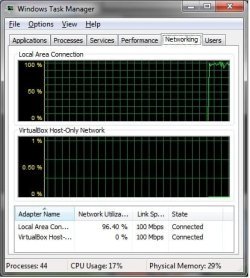
I am currently running build 7237 and everything runs great except if I copy something across my network. I have attached a picture that shows my network utilization spiking up to almost 99% when just coping files from one computer to the other. This only happens under 7, not on xp or vista.

I have tried playing around with adapter settings, etc but nothing seems to help. My motherboard is a Gigabyte with the built in 8168/8111 nic card. Connecting to a Linksys WRT54GL router. I have checked gigabytes site and they don't have any new drivers for 7 yet.

Anyone have any idea's I could try?
 

Attachments
  • wtfroak.jpg
    wtfroak.jpg
    82.9 KB · Views: 60

My Computer

Computer type
Laptop
Computer Manufacturer/Model Number
HP 6145DX
OS
Windows 7 Ultimate x64 SP1
CPU
AMD A8-3500M
Memory
8 gigs
Graphics Card(s)
ATI 6620G
network issue

I have searched through some of the threads and there seems to be an issue with the realtek drivers, but I am wondering if anyone has any other ideas.

I am currently running build 7237 and everything runs great except if I copy something across my network. I have attached a picture that shows my network utilization spiking up to almost 99% when just coping files from one computer to the other. This only happens under 7, not on xp or vista.

I have tried playing around with adapter settings, etc but nothing seems to help. My motherboard is a Gigabyte with the built in 8168/8111 nic card. Connecting to a Linksys WRT54GL router. I have checked gigabytes site and they don't have any new drivers for 7 yet.

Anyone have any idea's I could try?
How big are the files and what are you using to copy/move them. I would suggest taking a 500mB file timing how long it takes and try two different methods of copying. You could drag and drop for one and use teracopy for the other.

I assume you router is a 10/100 and what knid of cable are you using (cat 5, or cat6e) if its wireless what card and what router.

Any info you can give us would help

Ken
 

My Computer

Computer Manufacturer/Model Number
HP Pavillion dv-7 1005 Tx
OS
Win 8 Release candidate 8400
CPU
[email protected]
Memory
4 gigs
Graphics Card(s)
Nvidia 9600M
Sound Card
HD built-in
Monitor(s) Displays
17" Wxga
Screen Resolution
1440x900
Cooling
none
Internet Speed
45Mb down 5Mb up
Strange, I've got a Foxcon GM31X-K with inbuilt Realtek 8168/8111 and it's terribly slow loading pages in browsers, even my router's config page (WRT160N — Linksys/Cisco). File transfer, however, is really speedy — a 174MB file from my NAS to the computer's hard drive was a relatively respectable 8MB/s, as opposed to the <10kB/s I get when trying to load pages.
I've tried with a ton of different drivers — Win7 default ones, the ones suggested here: http://www.sevenforums.com/network-internet/14038-realtek-nic-slow-uploads-8111c.html, the latest Vista drivers and the latest Win7 drivers from the Realtek site (and the drivers on Foxconn's site, which are the same as Realtek's). Some don't work at all, some work but, as I've said, really slow. It's a real shame because this machine is pretty damn good and it's a shame to have to use XP or Vista just because the networking drivers don't work.

Cat5 cable, afaik, no wireless card.
Any more info available on request.
 

My Computer

Computer Manufacturer/Model Number
Dell DM061 (E520)
OS
Win 7 (7100 x64); OS X 10.5.6
CPU
Intel Pentium D 915 - 2.8Ghz x 2
Motherboard
Dell 0WG864
Memory
4GB DDR2 PC2-6400
Graphics Card(s)
nVidia XFX GeForce 9600GT
Monitor(s) Displays
Acer P223W; Acer X223W
Screen Resolution
3360x1050
Hard Drives
Seagate 150GB; Western Digital 150GB; Western Digital 500GB; WD MyBook World Edition 1TB (NAS)
PSU
OCZ StealthXstream 400W
Case
Dell E520 (lol)
Keyboard
Dell Multimedia Keyboard
Mouse
Dell
Internet Speed
128KB/s :(
inetslowdown

Strange, I've got a Foxcon GM31X-K with inbuilt Realtek 8168/8111 and it's terribly slow loading pages in browsers, even my router's config page (WRT160N — Linksys/Cisco). File transfer, however, is really speedy — a 174MB file from my NAS to the computer's hard drive was a relatively respectable 8MB/s, as opposed to the <10kB/s I get when trying to load pages.
I've tried with a ton of different drivers — Win7 default ones, the ones suggested here: http://www.sevenforums.com/network-internet/14038-realtek-nic-slow-uploads-8111c.html, the latest Vista drivers and the latest Win7 drivers from the Realtek site (and the drivers on Foxconn's site, which are the same as Realtek's). Some don't work at all, some work but, as I've said, really slow. It's a real shame because this machine is pretty damn good and it's a shame to have to use XP or Vista just because the networking drivers don't work.

Cat5 cable, afaik, no wireless card.
Any more info available on request.
why dont you try a speedtest. speedtest.net It would at least tell you what the average oing time is. you may have a single bottleneck. If speedtest doesn't help you could run a traceroute (ping-probe) to give you a clear picture of where the slowdown starts.

Let me know how this works out I have subscribed to this thread so anytime something is posted I get an email

Ken
 

My Computer

Computer Manufacturer/Model Number
HP Pavillion dv-7 1005 Tx
OS
Win 8 Release candidate 8400
CPU
[email protected]
Memory
4 gigs
Graphics Card(s)
Nvidia 9600M
Sound Card
HD built-in
Monitor(s) Displays
17" Wxga
Screen Resolution
1440x900
Cooling
none
Internet Speed
45Mb down 5Mb up
Couldn't load the Speedtest site.
May be worth doing a traceroute but I have to confess to not knowing exactly how to do that on Windows. :\

Had a real 'Doh' moment when I realised my OS X machine has a Belkin wireless dongle (G+ mimo — F5D9050 v3001uk) sat around doing nothing so I installed that on the Realtek computer as a temporary fix; internet works as good as it should now.
Hopefully this issue is purely an issue with the Realtek drivers and they'll get their act together between now and RTM/official release.
 

My Computer

Computer Manufacturer/Model Number
Dell DM061 (E520)
OS
Win 7 (7100 x64); OS X 10.5.6
CPU
Intel Pentium D 915 - 2.8Ghz x 2
Motherboard
Dell 0WG864
Memory
4GB DDR2 PC2-6400
Graphics Card(s)
nVidia XFX GeForce 9600GT
Monitor(s) Displays
Acer P223W; Acer X223W
Screen Resolution
3360x1050
Hard Drives
Seagate 150GB; Western Digital 150GB; Western Digital 500GB; WD MyBook World Edition 1TB (NAS)
PSU
OCZ StealthXstream 400W
Case
Dell E520 (lol)
Keyboard
Dell Multimedia Keyboard
Mouse
Dell
Internet Speed
128KB/s :(
You might also try going to: Speed tests and problem diagnosis tools - dslreports.com

Run the tweak test first and then try the speed tests, in addition there are several other tests available.

A friend of mine had issues with the Realtek on-board LAN at one time. Regardless of how we configured it and what driver we used, it just wasn't performing well at all. (XP Pro was installed.)

He finally decided to bite the bullet and put in a D-Link NIC card and it worked great! I think it was a DGE-530T card. Cost was around $20. We just went to the BIOS and disabled the on-board LAN setting, rebooted and then installed the card and driver.
 

My Computer

Computer Manufacturer/Model Number
Custom Build by Nibiru2008 Computer Shop
OS
Windows 7 Professional X64 Build 7600.16385 (win7_rtm.090713-1255)
CPU
Intel Core 2 Duo E8400 Wolfdale 3.0GHz 6MB L2 Cache
Motherboard
Gigabyte GA-EP45-UD3R F12 BIOS
Memory
Mushkin Enhanced Blackline PC8500 DDR2 6 GB (2x2GB & 2x1GB)
Graphics Card(s)
XFX Radeon HD 5770 1 GB DDR5
Sound Card
Onboard Realtek Azalia HD Audio
Monitor(s) Displays
ViewSonic VX2250wm 22" Widescreen LED Backlight LCD
Screen Resolution
1920 X 1080p HD
Hard Drives
OCZ Vertex 2 60GB SSD, Samsung F3 HD502HJ 500GB, Samsung F1 HD502IJ 500GB, Samsung HD102SJ 1TB, Western Digital WD500AAKS 500GB
PSU
Bgears B-Tarantula 550 watt with Pigtail Modular Cabling
Case
Lian Li PC-7F Black Anodized All Aluminum bottom PSU mount
Cooling
Xigmatek Nepartak S983 3-Pipe HDT CPU Cooler & 92mm PWM Fan
Keyboard
KeyTronic Lifetime Series Model: LT Designer Black Full Size
Mouse
Logitech Wireless Trackman Wheel
Internet Speed
30 Mbps Down 2 Mbps Up Turbo RoadRunner
Other Info
G DATA Internet Security
How big are the files and what are you using to copy/move them. I would suggest taking a 500mB file timing how long it takes and try two different methods of copying. You could drag and drop for one and use teracopy for the other.

I assume you router is a 10/100 and what knid of cable are you using (cat 5, or cat6e) if its wireless what card and what router.

Any info you can give us would help

Ken


My whole network is 10/100 with cat5, except for my laptop which uses wireless. I put Win7 on my laptop yesterday and ran some more tests using teracopy and same thing. Doesn't matter which files, could be mp3's, pictures or rar files. It's not the amount of time it takes to copy files, it's the fact that once I start the copy it takes over all my bandwidth. So much so that I can't browse my local network anymore or open up webpages.

I just don't get it, my network runs great as long as I don't copy files. I could be downloading 10gigs worth of torrents at 1.2megs a second and my network is fine. The minute I start coping files back and forth it chugs and I can't even open up webpages.
 

My Computer

Computer type
Laptop
Computer Manufacturer/Model Number
HP 6145DX
OS
Windows 7 Ultimate x64 SP1
CPU
AMD A8-3500M
Memory
8 gigs
Graphics Card(s)
ATI 6620G
slow copy

My whole network is 10/100 with cat5, except for my laptop which uses wireless. I put Win7 on my laptop yesterday and ran some more tests using teracopy and same thing. Doesn't matter which files, could be mp3's, pictures or rar files. It's not the amount of time it takes to copy files, it's the fact that once I start the copy it takes over all my bandwidth. So much so that I can't browse my local network anymore or open up webpages.

I just don't get it, my network runs great as long as I don't copy files. I could be downloading 10gigs worth of torrents at 1.2megs a second and my network is fine. The minute I start coping files back and forth it chugs and I can't even open up webpages.


How much ram on the machines?

K
 

My Computer

Computer Manufacturer/Model Number
HP Pavillion dv-7 1005 Tx
OS
Win 8 Release candidate 8400
CPU
[email protected]
Memory
4 gigs
Graphics Card(s)
Nvidia 9600M
Sound Card
HD built-in
Monitor(s) Displays
17" Wxga
Screen Resolution
1440x900
Cooling
none
Internet Speed
45Mb down 5Mb up
My desktop has 4gigs and my laptop has 2gigs
 

My Computer

Computer type
Laptop
Computer Manufacturer/Model Number
HP 6145DX
OS
Windows 7 Ultimate x64 SP1
CPU
AMD A8-3500M
Memory
8 gigs
Graphics Card(s)
ATI 6620G
slow network

My desktop has 4gigs and my laptop has 2gigs

you know the only thing I can think of is try unplugging 1 thing at a time and see if the problem clears. I ran accross the same kind of problem with an unterminated cable. I rally cant think of any thing else. Let me do some searching to see if I can come up with something

Ken
 

My Computer

Computer Manufacturer/Model Number
HP Pavillion dv-7 1005 Tx
OS
Win 8 Release candidate 8400
CPU
[email protected]
Memory
4 gigs
Graphics Card(s)
Nvidia 9600M
Sound Card
HD built-in
Monitor(s) Displays
17" Wxga
Screen Resolution
1440x900
Cooling
none
Internet Speed
45Mb down 5Mb up
interesting I have 8168B/8111B built in realtek with foxconn motherboard, and I had some issues with it as well, but it was mostly due to cable issues not driver issues, this is scaring me now if I want to use it I may end up having bad performance! I'm using a wireless DLink that works fine.

If all else is faling, do you have a spare wireless crad you could try? or another NIC card?
 

My Computer

Computer Manufacturer/Model Number
home made
OS
Windows 7 7264x64(main), 7260x86(secendary), XP SP3 Triple Boot
CPU
Intel Core 2 Duo E7400 2.8Mhz
Motherboard
Intel G33 express chipset
Memory
2GB DD2 667
Graphics Card(s)
Intel(R) 82G33 Graphics and Memory Controller Hub
Sound Card
Realtek Built into the G31
Monitor(s) Displays
19"
Screen Resolution
1280x1024
Hard Drives
320GB SATA (Main), 160GB IDE (Backup)
Case
Gigabyte SETTO
Keyboard
Genius
Mouse
Logitech
Internet Speed
1MB Download, 128k Upload
I ran some more tests the last few minutes. I tried coping some files from my desktop and my wife's laptop. My wife's laptop is running XP. When I started coping the files from my desktop to her laptop the network utilization on the desktop jumped to 99% again. But her laptop was only at like 5%. But trying to open a webpage on either computer took about 25seconds to open up yahoo as there was no bandwidth.

Same test again this time coping files from my laptop to her laptop, same thing happened.

So it has to be something in Win7 because when I was running vista on my desktop and laptop this didn't happen.
 

My Computer

Computer type
Laptop
Computer Manufacturer/Model Number
HP 6145DX
OS
Windows 7 Ultimate x64 SP1
CPU
AMD A8-3500M
Memory
8 gigs
Graphics Card(s)
ATI 6620G
Copying files wirelessly across my network seems to take 2 (Sometimes 4) times as long to copy (using the same router, and the same files. (2wire wireless gateway.)) than my XP network. The 7 machine has more memory, and a faster processor. anyone have any ideas?
 

My Computer

Computer Manufacturer/Model Number
HP Touchsmart
OS
XP Media Edition / Vista /Win 7 Home Premium
CPU
Win 7 Machine: Intel Core 2 Duo T5850 @ 2.16GHz Merom 65nm
Motherboard
Pegatron Corp. EVE Model
Memory
4GB Dual Channel DDR2 @ 333MHz 5-5-5-15
Graphics Card(s)
Nvidia Defaul 1920X1200 256MB GeForce 9300M
Sound Card
SoundMAX Integrated Digital HD Audio
Monitor(s) Displays
HP 25" Flat Panel Touch Screen
Screen Resolution
1900X1200
Hard Drives
500 GB Seagate ST3500620as (Sata) 1.5 TB Seagate External
Keyboard
HP Model RK713A
Internet Speed
3.0Gb
Back
Top