Small and Large Desktop Icons - Why?

bob3d

New member
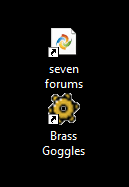
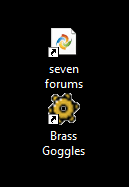
I don't understand why it is when I create an internet shortcut on a Windows 7 desktop, most of the icons are "miniature", where as some of them are full size on the desktop. There doesn't seem to be any rhyme or reason as to which shortcut will be small and which will be full size.

Please see the attached screenshot. The site "Brass Goggles" is full size and "seven forums" is miniature.

On XP, these same sites were all full size. I have no idea what is causing this erratic behavior. Any ideas?

Bob

PS Is this the correct place to address this questions? (This is my first post here).
 

Attachments
  • Icon differences.png
    Icon differences.png
    3.8 KB · Views: 3,036

My Computer

OS
Windows 7 Enterprise x64
...Please see the attached screenshot. The site "Brass Goggles" is full size and "seven forums" is miniature...
They look the same size to me.
 

My Computer

Computer type
PC/Desktop
Computer Manufacturer/Model Number
OQO 2+
OS
Windows 8 Pro w/MC 32-bit
CPU
Intel Atom 1.86 GHz
Motherboard
OQO 2+
Memory
2 GB
Graphics Card(s)
Intel GMA 500
Sound Card
IDT
Monitor(s) Displays
LCD
Screen Resolution
800 x 480 (portable) 1280 x 1024 (docked)
Hard Drives
64 GB SSD
PSU
9 Ah Battery (portable) or OQO Brick (docked)
Case
Shirt Pocket Sized
Cooling
Tiny Fan
Keyboard
Slide out (portable) DiNovo Edge (docked)
Mouse
Eraser head (portable) Logitech Bluetooth (docked)
Internet Speed
WWAN or 802.11G (portable) T1 (docked)
Browser
IE 10
Other Info
DVD-RW OQO Docking Station
I agree with roncerr ... they do look the same size. I'm basing this on the size of the shortcut arrows in the lower left corner of each icon. In case you're not aware of it, you do have some control over the icons.

If your mouse has a scroll wheel, place your cursor on an empty section of the desktop, hold down CTRL, then scroll the mouse wheel to change icon size. (NOTE: If you make the icons too large they might change location on the desktop to conform to a new grid.)

Also:
1. By default, the icons on the desktop are a little large
2. Right click on an open area of the desktop
3. Select View
4. Select Small Icons (or medium or large)
 

My Computer

Computer type
Laptop
Computer Manufacturer/Model Number
Sony Vaio VPCEB47GM Laptop
OS
Win 7 Pro 64-bit
CPU
Intel i5 2.4 Ghz
Memory
8GB DDR3
Graphics Card(s)
Intel HD 3000
Sound Card
IDT High Definition
Monitor(s) Displays
15.6 WGXA Anti-Glare LED
Screen Resolution
1280x800
Hard Drives
640Gb 7200rpm
Antivirus
MSE
Browser
Opera (primary) with IE9 backup
Website icon size and presentation differences between XP and Win 7

I am well aware of how to change all icon sizes, but thanks for answering. Also, you'll notice that I altered the Windows 7 shortcut arrow to be the same arrow as is used by XP.

Perhaps I did not explain it good enough. I have attached two partial screenshots of the same icon pair on an XP machine and on a Windows 7 machine below. Notice that the website specific icon for Seven Forums is much smaller and contained within a white notepad-ish "wrapper" whereas, the Brass Goggles website icon is full size and not contained in a "wrapper". (Please ignore the icon spacing and text placement & size).

Why, this seemingly random behavior?

Thanks.

Bob

PS Note that Windows 7 desktop icons are on the left and XP desktop icons are on the right. What is causing me problems is in the left screenshot the "seven forums" website icon is encapsulated within a a white folder looking thing, making the desktop website icon hard for my old eyes to see. In XP, I can clearly see the shape and colors of the desktop website icon easy for me to see.

It's difficult growing old. I don't recommend it.
 

Attachments

  • Windows 7 Icon differences.png
    Windows 7 Icon differences.png
    3.8 KB · Views: 3,023
  • XP icon size.PNG
    XP icon size.PNG
    4.7 KB · Views: 3,025
Last edited:

My Computer

OS
Windows 7 Enterprise x64
I can't seem to duplicate what you're seeing but I would guess that it has something to do with the transparency of the icon's background.
 

My Computer

Computer type
PC/Desktop
Computer Manufacturer/Model Number
Home Built desktop, Dell G15 5511 Gaming laptop,MS Surface Pro 7 tablet
OS
W10 Pro desktop, W11 laptop, W11 Pro tablet (all 64-bit)
CPU
3.7Ghz 8700K i7, i7-11800H, i7-1065G7
Motherboard
ASUS TUF Z370-Pro Gaming in desktop
Memory
16G desktop, 16G laptop, 4G tablet
Graphics Card(s)
AMD Radeon RX580, RTX 3060, Intel Iris Plus
Sound Card
High Definition Audio (Built-in to mobo)
Monitor(s) Displays
Samsung U32J59 32" (2x), 15.6", 12"
Screen Resolution
3840x2160, 3840x2160, 1920x1080, 2160x1440
Hard Drives
500G SSD for OS; 2T, 10T & 15T HDDs for Data on Desktop, 1TB SSD laptop, 128G SSD tablet.
PSU
Corsair CX 750M
Case
Antec 100
Cooling
CM 212+
Keyboard
IBM Model M - used continuously since 1986
Mouse
Microsoft Pro IntelliMouse
Internet Speed
400M down 8M up
Antivirus
Windows Defender
Browser
FireFox
Other Info
Built my first computer (8Mhz 8088cpu, 640K RAM, 20MB HDD, 2 360K floppy drives) in 1985 and have been building them for myself, relatives and friends ever since.
Clarification made in post #4

I clarified my last post.

Bob
 

My Computer

OS
Windows 7 Enterprise x64
I've noticed my internet shortcut icons often change completely. Sometimes generic, sometimes one or another custom version chosen by the website. But if you want to try something, you could network the computers and drag the icon you prefer to both desktops.
 

My Computer

Computer type
PC/Desktop
Computer Manufacturer/Model Number
OQO 2+
OS
Windows 8 Pro w/MC 32-bit
CPU
Intel Atom 1.86 GHz
Motherboard
OQO 2+
Memory
2 GB
Graphics Card(s)
Intel GMA 500
Sound Card
IDT
Monitor(s) Displays
LCD
Screen Resolution
800 x 480 (portable) 1280 x 1024 (docked)
Hard Drives
64 GB SSD
PSU
9 Ah Battery (portable) or OQO Brick (docked)
Case
Shirt Pocket Sized
Cooling
Tiny Fan
Keyboard
Slide out (portable) DiNovo Edge (docked)
Mouse
Eraser head (portable) Logitech Bluetooth (docked)
Internet Speed
WWAN or 802.11G (portable) T1 (docked)
Browser
IE 10
Other Info
DVD-RW OQO Docking Station
I am well aware of how to change all icon sizes, but thanks for answering. Also, you'll notice that I altered the Windows 7 shortcut arrow to be the same arrow as is used by XP.

Perhaps I did not explain it good enough. I have attached two partial screenshots of the same icon pair on an XP machine and on a Windows 7 machine below. Notice that the website specific icon for Seven Forums is much smaller and contained within a white notepad-ish "wrapper" whereas, the Brass Goggles website icon is full size and not contained in a "wrapper". (Please ignore the icon spacing and text placement & size).

Why, this seemingly random behavior?

Thanks.

Bob

PS Note that Windows 7 desktop icons are on the left and XP desktop icons are on the right. What is causing me problems is in the left screenshot the "seven forums" website icon is encapsulated within a a white folder looking thing, making the desktop website icon hard for my old eyes to see. In XP, I can clearly see the shape and colors of the desktop website icon easy for me to see.

It's difficult growing old. I don't recommend it.

The icons placed on the desktop are extracted from the website's favicon... Different browsers read/recognize (whatevs) the favicons in a different way, this is why even on the same OS, the desktop shortcuts may look different from two different browsers. Since you provide screenshots from two different OSs, I see nothing wrong with the shortcuts, regardless of the obvious difference. I don't think there's a way of "fixing" this...

Someone correct me if I'm wrong :geek:
 

My Computer

Computer type
Laptop
Computer Manufacturer/Model Number
Custom
OS
Windows 7 Home Premium x64
CPU
Intel Core i5 2500K
Motherboard
MSI MS-7750
Memory
8GB DDR3
Graphics Card(s)
nVidia GeForce GTX650 Ti BOOST
Sound Card
Realtek
Monitor(s) Displays
21' Philips
Screen Resolution
Full HD
Hard Drives
1TB
PSU
500W
Desktop Favicons are different (worse) between XP and Windows 7

The icons placed on the desktop are extracted from the website's favicon... Different browsers read/recognize (whatevs) the favicons in a different way, this is why even on the same OS, the desktop shortcuts may look different from two different browsers. Since you provide screenshots from two different OSs, I see nothing wrong with the shortcuts, regardless of the obvious difference. I don't think there's a way of "fixing" this...

Someone correct me if I'm wrong :geek:
That's the word I was fishing for: Favicon as in http://www.sevenforums.com/favicon.ico! The file favicon.ico is located on every website's root directory, if that website hase a favicon. Now that I know what to search for, I found the answer here in this forum's post:
...The one with the white background is the new IE8 shortcut with the "FavIcon" graphic in the center.

The tiny tiny graphic on the huge white page is new to Windows 7 and is an irritation to me personally. Previously the FavIcon would cover the entire icon but I think that that was seen as a security issue. Some malicious website could install a FavIcon that mimiced a windows program or something to make you click it :P...

I think I see my answer, but I am very unhappy with it, since I cannot see my desktop favicon's within the new Windows 7 method of displaying them. Great. Just what I needed, another slam to the visually impaired brought to you in the name of "security".:cry:

Bob
 

My Computer

OS
Windows 7 Enterprise x64

My Computer

Computer type
PC/Desktop
Computer Manufacturer/Model Number
OQO 2+
OS
Windows 8 Pro w/MC 32-bit
CPU
Intel Atom 1.86 GHz
Motherboard
OQO 2+
Memory
2 GB
Graphics Card(s)
Intel GMA 500
Sound Card
IDT
Monitor(s) Displays
LCD
Screen Resolution
800 x 480 (portable) 1280 x 1024 (docked)
Hard Drives
64 GB SSD
PSU
9 Ah Battery (portable) or OQO Brick (docked)
Case
Shirt Pocket Sized
Cooling
Tiny Fan
Keyboard
Slide out (portable) DiNovo Edge (docked)
Mouse
Eraser head (portable) Logitech Bluetooth (docked)
Internet Speed
WWAN or 802.11G (portable) T1 (docked)
Browser
IE 10
Other Info
DVD-RW OQO Docking Station
Right Click on the icon, choose Properties, then "Change Icon". That's what I did with a bunch of my icons. You may want to download a complete fresh set for your computer, make a new folder tucked away and download some new ones. In case you don't know, a .PNG file may or may not have a transparent background, but in most cases they do.

Here's a site I like:
Icons & Icon Packs - Download Free PNG Icons | IconsPedia
 

My Computer

Computer type
Laptop
Computer Manufacturer/Model Number
Dell Precision M6600
OS
Windows 7 Professional 64bit
CPU
Intel Core i7 2820QM 2.3GHz
Memory
8GB ( 1666 MHz )
Graphics Card(s)
ATI Fire Pro M8900
Sound Card
MOTU UltraLite mk3 Hybrid ( external )
Screen Resolution
1200
Hard Drives
250GB 7200 rpm
Keyboard
It lights up
Mouse
Logitech laser
Internet Speed
Blazing
Antivirus
COMODO Internet Security (There is NO OTHER)
Browser
Firefox (There is NO OTHER)...well Opera is cool
Back
Top