badspell68 New member Member VIP Local time 3:19 AM Messages 231 Location PA Jun 28, 2012 #1 How does one disable the snap to grid or any type of positioning restriction of icons on the desktop under Win 7? My Computer OSWindows 7
How does one disable the snap to grid or any type of positioning restriction of icons on the desktop under Win 7?
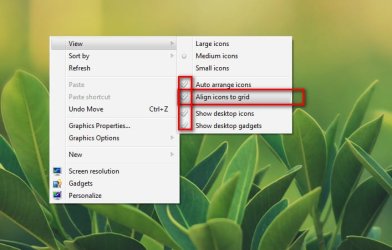
Arc New member SF Team Local time 12:49 PM Messages 35,002 Jun 28, 2012 #2 By right clicking the desktop, Expanding view context menu, and unchecking those .... My Computer Computer typePC/DesktopComputer Manufacturer/Model NumberSelf AssembledOSMicrosoft Windows 10 Pro Insider Preview 64-bitCPUIntel(R) Core(TM) i3-4130 CPU @ 3.40GHzMotherboardGigabyte Technology Co., Ltd. B85M-D3HMemoryCorsair Vengence 4GB x2 (8.00GB Dual-Channel DDR3 @ 798MHz)Graphics Card(s)2047MB GeForce GTS 450 (ZOTAC International)Sound CardOnboard (Realtek High Definition Audio)Monitor(s) DisplaysLG Flatron E2040TScreen Resolution1600x900Hard DrivesWestern Digital 1 TB Seagate 500 GBPSUCorsair VS550CaseCooler Master K380CoolingCooler Master Seidon 120V PlusKeyboardLogitech MK260rMouseLogitech MK260rInternet SpeedPMPL BroadbandAntivirusWindows Defender + MBAMBrowserFirefoxOther InfoDell Studio 15" Laptop
M menaice New member Local time 3:19 AM Messages 1 Aug 8, 2012 #3 Why is it when i disable this option and put my icons on my desktop where i want them. If i restart the computer the icons are realigned again? My Computer OSwindows 7 professional 64bit
Why is it when i disable this option and put my icons on my desktop where i want them. If i restart the computer the icons are realigned again?
badspell68 New member Member VIP Thread Starter Local time 3:19 AM Messages 231 Location PA Aug 9, 2012 #4 I have had that happen too... My Computer OSWindows 7