

As I said...my resolution is 1920x1080
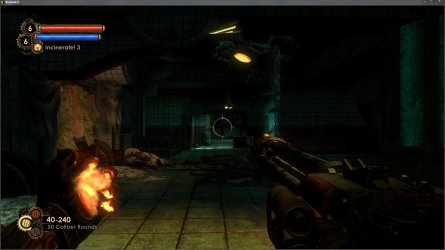
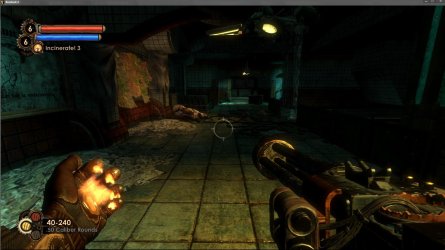
First screenshot is with FOV at 75 (default), 2nd is with FOV at 100. The patch still keeps the FOV at 75, so even if a person has installed the patch, they still may be better off editing the .ini
First screenshot is with FOV at 75 (default), 2nd is with FOV at 100. The patch still keeps the FOV at 75, so even if a person has installed the patch, they still may be better off editing the .ini
Attachments
My Computer
At a glance
Windows 10 Tech Preview 9926 x64AMD FX-835016GB DDR3 1333Asus R9 290 DirectCU II OC, Gigabyte Windforc...
- Computer type
- PC/Desktop
- Computer Manufacturer/Model Number
- SuperBeast
- OS
- Windows 10 Tech Preview 9926 x64
- CPU
- AMD FX-8350
- Motherboard
- Gigabyte GA-990FXA-UD3
- Memory
- 16GB DDR3 1333
- Graphics Card(s)
- Asus R9 290 DirectCU II OC, Gigabyte Windforce R9 290 OC
- Sound Card
- Integrated w/ Creative A250 2.1 speakers
- Monitor(s) Displays
- Main: Asus VN289H 28" Secondary: Acer G246HL 24"
- Screen Resolution
- 1920x1080
- Hard Drives
- 128 GB SanDisk Ultra Plus (Windows drive)
240 GB Crucial M500 SSD (Games drive)
1 TB WDC WD10EACS 7200RPM HDD (Data drive)
2 TB Seagate Expansion Desktop external HDD (Backup drive)
- PSU
- 900w Antec HCG-900
- Case
- Raidmax Agusta Full ATX
- Cooling
- Corsair H80
- Keyboard
- Cooler Master Devastator MB24
- Mouse
- Cooler Master Devastator MS2K 1000/1600/2000 DPI
- Internet Speed
- 100Mbps cable
- Antivirus
- Avast!
- Browser
- Chrome


