Some updates failed, tried to rectify but to no prevail

kelvinwgr

New member
Local time
9:19 AM
Messages
43
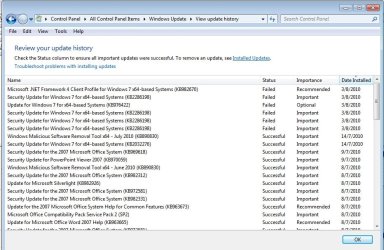
Hi Guys, I was trying to do my windows update manually til I encountered an error in windows update. There are 2 important updates and 1 optional update. Pls refer to screenshot 1.

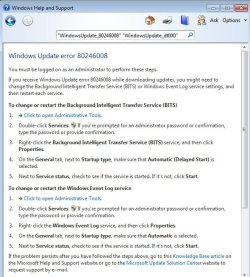
Thereafter, I clicked on the help and followed the instructions on screenshot 2.

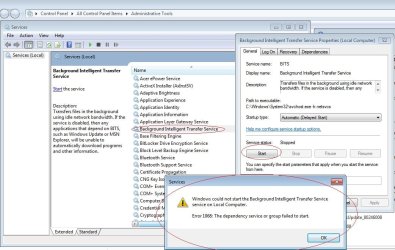
During my troubleshoot, found that one of the services called "Background Intelligent Transfer Service" which was supposed o be started was not started. Upon starting it, got another error (screenshot 3)

Pls help. Thanks.
 

Attachments
  • Screenshot1.jpg
    Screenshot1.jpg
    97.7 KB · Views: 22
  • Screenshot2.jpg
    Screenshot2.jpg
    62.2 KB · Views: 16
  • Screenshot3.jpg
    Screenshot3.jpg
    99.9 KB · Views: 32

My Computer My Computer

At a glance

Windows 7 Home Premium 64-bits OS2 GB Ram
Computer Manufacturer/Model Number
Acer Timeline 3820T
OS
Windows 7 Home Premium 64-bits OS
Memory
2 GB Ram
Hard Drives
320 GB
Open regedit (Start>>Search>>regedit) and check permissions for these keys:

HKEY_LOCALE_MACHINE\System\CurrentControlSet\Services\BITS
HKEY_LOCALE_MACHINE\System\CurrentControlSet\Services\BITS\Parameters
HKEY_LOCALE_MACHINE\System\CurrentControlSet\Services\BITS\Performance
HKEY_LOCALE_MACHINE\System\CurrentControlSet\Services\BITS\Security


Permissions should be following (for all keys):

Administrators,SYSTEM (full control,all checked)
Users:read

anywhere you have different settings you have to correct it + restart

To check permission right click on key>>properties>>permissions

//additional helpful links:

Folder Permissions - Vista Forums

Take Ownership of file - Vista Forums

If permissions are OK and still you have this problem then import this fix BITSWin7.zip to registry +restart
 

My Computer My Computer

At a glance

Windows 7 Professional x64 PLAMD Athlon 4450eGoodRam DDR2 2x2048MB (FSB 800MHz)nVidia GeForce 9600GT (G94-300) 1024 MB
Computer Manufacturer/Model Number
Custom made
OS
Windows 7 Professional x64 PL
CPU
AMD Athlon 4450e
Motherboard
Giga-Byte GA-MA69G-S3H
Memory
GoodRam DDR2 2x2048MB (FSB 800MHz)
Graphics Card(s)
nVidia GeForce 9600GT (G94-300) 1024 MB
Monitor(s) Displays
SAMSUNG SyncMaster HS2P301688
Hard Drives
Seagate ST3750330AS 750GB
PSU
Corsair 550W
Cooling
AeroCool ExtremeEngine 3T
Hi Flavius, I have chnaged the permission for performance. I noticed that under performance, administrator did not have full permission. After restarting my pc, the BITS service still could not be started.

Appreciate for the fix, but before I run it, may I know what does the fix do? I just want to play safe as changing the registry settings may affect the system in other ways. Pls pardon me.
 

My Computer My Computer

At a glance

Windows 7 Home Premium 64-bits OS2 GB Ram
Computer Manufacturer/Model Number
Acer Timeline 3820T
OS
Windows 7 Home Premium 64-bits OS
Memory
2 GB Ram
Hard Drives
320 GB
Appreciate for the fix, but before I run it, may I know what does the fix do?
It restore orginal BITS service settings.

If it also didn't work then you may have problem with COM+ Event System service

Can you start this service? If not import this fix for this service View attachment EventSystem.zip +restart
 

My Computer My Computer

At a glance

Windows 7 Professional x64 PLAMD Athlon 4450eGoodRam DDR2 2x2048MB (FSB 800MHz)nVidia GeForce 9600GT (G94-300) 1024 MB
Computer Manufacturer/Model Number
Custom made
OS
Windows 7 Professional x64 PL
CPU
AMD Athlon 4450e
Motherboard
Giga-Byte GA-MA69G-S3H
Memory
GoodRam DDR2 2x2048MB (FSB 800MHz)
Graphics Card(s)
nVidia GeForce 9600GT (G94-300) 1024 MB
Monitor(s) Displays
SAMSUNG SyncMaster HS2P301688
Hard Drives
Seagate ST3750330AS 750GB
PSU
Corsair 550W
Cooling
AeroCool ExtremeEngine 3T
Hi Flavius, you have solved my issue. Thanks a lot.

The COM + Event System service was disabled. I don't know why it is but one reason that I can think of is that it may be due to I have disabled most settings under msconfig > startup when my windows 7 home premium starts up with 78 processes and 50% memory usage at idle.

After starting the above service, i could start BITS and windows update went well. Cheers!
 

My Computer My Computer

At a glance

Windows 7 Home Premium 64-bits OS2 GB Ram
Computer Manufacturer/Model Number
Acer Timeline 3820T
OS
Windows 7 Home Premium 64-bits OS
Memory
2 GB Ram
Hard Drives
320 GB
Hi Flavius, you have solved my issue. Thanks a lot.

The COM + Event System service was disabled. I don't know why it is but one reason that I can think of is that it may be due to I have disabled most settings under msconfig > startup when my windows 7 home premium starts up with 78 processes and 50% memory usage at idle.

After starting the above service, i could start BITS and windows update went well. Cheers!

You should not be stopping Microsoft services and processes. There is an option in MsConfig to hide them. My Windows 7 ULTIMATE runs 39-42 processes when idle.
 

My Computer My Computer

At a glance

Windows 7 x64 Ultimate SP1Core i7-2630QM6 GB DDR3Nvidia GT 540M / Intel HD 3000 - Optimus swit...
Computer Manufacturer/Model Number
Asus N73SV
OS
Windows 7 x64 Ultimate SP1
CPU
Core i7-2630QM
Motherboard
Intel HM 65
Memory
6 GB DDR3
Graphics Card(s)
Nvidia GT 540M / Intel HD 3000 - Optimus switching
Sound Card
HD Audio (Intel Azalia/Realtek) ALC269
Monitor(s) Displays
LED flat panel
Screen Resolution
1920 x 1080
Hard Drives
2x Seagate Momentus 640 GB - 1,28 TB in total
Internet Speed
4 MB/256 kbps
Other Info
External HDs

WD Elements 1,5 TB
WD MyBook 500 GB
Back
Top