"Something" blocks processes while writing to disk

pdario

New member
I think of me as a computer expert and I believe this is a very though one (I'm planning to scratch Windows, in facts), but I have a last hope asking here! :D

The problem is: there's "something" that blocks processes while they're writing to disk.
The effects showed are, for example:

  • the kaspersky internet security breaks during updates and suspend itself saying the virus base is broken
  • download in chrome stops halfway
  • Adobe Lightroom (which uses a custom sqlite db) breaks during operations, saying the catalog is corrupt and attempts recovery at restart (operation that can break, too)
I tried disabling windows defender that in other occasions showed to lock files, but with no success.
I noticed that in Safe mode operations seems good.
I used ProcExplored to see if there's any process using CPU during this breakups, but didn't find anything; I also looked in the open handles to find other processes using the same file as the breaking ones without luck.


I don't thing it to be a virus as I have AV protection and tend not to expose PC to malware.


I also notice that this behavior mainly happens a few minutes after boot and then seems to disappear after other several minutes.


Does anybody have clues on what's happening or on how to find it out?


Thank you very much!!
 

My Computer

Computer type
Laptop
Computer Manufacturer/Model Number
Acer Aspire 8935G
OS
Windows 7 Home Premium 32bit
Memory
4GB
Graphics Card(s)
ATI 4870 1GB
Screen Resolution
1920x1080
Hard Drives
500GB
Internet Speed
7Mbit
Antivirus
Kaspersky Internet Security 2013
Browser
Chrome
Hello pdario as a long time KISS user mate I would uninstall and reinstall something has probably corrupted the system there.

Just save the trial to downloads use the unistalled from the Start Orb and reinstall from the Downloads and activate with your code but I am guessing I telling my grandmother to suck eggs but that is where I would start.:)

I know it is a pain but there have been a few bugs in KISS juts lately.

A sfc and chkdsk would not go amiss but again I guesing you ahave already tried these if you are ok at this stuff.
http://www.sevenforums.com/tutorials/220165-troubleshooting-steps-windows-7-a.html (point 15 1st up) and http://www.sevenforums.com/tutorials/433-disk-check.html
 

My Computer

Computer type
PC/Desktop
Computer Manufacturer/Model Number
Own build (new) Desk1 / Asus ROG Win 7 / Desk2 1st build
OS
Desk1 7 Home Prem / Desk2 10 Pro / Main lap Asus ROG 10 Pro 2 laptop Toshiba 7 Pro Asus P2520 7 & 10
CPU
Desk1 i5 3750K / Laptop i7 GTX 860M / Desk2 i5 2500
Motherboard
Desk1 Asus P877-V / Desk2 Gigabyte H67 UD3H / Laptop ?
Memory
Desk1 8GB (1866) / Desk2 16GB (1333) / Laptop 8Gb DDR3
Graphics Card(s)
Desk 1& 2NVidia GTX 650 & Laptops on board Intel
Sound Card
Desk 1 & 2 -XONAR DG Realtek High Def audio Laptop
Monitor(s) Displays
Desk 1 Benq HD 2450 / Desk2 Philips 24" / Laptop 17.5"
Screen Resolution
1920x1080 D1 & D2 & Laptop 1
Hard Drives
Desk1 Samsung 120GB 830 SSD
Asus ROG 256GB 850 Pro SSD
Desk2 Samsung 840 256 SSD
Toshiba 120GB EVO
PSU
Desk 1 Corsair HX 1050/ Laptop ? / Desk 2 Corsair HX 650
Case
Desk 1 Cooler HAF XM ? Toshiba laptop / Desk2 Coolermaster
Cooling
Fans on all Desk1 -2 Desk2 - all Coolermasters 5 Laptop ?
Keyboard
Desk 1 MS Sidewinder X6 Desk 2 MS Sidewinder X 4
Mouse
Desk 1&2 - Gigabyte MS 900 gamer - laptop - Logitec wireless
Internet Speed
ADSL2+
Other Info
One other Desktop (tester) and spare Toshba laptop both with SSD's
Running Kaspersky 2016 ISS on all machines config'd identically
Logitec audio stereo systems on each machine (x3)
Canon MG5250MFC
Router/modem TP-Link running WPA2SK
Noo!! I didn't even think of an hardware failure!! No panic, no panic!!!

Ok, I'll go for the sfc and chkdsk checks and still hope it's a sw problem.

About KIS: I also tried suspending and stopping it; I will also try a reinstall, if you think it could be the cause (I thought that it is something below it, as it is itself broken).
 

My Computer

Computer type
Laptop
Computer Manufacturer/Model Number
Acer Aspire 8935G
OS
Windows 7 Home Premium 32bit
Memory
4GB
Graphics Card(s)
ATI 4870 1GB
Screen Resolution
1920x1080
Hard Drives
500GB
Internet Speed
7Mbit
Antivirus
Kaspersky Internet Security 2013
Browser
Chrome

Pdario I personally don't like Chrome but whatever floats the boat. That isa strange symptom for KISS though and no mate a reinstall sounds like it mightbe in order.

Now you know you have the two main options one in the Start list which Ipersonally don't like although it does save your config of the program there isthe uninstall tool from Kaspersky

http://support.kaspersky.com/common/service.aspx?el=1464

I don't know how you config the KISS I use my own which I got from anothersite but it has been removed but if you want a hand through - ask.

But first run these they will find stuff that any AV can miss

http://www.superantispyware.com/

http://www.malwarebytes.org/products/malwarebytes_free/

http://www.bleepingcomputer.com/download/adwcleaner/
download the ADW from bleeping computer


If you are going to reinstall 7 then it looks like the chipset supports 64bit and there are options for you. A factory default (32bit) this http://www.sevenforums.com/tutorials/2432-usb-windows-7-installation-key-drive-create.html use the ISO and the activation code from your machine sticker or just buy and install a 7 OEM that would get rid of all the bloatware.

The sfc and chkdsk are not really hardware related mate they just check the OS filing sytem and try to correct problems.

Another check you could do is a temp check with Speccy Speccy - Download download from piriform and see what the temps are they can cause problems.

and a memtest if needed though this takes some time to do and needs at least 8 passes.
Memtest86+ - Advanced Memory Diagnostic Tool download and make a bootable stick or disk and set the BIOS to boot from the optical drive and let run.

Then if all this fails start in this http://www.sevenforums.com/tutorials/220165-troubleshooting-steps-windows-7-a.html you will have done some already.
 

My Computer

Computer type
PC/Desktop
Computer Manufacturer/Model Number
Own build (new) Desk1 / Asus ROG Win 7 / Desk2 1st build
OS
Desk1 7 Home Prem / Desk2 10 Pro / Main lap Asus ROG 10 Pro 2 laptop Toshiba 7 Pro Asus P2520 7 & 10
CPU
Desk1 i5 3750K / Laptop i7 GTX 860M / Desk2 i5 2500
Motherboard
Desk1 Asus P877-V / Desk2 Gigabyte H67 UD3H / Laptop ?
Memory
Desk1 8GB (1866) / Desk2 16GB (1333) / Laptop 8Gb DDR3
Graphics Card(s)
Desk 1& 2NVidia GTX 650 & Laptops on board Intel
Sound Card
Desk 1 & 2 -XONAR DG Realtek High Def audio Laptop
Monitor(s) Displays
Desk 1 Benq HD 2450 / Desk2 Philips 24" / Laptop 17.5"
Screen Resolution
1920x1080 D1 & D2 & Laptop 1
Hard Drives
Desk1 Samsung 120GB 830 SSD
Asus ROG 256GB 850 Pro SSD
Desk2 Samsung 840 256 SSD
Toshiba 120GB EVO
PSU
Desk 1 Corsair HX 1050/ Laptop ? / Desk 2 Corsair HX 650
Case
Desk 1 Cooler HAF XM ? Toshiba laptop / Desk2 Coolermaster
Cooling
Fans on all Desk1 -2 Desk2 - all Coolermasters 5 Laptop ?
Keyboard
Desk 1 MS Sidewinder X6 Desk 2 MS Sidewinder X 4
Mouse
Desk 1&2 - Gigabyte MS 900 gamer - laptop - Logitec wireless
Internet Speed
ADSL2+
Other Info
One other Desktop (tester) and spare Toshba laptop both with SSD's
Running Kaspersky 2016 ISS on all machines config'd identically
Logitec audio stereo systems on each machine (x3)
Canon MG5250MFC
Router/modem TP-Link running WPA2SK
  • Like
Reactions: Arc
Thanks for suggestion. When I mentioned HW I was thinking of bad sectors, that sounds plausible...

I tried sfc but it said it cannot run after getting to 28%.
I tried windowed check disk selecting bad sectors check, it complained it couldn't run and set a boot scan.
I rebooted but nothing happened, so I set the disk dirty with fsutil and rebooted; it is now scanning for error, but it says is going through 5 steps which will exclude sectors scan.

One thing I noted before rebooting is the Crypto Service taking almost 50% CPU (basically a full core) and a LOT of ESENT errors in the Windows logs (saying it cannot read or write some files), but I don't know if this is a cause or an effect.

If I'm able to find out the disk is good, I think I'll go for 7 reinstall, so to retake my last GB of RAM that now is hidden by the graphic memory.
 

My Computer

Computer type
Laptop
Computer Manufacturer/Model Number
Acer Aspire 8935G
OS
Windows 7 Home Premium 32bit
Memory
4GB
Graphics Card(s)
ATI 4870 1GB
Screen Resolution
1920x1080
Hard Drives
500GB
Internet Speed
7Mbit
Antivirus
Kaspersky Internet Security 2013
Browser
Chrome
Maybe try those in safe mode pdario - the sfc again and the malware runs cos it sounds like something is gobbling up the machine with that core use.
 

My Computer

Computer type
PC/Desktop
Computer Manufacturer/Model Number
Own build (new) Desk1 / Asus ROG Win 7 / Desk2 1st build
OS
Desk1 7 Home Prem / Desk2 10 Pro / Main lap Asus ROG 10 Pro 2 laptop Toshiba 7 Pro Asus P2520 7 & 10
CPU
Desk1 i5 3750K / Laptop i7 GTX 860M / Desk2 i5 2500
Motherboard
Desk1 Asus P877-V / Desk2 Gigabyte H67 UD3H / Laptop ?
Memory
Desk1 8GB (1866) / Desk2 16GB (1333) / Laptop 8Gb DDR3
Graphics Card(s)
Desk 1& 2NVidia GTX 650 & Laptops on board Intel
Sound Card
Desk 1 & 2 -XONAR DG Realtek High Def audio Laptop
Monitor(s) Displays
Desk 1 Benq HD 2450 / Desk2 Philips 24" / Laptop 17.5"
Screen Resolution
1920x1080 D1 & D2 & Laptop 1
Hard Drives
Desk1 Samsung 120GB 830 SSD
Asus ROG 256GB 850 Pro SSD
Desk2 Samsung 840 256 SSD
Toshiba 120GB EVO
PSU
Desk 1 Corsair HX 1050/ Laptop ? / Desk 2 Corsair HX 650
Case
Desk 1 Cooler HAF XM ? Toshiba laptop / Desk2 Coolermaster
Cooling
Fans on all Desk1 -2 Desk2 - all Coolermasters 5 Laptop ?
Keyboard
Desk 1 MS Sidewinder X6 Desk 2 MS Sidewinder X 4
Mouse
Desk 1&2 - Gigabyte MS 900 gamer - laptop - Logitec wireless
Internet Speed
ADSL2+
Other Info
One other Desktop (tester) and spare Toshba laptop both with SSD's
Running Kaspersky 2016 ISS on all machines config'd identically
Logitec audio stereo systems on each machine (x3)
Canon MG5250MFC
Router/modem TP-Link running WPA2SK
I left chkdsk run this night; this morning I found Windows rebooted: I looked in the event log, but it seems no errors were found (bad sectors check skipped); anyway something happened, because I lost my Google cookies in Chrome (I found my self logged out of Gmail), I lost my ssh password in MobaXTerm and other oddities.
I tried sfc again and it stopped, I'll try in safe mode.

Anyway, I'm preparing for Windows reinstall, but I first need to be sure the HD is ok: can you suggest a way to check the disk surface?
 

My Computer

Computer type
Laptop
Computer Manufacturer/Model Number
Acer Aspire 8935G
OS
Windows 7 Home Premium 32bit
Memory
4GB
Graphics Card(s)
ATI 4870 1GB
Screen Resolution
1920x1080
Hard Drives
500GB
Internet Speed
7Mbit
Antivirus
Kaspersky Internet Security 2013
Browser
Chrome
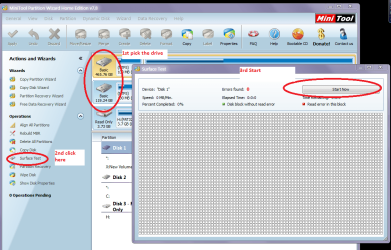
Sorry for late reply mate one yest particularly of the actual surface you cab do with the Partition Wizard http://www.partitionwizard.com/free-partition-manager.html

Just install run and click on surface test see my pic it takes some time too.

This is a very useful tool to use for other jobs.

For testing the drive - I don't know what brand they are so I would suggest the Seatools one

SeaTools | Seagate go to the Downloads finder
 

Attachments

  • SW.PNG
    SW.PNG
    179.2 KB · Views: 1

My Computer

Computer type
PC/Desktop
Computer Manufacturer/Model Number
Own build (new) Desk1 / Asus ROG Win 7 / Desk2 1st build
OS
Desk1 7 Home Prem / Desk2 10 Pro / Main lap Asus ROG 10 Pro 2 laptop Toshiba 7 Pro Asus P2520 7 & 10
CPU
Desk1 i5 3750K / Laptop i7 GTX 860M / Desk2 i5 2500
Motherboard
Desk1 Asus P877-V / Desk2 Gigabyte H67 UD3H / Laptop ?
Memory
Desk1 8GB (1866) / Desk2 16GB (1333) / Laptop 8Gb DDR3
Graphics Card(s)
Desk 1& 2NVidia GTX 650 & Laptops on board Intel
Sound Card
Desk 1 & 2 -XONAR DG Realtek High Def audio Laptop
Monitor(s) Displays
Desk 1 Benq HD 2450 / Desk2 Philips 24" / Laptop 17.5"
Screen Resolution
1920x1080 D1 & D2 & Laptop 1
Hard Drives
Desk1 Samsung 120GB 830 SSD
Asus ROG 256GB 850 Pro SSD
Desk2 Samsung 840 256 SSD
Toshiba 120GB EVO
PSU
Desk 1 Corsair HX 1050/ Laptop ? / Desk 2 Corsair HX 650
Case
Desk 1 Cooler HAF XM ? Toshiba laptop / Desk2 Coolermaster
Cooling
Fans on all Desk1 -2 Desk2 - all Coolermasters 5 Laptop ?
Keyboard
Desk 1 MS Sidewinder X6 Desk 2 MS Sidewinder X 4
Mouse
Desk 1&2 - Gigabyte MS 900 gamer - laptop - Logitec wireless
Internet Speed
ADSL2+
Other Info
One other Desktop (tester) and spare Toshba laptop both with SSD's
Running Kaspersky 2016 ISS on all machines config'd identically
Logitec audio stereo systems on each machine (x3)
Canon MG5250MFC
Router/modem TP-Link running WPA2SK
Yes, thank you! I'll look at them and try these tests
 

My Computer

Computer type
Laptop
Computer Manufacturer/Model Number
Acer Aspire 8935G
OS
Windows 7 Home Premium 32bit
Memory
4GB
Graphics Card(s)
ATI 4870 1GB
Screen Resolution
1920x1080
Hard Drives
500GB
Internet Speed
7Mbit
Antivirus
Kaspersky Internet Security 2013
Browser
Chrome
Welcome to the forums pdario,

If it's unable to write files to the disk, then I would think of it either being some kind of malware, or possible disk failure/corruption.
 

My Computer

Computer type
Laptop
Hello Xbluerobot, I first thought of (and was looking for) some system software failure, but I'm now working on checking the disk first (as you read above).
If it's ok, I'm going for a reinstall, so to upgrade to x64, a thing I should have done time ago.

I also found this in the logs: does anybody know what could be?

Code:
Bucket errato , tipo 0 Nome evento: WindowsWcpOtherFailure3 Risposta: Non disponibile ID CAB: 0  Firma problema: P1: 6.1.7601 P2: base\wcp\sil\merged\ntu\ntsystem.cpp P3: Windows::Rtl::SystemImplementation::DirectFileSystemProvider::SysReadFile P4: 2155 P5: c0000017 P6: 0x649e6b12 P7:  P8:  P9:  P10:   File allegati: C:\Windows\Logs\CBS\CBS.log C:\Windows\servicing\Sessions\Sessions.xml C:\Windows\Logs\CBS\FilterList.log C:\Windows\Temp\WERC0E4.tmp.mdmp C:\Windows\Temp\WER65CA.tmp.WERDataCollectionFailure.txt  I file potrebbero essere disponibili qui: C:\ProgramData\Microsoft\Windows\WER\ReportQueue\Critical_6.1.7601_3e2b7183b260f3d7db50e3139012596f1775e56d_cab_1bb366b2  Simbolo analisi:  Nuova ricerca di soluzioni: 0 ID rapporto: 29a5d966-dedb-11e2-aba1-00238be5baf5 Stato rapporto: 4
 

My Computer

Computer type
Laptop
Computer Manufacturer/Model Number
Acer Aspire 8935G
OS
Windows 7 Home Premium 32bit
Memory
4GB
Graphics Card(s)
ATI 4870 1GB
Screen Resolution
1920x1080
Hard Drives
500GB
Internet Speed
7Mbit
Antivirus
Kaspersky Internet Security 2013
Browser
Chrome
Yes, that's what I'm leaning toward, but I first need to check if this corruption came from hd failure.
 

My Computer

Computer type
Laptop
Computer Manufacturer/Model Number
Acer Aspire 8935G
OS
Windows 7 Home Premium 32bit
Memory
4GB
Graphics Card(s)
ATI 4870 1GB
Screen Resolution
1920x1080
Hard Drives
500GB
Internet Speed
7Mbit
Antivirus
Kaspersky Internet Security 2013
Browser
Chrome
My HD is from Hitachi: I downloaded their tool, but nothing shows in the list; the seagate tool list the HD, but I'm not sure what test to run.

In the meanwhile I'm testing it with HDDScan 3.3
 

My Computer

Computer type
Laptop
Computer Manufacturer/Model Number
Acer Aspire 8935G
OS
Windows 7 Home Premium 32bit
Memory
4GB
Graphics Card(s)
ATI 4870 1GB
Screen Resolution
1920x1080
Hard Drives
500GB
Internet Speed
7Mbit
Antivirus
Kaspersky Internet Security 2013
Browser
Chrome
Did you do the surface test too pdario as I suggested? Plus mate if you are going to upgrade to a 64bit OS then you will need to get that. Myself I would save what data I could and do a complete clean install.

You can try that by downloading the ISO and trying it while getting the OEM and then activate it later with the code - you don't need to reinstall from the disk itself - I have just done this myself on a fix:)

http://www.sevenforums.com/tutorials/2432-usb-windows-7-installation-key-drive-create.html

personally I like the disk way better and if you have the data saved then you will not get the bloatware from Acer.
 

My Computer

Computer type
PC/Desktop
Computer Manufacturer/Model Number
Own build (new) Desk1 / Asus ROG Win 7 / Desk2 1st build
OS
Desk1 7 Home Prem / Desk2 10 Pro / Main lap Asus ROG 10 Pro 2 laptop Toshiba 7 Pro Asus P2520 7 & 10
CPU
Desk1 i5 3750K / Laptop i7 GTX 860M / Desk2 i5 2500
Motherboard
Desk1 Asus P877-V / Desk2 Gigabyte H67 UD3H / Laptop ?
Memory
Desk1 8GB (1866) / Desk2 16GB (1333) / Laptop 8Gb DDR3
Graphics Card(s)
Desk 1& 2NVidia GTX 650 & Laptops on board Intel
Sound Card
Desk 1 & 2 -XONAR DG Realtek High Def audio Laptop
Monitor(s) Displays
Desk 1 Benq HD 2450 / Desk2 Philips 24" / Laptop 17.5"
Screen Resolution
1920x1080 D1 & D2 & Laptop 1
Hard Drives
Desk1 Samsung 120GB 830 SSD
Asus ROG 256GB 850 Pro SSD
Desk2 Samsung 840 256 SSD
Toshiba 120GB EVO
PSU
Desk 1 Corsair HX 1050/ Laptop ? / Desk 2 Corsair HX 650
Case
Desk 1 Cooler HAF XM ? Toshiba laptop / Desk2 Coolermaster
Cooling
Fans on all Desk1 -2 Desk2 - all Coolermasters 5 Laptop ?
Keyboard
Desk 1 MS Sidewinder X6 Desk 2 MS Sidewinder X 4
Mouse
Desk 1&2 - Gigabyte MS 900 gamer - laptop - Logitec wireless
Internet Speed
ADSL2+
Other Info
One other Desktop (tester) and spare Toshba laptop both with SSD's
Running Kaspersky 2016 ISS on all machines config'd identically
Logitec audio stereo systems on each machine (x3)
Canon MG5250MFC
Router/modem TP-Link running WPA2SK
I managed to get an OK from a chkdsk /r run from a recovery command line started from a fresh downloaded Win 7 x64 SP1 ISO just downloaded for the occasion.

My HD seems good, I have the DVD ready for reinstall and the only doubt I still have is whether format the partition or not; I would prefer to keep the data on it and install the new Windows there, then rearranging data to their correct position.
Scratching the partition would be way longer, as I have to move data back and forth my NAS through my 100Mbit switch. Since I understand leaving the partition as it is would not harm the clean install, I'll take that way.
Plus I suspect my "upgrade" Win7 license would complain if it does not find an old Win installation.
 

My Computer

Computer type
Laptop
Computer Manufacturer/Model Number
Acer Aspire 8935G
OS
Windows 7 Home Premium 32bit
Memory
4GB
Graphics Card(s)
ATI 4870 1GB
Screen Resolution
1920x1080
Hard Drives
500GB
Internet Speed
7Mbit
Antivirus
Kaspersky Internet Security 2013
Browser
Chrome
Might I make a suggestion pdario mate I would be very inclined to get a new hard drive an OEM and clean install the 64bit ISO to it using the OEM activation code for the ISO install when you get it.

The old drive you can hook up with a gadget via a USB cable and copy across any data you need or want form thta.

It does save all that bloatware mate but that is just what I would be doing as I did with both my Toshibas.

The gadget looks like this one in Amazon they are cheap and you just plug in the old drive to the adaptor the USB lead to your machine and the power supply to the gadget Amazon.com: USB 2.0 to 2.5" 3.5" SATA/IDE Hard Drive HDD CD-Rom 3.5/2.5 Converter Adapter Cable + AC Power Adapter: Computers & Accessories always handy to ahe around but the choice is yours. :)
 

My Computer

Computer type
PC/Desktop
Computer Manufacturer/Model Number
Own build (new) Desk1 / Asus ROG Win 7 / Desk2 1st build
OS
Desk1 7 Home Prem / Desk2 10 Pro / Main lap Asus ROG 10 Pro 2 laptop Toshiba 7 Pro Asus P2520 7 & 10
CPU
Desk1 i5 3750K / Laptop i7 GTX 860M / Desk2 i5 2500
Motherboard
Desk1 Asus P877-V / Desk2 Gigabyte H67 UD3H / Laptop ?
Memory
Desk1 8GB (1866) / Desk2 16GB (1333) / Laptop 8Gb DDR3
Graphics Card(s)
Desk 1& 2NVidia GTX 650 & Laptops on board Intel
Sound Card
Desk 1 & 2 -XONAR DG Realtek High Def audio Laptop
Monitor(s) Displays
Desk 1 Benq HD 2450 / Desk2 Philips 24" / Laptop 17.5"
Screen Resolution
1920x1080 D1 & D2 & Laptop 1
Hard Drives
Desk1 Samsung 120GB 830 SSD
Asus ROG 256GB 850 Pro SSD
Desk2 Samsung 840 256 SSD
Toshiba 120GB EVO
PSU
Desk 1 Corsair HX 1050/ Laptop ? / Desk 2 Corsair HX 650
Case
Desk 1 Cooler HAF XM ? Toshiba laptop / Desk2 Coolermaster
Cooling
Fans on all Desk1 -2 Desk2 - all Coolermasters 5 Laptop ?
Keyboard
Desk 1 MS Sidewinder X6 Desk 2 MS Sidewinder X 4
Mouse
Desk 1&2 - Gigabyte MS 900 gamer - laptop - Logitec wireless
Internet Speed
ADSL2+
Other Info
One other Desktop (tester) and spare Toshba laptop both with SSD's
Running Kaspersky 2016 ISS on all machines config'd identically
Logitec audio stereo systems on each machine (x3)
Canon MG5250MFC
Router/modem TP-Link running WPA2SK
ICit2lol, I don't even need that adapter: my notebook has to hd bays, so I can simply move my current hd to the second one and put a new one in the first, maybe even a SSD!
But there are issues:

  • I've been told that recent disks may not work on my controller (SATA3 disks on SATA controller)
  • The original HD has a couple of special partition; apart from the recovery one (that I don't think I will ever user, as it contains the original Vista 32bit), it has a handy "media player" partition that can be booted and used to play media without starting Win7
  • I'm not sure I want to spend money for this old machine: it is 4 years old now, it could be less worth than the new disk! A faster router/switch for my LAN has higher priority now! :)
Thanks a lot for your suggestions, anyway.
 

My Computer

Computer type
Laptop
Computer Manufacturer/Model Number
Acer Aspire 8935G
OS
Windows 7 Home Premium 32bit
Memory
4GB
Graphics Card(s)
ATI 4870 1GB
Screen Resolution
1920x1080
Hard Drives
500GB
Internet Speed
7Mbit
Antivirus
Kaspersky Internet Security 2013
Browser
Chrome
No probs mate you are probably right it is a throw away world these days eh ?
 

My Computer

Computer type
PC/Desktop
Computer Manufacturer/Model Number
Own build (new) Desk1 / Asus ROG Win 7 / Desk2 1st build
OS
Desk1 7 Home Prem / Desk2 10 Pro / Main lap Asus ROG 10 Pro 2 laptop Toshiba 7 Pro Asus P2520 7 & 10
CPU
Desk1 i5 3750K / Laptop i7 GTX 860M / Desk2 i5 2500
Motherboard
Desk1 Asus P877-V / Desk2 Gigabyte H67 UD3H / Laptop ?
Memory
Desk1 8GB (1866) / Desk2 16GB (1333) / Laptop 8Gb DDR3
Graphics Card(s)
Desk 1& 2NVidia GTX 650 & Laptops on board Intel
Sound Card
Desk 1 & 2 -XONAR DG Realtek High Def audio Laptop
Monitor(s) Displays
Desk 1 Benq HD 2450 / Desk2 Philips 24" / Laptop 17.5"
Screen Resolution
1920x1080 D1 & D2 & Laptop 1
Hard Drives
Desk1 Samsung 120GB 830 SSD
Asus ROG 256GB 850 Pro SSD
Desk2 Samsung 840 256 SSD
Toshiba 120GB EVO
PSU
Desk 1 Corsair HX 1050/ Laptop ? / Desk 2 Corsair HX 650
Case
Desk 1 Cooler HAF XM ? Toshiba laptop / Desk2 Coolermaster
Cooling
Fans on all Desk1 -2 Desk2 - all Coolermasters 5 Laptop ?
Keyboard
Desk 1 MS Sidewinder X6 Desk 2 MS Sidewinder X 4
Mouse
Desk 1&2 - Gigabyte MS 900 gamer - laptop - Logitec wireless
Internet Speed
ADSL2+
Other Info
One other Desktop (tester) and spare Toshba laptop both with SSD's
Running Kaspersky 2016 ISS on all machines config'd identically
Logitec audio stereo systems on each machine (x3)
Canon MG5250MFC
Router/modem TP-Link running WPA2SK
Back
Top