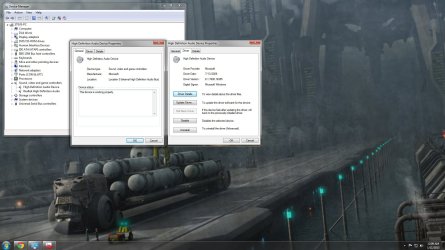
Removed Video Card to clean w/ air, replaced now sound very very low w/ some static/interference/buzz/hazzyness
cpu always had 2 entries for sound under device manager, 1 realtek 1 ati/amd
Things I have tried so far:
- backup cpu to day before sound went
- uninstalled, deleted sound drivers + software, let Windows find and install new
- uninstalled all sound drivers, installed latest Realtek driver
- installed latest ATI HDMI Audio Device driver
- BIOS at defaults. (Always was) Onboard audio shows enabled.
- uninstalled video card drivers and software, ran driver sweeper, installed latest.
When trying to play music, levels in in Volume Mixer respond (up+down movement)
Speakers work just fine when plugged into anything else
In Playback Devices Speakers are default, enabled, green checkmark, bar graph responds to music playing.
All volume sliders at full.
In Volume Control options all boxes are checked.
In Realtek Sound Manager main volume is full.
Rear speaker jack, front headphone jack both are very quiet. Can barely hear whats playing at full volume.
Im not sure if there is a short, a conflict
Sound is onboard audio Asus M4A89GTD PRO/USB 3
Video ATI Radeon 5770.
BIOS: American Megatrends Inc, 2301, 7/18/2011
Realtek audio driver version 6.0.1.662
Audio Controller: HD Audio
Audio Codec: ALC892.
There is as much info as I can offer. Hopefully someone can see an answer to this problem bc I sure cant.
cpu always had 2 entries for sound under device manager, 1 realtek 1 ati/amd
Things I have tried so far:
- backup cpu to day before sound went
- uninstalled, deleted sound drivers + software, let Windows find and install new
- uninstalled all sound drivers, installed latest Realtek driver
- installed latest ATI HDMI Audio Device driver
- BIOS at defaults. (Always was) Onboard audio shows enabled.
- uninstalled video card drivers and software, ran driver sweeper, installed latest.
When trying to play music, levels in in Volume Mixer respond (up+down movement)
Speakers work just fine when plugged into anything else
In Playback Devices Speakers are default, enabled, green checkmark, bar graph responds to music playing.
All volume sliders at full.
In Volume Control options all boxes are checked.
In Realtek Sound Manager main volume is full.
Rear speaker jack, front headphone jack both are very quiet. Can barely hear whats playing at full volume.
Im not sure if there is a short, a conflict
Sound is onboard audio Asus M4A89GTD PRO/USB 3
Video ATI Radeon 5770.
BIOS: American Megatrends Inc, 2301, 7/18/2011
Realtek audio driver version 6.0.1.662
Audio Controller: HD Audio
Audio Codec: ALC892.
There is as much info as I can offer. Hopefully someone can see an answer to this problem bc I sure cant.
My Computer
At a glance
Windows 7 Professional 64 bitAMD Phenom II X6 1090T Black Edition 3.2Ghz CPUCorsair 8GB DDR3 PC12800 1600MHz (4x2GB) Class 9Nvidia GTX 650 Ti
- OS
- Windows 7 Professional 64 bit
- CPU
- AMD Phenom II X6 1090T Black Edition 3.2Ghz CPU
- Motherboard
- ASUS M4A89GTD PRO USB3 AMD 890GX AM3 Motherboard
- Memory
- Corsair 8GB DDR3 PC12800 1600MHz (4x2GB) Class 9
- Graphics Card(s)
- Nvidia GTX 650 Ti
- Monitor(s) Displays
- LG W2343T-PF 23IN 1920X1080 5MS DVI LCD Monitor
- Screen Resolution
- 1920x1080
- Hard Drives
- Fantom Drive Green Drive 2TB eSATA USB 2.0 HD
Seagate 1TB LP Serial ATA HD 5900/32MB/SATA-3G
- Case
- Ultra XBlaster Mid-Tower Case Black
- Keyboard
- Logitech Cordless Desktop Wave Pro
- Mouse
- Logitech Cordless Desktop Wave Pro
- Internet Speed
- 16 mbps cable internet
- Other Info
- Ultra X3 ULT40311 1000-Watt Power Supply - ATX, SATA-Ready, PCI-E Ready, Energy Efficient, Modular
Ultra Thermo-Control 120mm Dual Ball Bearing Fan x2