Sound control panel configuration

kitube

New member
Local time
2:35 AM
Messages
3
I just got new 5.1 surround sound speakers and i have a couple of problems configuring them properly.

1. with higher frequency there's a static noise, which i believe has to do with treble, in the control panel the sound configuration doesnt offer any option to change this, any tool which i could use?

2.i changed the speaker volume according to where they are, so for example my right speaker for being much closer is quieter.
but now this configuration is assigned to all my jackets, so if i plug in my headphones in the front jacket i have the same alteration.
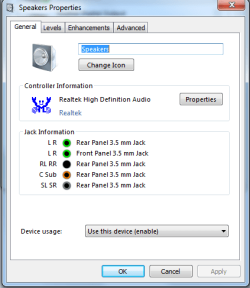
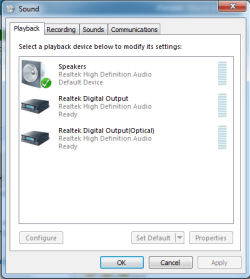
sound2.pngsound1.png
in the jack information it specifies ALL jacks for that device.
and in the device list there used to be a headphone device too, not just speakers and the 2 other realtek stuff.

is there anyway to change the jacks for the specific devices?

maybe an overall different software which works better and has more options.
thanks for any help.
 

My Computer

OS
Windows 7 Professional x64
The high pitched sound usually occurs when you have your out set greater than about 75% of the computer's max and are using high end speakers.
The audio devices in computers just aren't made to push super high volumes and they get over strained when you push the volume way up.

I'm guessing the speakers are already amplified.
I guess that leads to my biggest burning question.

I see you have optical out as an option.
why are you not using that? I mean it's 1 cable for all the channels.
 

My Computer

Computer Manufacturer/Model Number
Insane hobo technologies. ;-)
OS
Windows 7 x64
CPU
Intel i7 2600k
Motherboard
Asrock z68 extreme 4 gen 3
Memory
G.skill Ripjaw 16gigs @ 1866
Graphics Card(s)
Nvidia gtx580 (evga)
Sound Card
Integrated HD audio + hdmi
Monitor(s) Displays
24" ASUS widescreen + 42" insignia
Screen Resolution
1080p (1920x1080)
Hard Drives
128 Samsung 830
256 Samsung 840
3 x 1tb storage drive (various)
1 western digital 1tb (eSATA)
1 Seagate 1tb (eSATA)
PSU
1 kilowatt SLI/Crossfire rated Silverstone modular
Case
NZXT Phantom + additional 220 fan
Cooling
Zalmann
Keyboard
Microsoft wireless 3000 (v2)
Mouse
MS - wireless 5000 (bluetrack)
Internet Speed
depends on if you ask me or my provider.
Other Info
The above information is provided as is, and the author assumes no responsibility for issues it may cause with your sanity or fanboyism.
i dont think i have those jacks.
i have (output):
Line-Out: Green - Line Out, is a connector for speakers or headphones.
RS-Out: Black - Rear-Surround Out in 4/5.1/7.1 channel mode
CS-Out: Orange - Center/Subwoofer Out in 5.1/7.1 Channel mode
SS-Out: Gray - Side Surround Out 7.1 channel mode

iam currently using the green, black and orange jack as specified in the speakers manual.
then ive got a line in and a mic line in.
plus a line out: green and another mic at the front panel.

EDIT: i do have that optical port, but i dont have such a cable and my speakers have no such connector.
 

My Computer

OS
Windows 7 Professional x64
entirely new problem now, all speakers work fine but when i play any sort of sound, movie music, be it from vlc media player or youtube the sound only comes from the front left and right speaker, the center, subwoofer and both rear speakers emit a quite static noise.
in windows i have it set to 5.1 channels and i cant find a solution, i searched in google and there were a few similar problems, but none had a solution.
 

My Computer

OS
Windows 7 Professional x64
Back
Top