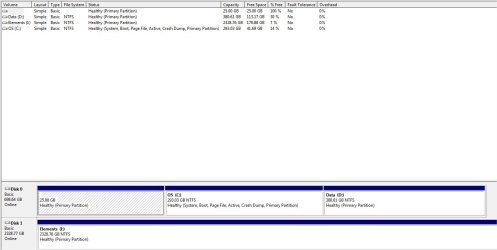
Hi. I recently noticed that my C: said I only had 42 GB free. Running WinDirStat shows that I am only using about 150 GB of data, though it does only show 42 GB free, rather than 150 GB free (i.e. about 100 GB is 'missing').
I then ran SpaceSniffer which also shows that i'm using about 150 GB of data but, it also shows 94.5 GB of 'unaccessible space'.
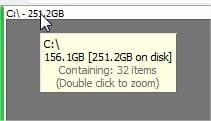
I further see that spacesniffer says the C: is using 156 GB, but 251 GB 'on disk' (a difference of 94.5 GB).
Any thoughts as to why there's 94.5 GB of missing/unaccessible space?
Thank you!
p.s. I'm running Win 7 home premium on an Asus laptop
I then ran SpaceSniffer which also shows that i'm using about 150 GB of data but, it also shows 94.5 GB of 'unaccessible space'.
I further see that spacesniffer says the C: is using 156 GB, but 251 GB 'on disk' (a difference of 94.5 GB).
Any thoughts as to why there's 94.5 GB of missing/unaccessible space?
Thank you!
p.s. I'm running Win 7 home premium on an Asus laptop
Attachments


My Computer
At a glance
Windows 7 Home Premium 64 bit
- Computer type
- Laptop
- Computer Manufacturer/Model Number
- Asus
- OS
- Windows 7 Home Premium 64 bit