SSD alignment

Datman

New member
I have set up 2 computers with SSD as the C drive. I used diskpart to align both of them. Both had different issues. The 1st I could not install the image backup so I did a fresh install of W7.

The 2nd the image restore when smooth and all seemed to work but I had a new hardware conflict the was giving me BSOD and I didn’t figure that out until I hosed the 500g backup drive on the machine (another thread):banghead:. So I did a fresh install of Vista.

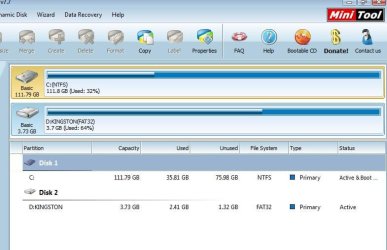
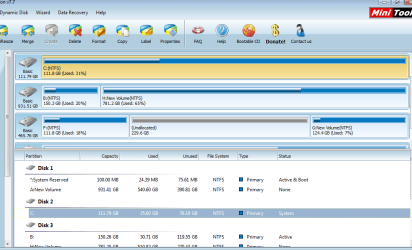
As always when I install a fresh copy I format the drive to install windows on and it looks to me like I must have deleted the partition for the bitlocker set up in the diskpart procedure. As you can see from the screenshots nether of them shows a partition.

So at this point both seem to work fine. Can they be aligned after the OS has been installed? Or do I make an image then remove each and align and restore the image?
 

Attachments
  • bitlocker.png
    bitlocker.png
    79.6 KB · Views: 25
  • bitlocker2.jpg
    bitlocker2.jpg
    60.5 KB · Views: 14

My Computer

OS
Window 7 home x64
CPU
AMD FX-8150 Zambezi 3.6GHz Socket AM3+
Motherboard
GIGABYTE GA-970A-UD3 AM3
Memory
G.SKILL Ripjaws X Series 8GB (2 x 4GB
Graphics Card(s)
SAPPHIRE 100328L Radeon HD 6770 1GB GDDR5
Sound Card
Asus xonar hdav 1.3 deluxe
Hard Drives
Seagate Barracuda ST31000524AS 1TB 7200 RPM SATA 6.0Gb/s
Case
Rosewill CHALLENGER Black Gaming ATX Mid Tower
Cooling
CORSAIR Hydro Series H60

My Computer

Computer type
Laptop
Computer Manufacturer/Model Number
MSI GE72VR Apache Pro-416
OS
Windows 10x64 Build 1709
CPU
Intel i7 7700HQ Kaby Lake
Motherboard
Micro-Star Intl. MS-179B (U3C1)
Memory
16 GB DDR4 @2400
Graphics Card(s)
Nvidia Geforce GTX 1060
Screen Resolution
1920x1080 120Hz
Hard Drives
256 GB Nvme M.2 SSD

1TB HDD@7200
Cooling
Cooler Blast 4
Keyboard
Steel Series
Antivirus
Bit Defender Free
Browser
Edge
Datman, do they both boot? Are you sure you are out of alignment? The link indianacarnie provided will tell you how to check alignment. Any time a partition is created and formatted before install, Windows will not create the bootmanager as a separate partition, it is created in the "C" partition. If they both boot and are in alignment, there is no problem. Many people, myself included, do it that way intentionally.
 
Last edited:

My Computers

System One System Two

  • Computer type
    PC/Desktop
    Computer Manufacturer/Model Number
    ALWAYS UNDER CONSTRUCTION
    OS
    Windows 11 Pro
    CPU
    Ryzen 9 5900X
    Motherboard
    Asus X570 Crosshair Viii Hero
    Memory
    32GB G Skill DDR4-3600
    Graphics Card(s)
    EVGA RTX 3080 FTW 3 Ultra
    Sound Card
    On Board/Sennheiser PC37X Headset
    Monitor(s) Displays
    3 X Asus 27"
    Screen Resolution
    2560x1440
    Hard Drives
    2 X 1 TB NVME drives
    PSU
    EVGA 850
    Case
    Phanteks Eclipse P400A
    Cooling
    EVGA 280 AIO
    Keyboard
    Logitech G510s/ Logitech G13
    Mouse
    Logitech G502
    Internet Speed
    24/1
    Antivirus
    ESET/MBAM Pro/SAS Pro
    Browser
    Chrome/ Firefox/ Edge
  • Computer type
    Laptop
    System Manufacturer/Model Number
    Dell 16 Plus
    OS
    Windows 11 Pro
    CPU
    Intel Ultra 9 288V
    Memory
    32 GB LPDDR5X 8533
    Monitor(s) Displays
    16" Mini-LED HDR600 Touch 90 Hz
    Screen Resolution
    2560X1600
    Hard Drives
    1 TB NVME
Thanks guys it looks like I'm ok I have an offset of 1024KB. Sometimes I worry to much:confused:
 

My Computer

OS
Window 7 home x64
CPU
AMD FX-8150 Zambezi 3.6GHz Socket AM3+
Motherboard
GIGABYTE GA-970A-UD3 AM3
Memory
G.SKILL Ripjaws X Series 8GB (2 x 4GB
Graphics Card(s)
SAPPHIRE 100328L Radeon HD 6770 1GB GDDR5
Sound Card
Asus xonar hdav 1.3 deluxe
Hard Drives
Seagate Barracuda ST31000524AS 1TB 7200 RPM SATA 6.0Gb/s
Case
Rosewill CHALLENGER Black Gaming ATX Mid Tower
Cooling
CORSAIR Hydro Series H60
That's great, Datman. It never hurts to make sure you are set up right. Well done.
 

My Computers

System One System Two

  • Computer type
    PC/Desktop
    Computer Manufacturer/Model Number
    ALWAYS UNDER CONSTRUCTION
    OS
    Windows 11 Pro
    CPU
    Ryzen 9 5900X
    Motherboard
    Asus X570 Crosshair Viii Hero
    Memory
    32GB G Skill DDR4-3600
    Graphics Card(s)
    EVGA RTX 3080 FTW 3 Ultra
    Sound Card
    On Board/Sennheiser PC37X Headset
    Monitor(s) Displays
    3 X Asus 27"
    Screen Resolution
    2560x1440
    Hard Drives
    2 X 1 TB NVME drives
    PSU
    EVGA 850
    Case
    Phanteks Eclipse P400A
    Cooling
    EVGA 280 AIO
    Keyboard
    Logitech G510s/ Logitech G13
    Mouse
    Logitech G502
    Internet Speed
    24/1
    Antivirus
    ESET/MBAM Pro/SAS Pro
    Browser
    Chrome/ Firefox/ Edge
  • Computer type
    Laptop
    System Manufacturer/Model Number
    Dell 16 Plus
    OS
    Windows 11 Pro
    CPU
    Intel Ultra 9 288V
    Memory
    32 GB LPDDR5X 8533
    Monitor(s) Displays
    16" Mini-LED HDR600 Touch 90 Hz
    Screen Resolution
    2560X1600
    Hard Drives
    1 TB NVME
Hey guys,

On my wife’s computer I was having so much trouble with; you may have seen my other thread. I was still having some issues. I checked the offset and its 32 so I guess that is ok. When I changed the bios to ACHI the computer will not boot and the drive is no longer present. I did a bios update and Asus said the older mobo may not work with a SSD. With it set to sata the drive seems to work but I did get one BSOD.

Giving that I had so much trouble with this install I’m wondering if I should just give up on the SSD and do what I set out to do a couple weeks ago when I was trying to copy an image of the Cdrive on to a partition. That’s when I deleted the partition wiping all my wife’s stuff out.:banghead: I recovered 40,000 of the photos hopefully none of the other stuff was important.

So my point is if I can’t set the bios to ACHI how much better is the SSD over a sata 3.0 drive?

I will partition the 500gb storage drive just incase I have more issues.

I’m not sure if Macrium reflect will copy on to a partition without wiping out the entire drive. I may have screwed it up somehow when I did it before. I know Acronis would I did it several times over the years.
 

My Computer

OS
Window 7 home x64
CPU
AMD FX-8150 Zambezi 3.6GHz Socket AM3+
Motherboard
GIGABYTE GA-970A-UD3 AM3
Memory
G.SKILL Ripjaws X Series 8GB (2 x 4GB
Graphics Card(s)
SAPPHIRE 100328L Radeon HD 6770 1GB GDDR5
Sound Card
Asus xonar hdav 1.3 deluxe
Hard Drives
Seagate Barracuda ST31000524AS 1TB 7200 RPM SATA 6.0Gb/s
Case
Rosewill CHALLENGER Black Gaming ATX Mid Tower
Cooling
CORSAIR Hydro Series H60
Try updating the firmware of the SSD
 

My Computer

Computer Manufacturer/Model Number
Custom Built
OS
Windows 7 Ultimate 32-Bit & Windows 7 Ultimate 64-Bit
CPU
Intel Core i7 CPU 950 @ 3.07GHz
Motherboard
ASUS P6T DELUXE V2
Memory
OCZ 6GB (3 x 2GB) 240-Pin DDR3 SDRAM DDR3 1600 OCZ3X1600R2
Graphics Card(s)
ATI Radeon HD 5700 Series
Sound Card
OnBoard
Hard Drives
WD6400AACS-00M3B0 (640GB SATA )
PSU
CORSAIR 850w
Case
NZXT LEXA
Cooling
Intel Stock Heatsink Fan
Keyboard
Microsoft Wireless Laser Keyboard 7000
Mouse
Microsoft Wireless Laser Mouse 7000

My Computers

System One System Two

  • Computer type
    PC/Desktop
    Computer Manufacturer/Model Number
    ALWAYS UNDER CONSTRUCTION
    OS
    Windows 11 Pro
    CPU
    Ryzen 9 5900X
    Motherboard
    Asus X570 Crosshair Viii Hero
    Memory
    32GB G Skill DDR4-3600
    Graphics Card(s)
    EVGA RTX 3080 FTW 3 Ultra
    Sound Card
    On Board/Sennheiser PC37X Headset
    Monitor(s) Displays
    3 X Asus 27"
    Screen Resolution
    2560x1440
    Hard Drives
    2 X 1 TB NVME drives
    PSU
    EVGA 850
    Case
    Phanteks Eclipse P400A
    Cooling
    EVGA 280 AIO
    Keyboard
    Logitech G510s/ Logitech G13
    Mouse
    Logitech G502
    Internet Speed
    24/1
    Antivirus
    ESET/MBAM Pro/SAS Pro
    Browser
    Chrome/ Firefox/ Edge
  • Computer type
    Laptop
    System Manufacturer/Model Number
    Dell 16 Plus
    OS
    Windows 11 Pro
    CPU
    Intel Ultra 9 288V
    Memory
    32 GB LPDDR5X 8533
    Monitor(s) Displays
    16" Mini-LED HDR600 Touch 90 Hz
    Screen Resolution
    2560X1600
    Hard Drives
    1 TB NVME
I believe you're right Essenbe, looking at Macrium now and theres a section to "choose your partition" waaaaayyyy down the tree. Haven't used that particular function but it sure looks like it. Came up with a graphic of all my drives/partitions and said choose.
 

My Computer

Computer type
Laptop
Computer Manufacturer/Model Number
MSI GE72VR Apache Pro-416
OS
Windows 10x64 Build 1709
CPU
Intel i7 7700HQ Kaby Lake
Motherboard
Micro-Star Intl. MS-179B (U3C1)
Memory
16 GB DDR4 @2400
Graphics Card(s)
Nvidia Geforce GTX 1060
Screen Resolution
1920x1080 120Hz
Hard Drives
256 GB Nvme M.2 SSD

1TB HDD@7200
Cooling
Cooler Blast 4
Keyboard
Steel Series
Antivirus
Bit Defender Free
Browser
Edge
I believe you're right Essenbe, looking at Macrium now and theres a section to "choose your partition" waaaaayyyy down the tree. Haven't used that particular function but it sure looks like it. Came up with a graphic of all my drives/partitions and said choose.

Its possible I left something checked and that's why it wiped the drive. If I go that route I will try it again. The damage is done.

essenbe I followed the tutorial and it was already set to the correct value of "0" I changed the bios back to ACHI and it definitely makes the bios not see the drive.
 

My Computer

OS
Window 7 home x64
CPU
AMD FX-8150 Zambezi 3.6GHz Socket AM3+
Motherboard
GIGABYTE GA-970A-UD3 AM3
Memory
G.SKILL Ripjaws X Series 8GB (2 x 4GB
Graphics Card(s)
SAPPHIRE 100328L Radeon HD 6770 1GB GDDR5
Sound Card
Asus xonar hdav 1.3 deluxe
Hard Drives
Seagate Barracuda ST31000524AS 1TB 7200 RPM SATA 6.0Gb/s
Case
Rosewill CHALLENGER Black Gaming ATX Mid Tower
Cooling
CORSAIR Hydro Series H60
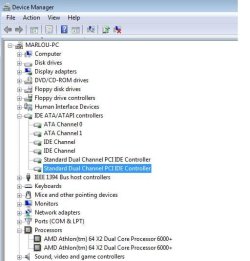
So, I assume you're in IDE mode in bios? Click the start button, type device manager in the search box and open device manager. Go to IDE ATA/ATAPI Controllers, click the arrow next to it to expand it, and at the bottom see if you see MSAHCI or something else with AHCI in it. There is no reason your SSD should not appear by putting the sata mode to AHCI. AHCI is simply another SATA mode. The only reason to make the registry change is to force windows to install AHCI drivers to the OS, so the OS can boot. What happens in bios has nothing to do with the OS. You are not in the OS yet. The BIOS is the board recognizing the hardware and setting values for the hardware.
 

My Computers

System One System Two

  • Computer type
    PC/Desktop
    Computer Manufacturer/Model Number
    ALWAYS UNDER CONSTRUCTION
    OS
    Windows 11 Pro
    CPU
    Ryzen 9 5900X
    Motherboard
    Asus X570 Crosshair Viii Hero
    Memory
    32GB G Skill DDR4-3600
    Graphics Card(s)
    EVGA RTX 3080 FTW 3 Ultra
    Sound Card
    On Board/Sennheiser PC37X Headset
    Monitor(s) Displays
    3 X Asus 27"
    Screen Resolution
    2560x1440
    Hard Drives
    2 X 1 TB NVME drives
    PSU
    EVGA 850
    Case
    Phanteks Eclipse P400A
    Cooling
    EVGA 280 AIO
    Keyboard
    Logitech G510s/ Logitech G13
    Mouse
    Logitech G502
    Internet Speed
    24/1
    Antivirus
    ESET/MBAM Pro/SAS Pro
    Browser
    Chrome/ Firefox/ Edge
  • Computer type
    Laptop
    System Manufacturer/Model Number
    Dell 16 Plus
    OS
    Windows 11 Pro
    CPU
    Intel Ultra 9 288V
    Memory
    32 GB LPDDR5X 8533
    Monitor(s) Displays
    16" Mini-LED HDR600 Touch 90 Hz
    Screen Resolution
    2560X1600
    Hard Drives
    1 TB NVME
Yes I also assume its IDE, the choices are SATA, RAID or AHCI. It may be the older mobo. I didn't see anything like MSAHCI.
 

Attachments

  • IDE.jpg
    IDE.jpg
    44.3 KB · Views: 6

My Computer

OS
Window 7 home x64
CPU
AMD FX-8150 Zambezi 3.6GHz Socket AM3+
Motherboard
GIGABYTE GA-970A-UD3 AM3
Memory
G.SKILL Ripjaws X Series 8GB (2 x 4GB
Graphics Card(s)
SAPPHIRE 100328L Radeon HD 6770 1GB GDDR5
Sound Card
Asus xonar hdav 1.3 deluxe
Hard Drives
Seagate Barracuda ST31000524AS 1TB 7200 RPM SATA 6.0Gb/s
Case
Rosewill CHALLENGER Black Gaming ATX Mid Tower
Cooling
CORSAIR Hydro Series H60
I'm at a loss as to what to tell you to do. In IDE mode, the drive will still out perform a mechanical hard drive, by far. But, you will not get maximum performance from the SSD. But, whether the board is old or not, if it has AHCI as an option, it should run in AHCI mode. That's why that option is there. If the board wouldn't run in AHCI mode, they wouldn't have listed it as an option. Under no circumstances should the SSD disappear, that I am aware of. I'm no expert by a long shot, but I would think you have a bad board, corrupted bios or a bad SSD. Those are the only reasons I can think of that an SSD would disappear from bios when put in AHCI mode. I would echo what Indianacarney suggested and see if there is updated firmware for the SSD.
 

My Computers

System One System Two

  • Computer type
    PC/Desktop
    Computer Manufacturer/Model Number
    ALWAYS UNDER CONSTRUCTION
    OS
    Windows 11 Pro
    CPU
    Ryzen 9 5900X
    Motherboard
    Asus X570 Crosshair Viii Hero
    Memory
    32GB G Skill DDR4-3600
    Graphics Card(s)
    EVGA RTX 3080 FTW 3 Ultra
    Sound Card
    On Board/Sennheiser PC37X Headset
    Monitor(s) Displays
    3 X Asus 27"
    Screen Resolution
    2560x1440
    Hard Drives
    2 X 1 TB NVME drives
    PSU
    EVGA 850
    Case
    Phanteks Eclipse P400A
    Cooling
    EVGA 280 AIO
    Keyboard
    Logitech G510s/ Logitech G13
    Mouse
    Logitech G502
    Internet Speed
    24/1
    Antivirus
    ESET/MBAM Pro/SAS Pro
    Browser
    Chrome/ Firefox/ Edge
  • Computer type
    Laptop
    System Manufacturer/Model Number
    Dell 16 Plus
    OS
    Windows 11 Pro
    CPU
    Intel Ultra 9 288V
    Memory
    32 GB LPDDR5X 8533
    Monitor(s) Displays
    16" Mini-LED HDR600 Touch 90 Hz
    Screen Resolution
    2560X1600
    Hard Drives
    1 TB NVME
I would make 2 suggestions:

1. Stop worrying about AHCI for the moment. Try to make it work in IDE. The performance impact is minimal anyhow.

2. The image you have with your wife's stuff - mount this image on your system (Macrium must be installed on your system) by double clicking on the image file. Then it will show up as a VHD in Computer. From there copy all importand files of your wife to a safe place. That way you have an additional backup of her stuff.

You could also just make a copy of the image to a safe place (normal copy operation). But that will require a lot more space.

Report back how you are doing in IDE mode.
 

My Computer

Computer Manufacturer/Model Number
HP, Dell, Gateway, Toshiba - 4 laptops and 2 desktops
OS
Vista, Windows7, Mint Mate, Zorin, Windows 8
CPU
from 1.6GHz Duo to i7
Monitor(s) Displays
2x HP w2207
Hard Drives
5x HDD, 7x SSD, 12x Externals
Keyboard
with trackball - no mices
Mouse
Trackball mice
Internet Speed
DSL 6000
Back
Top