Solved Start box icon has another Start box icon "shadowed" behind it

mike0921

New member
Local time
7:36 PM
Messages
8
Location
Fairmont, WV
Start box icon has another Start box icon "shadowed" behind it

Recently I had some "memory hogging" issues, which was resolved by discovering (finally) that a corrupt .avi file I had downloaded was causing a Win Media Player file (I can't recall which right now, but it had to do with the Player stuck in a loop looking for a networking sharing device...) to use 95% of memory and 50% of the CPU which of course slowed everything down to a crawl. (or less than a crawl....)

Sometime later, I noticed a "double" Start box icon... There is one Start box icon overlapped and offset just enough so that you can see the edges of the one beneath it.

I tried a few things to troubleshoot and remove one... to fix the issue, but got distracted by life and now three weeks later have no memory of what I did to trouble shoot it, but at one point the issue resolved itself. After shutting down and then later booting the system back up the "Double Start Box" issue was back.

Could someone please help me first, understand why this happens in the first place... and help me resolve this little bug that is really "bugging" me? :p

Thanks for your time and attention,

Michael
 

My Computer My Computer

At a glance

Windows 7 Home Premium 64 bit SP1Intel Celeron B840 @ 1.90GHz4.00GB Single-Channel DDR3 @ 665MHz (9-9-9-24)Generic PnP Monitor (1366x768@60Hz)
Computer type
Laptop
Computer Manufacturer/Model Number
HP ProBook 4440S
OS
Windows 7 Home Premium 64 bit SP1
CPU
Intel Celeron B840 @ 1.90GHz
Motherboard
Hewlett-Packard 17F3 (U3E1)
Memory
4.00GB Single-Channel DDR3 @ 665MHz (9-9-9-24)
Graphics Card(s)
Generic PnP Monitor (1366x768@60Hz)
Sound Card
AnvSoft Virtual Sound Device, High Definition Audio Device,
Monitor(s) Displays
Generic PnP Monitor on Intel HD Graphics
Screen Resolution
1366x768 pixels
Hard Drives
ST320LT007-9ZV142 ATA Device, Manufacturer Seagate,
Form Factor 3.5", Capacity 298 GB, Real size - 320,072,933,376 bytes, SATA type SATA-II 3.0Gb/s,
Keyboard
Standard PS/2 Keyboard
Mouse
Microsoft USB Dual Receiver Wireless Mouse & touch pad
Internet Speed
15 mps
Antivirus
Microsoft Security Esssentials
Browser
IE 11
Welcome to the Seven Forums

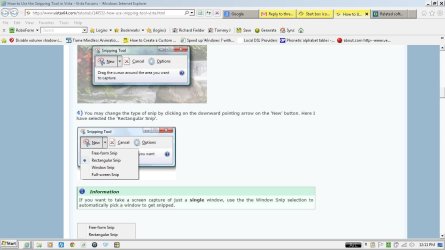
Can you post a screenshot of it.
Use these tutorials for posting screenshots.
http://www.sevenforums.com/tutorials/9717-screenshot-paint.html
How to Use the Snipping Tool in Vista - Vista Forums
http://www.sevenforums.com/tutorials/9733-screenshots-files-upload-post-seven-forums.html

Also try:
Do Option 2 of this tutorial http://www.sevenforums.com/tutorials/1538-sfc-scannow-command-system-file-checker.html it will not harm any data or programs you have installed it will try to find and repair any corrupt system files that you have.

Jerry
 

My Computer My Computer

At a glance

Win 7 Pro x64 / Win 10 ProIntel(R) Core(TM) i7-3630QM CPU @ 2.40GHz12 GB(1) Intel(R) HD Graphics 4000 (2) NVIDIA GeFo...
Computer type
Laptop
Computer Manufacturer/Model Number
Sager NP9170
OS
Win 7 Pro x64 / Win 10 Pro
CPU
Intel(R) Core(TM) i7-3630QM CPU @ 2.40GHz
Motherboard
CLEVO P170EM
Memory
12 GB
Graphics Card(s)
(1) Intel(R) HD Graphics 4000 (2) NVIDIA GeForce GTX 675M
Sound Card
(1) Realtek High Definition Audio (2) Intel(R) Display Aud
Monitor(s) Displays
17.3
Screen Resolution
1920x1080
Hard Drives
(1) Samsung 860 EVO 500GB(OS) (1) Samsung 860 EVO 500GB(Data)
Keyboard
Backlite
Antivirus
MSE, Malwarebytes Pro
Browser
Firefox
Other Info
DESKTOP: Custom-built.
OS: Win 10 Pro x64.
CASE: Rosewill R5.
CPU: Intel I5 4670K CPU @ 3.40GHz.
CPU COOLER: Cool Master Hyper 212 EVO.
MOTHERBOARD: Asus Z87-A.
MEMORY: Kingston HyperX 2x4 GB.
GPU: Nvidia Geforce 650 TI.
PSU: Corsair TX750.
DRIVES: (1) Samsung 840 120 GB SSD (2) Western Digital blue 500 GB 7200 RPM.
Thanks for the "Welcome"...

and your reply.

I am unable to get the "prt sc" key to work with any combination of keys yet. I have sent a request to HP in case it is something to do with a driver I might be missing as some "quick and dirty" Google search returns seem to suggest and then I will begin to do the troubleshooting I might have to... if you know something about this issue please offer whatever suggestions might come to mind. :D I have never had occasion to need the prt sc function before so this is just coming to light. (I do have an Associates in Computer Information Management - but it is from 1983. If you ever have a question about an IBM 370 mainframe, let me know!) I never worked in IT with that though... and I have built around 15 desktop systems - though none since the 90's... and I have some fairly good level of programming understanding from the Associates work I did. I would put my level of understanding and experience around Intermediate but only because of my knowing the concepts and fundamentals on a general level... it is more of a hobby I use when my ADD is riled up!
So, as soon as I can I will post a screenshot...

I did run the system file checker routine and that came back okay. "....no integrity violations."

Does anything else come to mind?

Thanks a lot for your help in this. I do appreciate it,

Mike
 

My Computer My Computer

At a glance

Windows 7 Home Premium 64 bit SP1Intel Celeron B840 @ 1.90GHz4.00GB Single-Channel DDR3 @ 665MHz (9-9-9-24)Generic PnP Monitor (1366x768@60Hz)
Computer type
Laptop
Computer Manufacturer/Model Number
HP ProBook 4440S
OS
Windows 7 Home Premium 64 bit SP1
CPU
Intel Celeron B840 @ 1.90GHz
Motherboard
Hewlett-Packard 17F3 (U3E1)
Memory
4.00GB Single-Channel DDR3 @ 665MHz (9-9-9-24)
Graphics Card(s)
Generic PnP Monitor (1366x768@60Hz)
Sound Card
AnvSoft Virtual Sound Device, High Definition Audio Device,
Monitor(s) Displays
Generic PnP Monitor on Intel HD Graphics
Screen Resolution
1366x768 pixels
Hard Drives
ST320LT007-9ZV142 ATA Device, Manufacturer Seagate,
Form Factor 3.5", Capacity 298 GB, Real size - 320,072,933,376 bytes, SATA type SATA-II 3.0Gb/s,
Keyboard
Standard PS/2 Keyboard
Mouse
Microsoft USB Dual Receiver Wireless Mouse & touch pad
Internet Speed
15 mps
Antivirus
Microsoft Security Esssentials
Browser
IE 11

My Computer My Computer

At a glance

Win 7 Pro x64 / Win 10 ProIntel(R) Core(TM) i7-3630QM CPU @ 2.40GHz12 GB(1) Intel(R) HD Graphics 4000 (2) NVIDIA GeFo...
Computer type
Laptop
Computer Manufacturer/Model Number
Sager NP9170
OS
Win 7 Pro x64 / Win 10 Pro
CPU
Intel(R) Core(TM) i7-3630QM CPU @ 2.40GHz
Motherboard
CLEVO P170EM
Memory
12 GB
Graphics Card(s)
(1) Intel(R) HD Graphics 4000 (2) NVIDIA GeForce GTX 675M
Sound Card
(1) Realtek High Definition Audio (2) Intel(R) Display Aud
Monitor(s) Displays
17.3
Screen Resolution
1920x1080
Hard Drives
(1) Samsung 860 EVO 500GB(OS) (1) Samsung 860 EVO 500GB(Data)
Keyboard
Backlite
Antivirus
MSE, Malwarebytes Pro
Browser
Firefox
Other Info
DESKTOP: Custom-built.
OS: Win 10 Pro x64.
CASE: Rosewill R5.
CPU: Intel I5 4670K CPU @ 3.40GHz.
CPU COOLER: Cool Master Hyper 212 EVO.
MOTHERBOARD: Asus Z87-A.
MEMORY: Kingston HyperX 2x4 GB.
GPU: Nvidia Geforce 650 TI.
PSU: Corsair TX750.
DRIVES: (1) Samsung 840 120 GB SSD (2) Western Digital blue 500 GB 7200 RPM.
and your reply.

I am unable to get the "prt sc" key to work with any combination of keys yet. I have sent a request to HP in case it is something to do with a driver I might be missing as some "quick and dirty" Google search returns seem to suggest and then I will begin to do the troubleshooting I might have to... if you know something about this issue please offer whatever suggestions might come to mind. :D I have never had occasion to need the prt sc function before so this is just coming to light. (I do have an Associates in Computer Information Management - but it is from 1983. If you ever have a question about an IBM 370 mainframe, let me know!) I never worked in IT with that though... and I have built around 15 desktop systems - though none since the 90's... and I have some fairly good level of programming understanding from the Associates work I did. I would put my level of understanding and experience around Intermediate but only because of my knowing the concepts and fundamentals on a general level... it is more of a hobby I use when my ADD is riled up!
So, as soon as I can I will post a screenshot...

I did run the system file checker routine and that came back okay. "....no integrity violations."

Does anything else come to mind?

Thanks a lot for your help in this. I do appreciate it,

Mike

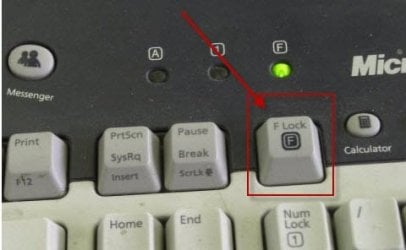
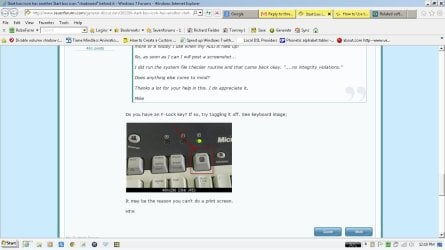
Do you have an F-Lock key? If so, try toggling it off. See keyboard image;

F-Lock Key.jpg

It may be the reason you can't do a print screen.

HTH
 

My Computer My Computer

At a glance

Windows 7 Professional x64Intel i5 quad processor16 GBRadeon HD 5770
Computer type
PC/Desktop
Computer Manufacturer/Model Number
Custom Built
OS
Windows 7 Professional x64
CPU
Intel i5 quad processor
Motherboard
DP67BG
Memory
16 GB
Graphics Card(s)
Radeon HD 5770
Sound Card
Realtek High Definition Audio
Monitor(s) Displays
Samsung SyncMaster
Screen Resolution
1920X1080
Hard Drives
WD 2TB (SATA Internal)
WD 1TB (USB External)
PSU
Corsair GS800
Case
Tower (Generic)
Cooling
3 Internal Fans
Keyboard
MS Wireless
Mouse
MS Optical Wired
Internet Speed
54 mbps
Antivirus
Emsisoft
Browser
IE-Version 9, Palemoon-Version 24.2.0
sheesh,
I must really need to get my head in the game....
The snipping tool did work... my head wasn't... it was in the back of my mind when I went to sleep last night. Falling asleep I remembered an occasion using it awhile ago. :-)

But, just now, I tried the prt sc key again with the windows key and it worked. Then I started thinking, so I tried again with the ctrl, fn, and alt keys. It works with all but one (and now I have forgotten which one!) as well as working by itself... ???

The only difference? Last night while the system file check routine was running, I fell asleep, the laptop on the dresser where I was using it. Just as I fell asleep, my cat jumped up and knocked it off, the laptop falling about 4 feet to the floor. At the crash, I was to far into my sleep to do anything but make a note. This morning, the laptop, after putting the battery back in, booted up and all is well. (A testament to the old optional, "Park Disk Head" routine which is now built into HDD's!)

Well, maybe one other "difference". Could have been a variation of Pilot Error...

Here is the jpeg attached,

Thanks Jerry,

Mike
 

Attachments

  • 2ndScreenshot-DoubleStartBox-w_prtsckey.jpg
    2ndScreenshot-DoubleStartBox-w_prtsckey.jpg
    86.2 KB · Views: 4
  • Screenshot- DoubleStartbox- Snipping tool.JPG
    Screenshot- DoubleStartbox- Snipping tool.JPG
    96.1 KB · Views: 6

My Computer My Computer

At a glance

Windows 7 Home Premium 64 bit SP1Intel Celeron B840 @ 1.90GHz4.00GB Single-Channel DDR3 @ 665MHz (9-9-9-24)Generic PnP Monitor (1366x768@60Hz)
Computer type
Laptop
Computer Manufacturer/Model Number
HP ProBook 4440S
OS
Windows 7 Home Premium 64 bit SP1
CPU
Intel Celeron B840 @ 1.90GHz
Motherboard
Hewlett-Packard 17F3 (U3E1)
Memory
4.00GB Single-Channel DDR3 @ 665MHz (9-9-9-24)
Graphics Card(s)
Generic PnP Monitor (1366x768@60Hz)
Sound Card
AnvSoft Virtual Sound Device, High Definition Audio Device,
Monitor(s) Displays
Generic PnP Monitor on Intel HD Graphics
Screen Resolution
1366x768 pixels
Hard Drives
ST320LT007-9ZV142 ATA Device, Manufacturer Seagate,
Form Factor 3.5", Capacity 298 GB, Real size - 320,072,933,376 bytes, SATA type SATA-II 3.0Gb/s,
Keyboard
Standard PS/2 Keyboard
Mouse
Microsoft USB Dual Receiver Wireless Mouse & touch pad
Internet Speed
15 mps
Antivirus
Microsoft Security Esssentials
Browser
IE 11
Try switching to a Aero theme in Personalization then reboot then switch back to the Classic theme and reboot again and see if it's gone.

Jerry
 

My Computer My Computer

At a glance

Win 7 Pro x64 / Win 10 ProIntel(R) Core(TM) i7-3630QM CPU @ 2.40GHz12 GB(1) Intel(R) HD Graphics 4000 (2) NVIDIA GeFo...
Computer type
Laptop
Computer Manufacturer/Model Number
Sager NP9170
OS
Win 7 Pro x64 / Win 10 Pro
CPU
Intel(R) Core(TM) i7-3630QM CPU @ 2.40GHz
Motherboard
CLEVO P170EM
Memory
12 GB
Graphics Card(s)
(1) Intel(R) HD Graphics 4000 (2) NVIDIA GeForce GTX 675M
Sound Card
(1) Realtek High Definition Audio (2) Intel(R) Display Aud
Monitor(s) Displays
17.3
Screen Resolution
1920x1080
Hard Drives
(1) Samsung 860 EVO 500GB(OS) (1) Samsung 860 EVO 500GB(Data)
Keyboard
Backlite
Antivirus
MSE, Malwarebytes Pro
Browser
Firefox
Other Info
DESKTOP: Custom-built.
OS: Win 10 Pro x64.
CASE: Rosewill R5.
CPU: Intel I5 4670K CPU @ 3.40GHz.
CPU COOLER: Cool Master Hyper 212 EVO.
MOTHERBOARD: Asus Z87-A.
MEMORY: Kingston HyperX 2x4 GB.
GPU: Nvidia Geforce 650 TI.
PSU: Corsair TX750.
DRIVES: (1) Samsung 840 120 GB SSD (2) Western Digital blue 500 GB 7200 RPM.
:o
That did the trick. Sometimes it's the simple stuff... I must really need a change or a vacation! My life outlook has surely been too complicated lately...

Thanks Jerry, now I'm going off too reboot myself!

Mike
 

My Computer My Computer

At a glance

Windows 7 Home Premium 64 bit SP1Intel Celeron B840 @ 1.90GHz4.00GB Single-Channel DDR3 @ 665MHz (9-9-9-24)Generic PnP Monitor (1366x768@60Hz)
Computer type
Laptop
Computer Manufacturer/Model Number
HP ProBook 4440S
OS
Windows 7 Home Premium 64 bit SP1
CPU
Intel Celeron B840 @ 1.90GHz
Motherboard
Hewlett-Packard 17F3 (U3E1)
Memory
4.00GB Single-Channel DDR3 @ 665MHz (9-9-9-24)
Graphics Card(s)
Generic PnP Monitor (1366x768@60Hz)
Sound Card
AnvSoft Virtual Sound Device, High Definition Audio Device,
Monitor(s) Displays
Generic PnP Monitor on Intel HD Graphics
Screen Resolution
1366x768 pixels
Hard Drives
ST320LT007-9ZV142 ATA Device, Manufacturer Seagate,
Form Factor 3.5", Capacity 298 GB, Real size - 320,072,933,376 bytes, SATA type SATA-II 3.0Gb/s,
Keyboard
Standard PS/2 Keyboard
Mouse
Microsoft USB Dual Receiver Wireless Mouse & touch pad
Internet Speed
15 mps
Antivirus
Microsoft Security Esssentials
Browser
IE 11
Jerry,
Just noticed your award last month. Congratulations!

Mike
 

My Computer My Computer

At a glance

Windows 7 Home Premium 64 bit SP1Intel Celeron B840 @ 1.90GHz4.00GB Single-Channel DDR3 @ 665MHz (9-9-9-24)Generic PnP Monitor (1366x768@60Hz)
Computer type
Laptop
Computer Manufacturer/Model Number
HP ProBook 4440S
OS
Windows 7 Home Premium 64 bit SP1
CPU
Intel Celeron B840 @ 1.90GHz
Motherboard
Hewlett-Packard 17F3 (U3E1)
Memory
4.00GB Single-Channel DDR3 @ 665MHz (9-9-9-24)
Graphics Card(s)
Generic PnP Monitor (1366x768@60Hz)
Sound Card
AnvSoft Virtual Sound Device, High Definition Audio Device,
Monitor(s) Displays
Generic PnP Monitor on Intel HD Graphics
Screen Resolution
1366x768 pixels
Hard Drives
ST320LT007-9ZV142 ATA Device, Manufacturer Seagate,
Form Factor 3.5", Capacity 298 GB, Real size - 320,072,933,376 bytes, SATA type SATA-II 3.0Gb/s,
Keyboard
Standard PS/2 Keyboard
Mouse
Microsoft USB Dual Receiver Wireless Mouse & touch pad
Internet Speed
15 mps
Antivirus
Microsoft Security Esssentials
Browser
IE 11
You're Welcome Mike, enjoy your reboot :)

Thanks Mike
 

My Computer My Computer

At a glance

Win 7 Pro x64 / Win 10 ProIntel(R) Core(TM) i7-3630QM CPU @ 2.40GHz12 GB(1) Intel(R) HD Graphics 4000 (2) NVIDIA GeFo...
Computer type
Laptop
Computer Manufacturer/Model Number
Sager NP9170
OS
Win 7 Pro x64 / Win 10 Pro
CPU
Intel(R) Core(TM) i7-3630QM CPU @ 2.40GHz
Motherboard
CLEVO P170EM
Memory
12 GB
Graphics Card(s)
(1) Intel(R) HD Graphics 4000 (2) NVIDIA GeForce GTX 675M
Sound Card
(1) Realtek High Definition Audio (2) Intel(R) Display Aud
Monitor(s) Displays
17.3
Screen Resolution
1920x1080
Hard Drives
(1) Samsung 860 EVO 500GB(OS) (1) Samsung 860 EVO 500GB(Data)
Keyboard
Backlite
Antivirus
MSE, Malwarebytes Pro
Browser
Firefox
Other Info
DESKTOP: Custom-built.
OS: Win 10 Pro x64.
CASE: Rosewill R5.
CPU: Intel I5 4670K CPU @ 3.40GHz.
CPU COOLER: Cool Master Hyper 212 EVO.
MOTHERBOARD: Asus Z87-A.
MEMORY: Kingston HyperX 2x4 GB.
GPU: Nvidia Geforce 650 TI.
PSU: Corsair TX750.
DRIVES: (1) Samsung 840 120 GB SSD (2) Western Digital blue 500 GB 7200 RPM.
Back
Top