Start button appearance and behavior

Jpeg9999

New member
Local time
3:46 AM
Messages
11
Has anyone seen this before?

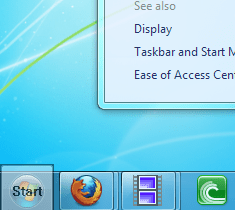
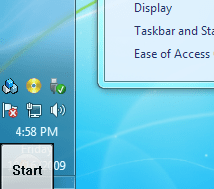
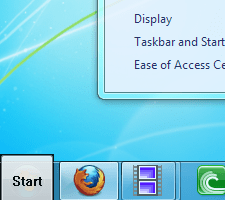
My start button occasionally appears gray and squarish (see attachment #1). This is on top of the normal start button; if I make the squarish one transparent, I can see the original one (attachment #2). If I move the taskbar, the start button no longer moves with it (attachement #3). Now my first guess would be a corrupt theme file or something like that. But I cannot seem to find a solution to this problem. I just want the normal start button...

Here's what I've tried with no success:

Renewing the icon cache (including reboots)
Swapping out all the theme files from my laptop
 

Attachments
  • start button.png
    start button.png
    14.9 KB · Views: 647
  • icu.png
    icu.png
    17.1 KB · Views: 642
  • halp.png
    halp.png
    12.9 KB · Views: 637

My Computer My Computer

At a glance

Windows 7 UltimateCore 2 Quad Q66002GBnVidia GeForce 8600 GT
Computer Manufacturer/Model Number
Me
OS
Windows 7 Ultimate
CPU
Core 2 Quad Q6600
Motherboard
Gigabyte GA-N650SLI-DS4
Memory
2GB
Graphics Card(s)
nVidia GeForce 8600 GT
Sound Card
Realtek HD Audio
Monitor(s) Displays
ViewSonic
Screen Resolution
Large Please
Case
Alienware
Cooling
Zalman
Hello Jpeg, and welcome to Windows 7.

Did you install any theme or skin modifying programs?

Where did you get your copy of Windows 7 at? You may have a bad copy, or a corrupted installation.

Either way, you might consider doing a repair install to fix this if you do not have a bad copy.

Hope this helps,
Shawn
 

My Computer My Computer

At a glance

64-bit Windows 11 Pro for WorkstationsIntel i7-8700K OC'd to 5 GHz64 GB (4x16GB) G.SKILL TridentZ RGB DDR4 3600...ASUS ROG-STRIX-GTX1080TI-O11G-GAMING
Computer type
PC/Desktop
Computer Manufacturer/Model Number
Self built custom
OS
64-bit Windows 11 Pro for Workstations
CPU
Intel i7-8700K OC'd to 5 GHz
Motherboard
ASUS ROG Maximus XI Formula Z390
Memory
64 GB (4x16GB) G.SKILL TridentZ RGB DDR4 3600 MHz
Graphics Card(s)
ASUS ROG-STRIX-GTX1080TI-O11G-GAMING
Sound Card
Integrated
Monitor(s) Displays
2 x Samsung Odyssey G7 27"
Screen Resolution
2560x1440
Hard Drives
1TB Samsung 990 PRO M.2,
4TB Samsung 990 PRO PRO M.2,
TerraMaster F8 SSD Plus NAS
PSU
Seasonic Prime Titanium 850W
Case
Thermaltake Core P3
Cooling
Corsair Hydro H115i
Keyboard
Logitech wireless K800
Mouse
Logitech MX Master 4
Internet Speed
2 Gb/s Download and 100 Mb/s Upload
Antivirus
Malwarebyte Anti-Malware Premium
Browser
Google Chrome
Other Info
Logitech Z625 speaker system,
Logitech BRIO 4K Pro webcam,
HP Color LaserJet Pro MFP M477fdn,
APC SMART-UPS RT 1000 XL - SURT1000XLI,
Galaxy S23 Plus phone
Is that a "ahem" torrent version/cracked one...? Because when i was curious to check out office 2010, i downloaded a torrent version, and the menu/save button looked kinda-of like and awkward square - like that !
 
Last edited:

My Computer My Computer

At a glance

7 x64/ Back-Track 4Intel Core 2 Duo CPU 8300@ 2.4 Ghz4096 MB DDR2Nvidia 8400M GS
Computer Manufacturer/Model Number
HP dv6000t CTO Entertainment Lappy |My Desktop @ Bottom
OS
7 x64/ Back-Track 4
CPU
Intel Core 2 Duo CPU 8300@ 2.4 Ghz
Motherboard
HP's Own
Memory
4096 MB DDR2
Graphics Card(s)
Nvidia 8400M GS
Sound Card
Altec Lansing (The usual on Laptops )
Monitor(s) Displays
Laptop Screen. 17' Wide.
Screen Resolution
1280 x 800
Hard Drives
150 GB HDD.
Cooling
2 External Fans, Undervolted, Coolant
Keyboard
Norm. Cheap Random Keyboard
Mouse
Norm. Cheap Random Mouse
Other Info
This is my Homemade Desktop :)
HDD: Western Digital Caviar Blue 320GB 16MB 7200RPM SATA2
And more to come in a bit! :D
I've used the same installation on my laptop with no issues. Only difference was that my laptop, which is older, wont do Aero. So I realized that this problem is caused due to a conflict between the Aero theme and glass2k (program I am using make each window completely transparent, just a little).

The problem is intermittent because windows doesn't always load glass2k at the same time when booting up.

I appreciate your ideas! As you can guess, this issue was pretty annoying~
 

My Computer My Computer

At a glance

Windows 7 UltimateCore 2 Quad Q66002GBnVidia GeForce 8600 GT
Computer Manufacturer/Model Number
Me
OS
Windows 7 Ultimate
CPU
Core 2 Quad Q6600
Motherboard
Gigabyte GA-N650SLI-DS4
Memory
2GB
Graphics Card(s)
nVidia GeForce 8600 GT
Sound Card
Realtek HD Audio
Monitor(s) Displays
ViewSonic
Screen Resolution
Large Please
Case
Alienware
Cooling
Zalman
No problem Jpeg. I'm happy to hear that you found the source of the problem. :)
 

My Computer My Computer

At a glance

64-bit Windows 11 Pro for WorkstationsIntel i7-8700K OC'd to 5 GHz64 GB (4x16GB) G.SKILL TridentZ RGB DDR4 3600...ASUS ROG-STRIX-GTX1080TI-O11G-GAMING
Computer type
PC/Desktop
Computer Manufacturer/Model Number
Self built custom
OS
64-bit Windows 11 Pro for Workstations
CPU
Intel i7-8700K OC'd to 5 GHz
Motherboard
ASUS ROG Maximus XI Formula Z390
Memory
64 GB (4x16GB) G.SKILL TridentZ RGB DDR4 3600 MHz
Graphics Card(s)
ASUS ROG-STRIX-GTX1080TI-O11G-GAMING
Sound Card
Integrated
Monitor(s) Displays
2 x Samsung Odyssey G7 27"
Screen Resolution
2560x1440
Hard Drives
1TB Samsung 990 PRO M.2,
4TB Samsung 990 PRO PRO M.2,
TerraMaster F8 SSD Plus NAS
PSU
Seasonic Prime Titanium 850W
Case
Thermaltake Core P3
Cooling
Corsair Hydro H115i
Keyboard
Logitech wireless K800
Mouse
Logitech MX Master 4
Internet Speed
2 Gb/s Download and 100 Mb/s Upload
Antivirus
Malwarebyte Anti-Malware Premium
Browser
Google Chrome
Other Info
Logitech Z625 speaker system,
Logitech BRIO 4K Pro webcam,
HP Color LaserJet Pro MFP M477fdn,
APC SMART-UPS RT 1000 XL - SURT1000XLI,
Galaxy S23 Plus phone
Back
Top