Start Menu - Add or Remove Search Button

How to Add or Remove the Search Button in the Windows 7 Start Menu

   Information
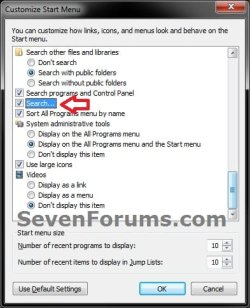
This tutorial will show you how to add the Search button back to the right dark side of the Windows 7 Start Menu by replacing either the Help and Support button or Run button with Search instead.

By default the Search button in the Start Menu is not available in Windows 7.
   Warning
You will only be able to do this while logged in as an administrator.

EXAMPLE: Start Menu with Search Added
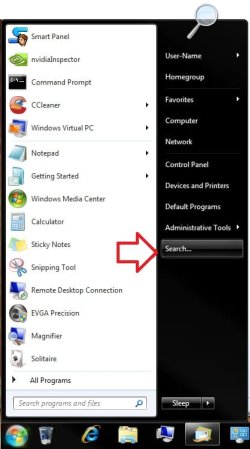
Start_Menu.jpgCustomize_Start_Menu_Properties.jpg
EXAMPLE: Search
NOTE: This is the Search window that opens when you click on the Search button in the Start Menu. It is the same Windows Key + F Search window.
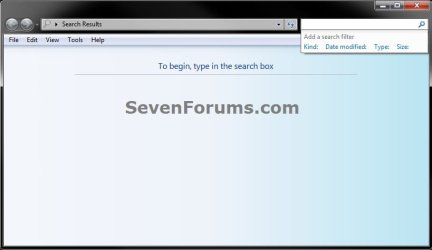
Search.jpg


OPTION ONE

To Add Search Button to Start Menu


1. Open the Start Menu, then type regedit in the search box and press enter.

2. If prompted by UAC, then click on Yes.

3. To Replace "Help and Support" Button with Search
A) In regedit, navigate to the location below.
HKEY_CLASSES_ROOT\CLSID\{2559a1f1-21d7-11d4-bdaf-00c04f60b9f0}
B) Go to step 5.
4. To Replace "Run" Button with Search
A) In regedit, navigate to the location below.
HKEY_CLASSES_ROOT\CLSID\{2559a1f3-21d7-11d4-bdaf-00c04f60b9f0}
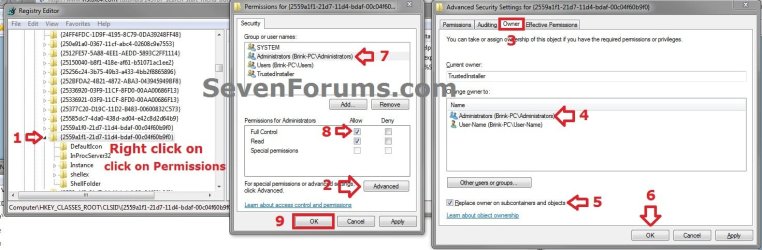
5. Take ownership (Option Three step 2 at link) of the {25591f.......} registry key number from step 3 or 4 above, then set permissions to Allow your user account Full Control of the registry key. The screenshot below has the steps numbered in order to help make it easier to do.
Permission.jpg
6. To Replace "Help and Support" Button with Search
A) Click on the download button below to download the file below.
Replace_Start_Menu_Help_with_Search.reg

Download


B) Go to step 8.
7. To Replace "Run" Button with Search
A) Click on the download button below to download the file below.
Replace_Start_Menu_Run_with_Search.reg

Download


8. Save the .reg file to the desktop.

9. Right click the downloaded .reg file and click on Merge.

10. Click on Run, Yes (UAC), Yes, and OK when prompted.

11. Log off and Log on, or restart the computer to apply changes.

12. When done, you can delete the downloaded .reg file if you like.


OPTION TWO

To Remove Search Button and Restore Default Button


1. To Remove Search and Restore "Help and Support" Button
A) Click on the download button below to download the file below.
Restore_Start_Menu_Help.reg

Download


B) Go to step 3.
2. To Remove Search and Restore "Run" Button
A) Click on the download button below to download the file below.
Replace_Start_Menu_Run.reg

Download


3. Save the .reg file to the desktop.

4. Right click the downloaded .reg file and click on Merge.

5. Click on Run, Yes (UAC), Yes, and OK when prompted.

6. Log off and Log on, or restart the computer to apply changes.

7. When done, you can delete the downloaded .reg file if you like.
That's it,
Shawn


Attachments

Last edited:
error reported citing ownership problem

When applying the registry patch Replace_Start_Menu_Help_with_Search.reg Windows (Pro) returns an error that the data was not written to the registry because "some keys are open by the system or other processes." I have enabled the ownership for the administrator as outlined in the tutorial. Looking through the open processes I don't find something that obviously is editing or "owning" the registry file. Can you suggest how I can troubleshoot? The patch fails to install.
 

My Computer

Computer Manufacturer/Model Number
HP
OS
windows 7 professional
Hello Pbahnson, and welcome to Seven Forums.

Did you also set the permissions to Allow your user account Full Control of the registry key?
 

My Computer

Computer type
PC/Desktop
Computer Manufacturer/Model Number
Self built custom
OS
64-bit Windows 11 Pro for Workstations
CPU
Intel i7-8700K OC'd to 5 GHz
Motherboard
ASUS ROG Maximus XI Formula Z390
Memory
64 GB (4x16GB) G.SKILL TridentZ RGB DDR4 3600 MHz
Graphics Card(s)
ASUS ROG-STRIX-GTX1080TI-O11G-GAMING
Sound Card
Integrated
Monitor(s) Displays
2 x Samsung Odyssey G7 27"
Screen Resolution
2560x1440
Hard Drives
1TB Samsung 990 PRO M.2,
4TB Samsung 990 PRO PRO M.2,
TerraMaster F8 SSD Plus NAS
PSU
Seasonic Prime Titanium 850W
Case
Thermaltake Core P3
Cooling
Corsair Hydro H115i
Keyboard
Logitech wireless K800
Mouse
Logitech MX Master 4
Internet Speed
2 Gb/s Download and 100 Mb/s Upload
Antivirus
Malwarebyte Anti-Malware Premium
Browser
Google Chrome
Other Info
Logitech Z625 speaker system,
Logitech BRIO 4K Pro webcam,
HP Color LaserJet Pro MFP M477fdn,
APC SMART-UPS RT 1000 XL - SURT1000XLI,
Galaxy S23 Plus phone
Hello there! My windows 7 dont have a "search" feature so I followed your thread on how to add the "search feature" and also the "replace run with search". After this one i restarted my pc, and there it was the "search feature". But when I click the search button this error message prompted, "There is no program associated to perform the requested action. Please install a program or, if one is already installed, create an association in the Default Programs control panel. What should I do next? Thank you very much!
 

My Computer

OS
windows 7 x64 ultimate
Hello Jehpih, and welcome to Seven Forums.

As a test, do you get the same message when you press the Windows + F keys to open Search instead?
 

My Computer

Computer type
PC/Desktop
Computer Manufacturer/Model Number
Self built custom
OS
64-bit Windows 11 Pro for Workstations
CPU
Intel i7-8700K OC'd to 5 GHz
Motherboard
ASUS ROG Maximus XI Formula Z390
Memory
64 GB (4x16GB) G.SKILL TridentZ RGB DDR4 3600 MHz
Graphics Card(s)
ASUS ROG-STRIX-GTX1080TI-O11G-GAMING
Sound Card
Integrated
Monitor(s) Displays
2 x Samsung Odyssey G7 27"
Screen Resolution
2560x1440
Hard Drives
1TB Samsung 990 PRO M.2,
4TB Samsung 990 PRO PRO M.2,
TerraMaster F8 SSD Plus NAS
PSU
Seasonic Prime Titanium 850W
Case
Thermaltake Core P3
Cooling
Corsair Hydro H115i
Keyboard
Logitech wireless K800
Mouse
Logitech MX Master 4
Internet Speed
2 Gb/s Download and 100 Mb/s Upload
Antivirus
Malwarebyte Anti-Malware Premium
Browser
Google Chrome
Other Info
Logitech Z625 speaker system,
Logitech BRIO 4K Pro webcam,
HP Color LaserJet Pro MFP M477fdn,
APC SMART-UPS RT 1000 XL - SURT1000XLI,
Galaxy S23 Plus phone
Thanks for the reply Shawn :)

nothing happens when I press ctrl F

regards
 

My Computer

OS
windows 7 x64 ultimate
That's the Windows + F instead. ;)
 

My Computer

Computer type
PC/Desktop
Computer Manufacturer/Model Number
Self built custom
OS
64-bit Windows 11 Pro for Workstations
CPU
Intel i7-8700K OC'd to 5 GHz
Motherboard
ASUS ROG Maximus XI Formula Z390
Memory
64 GB (4x16GB) G.SKILL TridentZ RGB DDR4 3600 MHz
Graphics Card(s)
ASUS ROG-STRIX-GTX1080TI-O11G-GAMING
Sound Card
Integrated
Monitor(s) Displays
2 x Samsung Odyssey G7 27"
Screen Resolution
2560x1440
Hard Drives
1TB Samsung 990 PRO M.2,
4TB Samsung 990 PRO PRO M.2,
TerraMaster F8 SSD Plus NAS
PSU
Seasonic Prime Titanium 850W
Case
Thermaltake Core P3
Cooling
Corsair Hydro H115i
Keyboard
Logitech wireless K800
Mouse
Logitech MX Master 4
Internet Speed
2 Gb/s Download and 100 Mb/s Upload
Antivirus
Malwarebyte Anti-Malware Premium
Browser
Google Chrome
Other Info
Logitech Z625 speaker system,
Logitech BRIO 4K Pro webcam,
HP Color LaserJet Pro MFP M477fdn,
APC SMART-UPS RT 1000 XL - SURT1000XLI,
Galaxy S23 Plus phone

My Computer

Computer type
PC/Desktop
Computer Manufacturer/Model Number
Self built custom
OS
64-bit Windows 11 Pro for Workstations
CPU
Intel i7-8700K OC'd to 5 GHz
Motherboard
ASUS ROG Maximus XI Formula Z390
Memory
64 GB (4x16GB) G.SKILL TridentZ RGB DDR4 3600 MHz
Graphics Card(s)
ASUS ROG-STRIX-GTX1080TI-O11G-GAMING
Sound Card
Integrated
Monitor(s) Displays
2 x Samsung Odyssey G7 27"
Screen Resolution
2560x1440
Hard Drives
1TB Samsung 990 PRO M.2,
4TB Samsung 990 PRO PRO M.2,
TerraMaster F8 SSD Plus NAS
PSU
Seasonic Prime Titanium 850W
Case
Thermaltake Core P3
Cooling
Corsair Hydro H115i
Keyboard
Logitech wireless K800
Mouse
Logitech MX Master 4
Internet Speed
2 Gb/s Download and 100 Mb/s Upload
Antivirus
Malwarebyte Anti-Malware Premium
Browser
Google Chrome
Other Info
Logitech Z625 speaker system,
Logitech BRIO 4K Pro webcam,
HP Color LaserJet Pro MFP M477fdn,
APC SMART-UPS RT 1000 XL - SURT1000XLI,
Galaxy S23 Plus phone
now this is the error message:

search:
Class not registered

:( :( :(
 

My Computer

OS
windows 7 x64 ultimate
See if running a sfc /scannow command may be able to help.

If not, then you could also do a system restore using a restore point (if available) dated before search went missing to hopefully fix it.
 

My Computer

Computer type
PC/Desktop
Computer Manufacturer/Model Number
Self built custom
OS
64-bit Windows 11 Pro for Workstations
CPU
Intel i7-8700K OC'd to 5 GHz
Motherboard
ASUS ROG Maximus XI Formula Z390
Memory
64 GB (4x16GB) G.SKILL TridentZ RGB DDR4 3600 MHz
Graphics Card(s)
ASUS ROG-STRIX-GTX1080TI-O11G-GAMING
Sound Card
Integrated
Monitor(s) Displays
2 x Samsung Odyssey G7 27"
Screen Resolution
2560x1440
Hard Drives
1TB Samsung 990 PRO M.2,
4TB Samsung 990 PRO PRO M.2,
TerraMaster F8 SSD Plus NAS
PSU
Seasonic Prime Titanium 850W
Case
Thermaltake Core P3
Cooling
Corsair Hydro H115i
Keyboard
Logitech wireless K800
Mouse
Logitech MX Master 4
Internet Speed
2 Gb/s Download and 100 Mb/s Upload
Antivirus
Malwarebyte Anti-Malware Premium
Browser
Google Chrome
Other Info
Logitech Z625 speaker system,
Logitech BRIO 4K Pro webcam,
HP Color LaserJet Pro MFP M477fdn,
APC SMART-UPS RT 1000 XL - SURT1000XLI,
Galaxy S23 Plus phone

My Computer

Computer type
PC/Desktop
Computer Manufacturer/Model Number
Self built custom
OS
64-bit Windows 11 Pro for Workstations
CPU
Intel i7-8700K OC'd to 5 GHz
Motherboard
ASUS ROG Maximus XI Formula Z390
Memory
64 GB (4x16GB) G.SKILL TridentZ RGB DDR4 3600 MHz
Graphics Card(s)
ASUS ROG-STRIX-GTX1080TI-O11G-GAMING
Sound Card
Integrated
Monitor(s) Displays
2 x Samsung Odyssey G7 27"
Screen Resolution
2560x1440
Hard Drives
1TB Samsung 990 PRO M.2,
4TB Samsung 990 PRO PRO M.2,
TerraMaster F8 SSD Plus NAS
PSU
Seasonic Prime Titanium 850W
Case
Thermaltake Core P3
Cooling
Corsair Hydro H115i
Keyboard
Logitech wireless K800
Mouse
Logitech MX Master 4
Internet Speed
2 Gb/s Download and 100 Mb/s Upload
Antivirus
Malwarebyte Anti-Malware Premium
Browser
Google Chrome
Other Info
Logitech Z625 speaker system,
Logitech BRIO 4K Pro webcam,
HP Color LaserJet Pro MFP M477fdn,
APC SMART-UPS RT 1000 XL - SURT1000XLI,
Galaxy S23 Plus phone
Hello Pbahnson, and welcome to Seven Forums.

Did you also set the permissions to Allow your user account Full Control of the registry key?

I am uncertain what you mean by "allow your user account full control." My user account has had adeqiate permission no update the registry usning other .reg files downloaded from SevenForiums. Not sure why this one would be different...
 

My Computer

Computer Manufacturer/Model Number
HP
OS
windows 7 professional
pbahnson,

It's from doing step 5 in OPTION ONE. Clicking on the links in the step will give you more details on how to do that action.

5. Take ownership (Option Three step 2 at link) of the {25591f.......} registry key number from step 3 or 4 above, then set permissions to Allow your user account Full Control of the registry key. The screenshot below has the steps numbered in order to help make it easier to do.


Those keys are owned by only the system by default, and administrators do not have rights to access or modify them without doing step 5 first.
 

My Computer

Computer type
PC/Desktop
Computer Manufacturer/Model Number
Self built custom
OS
64-bit Windows 11 Pro for Workstations
CPU
Intel i7-8700K OC'd to 5 GHz
Motherboard
ASUS ROG Maximus XI Formula Z390
Memory
64 GB (4x16GB) G.SKILL TridentZ RGB DDR4 3600 MHz
Graphics Card(s)
ASUS ROG-STRIX-GTX1080TI-O11G-GAMING
Sound Card
Integrated
Monitor(s) Displays
2 x Samsung Odyssey G7 27"
Screen Resolution
2560x1440
Hard Drives
1TB Samsung 990 PRO M.2,
4TB Samsung 990 PRO PRO M.2,
TerraMaster F8 SSD Plus NAS
PSU
Seasonic Prime Titanium 850W
Case
Thermaltake Core P3
Cooling
Corsair Hydro H115i
Keyboard
Logitech wireless K800
Mouse
Logitech MX Master 4
Internet Speed
2 Gb/s Download and 100 Mb/s Upload
Antivirus
Malwarebyte Anti-Malware Premium
Browser
Google Chrome
Other Info
Logitech Z625 speaker system,
Logitech BRIO 4K Pro webcam,
HP Color LaserJet Pro MFP M477fdn,
APC SMART-UPS RT 1000 XL - SURT1000XLI,
Galaxy S23 Plus phone
Back
Top