Start Menu User Folder Buttons - Open to Users Instead of Libraries

How to Make Windows 7 Start Menu User Folder Buttons Open to Users Instead of Libraries Location

   Information
This will show you how to make the Windows 7 Start Menu My Documents, Pictures, Music, and Videos buttons open to the real C:\Users\(user-name) location instead of the default Libraries location for all users.

You must be logged in as an administrator to be able to do the steps in this tutorial.

   Note
Credit belongs to our member Foe for this.


EXAMPLE: Start Menu User Folder Buttons
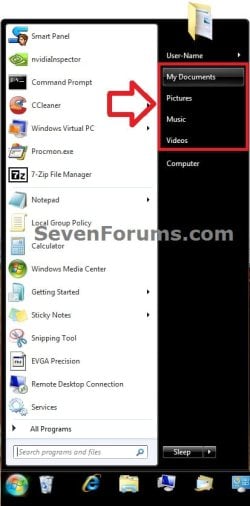
Start_Menu.jpg


OPTION ONE

Set Start Menu User Folder Buttons to Open to "Users" Location


1. Set Start Menu Documents Button to Open to Users Location
A) Click on the Download button below to download the file below.
Start_Menu_My_Documents_Open_to_Users.reg

Download


2. Set Start Menu Music Button to Open to Users Location
A) Click on the Download button below to download the file below.
Start_Menu_Music_Open_to_Users.reg

Download


3. Set Start Menu Pictures Button to Open to Users Location
A) Click on the Download button below to download the file below.
Start_Menu_Pictures_Open_to_Users.reg

Download


4. Set Start Menu Recorded TV Button to Open to Public Location
NOTE: Special thanks to Foe for this addition. :)
A) Click on the Download button below to download the file below.
Start_Menu_Recored_TV_Open_to_Public.bat

Download


5. Set Start Menu Videos Button to Open to Users Location
A) Click on the Download button below to download the file below.
Start_Menu_Videos_Open_to_Users.reg

Download


6. Save the .reg or. bat file to the desktop.

7. Double click on the downloaded .reg or .bat file.

8. Click on Run, Yes (UAC), Yes, and OK when prompted.

9. Log off and log on, or restart the computer to apply.

10. When done, you can delete the downloaded .reg file if you like.


OPTION TWO

Set Start Menu User Folder Buttons to Open to Default "Libraries" Location


1. Set Start Menu Documents Button back to Open to Default Libraries Location
A) Click on the Download button below to download the file below.
Default_Start_Menu_My_Documents_Open_to_Library.reg

Download


2. Set Start Menu Music Button back to Open to Default Libraries Location
A) Click on the Download button below to download the file below.
Default_Start_Menu_Music_Open_to_Library.reg

Download


3. Set Start Menu Pictures Button back to Open to Default Libraries Location
A) Click on the Download button below to download the file below.
Default_Start_Menu_Pictures_Open_to_Library.reg

Download


4. Set Start Menu Recorded TV Button back to Open to Default Public Libraries Location
NOTE: Special thanks to Foe for this addition. :)
A) Click on the Download button below to download the file below.
Start_Menu_Recored_TV_Open_to_Public_Library.reg

Download


5. Set Start Menu Videos Button back to Open to Default Libraries Location
A) Click on the Download button below to download the file below.
Default_Start_Menu_Videos_Open_to_Library.reg

Download


6. Save the .reg file to the desktop.

7. Double click on the downloaded .reg file.

8. Click on Run, Yes (UAC), Yes, and OK when prompted.

9. Log off and log on, or restart the computer to apply.

10. When done, you can delete the downloaded .reg file if you like.
That's it,
Shawn


Attachments

Last edited:
Registry Tweaks

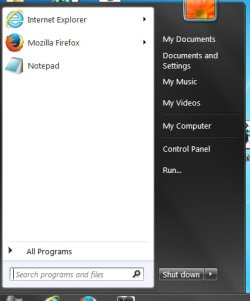
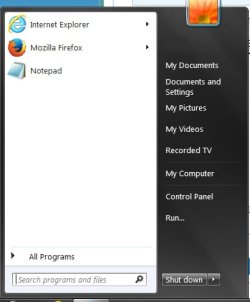
Here's a screenshot. I used the 4 registry tweaks. My Documents worked. It did point to my user name. My Videos worked too. My Pictures made the Documents and Settings button show up. And My Music tweak made the button be stuck. It didn't work at all.
 

Attachments

  • image.jpg
    image.jpg
    18.5 KB · Views: 244

My Computer My Computer

At a glance

Windows 7 Pro 64bit4.00 GBIntel Hd Graphics 4400
Computer type
Laptop
Computer Manufacturer/Model Number
Acer
OS
Windows 7 Pro 64bit
Memory
4.00 GB
Graphics Card(s)
Intel Hd Graphics 4400
Browser
Firefox
Start Menu

Hi. I decided to try it all over again. I had to reinstall 7 over. And I read where I have to login as administrator. And I did that. Well great almost. The administrator side worked great. All the buttons are there. And they all open to the user instead of the third wheel libraries. But I logged out. And logged back to the regular user account to see if it worked right on that side. And the My Music button is gone. And the strange Documents and Settings button showed up. It doesn't work. Access is denied. But all the other buttons, Documents, Pictures, Videos do work. And they skip the Libraries and open to user. Like XP always did. Now if only I could get the My Music button back again. And get rid of the Documents and Settings button. But there is a My Music folder in my user folder. What went wrong. It's not fair the administrator side got it all right. But the user gets no music folder. And that strange documents and settings folder.
P.S.
I just went to the Start Menu customize button to restore the default settings. And I guess the Documents and Settings button is really Local Disk (C:) How did that get there? And still no My Music button.


image.jpg
image 2.jpg
 
Last edited:

My Computer My Computer

At a glance

Windows 7 Pro 64bit4.00 GBIntel Hd Graphics 4400
Computer type
Laptop
Computer Manufacturer/Model Number
Acer
OS
Windows 7 Pro 64bit
Memory
4.00 GB
Graphics Card(s)
Intel Hd Graphics 4400
Browser
Firefox
Thank you Shadow. I'm going to look more into this to see what the issue could be for you. My internet is currently going in and out, so I'll get back with you as soon as possible.
 

My Computer My Computer

At a glance

64-bit Windows 11 Pro for WorkstationsIntel i7-8700K OC'd to 5 GHz64 GB (4x16GB) G.SKILL TridentZ RGB DDR4 3600...ASUS ROG-STRIX-GTX1080TI-O11G-GAMING
Computer type
PC/Desktop
Computer Manufacturer/Model Number
Self built custom
OS
64-bit Windows 11 Pro for Workstations
CPU
Intel i7-8700K OC'd to 5 GHz
Motherboard
ASUS ROG Maximus XI Formula Z390
Memory
64 GB (4x16GB) G.SKILL TridentZ RGB DDR4 3600 MHz
Graphics Card(s)
ASUS ROG-STRIX-GTX1080TI-O11G-GAMING
Sound Card
Integrated
Monitor(s) Displays
2 x Samsung Odyssey G7 27"
Screen Resolution
2560x1440
Hard Drives
1TB Samsung 990 PRO M.2,
4TB Samsung 990 PRO PRO M.2,
TerraMaster F8 SSD Plus NAS
PSU
Seasonic Prime Titanium 850W
Case
Thermaltake Core P3
Cooling
Corsair Hydro H115i
Keyboard
Logitech wireless K800
Mouse
Logitech MX Master 4
Internet Speed
2 Gb/s Download and 100 Mb/s Upload
Antivirus
Malwarebyte Anti-Malware Premium
Browser
Google Chrome
Other Info
Logitech Z625 speaker system,
Logitech BRIO 4K Pro webcam,
HP Color LaserJet Pro MFP M477fdn,
APC SMART-UPS RT 1000 XL - SURT1000XLI,
Galaxy S23 Plus phone
Start Menu Buttons

Hi Brink. Thanks. I hope you can figure this out. Like I said the administrator side works perfect. Wish the user side was the same.
 

My Computer My Computer

At a glance

Windows 7 Pro 64bit4.00 GBIntel Hd Graphics 4400
Computer type
Laptop
Computer Manufacturer/Model Number
Acer
OS
Windows 7 Pro 64bit
Memory
4.00 GB
Graphics Card(s)
Intel Hd Graphics 4400
Browser
Firefox
Shadow,

I can't find any issues so far. As a test, create a new standard user account, and see if it works properly in it after merging the .reg files in your administrator account.
 

My Computer My Computer

At a glance

64-bit Windows 11 Pro for WorkstationsIntel i7-8700K OC'd to 5 GHz64 GB (4x16GB) G.SKILL TridentZ RGB DDR4 3600...ASUS ROG-STRIX-GTX1080TI-O11G-GAMING
Computer type
PC/Desktop
Computer Manufacturer/Model Number
Self built custom
OS
64-bit Windows 11 Pro for Workstations
CPU
Intel i7-8700K OC'd to 5 GHz
Motherboard
ASUS ROG Maximus XI Formula Z390
Memory
64 GB (4x16GB) G.SKILL TridentZ RGB DDR4 3600 MHz
Graphics Card(s)
ASUS ROG-STRIX-GTX1080TI-O11G-GAMING
Sound Card
Integrated
Monitor(s) Displays
2 x Samsung Odyssey G7 27"
Screen Resolution
2560x1440
Hard Drives
1TB Samsung 990 PRO M.2,
4TB Samsung 990 PRO PRO M.2,
TerraMaster F8 SSD Plus NAS
PSU
Seasonic Prime Titanium 850W
Case
Thermaltake Core P3
Cooling
Corsair Hydro H115i
Keyboard
Logitech wireless K800
Mouse
Logitech MX Master 4
Internet Speed
2 Gb/s Download and 100 Mb/s Upload
Antivirus
Malwarebyte Anti-Malware Premium
Browser
Google Chrome
Other Info
Logitech Z625 speaker system,
Logitech BRIO 4K Pro webcam,
HP Color LaserJet Pro MFP M477fdn,
APC SMART-UPS RT 1000 XL - SURT1000XLI,
Galaxy S23 Plus phone
Hi. Well I decided to accept I can't get rid of libraries in 7. But I did reinstall the OS. And just use the registry tweak to get rid of the navigation library panel and save to. And at least it works. Not bad right now. When I click on the picture start menu button I see Library though. But I won't worry too much. I wish I could change the start menu picture button to open up to the user folder My Pictures. I don't see library there. Thank you.
 

My Computer My Computer

At a glance

Windows 7 Pro 64bit4.00 GBIntel Hd Graphics 4400
Computer type
Laptop
Computer Manufacturer/Model Number
Acer
OS
Windows 7 Pro 64bit
Memory
4.00 GB
Graphics Card(s)
Intel Hd Graphics 4400
Browser
Firefox
I'll keep playing to see if I may be able to reproduce what you're seeing, and see if I can come up with a solution.
 

My Computer My Computer

At a glance

64-bit Windows 11 Pro for WorkstationsIntel i7-8700K OC'd to 5 GHz64 GB (4x16GB) G.SKILL TridentZ RGB DDR4 3600...ASUS ROG-STRIX-GTX1080TI-O11G-GAMING
Computer type
PC/Desktop
Computer Manufacturer/Model Number
Self built custom
OS
64-bit Windows 11 Pro for Workstations
CPU
Intel i7-8700K OC'd to 5 GHz
Motherboard
ASUS ROG Maximus XI Formula Z390
Memory
64 GB (4x16GB) G.SKILL TridentZ RGB DDR4 3600 MHz
Graphics Card(s)
ASUS ROG-STRIX-GTX1080TI-O11G-GAMING
Sound Card
Integrated
Monitor(s) Displays
2 x Samsung Odyssey G7 27"
Screen Resolution
2560x1440
Hard Drives
1TB Samsung 990 PRO M.2,
4TB Samsung 990 PRO PRO M.2,
TerraMaster F8 SSD Plus NAS
PSU
Seasonic Prime Titanium 850W
Case
Thermaltake Core P3
Cooling
Corsair Hydro H115i
Keyboard
Logitech wireless K800
Mouse
Logitech MX Master 4
Internet Speed
2 Gb/s Download and 100 Mb/s Upload
Antivirus
Malwarebyte Anti-Malware Premium
Browser
Google Chrome
Other Info
Logitech Z625 speaker system,
Logitech BRIO 4K Pro webcam,
HP Color LaserJet Pro MFP M477fdn,
APC SMART-UPS RT 1000 XL - SURT1000XLI,
Galaxy S23 Plus phone
Start Menu User Folder Buttons

Thanks Brink. You sure are a smart computer guy.
 

My Computer My Computer

At a glance

Windows 7 Pro 64bit4.00 GBIntel Hd Graphics 4400
Computer type
Laptop
Computer Manufacturer/Model Number
Acer
OS
Windows 7 Pro 64bit
Memory
4.00 GB
Graphics Card(s)
Intel Hd Graphics 4400
Browser
Firefox
For some reason I can't get this to work in Windows 8.1. I'm using Start8 and when I click on "Music, Pictures, Videos" etc. It just takes me to the Libraries folder rather than "D:\Music" which is where I have that folder pointed to. Is there a way to get this tweak working in Windows 8.1?
 
Last edited:

My Computer My Computer

At a glance

Windows 7 Ultimate x64
OS
Windows 7 Ultimate x64
Hello XenonKilla,

I'm afraid that it won't work in any OS other than Windows 7. :(
 

My Computer My Computer

At a glance

64-bit Windows 11 Pro for WorkstationsIntel i7-8700K OC'd to 5 GHz64 GB (4x16GB) G.SKILL TridentZ RGB DDR4 3600...ASUS ROG-STRIX-GTX1080TI-O11G-GAMING
Computer type
PC/Desktop
Computer Manufacturer/Model Number
Self built custom
OS
64-bit Windows 11 Pro for Workstations
CPU
Intel i7-8700K OC'd to 5 GHz
Motherboard
ASUS ROG Maximus XI Formula Z390
Memory
64 GB (4x16GB) G.SKILL TridentZ RGB DDR4 3600 MHz
Graphics Card(s)
ASUS ROG-STRIX-GTX1080TI-O11G-GAMING
Sound Card
Integrated
Monitor(s) Displays
2 x Samsung Odyssey G7 27"
Screen Resolution
2560x1440
Hard Drives
1TB Samsung 990 PRO M.2,
4TB Samsung 990 PRO PRO M.2,
TerraMaster F8 SSD Plus NAS
PSU
Seasonic Prime Titanium 850W
Case
Thermaltake Core P3
Cooling
Corsair Hydro H115i
Keyboard
Logitech wireless K800
Mouse
Logitech MX Master 4
Internet Speed
2 Gb/s Download and 100 Mb/s Upload
Antivirus
Malwarebyte Anti-Malware Premium
Browser
Google Chrome
Other Info
Logitech Z625 speaker system,
Logitech BRIO 4K Pro webcam,
HP Color LaserJet Pro MFP M477fdn,
APC SMART-UPS RT 1000 XL - SURT1000XLI,
Galaxy S23 Plus phone
Wow really?

Oh well, just another reason to stay on Windows 7 I suppose. Every time I consider upgrading there's always some reason to stay behind. Guess I'll add this one to the list :D

Thanks for the fast response :)
 

My Computer My Computer

At a glance

Windows 7 Ultimate x64
OS
Windows 7 Ultimate x64
You could install the free program Classic Shell in Windows 8.1 to customize Start though.
 

My Computer My Computer

At a glance

64-bit Windows 11 Pro for WorkstationsIntel i7-8700K OC'd to 5 GHz64 GB (4x16GB) G.SKILL TridentZ RGB DDR4 3600...ASUS ROG-STRIX-GTX1080TI-O11G-GAMING
Computer type
PC/Desktop
Computer Manufacturer/Model Number
Self built custom
OS
64-bit Windows 11 Pro for Workstations
CPU
Intel i7-8700K OC'd to 5 GHz
Motherboard
ASUS ROG Maximus XI Formula Z390
Memory
64 GB (4x16GB) G.SKILL TridentZ RGB DDR4 3600 MHz
Graphics Card(s)
ASUS ROG-STRIX-GTX1080TI-O11G-GAMING
Sound Card
Integrated
Monitor(s) Displays
2 x Samsung Odyssey G7 27"
Screen Resolution
2560x1440
Hard Drives
1TB Samsung 990 PRO M.2,
4TB Samsung 990 PRO PRO M.2,
TerraMaster F8 SSD Plus NAS
PSU
Seasonic Prime Titanium 850W
Case
Thermaltake Core P3
Cooling
Corsair Hydro H115i
Keyboard
Logitech wireless K800
Mouse
Logitech MX Master 4
Internet Speed
2 Gb/s Download and 100 Mb/s Upload
Antivirus
Malwarebyte Anti-Malware Premium
Browser
Google Chrome
Other Info
Logitech Z625 speaker system,
Logitech BRIO 4K Pro webcam,
HP Color LaserJet Pro MFP M477fdn,
APC SMART-UPS RT 1000 XL - SURT1000XLI,
Galaxy S23 Plus phone
Can you tell me how to set this path: G:\Edit Stuff\Edit\transparent in the start menu like the My Pictures & My Documents? I viewed the text of the .reg file but it's just a bunch of random characters. I have no clue on how to make my 'transparent' folder and few of my other frequently accessed folders that have images used in my Photoshop like these do. Can you tell me how?


Edit: By the way, just tried the .reg files for My Documents and My Pictures. didn't work. it just added 'Games' and 'Computer' instead
 

My Computer My Computer

At a glance

Windows 7 Ultimate 64-bit SP1Intel Core 2 Duo E8400 @ 3.00GHz8.00GB Single-Channel DDR3 @ 531MHz (7-7-7-20)Intel Q45/Q43 Express Chipset (Dell)
Computer type
PC/Desktop
Computer Manufacturer/Model Number
Dell Optiplex 780
OS
Windows 7 Ultimate 64-bit SP1
CPU
Intel Core 2 Duo E8400 @ 3.00GHz
Motherboard
Dell Inc. 03NVJ6 (CPU)
Memory
8.00GB Single-Channel DDR3 @ 531MHz (7-7-7-20)
Graphics Card(s)
Intel Q45/Q43 Express Chipset (Dell)
Sound Card
SoundMAX Integrated Digital High Definition Audio
Monitor(s) Displays
Viore
Screen Resolution
1920x1080
Hard Drives
149GB Seagate ST3160318AS (SATA)
Keyboard
Dell
Mouse
Dell
Internet Speed
up to 7 Mbps (average 3.2 Mbps)
Antivirus
AVG IS
Browser
Firefox, Chrome
Hello Sylveon, :)

Did you move those folder locations, or make any other changes to them? If so, that could affect this.

It would be best to create a new thread in the Customization forum for the other item though.
 

My Computer My Computer

At a glance

64-bit Windows 11 Pro for WorkstationsIntel i7-8700K OC'd to 5 GHz64 GB (4x16GB) G.SKILL TridentZ RGB DDR4 3600...ASUS ROG-STRIX-GTX1080TI-O11G-GAMING
Computer type
PC/Desktop
Computer Manufacturer/Model Number
Self built custom
OS
64-bit Windows 11 Pro for Workstations
CPU
Intel i7-8700K OC'd to 5 GHz
Motherboard
ASUS ROG Maximus XI Formula Z390
Memory
64 GB (4x16GB) G.SKILL TridentZ RGB DDR4 3600 MHz
Graphics Card(s)
ASUS ROG-STRIX-GTX1080TI-O11G-GAMING
Sound Card
Integrated
Monitor(s) Displays
2 x Samsung Odyssey G7 27"
Screen Resolution
2560x1440
Hard Drives
1TB Samsung 990 PRO M.2,
4TB Samsung 990 PRO PRO M.2,
TerraMaster F8 SSD Plus NAS
PSU
Seasonic Prime Titanium 850W
Case
Thermaltake Core P3
Cooling
Corsair Hydro H115i
Keyboard
Logitech wireless K800
Mouse
Logitech MX Master 4
Internet Speed
2 Gb/s Download and 100 Mb/s Upload
Antivirus
Malwarebyte Anti-Malware Premium
Browser
Google Chrome
Other Info
Logitech Z625 speaker system,
Logitech BRIO 4K Pro webcam,
HP Color LaserJet Pro MFP M477fdn,
APC SMART-UPS RT 1000 XL - SURT1000XLI,
Galaxy S23 Plus phone
no I did not move the user folders they are still in the same C:\Users\<my username>\ folder as it always was
 

My Computer My Computer

At a glance

Windows 7 Ultimate 64-bit SP1Intel Core 2 Duo E8400 @ 3.00GHz8.00GB Single-Channel DDR3 @ 531MHz (7-7-7-20)Intel Q45/Q43 Express Chipset (Dell)
Computer type
PC/Desktop
Computer Manufacturer/Model Number
Dell Optiplex 780
OS
Windows 7 Ultimate 64-bit SP1
CPU
Intel Core 2 Duo E8400 @ 3.00GHz
Motherboard
Dell Inc. 03NVJ6 (CPU)
Memory
8.00GB Single-Channel DDR3 @ 531MHz (7-7-7-20)
Graphics Card(s)
Intel Q45/Q43 Express Chipset (Dell)
Sound Card
SoundMAX Integrated Digital High Definition Audio
Monitor(s) Displays
Viore
Screen Resolution
1920x1080
Hard Drives
149GB Seagate ST3160318AS (SATA)
Keyboard
Dell
Mouse
Dell
Internet Speed
up to 7 Mbps (average 3.2 Mbps)
Antivirus
AVG IS
Browser
Firefox, Chrome
Hey guys, new here, but I've been looking for something like this ever since I got Windows 7. This is unbelievably perfect - but for some reason very hard to find!

Just wondering, how do you get those HEX values (or whatever they are) for the folder names? I actually want to redirect the buttons to different locations, for example to E:\My Documents and E:\My Documents\My Pictures etc. Do you know how I can convert those folder names to the corresponding HEX values?

Thanks in advance :)

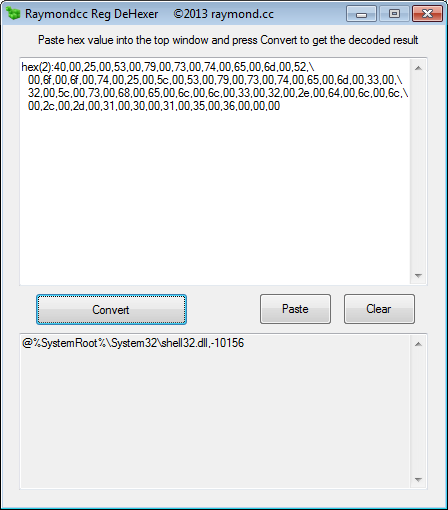
You probably know this already, but there's a dehexer (raymond.cc)
Here's a translation from a snippet of an export of the exefile key
NB: I think it only works with hex(2)

Code:
"FriendlyTypeName"=hex(2):40,00,25,00,53,00,79,00,73,00,74,00,65,00,6d,00,52,\
  00,6f,00,6f,00,74,00,25,00,5c,00,53,00,79,00,73,00,74,00,65,00,6d,00,33,00,\
  32,00,5c,00,73,00,68,00,65,00,6c,00,6c,00,33,00,32,00,2e,00,64,00,6c,00,6c,\
  00,2c,00,2d,00,31,00,30,00,31,00,35,00,36,00,00,00

gHvmIDW.png


You can also of course use regedit

HOWEVER, I think you might be referring to the CLSID for SpecialFolders...

Check the entries under
HKEY_LOCAL_MACHINE\SOFTWARE\Microsoft\Windows\CurrentVersion\Explorer\FolderDescriptions

(Grab a copy of registryscanner, create a link called rs.lnk and place in a path folder, like system32, or a links-folder that is in system32, then ya can run RS and just paste the search term)

(Do the same with regjump, then if ya wanna jump straight to a key in regedit you can run, for example,
rj HKEY_LOCAL_MACHINE\SOFTWARE\Microsoft\Windows\CurrentVersion\Explorer\FolderDescriptions
 

My Computer My Computer

At a glance

Windows 7 Ultimate 64bit2.28GbNVIDIA
Computer type
Laptop
Computer Manufacturer/Model Number
Dell
OS
Windows 7 Ultimate 64bit
CPU
2.2
Memory
8Gb
Graphics Card(s)
NVIDIA
Screen Resolution
1280/762
Mouse
built in pad || iphone || MS wireless
Internet Speed
100MB
Antivirus
Avast
Browser
Chrome, Chrome portable
Back
Top