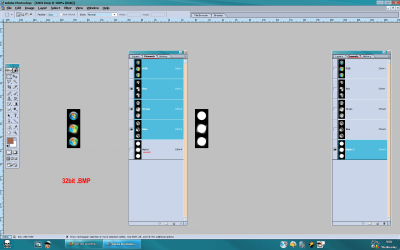
Start orb problem

NEXTLOVER

New member
Local time
2:10 PM
Messages
9
Hi. I've read around here and I haven't come across anyone having this problem (or haven't read enough). I'm on a Win 7 Home Prem. x64 with a DPI of 125%.

I know to change a start button, the bitmaps to be changed are 6806, 6807, 6808 with each one having a corresponding set of diff. bitmap dimensions. I did all that with Resource Hacker, did the whole Take Ownership tool. Followed all the steps fr. the How To Change Start Orb Tutorial fr. this forum.

Welp. It came out looking like this: & whenever I'd roll my mouse over it, a black squarish thing appears. It's like blinking or something.

Granted, the orb files were originally .png files & I used XnView to convert 'em to bitmaps, then used Paint to resize them to the sizes (66x198; 81x243; etc.).

So... where did I go wrong? Any help I'd appreciate :)
 

My Computer

OS
Windows 7 x64
Possible error is that the replacement pictures has no transparency.
Did you save it in 32bit bmp or 24bit?
Ur done everything right just to open the original orb in A. photoshop or some other G. software that allow saving 32bit bmp-s and look at the picture structure.
 

Attachments

  • orb.png
    orb.png
    65.2 KB · Views: 242

My Computer

Computer type
PC/Desktop
Computer Manufacturer/Model Number
696
OS
7 Ultimate x64 sp1
CPU
Intel i5-4690K
Motherboard
GA Z97X Gaming 5
Memory
16Gb HyperX fury
Graphics Card(s)
R9-270x 2Gb
Sound Card
On Board
Monitor(s) Displays
2443NW
Screen Resolution
1920x1200
Hard Drives
WD5000 -
WD5001 -
WD1002
PSU
Cft-650-14cs
Case
Very Big Case
Cooling
stock
Keyboard
G11
Mouse
Logitech
Internet Speed
Adsl
Browser
FF
Other Info
RWD
Possible error is that the replacement pictures has no transparency.
Did you save it in 32bit bmp or 24bit?
Ur done everything right just to open the original orb in A. photoshop or some other G. software that allow saving 32bit bmp-s and look at the picture structure.

;) Now that I think about it... I think I save them in 24-bit LOL! Probably with no transparency either. Heh.

I'm gonna give it a try. Thanks for the suggestion :D
 

My Computer

OS
Windows 7 x64
This has something to do with the alpha channel i think.... Take a look at this Video

;)
 

My Computer

Computer type
PC/Desktop
Computer Manufacturer/Model Number
Self Build
OS
MS Windows 7 Professional 64-bit SP1
CPU
AMD FX(tm)-6100 Six-Core Processor Socket AM3+ (942)
Motherboard
ASUSTeK COMPUTER INC. SABERTOOTH 990FX (AM3r2)
Memory
8.00 GB Dual-Channel DDR3 @ 802MHz (11-11-11-36) 1.5Volts
Graphics Card(s)
NVIDIA GeForce GTX 560 Ti
Sound Card
Onboard Realtek HD
Monitor(s) Displays
shimian (1920x1080@60Hz)
Screen Resolution
1920*1080
Hard Drives
OCZ-AGIL ITY3 SATA Disk Device 120GB
PSU
Corsair TX 750
Case
Corsair
Cooling
WaterCooled
Keyboard
Microsoft Wired
Mouse
Logitech USB Optical TiltWheel Mouse
Internet Speed
Realtek PCIe GBE Family Controller 20MB*1MB
Antivirus
Avast
Browser
Firefox
Other Info
150GB Internal Hard Drive for Backing Up Important Files -
Hauppauge Nova-DT Dual DVB-T Tuner Device (+IR) -
USB PC Camera with Mic (SN9C105)
Thanks to the suggestions above... it worked! LMAO. Problem was the MAKING/TWEAKS of the start buttons, not in the steps of changing the darn button.

I dug around & read that you either have to delete the alpha1 channel or put the background of the orb as black--> transparency. I don't really know, but it worked. & you really need a high-end type of graphics software (i.e. Photoshop).

Happy New Year :party:
 

My Computer

OS
Windows 7 x64
Thanks for posting back. Glad you got it figured out. Feel free to stick around, we will be happy to answer any more questions that you have.
 

My Computer

Computer Manufacturer/Model Number
Custom
OS
Windows 7 Professional x64
CPU
Intel i7 2600K OC'd @ 4620 MHz
Motherboard
Asus P8Z68-V Pro
Memory
16GB GSkill Sniper 2133 Mhz (4x4GB)
Graphics Card(s)
EVGA GeForce GTX 480 SuperClocked+
Sound Card
Realtek High Definition Audio
Monitor(s) Displays
2x Acer S273HLbmii 27"
Screen Resolution
2 x 1920x1080
Hard Drives
64GB Crucial M4 SSD

Storage: Hitachi 1TB 5400RPM, Samsung 1.5TB 5400RPM
PSU
Corsair HW Series 750w (modular)
Case
Cooler Master HAF 932 Advanced Blue Edition
Cooling
CM Hyper 212+ CPU cooler, 3x 230mm + 1x 140mm case fans
Keyboard
Logitech MK320 (wireless)
Mouse
Logitech MK320 (wireless)
Internet Speed
30 Mb/s : 2 Mb/s
Back
Top