
Start>Programs>Admin Tools... why do properties vary and what is /s?
Greetings, new member and total noob here.
I'm running Win 7 Ultimate on a 32 bit Lenovo laptop.
So I was playing around with the Admin Tools found by pressing Start>Programs>Admin Tools.
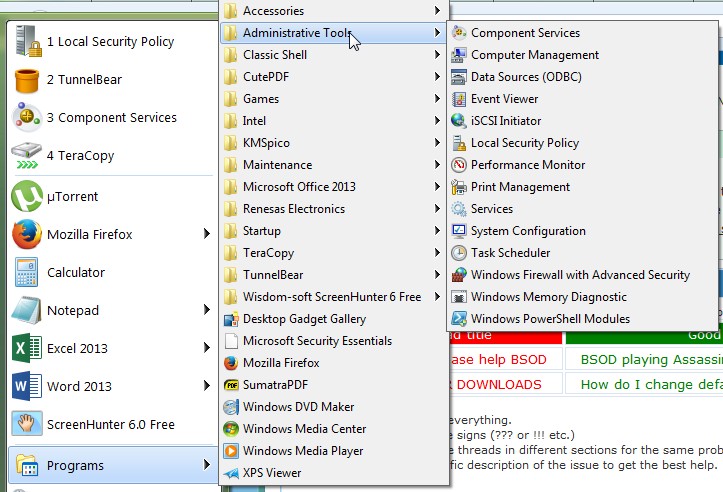
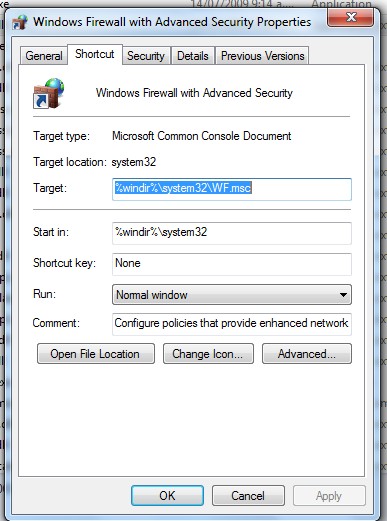
I noticed if I right click and select the properties of these items, they seem to point to a different "directory". I've attached screenshots of the Computer Management and Firewall properties as examples. You can see Firewall starts in %windir% and Computer Management starts in %HOMEDRIVE%%HOMEPATH%.
Can anyone please explain this. Sorry if this is basic stuff but I searched and my bad googling skills couldn't find much info. Also, why is there a space with an "/s" after the "compmgmt.msc" in the Target field of the Computer Management?

Greetings, new member and total noob here.
I'm running Win 7 Ultimate on a 32 bit Lenovo laptop.
So I was playing around with the Admin Tools found by pressing Start>Programs>Admin Tools.
I noticed if I right click and select the properties of these items, they seem to point to a different "directory". I've attached screenshots of the Computer Management and Firewall properties as examples. You can see Firewall starts in %windir% and Computer Management starts in %HOMEDRIVE%%HOMEPATH%.
Can anyone please explain this. Sorry if this is basic stuff but I searched and my bad googling skills couldn't find much info. Also, why is there a space with an "/s" after the "compmgmt.msc" in the Target field of the Computer Management?
My Computer
- Computer type
- PC/Desktop
- Computer Manufacturer/Model Number
- Lenovo
- OS
- Windows 7 Ultimate, 32 bit
- CPU
- i5-2520M @ 2.50 GHz
- Memory
- 4.00 GB
