
Hi everybody . .
I was downloading a software but most probably got a virus with also. Using AVG, it also gave alert but mistakenly allowed the threat. Later i realised my laptop start up menu folders are empty. All software are working normally as previously but i can't find/open from start up menu. Some of them that i had pinned to start up menu are there in place and can be opened from there. For example, MS Word was not pinned, so when i need to open MS Word, then i open an already saved MS Word file, and do save as to keep original.
When I re-installed MS Office, now its working with all application in the folders.
How can i restore start up menu folders.
P.S. I have gone through similarly related threads and found some of them but couldn't solve my problem.
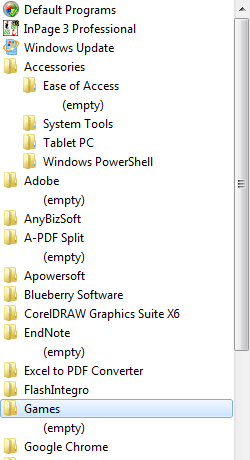
I am uploading a snapshot of my start up menu folders that empty.
I was downloading a software but most probably got a virus with also. Using AVG, it also gave alert but mistakenly allowed the threat. Later i realised my laptop start up menu folders are empty. All software are working normally as previously but i can't find/open from start up menu. Some of them that i had pinned to start up menu are there in place and can be opened from there. For example, MS Word was not pinned, so when i need to open MS Word, then i open an already saved MS Word file, and do save as to keep original.
When I re-installed MS Office, now its working with all application in the folders.
How can i restore start up menu folders.
P.S. I have gone through similarly related threads and found some of them but couldn't solve my problem.
I am uploading a snapshot of my start up menu folders that empty.
Attachments
My Computer
- Computer type
- Laptop
- Computer Manufacturer/Model Number
- Dell
- OS
- Win 7 Home 32bit
