Still no change between Vista and Win 7 in some ways

Since the problem comes up with ZIP files, would it make any difference if you turn off "Show compressed ZIP archives as folders"? Annoyances.org - How do I turn off Compressed Folders (built-in support for ZIP files) in Windows Vista and XP?

Actually it's more the EXE's that are very very slow to refresh in the folders much more than the zips....

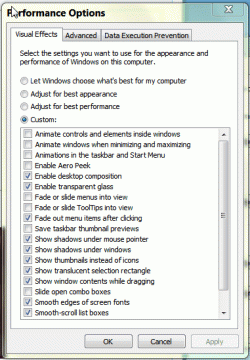
Here is a screen shot of my modified Advanced options dialog:

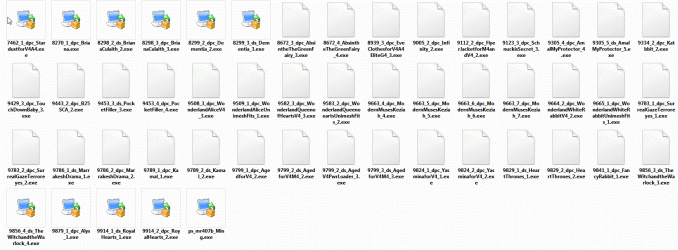
Below that is a folder that contains nothing but EXE's I've yet to install. In XP I would enter a folder like that and all the EXE's would have been represented by an icon within milliseconds. It was a full 30 seconds for this folder to update! :(
 

Attachments

  • ScreenHunter_01 Nov. 02 11.31.gif
    ScreenHunter_01 Nov. 02 11.31.gif
    31.6 KB · Views: 7
  • ScreenHunter_02 Nov. 02 11.35.gif
    ScreenHunter_02 Nov. 02 11.35.gif
    75.6 KB · Views: 7

My Computer My Computer

At a glance

Windows 7, 64 biti7 930 2.80GHz, Intel16 gigs DDR3 RAM (Crucial Brand)NVIDIA GeForce GTX 560
Computer Manufacturer/Model Number
CyberpowerPC Gaming PC
OS
Windows 7, 64 bit
CPU
i7 930 2.80GHz, Intel
Motherboard
Gigabyte EX58-UD3R
Memory
16 gigs DDR3 RAM (Crucial Brand)
Graphics Card(s)
NVIDIA GeForce GTX 560
Sound Card
Creative
Monitor(s) Displays
HG2810 HD 30" viewable monitor and HZ201 17" both HANNS-G
Screen Resolution
1920 X 1200
Hard Drives
Seagate internal - 1 (2 partitions)
Hitachi internal - 1 (2 partitions)
Seagate external - 1 (1 partition)
PSU
650
Case
CyberpowerPC case
Cooling
basic Intel fan for CPU, 3 other fans within case
Keyboard
Logitech wired keyboard
Mouse
Logitech wireless marble
Internet Speed
DSL
Other Info
Even though I have a gaming PC I bought it for it's power so I could do my 2D and 3D work without being hampered too much!
If your heavy in the 3d community then you should be getting a SSD HD

I have a very good external HD from Seagate. It's not perfect, I will make sure my next one has a port for Firewire as USB 2.0 is a bit slow when transfering files. My Downloads folder though is not situated on this drive, it's located on an internal 2nd drive. I have 3 drives and a total of 5 partitions. All my internal drives are SATA drives!
 

My Computer My Computer

At a glance

Windows 7, 64 biti7 930 2.80GHz, Intel16 gigs DDR3 RAM (Crucial Brand)NVIDIA GeForce GTX 560
Computer Manufacturer/Model Number
CyberpowerPC Gaming PC
OS
Windows 7, 64 bit
CPU
i7 930 2.80GHz, Intel
Motherboard
Gigabyte EX58-UD3R
Memory
16 gigs DDR3 RAM (Crucial Brand)
Graphics Card(s)
NVIDIA GeForce GTX 560
Sound Card
Creative
Monitor(s) Displays
HG2810 HD 30" viewable monitor and HZ201 17" both HANNS-G
Screen Resolution
1920 X 1200
Hard Drives
Seagate internal - 1 (2 partitions)
Hitachi internal - 1 (2 partitions)
Seagate external - 1 (1 partition)
PSU
650
Case
CyberpowerPC case
Cooling
basic Intel fan for CPU, 3 other fans within case
Keyboard
Logitech wired keyboard
Mouse
Logitech wireless marble
Internet Speed
DSL
Other Info
Even though I have a gaming PC I bought it for it's power so I could do my 2D and 3D work without being hampered too much!
Below that is a folder that contains nothing but EXE's I've yet to install. In XP I would enter a folder like that and all the EXE's would have been represented by an icon within milliseconds. It was a full 30 seconds for this folder to update! :(

I'm rather confident that the behaviour you're experiencing is not standard, and that it is caused by factors specific to your machine(s). That's not to say that it's somehow "your fault", but merely that you're in the habit of always installing some add-on or making a particular configuration change that leads to this behaviour, perhaps as no more than a side-effect.

Does it happen in safe mode?

Does it happen on ALL local drives? Network drives (if any)?

If you issue a DIR command in that directory (at the CMD prompt), is the response near-instantaneous like you'd expect it to be?

Does it happen if you test under a new user account, even if you have to create one solely for the purposes of testing?

If you have another machine close by and networked to this one, does it happen to the other box too while it's viewing the contents of the same folder as a mapped network drive, or through UNC (\\TargetName\ShareName)?
 

My Computer My Computer

At a glance

Win7x64
Computer Manufacturer/Model Number
Multiple machines in various stages of decomposition.
OS
Win7x64
Question: Does this still happen when you are in "details" view? Or with a folder "customized" for "Documents" view?

I found that the icon views are just painfuly slow nbecause yes, windows is opening every file, looking for thumbnails and all kinds of other information to "database" and show in the "panel" views and such.

I set all my drives to the documents/Details view, made every folder use that as the default and I no longer have the slowdowns. I also have indexing off but I do have MS Security essentials. I do not think it is either of those, I believe it's the shell itself "shmedia.dll etc" that are parsing the files looking for icons and thumbnails and other information to use for a "richer" explorer experience.
 

My Computer My Computer

At a glance

Windows 7 x64 Ultimatei7 96012 Gig Corsair DominatorNvidia 480
Computer Manufacturer/Model Number
Scratch built
OS
Windows 7 x64 Ultimate
CPU
i7 960
Motherboard
Asus P6X58D
Memory
12 Gig Corsair Dominator
Graphics Card(s)
Nvidia 480
Sound Card
Maudio Delta 44 + breakout box
Monitor(s) Displays
Dell UltraSharp U2410 24in and Samsung 21 dual monitors
Screen Resolution
1920x1200 and 1280x1024
Hard Drives
Primary: Intel X-25M G2 160G SSD
Secondary: Segate baracuda 1.0 TB
HDs in AHCI mode.
PSU
Corasair TX850
Case
Cooler Master HAF
Cooling
Corsair H50
Keyboard
Logitech G15 + N52 game pad
Mouse
Logitech MX518
Internet Speed
15kbs down 4.5kbps up
Other Info
WEI 7.6
CPU & RAM 7.6
Graphics 7.9
Hard disk 7.7
Below that is a folder that contains nothing but EXE's I've yet to install. In XP I would enter a folder like that and all the EXE's would have been represented by an icon within milliseconds. It was a full 30 seconds for this folder to update! :(

I'm rather confident that the behavior you're experiencing is not standard, and that it is caused by factors specific to your machine(s). That's not to say that it's somehow "your fault", but merely that you're in the habit of always installing some add-on or making a particular configuration change that leads to this behavior, perhaps as no more than a side-effect.

Does it happen in safe mode?

Haven't tried that yet...

Does it happen on ALL local drives? Network drives (if any)?

Yes

If you issue a DIR command in that directory (at the CMD prompt), is the response near-instantaneous like you'd expect it to be?

I don't use the Command Prompt unless it's dire so I don't know any of the common commands. I get brain freeze when I try to learn that sort of stuff! :p

Does it happen if you test under a new user account, even if you have to create one solely for the purposes of testing?

Haven't done that yet. These files are not kept on the C drive so not sure that that would be a way to test this out.

If you have another machine close by and networked to this one, does it happen to the other box too while it's viewing the contents of the same folder as a mapped network drive, or through UNC (\\TargetName\ShareName)?

Sorry, no other machine in my house, just this one!

You will find my responses in bold under your inquiries ....
 

My Computer My Computer

At a glance

Windows 7, 64 biti7 930 2.80GHz, Intel16 gigs DDR3 RAM (Crucial Brand)NVIDIA GeForce GTX 560
Computer Manufacturer/Model Number
CyberpowerPC Gaming PC
OS
Windows 7, 64 bit
CPU
i7 930 2.80GHz, Intel
Motherboard
Gigabyte EX58-UD3R
Memory
16 gigs DDR3 RAM (Crucial Brand)
Graphics Card(s)
NVIDIA GeForce GTX 560
Sound Card
Creative
Monitor(s) Displays
HG2810 HD 30" viewable monitor and HZ201 17" both HANNS-G
Screen Resolution
1920 X 1200
Hard Drives
Seagate internal - 1 (2 partitions)
Hitachi internal - 1 (2 partitions)
Seagate external - 1 (1 partition)
PSU
650
Case
CyberpowerPC case
Cooling
basic Intel fan for CPU, 3 other fans within case
Keyboard
Logitech wired keyboard
Mouse
Logitech wireless marble
Internet Speed
DSL
Other Info
Even though I have a gaming PC I bought it for it's power so I could do my 2D and 3D work without being hampered too much!
I set all my drives to the documents/Details view, made every folder use that as the default and I no longer have the slowdowns. I also have indexing off but I do have MS Security essentials. I do not think it is either of those, I believe it's the shell itself "shmedia.dll etc" that are parsing the files looking for icons and thumbnails and other information to use for a "richer" explorer experience.

Even in "Details" view I'm getting a delay!
 

My Computer My Computer

At a glance

Windows 7, 64 biti7 930 2.80GHz, Intel16 gigs DDR3 RAM (Crucial Brand)NVIDIA GeForce GTX 560
Computer Manufacturer/Model Number
CyberpowerPC Gaming PC
OS
Windows 7, 64 bit
CPU
i7 930 2.80GHz, Intel
Motherboard
Gigabyte EX58-UD3R
Memory
16 gigs DDR3 RAM (Crucial Brand)
Graphics Card(s)
NVIDIA GeForce GTX 560
Sound Card
Creative
Monitor(s) Displays
HG2810 HD 30" viewable monitor and HZ201 17" both HANNS-G
Screen Resolution
1920 X 1200
Hard Drives
Seagate internal - 1 (2 partitions)
Hitachi internal - 1 (2 partitions)
Seagate external - 1 (1 partition)
PSU
650
Case
CyberpowerPC case
Cooling
basic Intel fan for CPU, 3 other fans within case
Keyboard
Logitech wired keyboard
Mouse
Logitech wireless marble
Internet Speed
DSL
Other Info
Even though I have a gaming PC I bought it for it's power so I could do my 2D and 3D work without being hampered too much!
Haven't tried that yet...
Less talking, more testing ;)

I don't use the Command Prompt unless it's dire so I don't know any of the common commands. I get brain freeze when I try to learn that sort of stuff! :p

Start a CMD prompt instance (type CMD into the search box on the start menu to get there).

Type the name of the drive on which the files are kept and press enter. For example: D: <enter>

Type CD <full_path_to_the_affected_directory> and press enter. For example: CD D:\MyFiles\AffectedFolder <enter>

Type DIR and press enter.

Note how long it takes to ennumerate the folder contents.

Haven't done that yet. These files are not kept on the C drive so not sure that that would be a way to test this out.

It doesn't matter where they're kept. A second account will almost certainly have permissions to "see" the same local folder, thereby enabling you to test what happens in Explorer with that other user account.
 

My Computer My Computer

At a glance

Win7x64
Computer Manufacturer/Model Number
Multiple machines in various stages of decomposition.
OS
Win7x64
Haven't tried that yet...
Less talking, more testing ;)

I don't use the Command Prompt unless it's dire so I don't know any of the common commands. I get brain freeze when I try to learn that sort of stuff! :p

Start a CMD prompt instance (type CMD into the search box on the start menu to get there).

Type the name of the drive on which the files are kept and press enter. For example: D: <enter>

Type CD <full_path_to_the_affected_directory> and press enter. For example: CD D:\MyFiles\AffectedFolder <enter>

Type DIR and press enter.

Note how long it takes to ennumerate the folder contents.

Haven't done that yet. These files are not kept on the C drive so not sure that that would be a way to test this out.

It doesn't matter where they're kept. A second account will almost certainly have permissions to "see" the same local folder, thereby enabling you to test what happens in Explorer with that other user account.

This is the path to the EXE's folder I'm testing in the CMD:

E:\!New Downloads\!!Mil 4 Females\!!NEW Install Files\DAZ EXE's

CMD states that this is not a recognizable path. Uh huh, well it's a path so now what?

and please don't instruct me to change the path, I have these folders set up like this for a reason! ;)
 

My Computer My Computer

At a glance

Windows 7, 64 biti7 930 2.80GHz, Intel16 gigs DDR3 RAM (Crucial Brand)NVIDIA GeForce GTX 560
Computer Manufacturer/Model Number
CyberpowerPC Gaming PC
OS
Windows 7, 64 bit
CPU
i7 930 2.80GHz, Intel
Motherboard
Gigabyte EX58-UD3R
Memory
16 gigs DDR3 RAM (Crucial Brand)
Graphics Card(s)
NVIDIA GeForce GTX 560
Sound Card
Creative
Monitor(s) Displays
HG2810 HD 30" viewable monitor and HZ201 17" both HANNS-G
Screen Resolution
1920 X 1200
Hard Drives
Seagate internal - 1 (2 partitions)
Hitachi internal - 1 (2 partitions)
Seagate external - 1 (1 partition)
PSU
650
Case
CyberpowerPC case
Cooling
basic Intel fan for CPU, 3 other fans within case
Keyboard
Logitech wired keyboard
Mouse
Logitech wireless marble
Internet Speed
DSL
Other Info
Even though I have a gaming PC I bought it for it's power so I could do my 2D and 3D work without being hampered too much!
This is the path to the EXE's folder I'm testing in the CMD:

E:\!New Downloads\!!Mil 4 Females\!!NEW Install Files\DAZ EXE's

CMD states that this is not a recognizable path. Uh huh, well it's a path so now what?

Put double quotes around the entire path, like this:

CD "E:\!New Downloads\!!Mil 4 Females\!!NEW Install Files\DAZ EXE's"

Otherwise, every space character is interpreted as the start of another token.
 

My Computer My Computer

At a glance

Win7x64
Computer Manufacturer/Model Number
Multiple machines in various stages of decomposition.
OS
Win7x64
This is the path to the EXE's folder I'm testing in the CMD:

E:\!New Downloads\!!Mil 4 Females\!!NEW Install Files\DAZ EXE's

CMD states that this is not a recognizable path. Uh huh, well it's a path so now what?

Put double quotes around the entire path, like this:

CD "E:\!New Downloads\!!Mil 4 Females\!!NEW Install Files\DAZ EXE's"

Otherwise, every space character is interpreted as the start of another token.

ah yes, I forgot the quotes..

Oh and I created a new account, logged off and into the new account. Same thing, slow loading files, mostly folders that contain EXE's!!
 

My Computer My Computer

At a glance

Windows 7, 64 biti7 930 2.80GHz, Intel16 gigs DDR3 RAM (Crucial Brand)NVIDIA GeForce GTX 560
Computer Manufacturer/Model Number
CyberpowerPC Gaming PC
OS
Windows 7, 64 bit
CPU
i7 930 2.80GHz, Intel
Motherboard
Gigabyte EX58-UD3R
Memory
16 gigs DDR3 RAM (Crucial Brand)
Graphics Card(s)
NVIDIA GeForce GTX 560
Sound Card
Creative
Monitor(s) Displays
HG2810 HD 30" viewable monitor and HZ201 17" both HANNS-G
Screen Resolution
1920 X 1200
Hard Drives
Seagate internal - 1 (2 partitions)
Hitachi internal - 1 (2 partitions)
Seagate external - 1 (1 partition)
PSU
650
Case
CyberpowerPC case
Cooling
basic Intel fan for CPU, 3 other fans within case
Keyboard
Logitech wired keyboard
Mouse
Logitech wireless marble
Internet Speed
DSL
Other Info
Even though I have a gaming PC I bought it for it's power so I could do my 2D and 3D work without being hampered too much!
Yeah, the worst part is the additional layer of file sharing, now we have "home group" as well as "work group" and "public folders", with a right click option for sharing that's only available sometimes, and a sharing option in file properties that kinda randomly makes itself available, when it feels like it I guess. This is nuts, I'd rather be using windows 98 right now. I have no consistancy in the ability to share or access other computers on a network, regardless of OS. I'm seriously concidering going back to an older machine that can run XP. I can't even install it on my Dell XPS. Yeah, I tried. I HATE WINDOWS features 7 AS MUCH AS VISTA. Ive fallen so far behind in my work due to these useless and complex sharing features and rights issues. Seriously, I can't afford to struggle with it anymore.
 

My Computer My Computer

At a glance

Windows 7intel Core2 Duo 2 GigSamsung DDR2 PC-5300 4 gigsMobile intel 965 Express Chipset famiy
Computer Manufacturer/Model Number
Dell xPS M1330
OS
Windows 7
CPU
intel Core2 Duo 2 Gig
Motherboard
Dell 0N6507
Memory
Samsung DDR2 PC-5300 4 gigs
Graphics Card(s)
Mobile intel 965 Express Chipset famiy
Sound Card
Sigma Tel High Definition Audio Codec
Monitor(s) Displays
samsung sycmaster 731n
Yea, it's a bit to understand. I like Windows 7 except for this very annoying issue with exe icon files and folders refresh. Seems really odd to me that others are not having an issue. It's not a video card issue either (as in drawing and refresh) I have a rather good video card: NVIDIA GeForce 9800 GT with, I think, 500 Mb's of DDR2 on board..... I think it's more but not sure where to look for that info. Some things "computer" I'm very good with but sometimes I'm a total retard when it comes to finding certain bits of info, like how much DDR2 my video card has on board. I can tell you just about everything else about it but that and what version of OpenGL it's got on board!
 

My Computer My Computer

At a glance

Windows 7, 64 biti7 930 2.80GHz, Intel16 gigs DDR3 RAM (Crucial Brand)NVIDIA GeForce GTX 560
Computer Manufacturer/Model Number
CyberpowerPC Gaming PC
OS
Windows 7, 64 bit
CPU
i7 930 2.80GHz, Intel
Motherboard
Gigabyte EX58-UD3R
Memory
16 gigs DDR3 RAM (Crucial Brand)
Graphics Card(s)
NVIDIA GeForce GTX 560
Sound Card
Creative
Monitor(s) Displays
HG2810 HD 30" viewable monitor and HZ201 17" both HANNS-G
Screen Resolution
1920 X 1200
Hard Drives
Seagate internal - 1 (2 partitions)
Hitachi internal - 1 (2 partitions)
Seagate external - 1 (1 partition)
PSU
650
Case
CyberpowerPC case
Cooling
basic Intel fan for CPU, 3 other fans within case
Keyboard
Logitech wired keyboard
Mouse
Logitech wireless marble
Internet Speed
DSL
Other Info
Even though I have a gaming PC I bought it for it's power so I could do my 2D and 3D work without being hampered too much!
Is your disk running low on space? Defrag that puppy.
 

My Computer My Computer

At a glance

W7 Prof 64 biti7-3770kG.Skill Sniper 1866 16 GBEvga GTX 770
Computer type
PC/Desktop
Computer Manufacturer/Model Number
HomieJunker
OS
W7 Prof 64 bit
CPU
i7-3770k
Motherboard
Sabertooth Z77
Memory
G.Skill Sniper 1866 16 GB
Graphics Card(s)
Evga GTX 770
Sound Card
Sound Blaster Z
Monitor(s) Displays
Asus VG278HE
Screen Resolution
1920 x 1080
Hard Drives
4 Seagate Barracudas 250 GB
2 Intel® X25-M 160GB
PSU
Corsair H1000X
Case
Lian-Li A77B
Cooling
Phantek 120 dual fans
Keyboard
Corsair K70 RGB
Mouse
Logitech G502
Internet Speed
FiOS Quantum
Antivirus
Avira
Browser
Chrome
Me? LOL, no, plenty of space and well I did JUST install Win7 a few weeks ago, I think the disk is fine and not quite needing a defrag quite yet. As mentioned this issue persisted back when I ran Vista as well and I've defragged quite a few times when running that for over a year...
 

My Computer My Computer

At a glance

Windows 7, 64 biti7 930 2.80GHz, Intel16 gigs DDR3 RAM (Crucial Brand)NVIDIA GeForce GTX 560
Computer Manufacturer/Model Number
CyberpowerPC Gaming PC
OS
Windows 7, 64 bit
CPU
i7 930 2.80GHz, Intel
Motherboard
Gigabyte EX58-UD3R
Memory
16 gigs DDR3 RAM (Crucial Brand)
Graphics Card(s)
NVIDIA GeForce GTX 560
Sound Card
Creative
Monitor(s) Displays
HG2810 HD 30" viewable monitor and HZ201 17" both HANNS-G
Screen Resolution
1920 X 1200
Hard Drives
Seagate internal - 1 (2 partitions)
Hitachi internal - 1 (2 partitions)
Seagate external - 1 (1 partition)
PSU
650
Case
CyberpowerPC case
Cooling
basic Intel fan for CPU, 3 other fans within case
Keyboard
Logitech wired keyboard
Mouse
Logitech wireless marble
Internet Speed
DSL
Other Info
Even though I have a gaming PC I bought it for it's power so I could do my 2D and 3D work without being hampered too much!
Back
Top