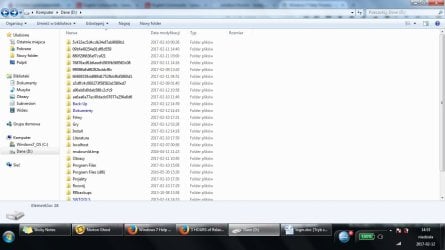
Strange directories appearing on disk D like 5c432ec5d4cdb34ef7ab9089b

Koles

New member
Local time
1:16 AM
Messages
12
Hi !

I am not sure if this question is more related with Windows 7 or Lenovo software or some other software, but my intuition told me to post here. Some stupid process is slowly creating these directories on my disk D and every time I remove them, they are slowly re-created (like ~ few dirs a day). When removing them, Windows asks for confirmation with message like ~ "this folder jest shared with with other users, are you sure you want to delete ?" for each directory, then once "to delete this you must have administrator privilages" and then again that question "shared blabla" for each dir. Strange. Does anybody know which process is creating these stupid directories? I want this to stop from happening, it is just rubbish.

NmnjPnY5ViJOfUZkBSWmNtF3BgSUVH75PMk48j96Txo
 

My Computer My Computer

At a glance

Windows 7 64-bit
Computer type
Laptop
Computer Manufacturer/Model Number
Lenovo ThinkPad T520
OS
Windows 7 64-bit
Antivirus
Eset NOD32
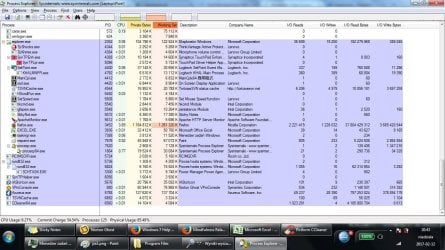
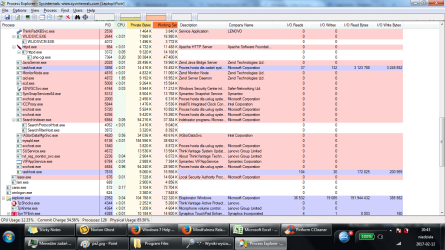
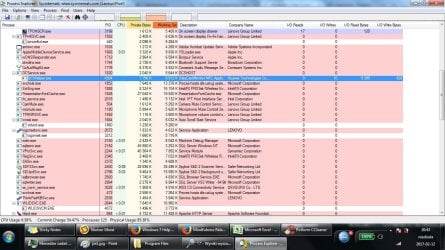
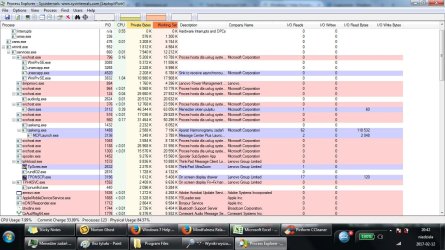
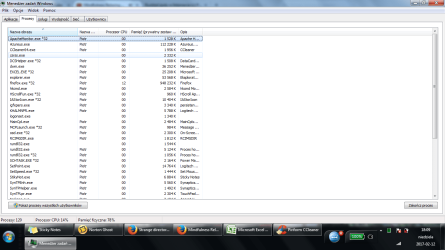
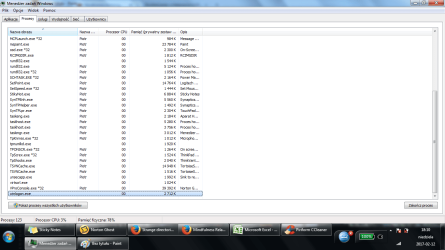
Could you take a screenshot for us of the Task Manager's Process list?
 

My Computer My Computer

At a glance

Windows 10 Pro x64 (UPGRADED - 10/20/2016)AMD FX 8350 (OC: 4.48GHz)14GB DDR3 Corsair VengeanceAsus AMD Radeon R9 280X 3GB
Computer type
PC/Desktop
Computer Manufacturer/Model Number
Custom Built
OS
Windows 10 Pro x64 (UPGRADED - 10/20/2016)
CPU
AMD FX 8350 (OC: 4.48GHz)
Motherboard
ASUS Crosshair V Formula-Z AM3+
Memory
14GB DDR3 Corsair Vengeance
Graphics Card(s)
Asus AMD Radeon R9 280X 3GB
Sound Card
N/A
Monitor(s) Displays
BenQ G2420HD
Screen Resolution
1920x1080
Hard Drives
Internal: 1x 500GB WD Blue SSD | 1TB WD Caviar Black | 3x 500GB WD Caviar Green
External: 500GB Seagate
PSU
Corsair AX1200i
Case
CoolerMaster HAF X
Cooling
Corsair Hydro H90 Water Cooling
Keyboard
Microsoft SideWinder X6 Keyboard
Mouse
Microsoft SideWinder X8 Mouse
Antivirus
MSE / Malwarebytes Anti-Malware
Browser
Mozilla Firefox + Google Chrome
O0m0Ql4I72puYRbhkJRUjNndoBOTrrhTSIEcRlQFxXo


wYfYkxwFr_QduBicoi6_NEYU9skuHNdGOgL34DPblFI
 

My Computer My Computer

At a glance

Windows 7 64-bit
Computer type
Laptop
Computer Manufacturer/Model Number
Lenovo ThinkPad T520
OS
Windows 7 64-bit
Antivirus
Eset NOD32
Hello Koles and Welcome to W7F. Your reply is blank so I'm assuming you don't know how to post a screenshot. So here's a quick pictorial I throw together.

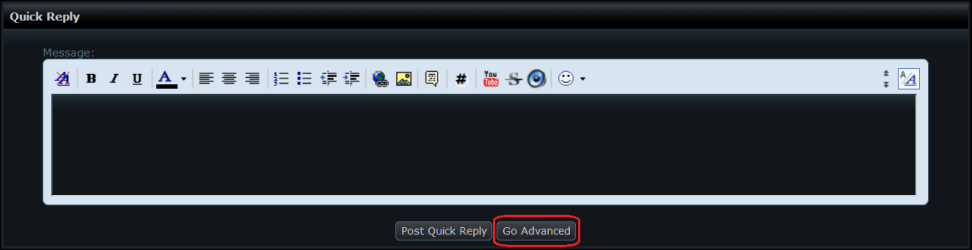
When you start a post, you'll note a button at the bottom called Go Advanced, click it.

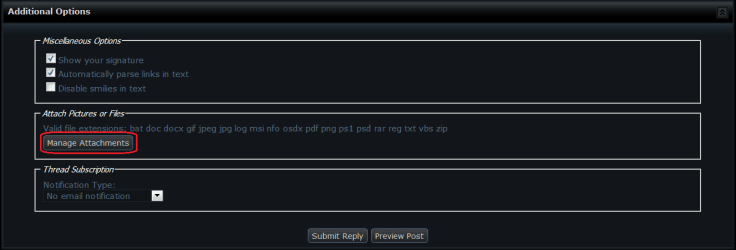
Next scroll down and click Manage Attachments.

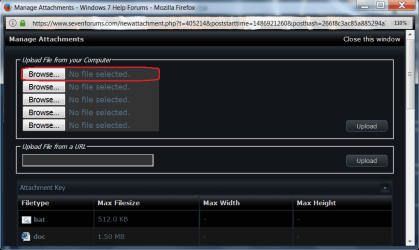
Under Manage Attachments click Browse.

Now Browse to were your screenshot is, select it and click Open.

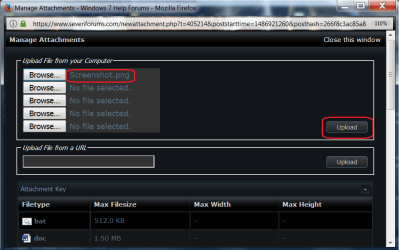
Now you see your screenshot there. Now click upload!

There you go! hope this helps.
 

Attachments

  • Go Advanced.png
    Go Advanced.png
    8.4 KB · Views: 1
  • Manage Attachments.png
    Manage Attachments.png
    12.7 KB · Views: 1
  • Browse.png
    Browse.png
    38.1 KB · Views: 1
  • Select.png
    Select.png
    34.5 KB · Views: 2
  • Upload.png
    Upload.png
    39.7 KB · Views: 1

My Computer My Computer

At a glance

Windows 10 Pro 64 bitAMD FX 9590 8 Core Black EditionCorsair Vengeance 16GB DDR3AMD Radeon (TM) R9 380 Gaming Series
Computer type
PC/Desktop
Computer Manufacturer/Model Number
Custom Built By Me.
OS
Windows 10 Pro 64 bit
CPU
AMD FX 9590 8 Core Black Edition
Motherboard
MSI 990FXA GAMING (MS-7893)
Memory
Corsair Vengeance 16GB DDR3
Graphics Card(s)
AMD Radeon (TM) R9 380 Gaming Series
Sound Card
AMD High Definition
Monitor(s) Displays
Samsung 32" 60Hz 4ms Curved PLS LED
Screen Resolution
1920 X 1080
Hard Drives
C: 223 GB SSD = E: 465 GB HDD = F: 931 GB HDD = G: 149 GB HDD = H: 931 GB HDD
PSU
EVGA Supernova NEX750B 750W ATX EPS12V 80PLUS Bronze
Case
Cool Master
Cooling
Noctua NH-D15 Premium Cooler with 2x NF-A15 PWM 140mm Fan
Internet Speed
Fiber Optic: Download 332.7 Mbps / Upload 331.5 Mbps
Antivirus
Windows Defender
Browser
Slimjet (64bit)
Sorry, screenshots on Dropbox were visible only to me.
Here they are attached.
 

Attachments

  • pe4.jpg
    pe4.jpg
    178.1 KB · Views: 2
  • pe3.png
    pe3.png
    88.8 KB · Views: 3
  • pe2.jpg
    pe2.jpg
    180.2 KB · Views: 3
  • pe1.jpg
    pe1.jpg
    176.2 KB · Views: 11
  • Windows stupid files.jpg
    Windows stupid files.jpg
    90.7 KB · Views: 10
  • task m1.png
    task m1.png
    53.1 KB · Views: 4
  • task m2.png
    task m2.png
    53.2 KB · Views: 2

My Computer My Computer

At a glance

Windows 7 64-bit
Computer type
Laptop
Computer Manufacturer/Model Number
Lenovo ThinkPad T520
OS
Windows 7 64-bit
Antivirus
Eset NOD32
They look like windows update folders to me. Nothing to worry about. Does windows have full control of updates?
 

My Computer My Computer

At a glance

Windows 10 Pro 64 bitAMD FX 9590 8 Core Black EditionCorsair Vengeance 16GB DDR3AMD Radeon (TM) R9 380 Gaming Series
Computer type
PC/Desktop
Computer Manufacturer/Model Number
Custom Built By Me.
OS
Windows 10 Pro 64 bit
CPU
AMD FX 9590 8 Core Black Edition
Motherboard
MSI 990FXA GAMING (MS-7893)
Memory
Corsair Vengeance 16GB DDR3
Graphics Card(s)
AMD Radeon (TM) R9 380 Gaming Series
Sound Card
AMD High Definition
Monitor(s) Displays
Samsung 32" 60Hz 4ms Curved PLS LED
Screen Resolution
1920 X 1080
Hard Drives
C: 223 GB SSD = E: 465 GB HDD = F: 931 GB HDD = G: 149 GB HDD = H: 931 GB HDD
PSU
EVGA Supernova NEX750B 750W ATX EPS12V 80PLUS Bronze
Case
Cool Master
Cooling
Noctua NH-D15 Premium Cooler with 2x NF-A15 PWM 140mm Fan
Internet Speed
Fiber Optic: Download 332.7 Mbps / Upload 331.5 Mbps
Antivirus
Windows Defender
Browser
Slimjet (64bit)
I've got some folders like those you have, this folder is one of them, d7488b49c283e49d865f59ff5cdbbc74, after taking a look inside one of the files it looks like they are the security patches I've been installing.

this file "Windows6.1-KB3192391-x64-pkgProperties" contains the following text

ApplicabilityInfo="Windows 7.0 Client SP1;Windows 7.0 Server Core SP1;Windows 7.0 Embedded SP1;Windows 7.0 Server SP1;Windows 7.0 WinPE 3.1;"
Applies to="Windows 6.1"
Build Date="2016/10/06"
Company="Microsoft Corporation"
File Version="1"
Installation Type="FULL"
Installer Engine="Component Based Servicing - WUSA.exe"
Installer Version="6.0.0.0"
KB Article Number="3192391"
Language="ALL"
Package Type="Security Update"
Processor Architecture="amd64"
Product Name="Windows 6.1"
Support Link="http://support.microsoft.com?kbid=3192391"
 

My Computer My Computer

At a glance

Microsoft Windows 7 Professional 64-bit SP1Intel(R) Core(TM) i7-4790K CPU @ 4.00GHz8 GBNVIDIA GeForce GTX 970
Computer type
PC/Desktop
Computer Manufacturer/Model Number
(custom shop build)
OS
Microsoft Windows 7 Professional 64-bit SP1
CPU
Intel(R) Core(TM) i7-4790K CPU @ 4.00GHz
Motherboard
Gigabyte Z97X-SLI
Memory
8 GB
Graphics Card(s)
NVIDIA GeForce GTX 970
Sound Card
Realtek High Definition Audio
Monitor(s) Displays
Dell 2007FP
Screen Resolution
1600 1200 (native)
Hard Drives
(1)Crucial M500 480GB SATA 6Gbps 2.5"
(2)Crucial M500 480GB SATA 6Gbps 2.5"
PSU
EVGA 1000W
Case
Antec
Cooling
CoolerMaster
Keyboard
Logitech
Mouse
Logitech
Antivirus
Microsoft Security Essentials
Browser
Internet Explorer 11
These folders are always empty. Second I remember this was not always the case there were created all over my disk D. Anyway this is littering my partition, I want to stop this nonsence from happening. How can I do this ?
 

My Computer My Computer

At a glance

Windows 7 64-bit
Computer type
Laptop
Computer Manufacturer/Model Number
Lenovo ThinkPad T520
OS
Windows 7 64-bit
Antivirus
Eset NOD32
As mentioned by Lance, these folders were created by Win update as temporary folders.
If they are empty, it's safe to delete them.
Do a cleanup with %windir%\system32\cleanmgr.exe and select all option.
 

My Computers My Computers

  • At a glance

    Windows 7 HP 64i5 6600K - 800MHz to 4200MHz4+4G GSkill DDR4 3000IG - Intel 530
    Computer type
    PC/Desktop
    Computer Manufacturer/Model Number
    custom build
    OS
    Windows 7 HP 64
    CPU
    i5 6600K - 800MHz to 4200MHz
    Motherboard
    GA-Z170-HD3P
    Memory
    4+4G GSkill DDR4 3000
    Graphics Card(s)
    IG - Intel 530
    Monitor(s) Displays
    Samsung 226BW
    Screen Resolution
    1680x1050
    Hard Drives
    (1) -1 SM951 – 128GB M.2 AHCI PCIe SSD drive for Windows 7 and Lubuntu
    (2) -1 WD SATA 3 - 1T for Data
    (3) -1 WD SATA 3 - 1T for backup
    PSU
    Thermaltake 450W TR2 gold
    Keyboard
    Old and good Chicony mechanical keyboard
    Mouse
    Logitech mX performance - 9 buttons (had to disable some)
    Internet Speed
    500Mb/s
    Browser
    Firefox 64
    Other Info
    TinyWall firewall
  • At a glance

    Windows 7 Proi7-4500U 800MHz to 3.0GHz(4+4)G DDR3 1600IG intel 4400 + NVIDIA GeForce GT 745M
    Computer type
    Laptop
    System Manufacturer/Model Number
    Asus Q550LF
    OS
    Windows 7 Pro
    CPU
    i7-4500U 800MHz to 3.0GHz
    Motherboard
    Asus Q550LF
    Memory
    (4+4)G DDR3 1600
    Graphics Card(s)
    IG intel 4400 + NVIDIA GeForce GT 745M
    Sound Card
    Realtek
    Monitor(s) Displays
    LG Display LP156WF4-SPH1
    Screen Resolution
    1920 x 1080
    Hard Drives
    BX500 120G SSD for Windows and programs +
    1T HDD for data
    Internet Speed
    500 Mb/s
    Browser
    Firefox
    Other Info
    TinyWall firewall
I know this. My question was HOW CAN I STOP COMPUTER FROM RE-CREATING THESE DIRECTORIES ALL OVER AGAIN ? Thanks...
 

My Computer My Computer

At a glance

Windows 7 64-bit
Computer type
Laptop
Computer Manufacturer/Model Number
Lenovo ThinkPad T520
OS
Windows 7 64-bit
Antivirus
Eset NOD32
I know this. My question was HOW CAN I STOP COMPUTER FROM RE-CREATING THESE DIRECTORIES ALL OVER AGAIN ? Thanks...

Disable updates
 

My Computers My Computers

  • At a glance

    Windows 7 HP 64i5 6600K - 800MHz to 4200MHz4+4G GSkill DDR4 3000IG - Intel 530
    Computer type
    PC/Desktop
    Computer Manufacturer/Model Number
    custom build
    OS
    Windows 7 HP 64
    CPU
    i5 6600K - 800MHz to 4200MHz
    Motherboard
    GA-Z170-HD3P
    Memory
    4+4G GSkill DDR4 3000
    Graphics Card(s)
    IG - Intel 530
    Monitor(s) Displays
    Samsung 226BW
    Screen Resolution
    1680x1050
    Hard Drives
    (1) -1 SM951 – 128GB M.2 AHCI PCIe SSD drive for Windows 7 and Lubuntu
    (2) -1 WD SATA 3 - 1T for Data
    (3) -1 WD SATA 3 - 1T for backup
    PSU
    Thermaltake 450W TR2 gold
    Keyboard
    Old and good Chicony mechanical keyboard
    Mouse
    Logitech mX performance - 9 buttons (had to disable some)
    Internet Speed
    500Mb/s
    Browser
    Firefox 64
    Other Info
    TinyWall firewall
  • At a glance

    Windows 7 Proi7-4500U 800MHz to 3.0GHz(4+4)G DDR3 1600IG intel 4400 + NVIDIA GeForce GT 745M
    Computer type
    Laptop
    System Manufacturer/Model Number
    Asus Q550LF
    OS
    Windows 7 Pro
    CPU
    i7-4500U 800MHz to 3.0GHz
    Motherboard
    Asus Q550LF
    Memory
    (4+4)G DDR3 1600
    Graphics Card(s)
    IG intel 4400 + NVIDIA GeForce GT 745M
    Sound Card
    Realtek
    Monitor(s) Displays
    LG Display LP156WF4-SPH1
    Screen Resolution
    1920 x 1080
    Hard Drives
    BX500 120G SSD for Windows and programs +
    1T HDD for data
    Internet Speed
    500 Mb/s
    Browser
    Firefox
    Other Info
    TinyWall firewall
So, noone knows how to stop these nonsence directories to show up ?
 

My Computer My Computer

At a glance

Windows 7 64-bit
Computer type
Laptop
Computer Manufacturer/Model Number
Lenovo ThinkPad T520
OS
Windows 7 64-bit
Antivirus
Eset NOD32
As mentioned by Lance, these folders were created by Win update as temporary folders.
If they are empty, it's safe to delete them.
Do a cleanup with %windir%\system32\cleanmgr.exe and select all option.

This didn't help. Beside it is not about deleting them, but stopping them from being re-created.
 

My Computer My Computer

At a glance

Windows 7 64-bit
Computer type
Laptop
Computer Manufacturer/Model Number
Lenovo ThinkPad T520
OS
Windows 7 64-bit
Antivirus
Eset NOD32
Disable updates

First - are you sure that Windows automatic updates are causing this ?
Second, I don't want to disable Windows updates, I want to keep my Windows up to date. Also I remember that few years ago these stupid folders didn't show up. Why? I am really not sure it is about Windows updates. And why do they show up to partition D, not C?
 

My Computer My Computer

At a glance

Windows 7 64-bit
Computer type
Laptop
Computer Manufacturer/Model Number
Lenovo ThinkPad T520
OS
Windows 7 64-bit
Antivirus
Eset NOD32
That's a valid point. Update folders are created on the C:\ Root. You say that they are empty. When you right click properties on one of the folders does it's size come up as 0? Have you run malware scans on your system?
 

My Computer My Computer

At a glance

Windows 10 Pro 64 bitAMD FX 9590 8 Core Black EditionCorsair Vengeance 16GB DDR3AMD Radeon (TM) R9 380 Gaming Series
Computer type
PC/Desktop
Computer Manufacturer/Model Number
Custom Built By Me.
OS
Windows 10 Pro 64 bit
CPU
AMD FX 9590 8 Core Black Edition
Motherboard
MSI 990FXA GAMING (MS-7893)
Memory
Corsair Vengeance 16GB DDR3
Graphics Card(s)
AMD Radeon (TM) R9 380 Gaming Series
Sound Card
AMD High Definition
Monitor(s) Displays
Samsung 32" 60Hz 4ms Curved PLS LED
Screen Resolution
1920 X 1080
Hard Drives
C: 223 GB SSD = E: 465 GB HDD = F: 931 GB HDD = G: 149 GB HDD = H: 931 GB HDD
PSU
EVGA Supernova NEX750B 750W ATX EPS12V 80PLUS Bronze
Case
Cool Master
Cooling
Noctua NH-D15 Premium Cooler with 2x NF-A15 PWM 140mm Fan
Internet Speed
Fiber Optic: Download 332.7 Mbps / Upload 331.5 Mbps
Antivirus
Windows Defender
Browser
Slimjet (64bit)
Those folders can show up on any partition (not limited to C).

In my case, they used appear on the partition that has the most free space available.
I have seen them on a completely different HDD (to the one that has the OS on it).

I haven't noticed any of the weird update folders, since I started using the Security-Only updates.
 

My Computer My Computer

At a glance

W7 Ultimate SP1, LM19.2 MATE, W10 Home 1703, ...AMD Phenom II x6 1100T, 3.3 GHz12GB DDR3 1333 G-Skill (4GB x 2), G-Skill (2G...NVIDIA GeForce GTX 660
Computer type
PC/Desktop
Computer Manufacturer/Model Number
n/a
OS
W7 Ultimate SP1, LM19.2 MATE, W10 Home 1703, W10 Pro 1703 VM, #All 64 bit
CPU
AMD Phenom II x6 1100T, 3.3 GHz
Motherboard
ASUS M4A88T-M/USB3 (AM3)
Memory
12GB DDR3 1333 G-Skill (4GB x 2), G-Skill (2GB x 2)
Graphics Card(s)
NVIDIA GeForce GTX 660
Sound Card
Realtek?
Monitor(s) Displays
Samsung S23B350
Screen Resolution
1920x1080
Hard Drives
WD Green 2TB (SATA), WD Green 3TB (SATA), WD Blue 4TB (SATA), WD Blue 6TB (SATA)
PSU
Cooler Master
Case
Antec GX300 Tower
Cooling
3x Antec TRICOOL 120mm Fans
Mouse
Wired Optical
Internet Speed
DSL
Antivirus
Avast
Browser
Pale Moon (64 bit)
Other Info
2018-12-27 Upgraded HDDs
2015-12-10 Upgraded case, graphics card, storage
2015-08-15 Upgraded motherboard & RAM
2015-07-15 Upgraded LM17.1 to LM17.2
Those folders can show up on any partition (not limited to C).

In my case, they used appear on the partition that has the most free space available.
I have seen them on a completely different HDD (to the one that has the OS on it).

I haven't noticed any of the weird update folders, since I started using the Security-Only updates.

Check this post:

Manual Win Update folder remnants - safe to delete?

If ROOTDRIVE is not set at a command line or authored into the Property table, the installer sets this property. During an administrative installation the installer sets ROOTDRIVE to the first connected network drive it finds that can be written to. If it is not an administrative installation, or if the installer can find no network drives, the installer sets ROOTDRIVE to the local drive that can be written to having the most free space.

Make sure you have the most free space on windows partition compared with free space on other partitions.
Make sure that there are no failed updates.
Run advanced disk cleanup to include windows update cleanup.
When installing windows updates make sure that you temporarily disable any security software that could interfere with the update process.
 

My Computer My Computer

At a glance

Microsoft Windows 7 Home Premium 64-bit 7601 ...AMD C-60 APU with Radeon(tm) HD Graphics4.00 GBAMD Radeon HD 6290 Graphics
Computer type
Laptop
Computer Manufacturer/Model Number
ASUS
OS
Microsoft Windows 7 Home Premium 64-bit 7601 Multiprocessor Free Service Pack 1
CPU
AMD C-60 APU with Radeon(tm) HD Graphics
Motherboard
ASUSTeK COMPUTER INC. X501U
Memory
4.00 GB
Graphics Card(s)
AMD Radeon HD 6290 Graphics
Sound Card
(1) AMD High Definition Audio Device (2) Realtek High Defi
Screen Resolution
1366 x 768 x 32 bits (4294967296 colors) @ 60 Hz
Hard Drives
Hitachi HTS545050A7E380 SATA Disk Device
Antivirus
Comodo CIS & FW, SecureAplus App Whitelisting, Threatfire
Browser
Cyberfox 64bit, Opera 64bit, Airfox
Other Info
Spy-The-Spy, HitmanPro.Alert, Norton Connect Safe, MJRegWatcher, BitDefender TrafficLight, Voodoo Shield, Zemana AntiMalware
Still I don't see any clear solution how to stop this crap from appearing all over again. Which idiot in Microsoft implemented this mechanism? I'm going to shoot him o.O I've been Googling for ROOTDRIVE info, but still I don't know what to do with it and even where to found it... in the last resort I want these folders to appear on C: instead, but no, this is not a drive that has most free space and it will NOT be.
 

My Computer My Computer

At a glance

Windows 7 64-bit
Computer type
Laptop
Computer Manufacturer/Model Number
Lenovo ThinkPad T520
OS
Windows 7 64-bit
Antivirus
Eset NOD32
I want these folders to appear on C: instead, but no, this is not a drive that has most free space and it will NOT be.

Your choices appear to be: Dismount those other drives or partitions when downloading and installing windows updates (not sure if this works) or create more free space on your windows partition than exists on other partitions.

ROOTDRIVE is set by the msi msu installer and as far as I know you cannot change this.

There is a discussion here:

Microsoft Updates And External Drives

In my opinion you should just manually delete those folders once the updates have installed.
 
Last edited:

My Computer My Computer

At a glance

Microsoft Windows 7 Home Premium 64-bit 7601 ...AMD C-60 APU with Radeon(tm) HD Graphics4.00 GBAMD Radeon HD 6290 Graphics
Computer type
Laptop
Computer Manufacturer/Model Number
ASUS
OS
Microsoft Windows 7 Home Premium 64-bit 7601 Multiprocessor Free Service Pack 1
CPU
AMD C-60 APU with Radeon(tm) HD Graphics
Motherboard
ASUSTeK COMPUTER INC. X501U
Memory
4.00 GB
Graphics Card(s)
AMD Radeon HD 6290 Graphics
Sound Card
(1) AMD High Definition Audio Device (2) Realtek High Defi
Screen Resolution
1366 x 768 x 32 bits (4294967296 colors) @ 60 Hz
Hard Drives
Hitachi HTS545050A7E380 SATA Disk Device
Antivirus
Comodo CIS & FW, SecureAplus App Whitelisting, Threatfire
Browser
Cyberfox 64bit, Opera 64bit, Airfox
Other Info
Spy-The-Spy, HitmanPro.Alert, Norton Connect Safe, MJRegWatcher, BitDefender TrafficLight, Voodoo Shield, Zemana AntiMalware
Back
Top