Strange problem with explorer windows

MarcusofaDown

New member
Local time
4:22 PM
Messages
4
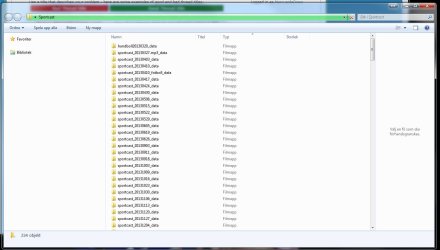
Ok, so this one is kinda hard to describe (at that is why I'm including a screenshot)...

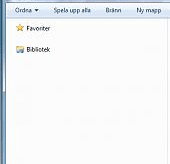
My windows 7 machine at work keeps "losing" access to both local and virtual drives on my computer. Or rather, the explorer windows do. It works fine for a couple of hours, but then when I open a new window, it looks like the provided screenshot.

What's even weirder is that this never happens within a program. If I, for instance, want to attach a file with Outlook, I can browse through folders with no problems. All my local drives and all of my network drives can be seen and accessed as usual. But if I open a new explorer window, or say double-click on a folder on my desktop, the drives can't been seen or accessed.

We've tried changing motherboard, network card and switching installs to another computer at work that runs fine. But nothing helps. Any ideas here? Thanks in advance!
 

Attachments
  • screen.jpg
    screen.jpg
    95.3 KB · Views: 20

My Computer

Computer type
PC/Desktop
OS
Sverige
Bump on this one. Is there anyone out there that has any idea what this is?
 

My Computer

Computer type
PC/Desktop
OS
Sverige
Hi Marcus,

At first I thought "That explorer window looks ok" but then I saw that the navigation pane did not present the computer or network information - just an empty field below Libaries (Bibliotek)
screen.png

Try right clicking on the empty area and select "Show all folders"

There might be something in the Tutorials section, but that's all I can think of at the moment.
 

My Computer

Computer type
Laptop
Computer Manufacturer/Model Number
HP Pavilion dv6-6c10us
OS
x64 (6.3.9600) Win8.1 Pro & soon dual boot x64 (6.1.7601) Win7_SP1 HomePrem
CPU
AMD A6-3420M APU with Radeon(tm) HD Graphics
Motherboard
Hewlett-Packard 1805
Memory
6.00 GB
Graphics Card(s)
AMD Radeon(TM) HD 6520G
Sound Card
(1) AMD High Definition Audio Device (2) IDT High Definiti
Monitor(s) Displays
HP W2072a 20" LCD (1600 x 900) @ 60 Hz
Screen Resolution
1366 x 768 x 32 bits (4294967296 colors) @ 60 Hz
Hard Drives
ST640LM0 00 HM641JI SATA Disk Device
Keyboard
Logitech k520 wireless KB
Mouse
Logitech m320 wireless mouse (bundled with KB)
Internet Speed
15/5 | 54 MB Wireless 'n'
Antivirus
Realtime: Defender or Avast | On-demand: Malwarebytes, ESET
Browser
IE 11 on Win8, IE 10 on win 7
Other Info
Media: [Gimp, Audacity, VLC] || Comm: [WEmail 2012, Skype] || Productivity: [OpenOffice,| Textpad] || Utils: [Sysinternals, cCleaner, Speccy, Defraggler]
Hi, and thanks for helping out :)

I actually tried "show all folders" now that you mentioned it, and it sort of worked out. Kind of :) I can at least navigate now, as opposed to earlier. Show all folders made it so that I could start navigate from where that folder was located, and that way I could access the rest of the folders, even if I had to click around a bit.

So thanks, at least it works a thousand times better than before :)
 

My Computer

Computer type
PC/Desktop
OS
Sverige
I'm glad it helped a bit. "Show all folders" changes the way objects are listed in the navigation pane.
"Expand to current folder" grows the folder list and highlights the folder you're working.

It sounds, by your description, as though "Expand to current folder" is in effect. Could you post a screen shot showing the navigation pane as it is working now?

This doesn't sound like Explorer is behaving as it should. I'll look in the tutorial section for another thing you could try.
In the meantime, you might want to run a troubleshooter:
Diagnose and repair Windows File and Folder Problems automatically

Found a few tutorials that might help: http://www.sevenforums.com/tutorials/39685-computer-add-remove-navigation-pane.html
Steps 1 through 9 (add computer to navigation pane), plus step 11 if your machine is 64 bit.

There are also related tutorials for other objects (home group, network, control panel...) in the navigation pane at the bottom of the first post. See if these help.
 

My Computer

Computer type
Laptop
Computer Manufacturer/Model Number
HP Pavilion dv6-6c10us
OS
x64 (6.3.9600) Win8.1 Pro & soon dual boot x64 (6.1.7601) Win7_SP1 HomePrem
CPU
AMD A6-3420M APU with Radeon(tm) HD Graphics
Motherboard
Hewlett-Packard 1805
Memory
6.00 GB
Graphics Card(s)
AMD Radeon(TM) HD 6520G
Sound Card
(1) AMD High Definition Audio Device (2) IDT High Definiti
Monitor(s) Displays
HP W2072a 20" LCD (1600 x 900) @ 60 Hz
Screen Resolution
1366 x 768 x 32 bits (4294967296 colors) @ 60 Hz
Hard Drives
ST640LM0 00 HM641JI SATA Disk Device
Keyboard
Logitech k520 wireless KB
Mouse
Logitech m320 wireless mouse (bundled with KB)
Internet Speed
15/5 | 54 MB Wireless 'n'
Antivirus
Realtime: Defender or Avast | On-demand: Malwarebytes, ESET
Browser
IE 11 on Win8, IE 10 on win 7
Other Info
Media: [Gimp, Audacity, VLC] || Comm: [WEmail 2012, Skype] || Productivity: [OpenOffice,| Textpad] || Utils: [Sysinternals, cCleaner, Speccy, Defraggler]
I'm sorry for the late reply, been out of the office for a few days.

For some weird reason, it mostly works fine now after having done what you suggested (fingers crossed, obviously). I'll keep poking at it and if I come across this weird thing again (it's been this way for at least six months), I'll let you know.

Thank you SO much for the help, it's been driving me nuts at times :)
 

My Computer

Computer type
PC/Desktop
OS
Sverige
Back
Top