
You are using an out of date browser. It may not display this or other websites correctly.
You should upgrade or use an alternative browser.
You should upgrade or use an alternative browser.
svchost.exe takes all cpu power from time to time
- Thread starter unko
- Start date

Well some users report that installing a particular version of Windows Update Client fixes the issue for them. However the version required varies.
Personally I found that although installing a particular version of Windows Update Client improved things (less RAM usage) it still wasn't a complete fix.
The solution for me was to fully remove Windows Updates including various files and folders along with resetting IE and fully removing and reinstalling .NET Framework. Then force install Windows Update Client. The fix is very long and complicated and may not even work the first time around. It could take several attempts.
I'm not confident that I could guide you through the fix.
RE: Your issue - the same as in Post #10 of this thread
There is something you can try although I have not ever tried this myself.
Start> Run
then type services.msc
in the window that opens scroll down to Windows Update Service and stop it.
Run an Elevated Command Prompt
Start - All Programs - Accessories - Right click Command Prompt and choose Run As Administrator.
If Windows is installed on drive C type:
esentutl.exe /k c:\Windows\SoftwareDistribution\DataStore\DataStore.edb
This will check integrity.
For help type esentutl.exe /?

You can attempt to defragment and repair DataStore.edb. If problems were detected do a recovery followed by a repair.
Recovery
esentutl.exe /r c:\Windows\SoftwareDistribution\DataStore\DataStore.edb
Repair
esentutl.exe /p c:\Windows\SoftwareDistribution\DataStore\DataStore.edb
Personally I found that although installing a particular version of Windows Update Client improved things (less RAM usage) it still wasn't a complete fix.
The solution for me was to fully remove Windows Updates including various files and folders along with resetting IE and fully removing and reinstalling .NET Framework. Then force install Windows Update Client. The fix is very long and complicated and may not even work the first time around. It could take several attempts.
I'm not confident that I could guide you through the fix.
RE: Your issue - the same as in Post #10 of this thread
There is something you can try although I have not ever tried this myself.
Start> Run
then type services.msc
in the window that opens scroll down to Windows Update Service and stop it.
Run an Elevated Command Prompt
Start - All Programs - Accessories - Right click Command Prompt and choose Run As Administrator.
If Windows is installed on drive C type:
esentutl.exe /k c:\Windows\SoftwareDistribution\DataStore\DataStore.edb
This will check integrity.
For help type esentutl.exe /?
You can attempt to defragment and repair DataStore.edb. If problems were detected do a recovery followed by a repair.
Recovery
esentutl.exe /r c:\Windows\SoftwareDistribution\DataStore\DataStore.edb
Repair
esentutl.exe /p c:\Windows\SoftwareDistribution\DataStore\DataStore.edb
My Computer
At a glance
Microsoft Windows 7 Home Premium 64-bit 7601 ...AMD C-60 APU with Radeon(tm) HD Graphics4.00 GBAMD Radeon HD 6290 Graphics
- Computer type
- Laptop
- Computer Manufacturer/Model Number
- ASUS
- OS
- Microsoft Windows 7 Home Premium 64-bit 7601 Multiprocessor Free Service Pack 1
- CPU
- AMD C-60 APU with Radeon(tm) HD Graphics
- Motherboard
- ASUSTeK COMPUTER INC. X501U
- Memory
- 4.00 GB
- Graphics Card(s)
- AMD Radeon HD 6290 Graphics
- Sound Card
- (1) AMD High Definition Audio Device (2) Realtek High Defi
- Screen Resolution
- 1366 x 768 x 32 bits (4294967296 colors) @ 60 Hz
- Hard Drives
- Hitachi HTS545050A7E380 SATA Disk Device
- Antivirus
- Comodo CIS & FW, SecureAplus App Whitelisting, Threatfire
- Browser
- Cyberfox 64bit, Opera 64bit, Airfox
- Other Info
- Spy-The-Spy, HitmanPro.Alert, Norton Connect Safe, MJRegWatcher, BitDefender TrafficLight, Voodoo Shield, Zemana AntiMalware
I'm back here cause i still have that issue after fresh install of windows 7 x64 on different pc, and multiple times (different ISO, which are the basic system with all updates pre-installed, one from 12/15, other one from 06/15); the issue seems actually worse now :/ I just tried "esentutl.exe /k c:\Windows\SoftwareDistribution\DataStore\DataStore.edb" but i get "Jet error -1032" AccessDenied..?!
PS: Off topic but do you have a link for a tools that'll scan for all known keyloggers? That'd be great.. Thanks!
PS: Off topic but do you have a link for a tools that'll scan for all known keyloggers? That'd be great.. Thanks!
My Computer
At a glance
Win7x64
- Computer type
- PC/Desktop
- OS
- Win7x64
I don't know much about problems with Windows Update after a fresh install. I heard that users resort to a fresh install in order to resolve Windows Update RAM usage issues only to experience the same problem.
Take a look at Usernameissues' post here:
http://www.sevenforums.com/windows-...ws-update-client-post3224052.html#post3224052
Let's see which Windows Update Client you've got:
From an Elevated Command Prompt - type Powershell then press enter and wait for the prompt to appear.
Then type (or copy and paste if you know how to enable quick edit mode in command prompt)
Press Enter. It should list what's installed.
Take a look at Usernameissues' post here:
http://www.sevenforums.com/windows-...ws-update-client-post3224052.html#post3224052
Let's see which Windows Update Client you've got:
From an Elevated Command Prompt - type Powershell then press enter and wait for the prompt to appear.
Then type (or copy and paste if you know how to enable quick edit mode in command prompt)
Code:
get-hotfix -id KB 2990214,KB305026,KB3065987,KB3075851,KB 3083324,KB3083710,KB3102810,KB3112343,KB3135445,KB3138612Press Enter. It should list what's installed.
My Computer
At a glance
Microsoft Windows 7 Home Premium 64-bit 7601 ...AMD C-60 APU with Radeon(tm) HD Graphics4.00 GBAMD Radeon HD 6290 Graphics
- Computer type
- Laptop
- Computer Manufacturer/Model Number
- ASUS
- OS
- Microsoft Windows 7 Home Premium 64-bit 7601 Multiprocessor Free Service Pack 1
- CPU
- AMD C-60 APU with Radeon(tm) HD Graphics
- Motherboard
- ASUSTeK COMPUTER INC. X501U
- Memory
- 4.00 GB
- Graphics Card(s)
- AMD Radeon HD 6290 Graphics
- Sound Card
- (1) AMD High Definition Audio Device (2) Realtek High Defi
- Screen Resolution
- 1366 x 768 x 32 bits (4294967296 colors) @ 60 Hz
- Hard Drives
- Hitachi HTS545050A7E380 SATA Disk Device
- Antivirus
- Comodo CIS & FW, SecureAplus App Whitelisting, Threatfire
- Browser
- Cyberfox 64bit, Opera 64bit, Airfox
- Other Info
- Spy-The-Spy, HitmanPro.Alert, Norton Connect Safe, MJRegWatcher, BitDefender TrafficLight, Voodoo Shield, Zemana AntiMalware
PS: Off topic but do you have a link for a tools that'll scan for all known keyloggers? That'd be great.. Thanks!
The one I use is PowerTool:
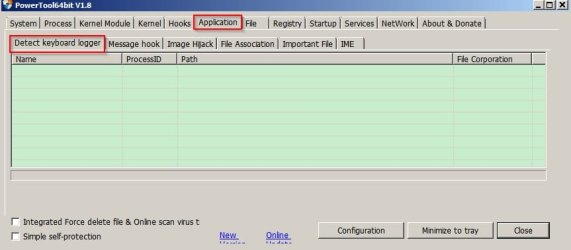
However it is pretty advanced and if used incorrectly will screw up your system.
I'd suggest a scan with Zemana AntiMalware free:
https://www.zemana.com/AntiMalwareFree
Or Malwarebytes free:
https://www.malwarebytes.org/antimalware/
When Malwarebytes installs it will ask you if you want to update to the free pro trial, update definitions and launch the program. Don't select the Pro trial - just select to update the definitions and launch the program.
Note: I do not currently use Malwarebytes but many other forum members do use it.
My Computer
At a glance
Microsoft Windows 7 Home Premium 64-bit 7601 ...AMD C-60 APU with Radeon(tm) HD Graphics4.00 GBAMD Radeon HD 6290 Graphics
- Computer type
- Laptop
- Computer Manufacturer/Model Number
- ASUS
- OS
- Microsoft Windows 7 Home Premium 64-bit 7601 Multiprocessor Free Service Pack 1
- CPU
- AMD C-60 APU with Radeon(tm) HD Graphics
- Motherboard
- ASUSTeK COMPUTER INC. X501U
- Memory
- 4.00 GB
- Graphics Card(s)
- AMD Radeon HD 6290 Graphics
- Sound Card
- (1) AMD High Definition Audio Device (2) Realtek High Defi
- Screen Resolution
- 1366 x 768 x 32 bits (4294967296 colors) @ 60 Hz
- Hard Drives
- Hitachi HTS545050A7E380 SATA Disk Device
- Antivirus
- Comodo CIS & FW, SecureAplus App Whitelisting, Threatfire
- Browser
- Cyberfox 64bit, Opera 64bit, Airfox
- Other Info
- Spy-The-Spy, HitmanPro.Alert, Norton Connect Safe, MJRegWatcher, BitDefender TrafficLight, Voodoo Shield, Zemana AntiMalware
Code:
30978 pages seen
0 bad checksums
0 correctable checksums
206 uninitialized pages
0 wrong page numbers
0x553a9 highest dbtime (pgno 0x6ca4)

15489 reads performed
968 MB read
3 seconds taken
322 MB/second
3603785 milliseconds used
232 milliseconds per read
562 milliseconds for the slowest read
0 milliseconds for the fastest read
Here's the integrity check you asked for above.
Powershell gives me a red error text when i try what you said.
PS: I'm not sure why you're so sure it's WUpdate causing this issue..
My Computer
At a glance
Win7x64
- Computer type
- PC/Desktop
- OS
- Win7x64
Code:30978 pages seen 0 bad checksums 0 correctable checksums 206 uninitialized pages 0 wrong page numbers 0x553a9 highest dbtime (pgno 0x6ca4) 15489 reads performed 968 MB read 3 seconds taken 322 MB/second 3603785 milliseconds used 232 milliseconds per read 562 milliseconds for the slowest read 0 milliseconds for the fastest read
Thanks - nothing wrong with that.
Powershell gives me a red error text when i try what you said.
Sorry but I mistakenly left extra spaces in the command line. Here is the corrected one:
Code:
get-hotfix -id KB2990214,KB305026,KB3065987,KB3075851,KB3083324,KB3083710,KB3102810,KB3112343,KB3135445,KB3138612PS: I'm not sure why you're so sure it's WUpdate causing this issue..
Well you confirmed that Windows Update was the issue here:
I had the same problem. For me it was a problem with windows updates check reading datastore.edb
Then note RAM usage by datastore.edb during an update check after fixing:
The fix is not easy.
Ok so i can confirm i have the same issue. You couldn't fix it?
You can disable Windows Update service via services.msc then reboot and test for a day to see if RAM usage becomes normal. If it doesn't - then it's not a Windows Update issue.
My Computer
At a glance
Microsoft Windows 7 Home Premium 64-bit 7601 ...AMD C-60 APU with Radeon(tm) HD Graphics4.00 GBAMD Radeon HD 6290 Graphics
- Computer type
- Laptop
- Computer Manufacturer/Model Number
- ASUS
- OS
- Microsoft Windows 7 Home Premium 64-bit 7601 Multiprocessor Free Service Pack 1
- CPU
- AMD C-60 APU with Radeon(tm) HD Graphics
- Motherboard
- ASUSTeK COMPUTER INC. X501U
- Memory
- 4.00 GB
- Graphics Card(s)
- AMD Radeon HD 6290 Graphics
- Sound Card
- (1) AMD High Definition Audio Device (2) Realtek High Defi
- Screen Resolution
- 1366 x 768 x 32 bits (4294967296 colors) @ 60 Hz
- Hard Drives
- Hitachi HTS545050A7E380 SATA Disk Device
- Antivirus
- Comodo CIS & FW, SecureAplus App Whitelisting, Threatfire
- Browser
- Cyberfox 64bit, Opera 64bit, Airfox
- Other Info
- Spy-The-Spy, HitmanPro.Alert, Norton Connect Safe, MJRegWatcher, BitDefender TrafficLight, Voodoo Shield, Zemana AntiMalware
Fine, I'll try. So the service is active and running even when updates are not being installed/downloaded/seeked? Seems so?
Yes and if you set Windows Update service to disabled and reboot you can test for a day or two to see if it Windows Updates the culprit.
Start> Run
type services.msc
Press Enter.
Right click Windows Update Service > Properties> Startup Type> Disabled. Reboot.
My Computer
At a glance
Microsoft Windows 7 Home Premium 64-bit 7601 ...AMD C-60 APU with Radeon(tm) HD Graphics4.00 GBAMD Radeon HD 6290 Graphics
- Computer type
- Laptop
- Computer Manufacturer/Model Number
- ASUS
- OS
- Microsoft Windows 7 Home Premium 64-bit 7601 Multiprocessor Free Service Pack 1
- CPU
- AMD C-60 APU with Radeon(tm) HD Graphics
- Motherboard
- ASUSTeK COMPUTER INC. X501U
- Memory
- 4.00 GB
- Graphics Card(s)
- AMD Radeon HD 6290 Graphics
- Sound Card
- (1) AMD High Definition Audio Device (2) Realtek High Defi
- Screen Resolution
- 1366 x 768 x 32 bits (4294967296 colors) @ 60 Hz
- Hard Drives
- Hitachi HTS545050A7E380 SATA Disk Device
- Antivirus
- Comodo CIS & FW, SecureAplus App Whitelisting, Threatfire
- Browser
- Cyberfox 64bit, Opera 64bit, Airfox
- Other Info
- Spy-The-Spy, HitmanPro.Alert, Norton Connect Safe, MJRegWatcher, BitDefender TrafficLight, Voodoo Shield, Zemana AntiMalware
PS C:\Users\Admin> get-hotfix -id KB2990214,KB305026,KB3065987,KB3075851,KB3083324,KB3083710,KB3102810,KB3112343,KB31354
45,KB3138612
Source Description HotFixID InstalledBy InstalledOn
------ ----------- -------- ----------- -----------
PC-TPW Update KB2990214 AUTORITE NT\Système
PC-TPW Update KB3112343 PC-TPW\Admin
PC-TPW Update KB3138612 PC-TPW\Admin
45,KB3138612
Source Description HotFixID InstalledBy InstalledOn
------ ----------- -------- ----------- -----------
PC-TPW Update KB2990214 AUTORITE NT\Système
PC-TPW Update KB3112343 PC-TPW\Admin
PC-TPW Update KB3138612 PC-TPW\Admin
My Computer
At a glance
Win7x64
- Computer type
- PC/Desktop
- OS
- Win7x64
Okay so you've got the latest version of Windows Update Client installed. Do you also have .NET Framework 4.6.1 installed?
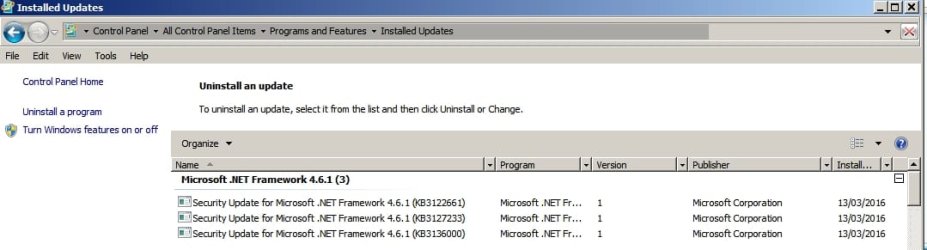
Control Panel> Windows Updates> View Update History> Installed Updates
Also - have you actually run RAMMap again to check what's actually using RAM?
In RAMMap - go to "File Summary" tab and click the "Active" column to sort by highest usage.
Control Panel> Windows Updates> View Update History> Installed Updates
Also - have you actually run RAMMap again to check what's actually using RAM?
In RAMMap - go to "File Summary" tab and click the "Active" column to sort by highest usage.
My Computer
At a glance
Microsoft Windows 7 Home Premium 64-bit 7601 ...AMD C-60 APU with Radeon(tm) HD Graphics4.00 GBAMD Radeon HD 6290 Graphics
- Computer type
- Laptop
- Computer Manufacturer/Model Number
- ASUS
- OS
- Microsoft Windows 7 Home Premium 64-bit 7601 Multiprocessor Free Service Pack 1
- CPU
- AMD C-60 APU with Radeon(tm) HD Graphics
- Motherboard
- ASUSTeK COMPUTER INC. X501U
- Memory
- 4.00 GB
- Graphics Card(s)
- AMD Radeon HD 6290 Graphics
- Sound Card
- (1) AMD High Definition Audio Device (2) Realtek High Defi
- Screen Resolution
- 1366 x 768 x 32 bits (4294967296 colors) @ 60 Hz
- Hard Drives
- Hitachi HTS545050A7E380 SATA Disk Device
- Antivirus
- Comodo CIS & FW, SecureAplus App Whitelisting, Threatfire
- Browser
- Cyberfox 64bit, Opera 64bit, Airfox
- Other Info
- Spy-The-Spy, HitmanPro.Alert, Norton Connect Safe, MJRegWatcher, BitDefender TrafficLight, Voodoo Shield, Zemana AntiMalware
MalwareBytes detects Rootkit.Fileless.MTGen here. Haven't tested if it's on the other unit too. Could be related. Will update. If you know how to get rid of it, tell me please. Doing things in safemode didn't help, it's still here.
My Computer
At a glance
Win7x64
- Computer type
- PC/Desktop
- OS
- Win7x64
I don't know anything much about rootkit removal except that rootkit detections "hidden from system" cn often be false positive detections. Having said that MBAM isn't known for false positives.
A decent rootkit scanner that I've used:
Trend Micro Software Download Center
See if it finds anything. It's fast.
A decent rootkit scanner that I've used:
Trend Micro Software Download Center
See if it finds anything. It's fast.
My Computer
At a glance
Microsoft Windows 7 Home Premium 64-bit 7601 ...AMD C-60 APU with Radeon(tm) HD Graphics4.00 GBAMD Radeon HD 6290 Graphics
- Computer type
- Laptop
- Computer Manufacturer/Model Number
- ASUS
- OS
- Microsoft Windows 7 Home Premium 64-bit 7601 Multiprocessor Free Service Pack 1
- CPU
- AMD C-60 APU with Radeon(tm) HD Graphics
- Motherboard
- ASUSTeK COMPUTER INC. X501U
- Memory
- 4.00 GB
- Graphics Card(s)
- AMD Radeon HD 6290 Graphics
- Sound Card
- (1) AMD High Definition Audio Device (2) Realtek High Defi
- Screen Resolution
- 1366 x 768 x 32 bits (4294967296 colors) @ 60 Hz
- Hard Drives
- Hitachi HTS545050A7E380 SATA Disk Device
- Antivirus
- Comodo CIS & FW, SecureAplus App Whitelisting, Threatfire
- Browser
- Cyberfox 64bit, Opera 64bit, Airfox
- Other Info
- Spy-The-Spy, HitmanPro.Alert, Norton Connect Safe, MJRegWatcher, BitDefender TrafficLight, Voodoo Shield, Zemana AntiMalware
We're talking about UC usage first, eh? RAMMap shows Chrome in top list, then there is system.evtx and then windows.edb
I do not see .NET Framework 4.6, i wasn't offered... How does it relate to the actual issue? Thanks for your replies.
I do not see .NET Framework 4.6, i wasn't offered... How does it relate to the actual issue? Thanks for your replies.
My Computer
At a glance
Win7x64
- Computer type
- PC/Desktop
- OS
- Win7x64
We're talking about UC usage first, eh? RAMMap shows Chrome in top list, then there is system.evtx and then windows.edb
RAMMap needs to be run only when you are also running a manual windows update check. If you don't see very high RAM usage by datastore.edb then windows update isn't likely to be the problem. If disabling windows update service (or manually stopping it along with BITS) returns RAM usage to normal then it's something you should investigate.
I do not see .NET Framework 4.6, i wasn't offered... How does it relate to the actual issue? Thanks for your replies.
Some say that .NET Framework 4.6 is needed if the latest WUC is installed. Check installed versions using this tool:
.NET Version Detector
Also see this post:
http://www.sevenforums.com/windows-...till-wont-update-post3237782.html#post3237782
Last edited:
My Computer
At a glance
Microsoft Windows 7 Home Premium 64-bit 7601 ...AMD C-60 APU with Radeon(tm) HD Graphics4.00 GBAMD Radeon HD 6290 Graphics
- Computer type
- Laptop
- Computer Manufacturer/Model Number
- ASUS
- OS
- Microsoft Windows 7 Home Premium 64-bit 7601 Multiprocessor Free Service Pack 1
- CPU
- AMD C-60 APU with Radeon(tm) HD Graphics
- Motherboard
- ASUSTeK COMPUTER INC. X501U
- Memory
- 4.00 GB
- Graphics Card(s)
- AMD Radeon HD 6290 Graphics
- Sound Card
- (1) AMD High Definition Audio Device (2) Realtek High Defi
- Screen Resolution
- 1366 x 768 x 32 bits (4294967296 colors) @ 60 Hz
- Hard Drives
- Hitachi HTS545050A7E380 SATA Disk Device
- Antivirus
- Comodo CIS & FW, SecureAplus App Whitelisting, Threatfire
- Browser
- Cyberfox 64bit, Opera 64bit, Airfox
- Other Info
- Spy-The-Spy, HitmanPro.Alert, Norton Connect Safe, MJRegWatcher, BitDefender TrafficLight, Voodoo Shield, Zemana AntiMalware

Hi,
Just wanted to note
On a 32 bit system net 4.6.1 was actually a bad thing
Net 4.5.2 was better for it
I do have net 4.6.1 installed on 2 64 bit systems without any issues,
I'd first test with net 4.5.2 it really should not matter unless you're on a 32 bit system
https://www.microsoft.com/en-us/download/details.aspx?id=49982
Net Framework 4.5.2
https://www.microsoft.com/en-us/download/details.aspx?id=42642
Just wanted to note
On a 32 bit system net 4.6.1 was actually a bad thing
Net 4.5.2 was better for it
I do have net 4.6.1 installed on 2 64 bit systems without any issues,
I'd first test with net 4.5.2 it really should not matter unless you're on a 32 bit system
https://www.microsoft.com/en-us/download/details.aspx?id=49982
Net Framework 4.5.2
https://www.microsoft.com/en-us/download/details.aspx?id=42642
My Computer
At a glance
Win-7-Pro64bit 7-H-Prem-64biti7-5930K 2nd i9-9940x both water blocked VRM'...Trident-z 3200C14 2nd Trident-z 3600C16EVGA 1080ti ftw3 2nd Titan Xp both water blocked
- Computer type
- PC/Desktop
- Computer Manufacturer/Model Number
- Custom assembled by me :}
- OS
- Win-7-Pro64bit 7-H-Prem-64bit
- CPU
- i7-5930K 2nd i9-9940x both water blocked VRM's too
- Motherboard
- ASUS SABERTOOTH X99 2nd ASUS x299 Apex
- Memory
- Trident-z 3200C14 2nd Trident-z 3600C16
- Graphics Card(s)
- EVGA 1080ti ftw3 2nd Titan Xp both water blocked
- Sound Card
- Built-in Realtek
- Monitor(s) Displays
- 1-AOC G2460PG 24"G-Sync 144Hz/ 2nd 1-ASUS VG248QE 24" 144Hz
- Screen Resolution
- 1920 x 1080 144Hz
- Hard Drives
- 2-Samsung M.2 Evo & Evo Plus
2-Samsung 850 EVO 500GB SSD's/ 3-2.5 W.D. Black 1tb-&3-1tb/3-3.5 WD Black 1tb hdd's
- PSU
- EVGA SuperNOVA 1000-P2 2nd 1200-P2
- Case
- 2-Corsair Obsidian Series 450D Black ATX Mid Tower
- Cooling
- Custom water loops
- Keyboard
- Logitech G710+/ 2nd Logitech G910
- Mouse
- 2-RedDragon M901 Perdition 16400 dpi Gaming mouse = wired
- Internet Speed
- Comcast Ping 19ms 89.31mbps download speed 6.12mbps upload
- Antivirus
- Malwarebytes Pro/ Superantispyware Pro
- Browser
- FireFox & Pale moon
- Other Info
- 2nd ASUS X299 Apex/Intel i9-9940x with Custom water loop/7H-Prem-x64/Corsair 450D case/Ram Trident-z 3600C16 4x8gb / Samsung970Evo plus 500gb SSD/Dual ssd EZ swap evo/PSU EVGA SuperNova 1200w-P2 80+Platinum/GPU Titan Xp /8-ML-140 on push-pull on 2-280GTX rads
Hi,
Just wanted to note
On a 32 bit system net 4.6.1 was actually a bad thing
Net 4.5.2 was better for it
I do have net 4.6.1 installed on 2 64 bit systems without any issues,
I'd first test with net 4.5.2 it really should not matter unless you're on a 32 bit system
https://www.microsoft.com/en-us/download/details.aspx?id=49982
Net Framework 4.5.2
https://www.microsoft.com/en-us/download/details.aspx?id=42642
Cheers!

My Computer
At a glance
Microsoft Windows 7 Home Premium 64-bit 7601 ...AMD C-60 APU with Radeon(tm) HD Graphics4.00 GBAMD Radeon HD 6290 Graphics
- Computer type
- Laptop
- Computer Manufacturer/Model Number
- ASUS
- OS
- Microsoft Windows 7 Home Premium 64-bit 7601 Multiprocessor Free Service Pack 1
- CPU
- AMD C-60 APU with Radeon(tm) HD Graphics
- Motherboard
- ASUSTeK COMPUTER INC. X501U
- Memory
- 4.00 GB
- Graphics Card(s)
- AMD Radeon HD 6290 Graphics
- Sound Card
- (1) AMD High Definition Audio Device (2) Realtek High Defi
- Screen Resolution
- 1366 x 768 x 32 bits (4294967296 colors) @ 60 Hz
- Hard Drives
- Hitachi HTS545050A7E380 SATA Disk Device
- Antivirus
- Comodo CIS & FW, SecureAplus App Whitelisting, Threatfire
- Browser
- Cyberfox 64bit, Opera 64bit, Airfox
- Other Info
- Spy-The-Spy, HitmanPro.Alert, Norton Connect Safe, MJRegWatcher, BitDefender TrafficLight, Voodoo Shield, Zemana AntiMalware
Hi,
No problem
My 32 bit was a weird ride on it's issue
I only noticed the problem like most people stalling on context menus slower performance....
Not until I installed Realtemp did I see the cpu was 50++ soon after startup
I out of desperation clean installed Vista sp2 32 bit on another spare ssd
Activation did not work so I phone activated with a new string from M$ which did activate finally,
Then used my retail win-7 upgrade disk and key which did activate.
Reinstalled the problematic ssd install and did the other process for existing installs
First thing I did was get rid of net 4.6.1 and installed net 4.5.2
Then the rest of it as stated on the previous link Callender posted too
dang if it didn't work finally
For how long no telling
But I did use Brink's bat file from option 3 here to use the upgrade key
I always suspected it might be why I was having the problem with svchost going nuts ?
http://www.sevenforums.com/tutorials/31402-clean-install-upgrade-windows-7-version.html
No problem
My 32 bit was a weird ride on it's issue
I only noticed the problem like most people stalling on context menus slower performance....
Not until I installed Realtemp did I see the cpu was 50++ soon after startup
I out of desperation clean installed Vista sp2 32 bit on another spare ssd
Activation did not work so I phone activated with a new string from M$ which did activate finally,
Then used my retail win-7 upgrade disk and key which did activate.
Reinstalled the problematic ssd install and did the other process for existing installs
First thing I did was get rid of net 4.6.1 and installed net 4.5.2
Then the rest of it as stated on the previous link Callender posted too
dang if it didn't work finally
For how long no telling
But I did use Brink's bat file from option 3 here to use the upgrade key
I always suspected it might be why I was having the problem with svchost going nuts ?
http://www.sevenforums.com/tutorials/31402-clean-install-upgrade-windows-7-version.html
My Computer
At a glance
Win-7-Pro64bit 7-H-Prem-64biti7-5930K 2nd i9-9940x both water blocked VRM'...Trident-z 3200C14 2nd Trident-z 3600C16EVGA 1080ti ftw3 2nd Titan Xp both water blocked
- Computer type
- PC/Desktop
- Computer Manufacturer/Model Number
- Custom assembled by me :}
- OS
- Win-7-Pro64bit 7-H-Prem-64bit
- CPU
- i7-5930K 2nd i9-9940x both water blocked VRM's too
- Motherboard
- ASUS SABERTOOTH X99 2nd ASUS x299 Apex
- Memory
- Trident-z 3200C14 2nd Trident-z 3600C16
- Graphics Card(s)
- EVGA 1080ti ftw3 2nd Titan Xp both water blocked
- Sound Card
- Built-in Realtek
- Monitor(s) Displays
- 1-AOC G2460PG 24"G-Sync 144Hz/ 2nd 1-ASUS VG248QE 24" 144Hz
- Screen Resolution
- 1920 x 1080 144Hz
- Hard Drives
- 2-Samsung M.2 Evo & Evo Plus
2-Samsung 850 EVO 500GB SSD's/ 3-2.5 W.D. Black 1tb-&3-1tb/3-3.5 WD Black 1tb hdd's
- PSU
- EVGA SuperNOVA 1000-P2 2nd 1200-P2
- Case
- 2-Corsair Obsidian Series 450D Black ATX Mid Tower
- Cooling
- Custom water loops
- Keyboard
- Logitech G710+/ 2nd Logitech G910
- Mouse
- 2-RedDragon M901 Perdition 16400 dpi Gaming mouse = wired
- Internet Speed
- Comcast Ping 19ms 89.31mbps download speed 6.12mbps upload
- Antivirus
- Malwarebytes Pro/ Superantispyware Pro
- Browser
- FireFox & Pale moon
- Other Info
- 2nd ASUS X299 Apex/Intel i9-9940x with Custom water loop/7H-Prem-x64/Corsair 450D case/Ram Trident-z 3600C16 4x8gb / Samsung970Evo plus 500gb SSD/Dual ssd EZ swap evo/PSU EVGA SuperNova 1200w-P2 80+Platinum/GPU Titan Xp /8-ML-140 on push-pull on 2-280GTX rads
Similar threads
- Replies
- 2
- Views
- 5K

- Replies
- 5
- Views
- 2K
