svchost instances and ram

ventans sieten

New member
Local time
8:46 PM
Messages
19
i have about 10 svchost processes running and one of them uses about 150mb ram, is this correct for windows 7?, i'm comparing with xp which shows less instances of svchost and none using more than about 30mb , not sure how it is in vista, is it similar to w7 on svchost usage?
 

My Computer My Computer

OS
windows 7 64
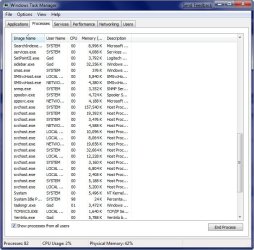
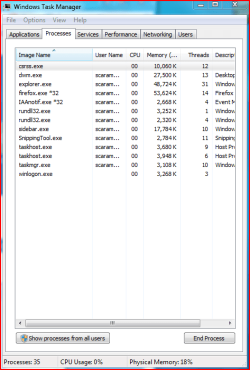
Here's mine, seems about right.

2009-01-28_113652.jpg
 

My Computer My Computer

Computer Manufacturer/Model Number
Home Brew
OS
Windows 7 Ultimate Vista Ultimate x64
CPU
Core 2 Duo E8500 3.16Ghz @ 3.8Ghz
Motherboard
eVGA 750i FTW
Memory
2x2Gigs Patriot PC2-6400 LL
Graphics Card(s)
Inno3D GeForce GTX260 216 SP
Monitor(s) Displays
ASUS VW222U 22" 2ms Response time
Screen Resolution
1680x1050
Hard Drives
SATA 150GB
SATA II 250GB
USB IDE 750GB Ext.
PSU
HYTEC 600W & Thermaltake 650W Toughpower Power Exp
Case
Thermaltake Armor LCS (Liquid Cooling System)
Cooling
Liquid Cooling System
Keyboard
Logitech G15 Gaming Keyboard
Mouse
Logitech G9 Gaming Mouse
thanks for the screengrab, thought there could be some problem but it's all good then, it is just w7 that uses more resources it seems
 

My Computer My Computer

OS
windows 7 64
Two extremes there. I'm somewhere around the middle, I guess. But Mr Grim's svchosts do seem a little high??
 

Attachments

  • Process.PNG
    Process.PNG
    14 KB · Views: 800

My Computer My Computer

Computer Manufacturer/Model Number
Three desktops and one laptop with good specs..
OS
Vista and now 7 in 32 and 64 bit.

My Computer My Computer

Computer Manufacturer/Model Number
Asus G73SW-XN2
OS
Windows 2000 5.0 Build 2195
CPU
Intel Core i7-2630QM@2GHz(2.9GHz Turbo Boost) [Sandy Bridge]
Motherboard
Asus G73SW (Intel HM65 Chipset)
Memory
Kingston DDR3 1333 16GB (4GBx4)
Graphics Card(s)
nVidia GTX 460m 1.5GB
Sound Card
EAX Advanced HD 5.0, THX TruStudio
Monitor(s) Displays
17.3 in. primary & 23 in. secondary
Screen Resolution
1920x1080
Hard Drives
Seagate Momentus XT (SATA II) 500 GB @ 7200 RPM
Hitachi (SATA II) 500GB @ 7200 RPM

Non Raid because ASUS was crappy to choose an HM65 Chipset
Keyboard
Built-in 102-Key Backlit Keyboard
Other Info
It's a Laptop.

My Computer My Computer

Computer Manufacturer/Model Number
Home Brew
OS
Windows 7 Ultimate Vista Ultimate x64
CPU
Core 2 Duo E8500 3.16Ghz @ 3.8Ghz
Motherboard
eVGA 750i FTW
Memory
2x2Gigs Patriot PC2-6400 LL
Graphics Card(s)
Inno3D GeForce GTX260 216 SP
Monitor(s) Displays
ASUS VW222U 22" 2ms Response time
Screen Resolution
1680x1050
Hard Drives
SATA 150GB
SATA II 250GB
USB IDE 750GB Ext.
PSU
HYTEC 600W & Thermaltake 650W Toughpower Power Exp
Case
Thermaltake Armor LCS (Liquid Cooling System)
Cooling
Liquid Cooling System
Keyboard
Logitech G15 Gaming Keyboard
Mouse
Logitech G9 Gaming Mouse
Thanks Arkhi.
I have found various ways to eliminate unwanted processes from starting, but that site sume it all up. I have managed (without harm) to eliminate yet another totally unsed items!!
 

My Computer My Computer

Computer Manufacturer/Model Number
Three desktops and one laptop with good specs..
OS
Vista and now 7 in 32 and 64 bit.
Better to use his "safe" options until you are sure you are not disconnecting any "linked" services. I had a bit of grief with that site in the early Vista days until I found my way around Vista
 

My Computer My Computer

Computer Manufacturer/Model Number
Three desktops and one laptop with good specs..
OS
Vista and now 7 in 32 and 64 bit.
Hey

I have to disagree that BlackVipers info is useful, it can be rather deceiving and many times down right destructive.

We did months of testing all the way back to XP pre SP1 and all the way to Vista release. Over 49 people took place in these tests and over time the groups that applied the various recommended service "tweaks" had an average of 46% more unknown problematic errors than the non tweaked groups.
Also found that the average RAM savings by stopping these services was UNDER 40MB at best. CPU savings were unmeasureable, basically...none.
Background services for the most part sit there doing nothing so consuming no CPU resources, and even with all default services on, the difference in RAM is a drop in the bucket on almost any system with over 512MB RAM. Most of them reside in the Page file area and not in Physical RAM.

Besides the drastic increase in "Unknown" error types, most of the tweaked group also found external devices (and some internal) that didn't work as expected, mainly due to them forgetting exactly what they tweaked so many months before, and many days/weeks up to months passed before they found that a disabled service was involved in those problems. Turning the services back on resolved the issues usually...what does that tell us.

It should all tell us that using these service tweaks on any machine newer than...oh, around 2000, simply don't need these tweaks and in many cases they may cause issues that are hard(er) to resolve
In fact there are probably only 2 or 3 services that could cause a security risk and MS has had those turned off by default since XP SP2. There really is no need for these tweaks unless you like to troubleshoot mysterious problems, or like to diagnose why certain devices and features suddenly don't work propery anymore...

There is plenty of reliable info on what I've said out there, from very top techs (many of whom took parts in our testing).

 

My Computer My Computer

Computer Manufacturer/Model Number
Personal Build
OS
Vista Ult 64bit - Windows 7 Ult 7264 64bit
CPU
Intel Core 2 Duo E6750
Motherboard
Asus Commando
Memory
4 G's Crucial Ballistix Tracer
Graphics Card(s)
BFG Nvidia 8800 GTS 340
Sound Card
Creative Sound Blaster X-FI Platinum FATAL1TY
Monitor(s) Displays
2-22" HP W2207 LCD
Screen Resolution
1920 x 1080
Hard Drives
3 x 500G WD Caviar SATA II
PSU
Enermax Noise Taker II 600W
Case
NZXT Lexa Classic (dual doored & windowed)
Cooling
Zalman 9700 CPU cooler - 4 x 120mm, 1 x 90mm fans
Keyboard
Logitech MX 5500
Mouse
Logitech MX Revolution
Internet Speed
Blazing...
Grab a copy of Process Explorer from Microsoft and as you move the mouse over each running svchost process it will show the services its running ;)

procexplorerlh3.jpg


It shouldn't be running that many svchost instances but I suspect its a non-Microsoft service launching multiple copies of itself, give it a try and let us know whats running behind a majority of the svchost instances ;)

Steven
 
Hi Chappy,

I totally agree. Seems the MS kernel team is working toward a way to turn many services on and off as needed anyway.

Gary
 

My Computer My Computer

Computer Manufacturer/Model Number
Dell XPS420
OS
Vista Ult 64 bit Seven Ult RTM x64
CPU
Intel Core2 Quad Q6600 2.40 gigahertz
Memory
Crucial Ballistix 4x2GB PC2 6400
Graphics Card(s)
NVIDIA GeForce 8600 GTS 256 MB
Sound Card
Creative SB X-Fi audio
Monitor(s) Displays
HP w2207 + HPvs15
Screen Resolution
1680x1050 + 1024x768
Hard Drives
2-WD5000AAKS-500 GB
WD5000AAV-500 GB external
Keyboard
Microsoft Comfort Curve
Mouse
MX Revolution
Other Info
Wacom Intuos 2 Graphics Tablet
Experience Index=5.5
Hey

I have to disagree that BlackVipers info is useful, it can be rather deceiving and many times down right destructive.

We did months of testing all the way back to XP pre SP1 and all the way to Vista release. Over 49 people took place in these tests and over time the groups that applied the various recommended service "tweaks" had an average of 46% more unknown problematic errors than the non tweaked groups.
Also found that the average RAM savings by stopping these services was UNDER 40MB at best. CPU savings were unmeasureable, basically...none.
Background services for the most part sit there doing nothing so consuming no CPU resources, and even with all default services on, the difference in RAM is a drop in the bucket on almost any system with over 512MB RAM. Most of them reside in the Page file area and not in Physical RAM.

Besides the drastic increase in "Unknown" error types, most of the tweaked group also found external devices (and some internal) that didn't work as expected, mainly due to them forgetting exactly what they tweaked so many months before, and many days/weeks up to months passed before they found that a disabled service was involved in those problems. Turning the services back on resolved the issues usually...what does that tell us.

It should all tell us that using these service tweaks on any machine newer than...oh, around 2000, simply don't need these tweaks and in many cases they may cause issues that are hard(er) to resolve
In fact there are probably only 2 or 3 services that could cause a security risk and MS has had those turned off by default since XP SP2. There really is no need for these tweaks unless you like to troubleshoot mysterious problems, or like to diagnose why certain devices and features suddenly don't work propery anymore...

There is plenty of reliable info on what I've said out there, from very top techs (many of whom took parts in our testing).

I agree 100 percent. I did many tests of my own using the Black Viper site as a guide and found that disabling a few services did absolutely nothing for performance. That guide is useless for the most part and potentially destructive as well.

I have found through my own testing that disabling nearly every service was the only way to gain any performance advantage when bench testing things like Vantage or other game benches. Of course you can't run the OP system like that so I only used "services" in Windows which would disable things only until the next restart. Windows 7 doesn't use much Ram and the CPU meter sits on 00 for hours on end. There is no need to tweak it.:)
 

My Computer My Computer

Computer type
PC/Desktop
Computer Manufacturer/Model Number
Home built
OS
Windows 7 Ult, Windows 8.1 Pro,
CPU
Q9650-4.275GHz, E8600 4.5GHz, E6750-3.8GHz
Motherboard
Evga 780i FTW
Memory
G.Skill PC2 9600 1200Mhz 5 5 5 15 2T
Graphics Card(s)
GTX480
Sound Card
Asus Xonar D2
Monitor(s) Displays
HannsG
Screen Resolution
1680X1050
Hard Drives
GSkill Phoenix Pro 120GB SSD
PSU
ThermalTake Toughpower 1000Watt modular
Case
ThermalTake XaserV
Cooling
Xigmatek S1283
Keyboard
Logitech G15
Mouse
Logitech G9
Internet Speed
T1
Back
Top