Switchable Graphics - Device Not Recognized

kbronski

New member
Power User
Local time
5:04 AM
Messages
287
Hello,

See my system specs for my laptop make and model.

Disclaimer: I did get a new mobo over Christmas break, but it was matching identical to the original I'm not sure why the AMD GPU is not wanting to recognize or install.

My laptop has the bridged processor with two GPUs; the Intel HD3000 and the AMD Raedon 6770M. The Intel HD3000 works fine and the drive for it is installed, but it sucks my battery down because, as some of you know, that is the "high performance graphics" processor. The AMD Raedon 6770M is not even recognizing in Device Manager. It is as if it does not exist. I installed the new motherboard myself and can confirm that the AMD GPU is physically there. However, it simply is not working. I've tried two variations of the AMD High Definition Graphics Driver from the HP Website (sp55092.exe and sp54462.exe). Neither work. It'll install and say it went through with no errors, but the whole process only installs 60MB of data, which means that the device is physically not being recognized. I have a feeling I'm doomed. Help?
 
Last edited:

My Computer

Computer type
PC/Desktop
Computer Manufacturer/Model Number
Custom
OS
Windows 7 Pro x64
CPU
Intel Core i7-5820k
Motherboard
ASUS X99-PRO
Memory
32GB Kingston HyperX FURY DDR4-2400
Graphics Card(s)
EVGA Geforce GTX970
Monitor(s) Displays
ASUS VC239h
Screen Resolution
1920x1080
Hard Drives
Samsung 850 EVO SSD 250GB x2
750 GB HDD
3TB HDD
PSU
Corsair RM750
Case
Fractal Design Define R5
Cooling
Noctua NH-D15
Keyboard
Corsair Strafe RGB
Mouse
Logitech G502

My Computer

Computer type
Laptop
Computer Manufacturer/Model Number
Packard Bell
OS
Windows 7 Home Premium 64Bit
CPU
AMD A6-3420M 1.5GHZ OC - 2.0GHZ
Memory
4GB DDR3 1600MHZ
Graphics Card(s)
AMD RADEON 6520G+AMD RADEON HD7470M 1GB DDR3
Screen Resolution
1366x768
Hard Drives
500GB SATA
Internet Speed
18Mb Unlimited
Antivirus
AVAST!
Browser
MOZILLA FIREFOX
Didn't work. It installed catalyst control center, and I download the driver updater tool even, but both say my graphics hardware is not recognized. I just don't get it. The GPU on the motherboard literally has "AMD" and the AMD logo etched into it. So...
 

My Computer

Computer type
PC/Desktop
Computer Manufacturer/Model Number
Custom
OS
Windows 7 Pro x64
CPU
Intel Core i7-5820k
Motherboard
ASUS X99-PRO
Memory
32GB Kingston HyperX FURY DDR4-2400
Graphics Card(s)
EVGA Geforce GTX970
Monitor(s) Displays
ASUS VC239h
Screen Resolution
1920x1080
Hard Drives
Samsung 850 EVO SSD 250GB x2
750 GB HDD
3TB HDD
PSU
Corsair RM750
Case
Fractal Design Define R5
Cooling
Noctua NH-D15
Keyboard
Corsair Strafe RGB
Mouse
Logitech G502

My Computer

Computer type
Laptop
Computer Manufacturer/Model Number
Packard Bell
OS
Windows 7 Home Premium 64Bit
CPU
AMD A6-3420M 1.5GHZ OC - 2.0GHZ
Memory
4GB DDR3 1600MHZ
Graphics Card(s)
AMD RADEON 6520G+AMD RADEON HD7470M 1GB DDR3
Screen Resolution
1366x768
Hard Drives
500GB SATA
Internet Speed
18Mb Unlimited
Antivirus
AVAST!
Browser
MOZILLA FIREFOX
I don't know. I bought the mobo used from a Chinese vendor on ebay. It said "tested 100% working" and the seller had an excellent rating so I trusted it. Maybe I just got burned. The GPU could have been damaged.
 

My Computer

Computer type
PC/Desktop
Computer Manufacturer/Model Number
Custom
OS
Windows 7 Pro x64
CPU
Intel Core i7-5820k
Motherboard
ASUS X99-PRO
Memory
32GB Kingston HyperX FURY DDR4-2400
Graphics Card(s)
EVGA Geforce GTX970
Monitor(s) Displays
ASUS VC239h
Screen Resolution
1920x1080
Hard Drives
Samsung 850 EVO SSD 250GB x2
750 GB HDD
3TB HDD
PSU
Corsair RM750
Case
Fractal Design Define R5
Cooling
Noctua NH-D15
Keyboard
Corsair Strafe RGB
Mouse
Logitech G502
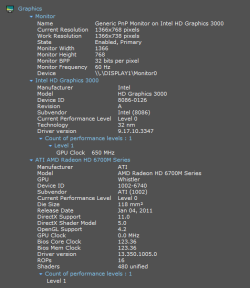
Here ya go.
 

Attachments

  • speccy1.png
    speccy1.png
    12.7 KB · Views: 28

My Computer

Computer type
PC/Desktop
Computer Manufacturer/Model Number
Custom
OS
Windows 7 Pro x64
CPU
Intel Core i7-5820k
Motherboard
ASUS X99-PRO
Memory
32GB Kingston HyperX FURY DDR4-2400
Graphics Card(s)
EVGA Geforce GTX970
Monitor(s) Displays
ASUS VC239h
Screen Resolution
1920x1080
Hard Drives
Samsung 850 EVO SSD 250GB x2
750 GB HDD
3TB HDD
PSU
Corsair RM750
Case
Fractal Design Define R5
Cooling
Noctua NH-D15
Keyboard
Corsair Strafe RGB
Mouse
Logitech G502
Also, I've included a TXT file in which I have compiled BIOS and device information.

Here is what technet says:

"Two devices have been assigned the same input/output (I/O) ports, the same interrupt, or the same Direct Memory Access channel. The assignment was made by either the basic input/output system (BIOS), the operating system, or a combination of the two."
 

Attachments

My Computer

Computer type
PC/Desktop
Computer Manufacturer/Model Number
Custom
OS
Windows 7 Pro x64
CPU
Intel Core i7-5820k
Motherboard
ASUS X99-PRO
Memory
32GB Kingston HyperX FURY DDR4-2400
Graphics Card(s)
EVGA Geforce GTX970
Monitor(s) Displays
ASUS VC239h
Screen Resolution
1920x1080
Hard Drives
Samsung 850 EVO SSD 250GB x2
750 GB HDD
3TB HDD
PSU
Corsair RM750
Case
Fractal Design Define R5
Cooling
Noctua NH-D15
Keyboard
Corsair Strafe RGB
Mouse
Logitech G502
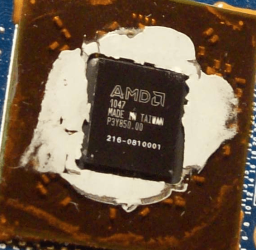
Additionally: Here is a picture of the GPU. Looking at the number on it, I searched "AMD 216-0810001" and found THIS.

It says it's an AMD HD 6700 which is sad, because I was really hoping the motherboard I installed would have the 6770 that my old one had. Alas, these are not transferrable between boards, or I'd just do that and solve all my own problems.


Any ideas regarding my issue, anyone?
 

Attachments

  • amd1.png
    amd1.png
    175.2 KB · Views: 25

My Computer

Computer type
PC/Desktop
Computer Manufacturer/Model Number
Custom
OS
Windows 7 Pro x64
CPU
Intel Core i7-5820k
Motherboard
ASUS X99-PRO
Memory
32GB Kingston HyperX FURY DDR4-2400
Graphics Card(s)
EVGA Geforce GTX970
Monitor(s) Displays
ASUS VC239h
Screen Resolution
1920x1080
Hard Drives
Samsung 850 EVO SSD 250GB x2
750 GB HDD
3TB HDD
PSU
Corsair RM750
Case
Fractal Design Define R5
Cooling
Noctua NH-D15
Keyboard
Corsair Strafe RGB
Mouse
Logitech G502
Bump?
 

My Computer

Computer type
PC/Desktop
Computer Manufacturer/Model Number
Custom
OS
Windows 7 Pro x64
CPU
Intel Core i7-5820k
Motherboard
ASUS X99-PRO
Memory
32GB Kingston HyperX FURY DDR4-2400
Graphics Card(s)
EVGA Geforce GTX970
Monitor(s) Displays
ASUS VC239h
Screen Resolution
1920x1080
Hard Drives
Samsung 850 EVO SSD 250GB x2
750 GB HDD
3TB HDD
PSU
Corsair RM750
Case
Fractal Design Define R5
Cooling
Noctua NH-D15
Keyboard
Corsair Strafe RGB
Mouse
Logitech G502
What are the related BIOS settings for GPU? Check every tab to be thorough. A camera snap will help; expand all choices given.

Include a screenshot of Device Manager with any erroring (!) Devices expanded. While you're at it include Disk Management - Post a Screen Capture Image.

Enable Automatically deliver drivers via Windows Update (Step 3) and run all Important and Optional Updates, with reboots, to completion. There may be newer or missing drivers Win7 provides, as well as critical patches for your hardware that might even be queued under Optional. So install them all except the Bingware.

Compare the install you did to the perfect install in Clean Reinstall - Factory OEM Windows 7 which compiles everything that has worked best in tens of thousands of installs we've helped with here.
 
Just as a suggestion, have you gone to BIOS and set optimized defaults? As I understand your bios txt, Bios is blocking the card from starting. If that is the case, you will never install drivers as the OS cannot "see" the card. It is not recognized in the OS because BIOS has blocked it, or kept it from starting. It is saying that it does not have the resources to start it. It will not show in Device manager until the drivers are installed. The drivers will not install unless they can 'see' the card. The card is blocked in BIOS for whatever reason. I know you already know this most likely. But, it just seems to me, that the problem is either the card is defective, the motherboard is defective or the BIOS is corrupt or not functioning correctly. The problem you are having is in BIOS not starting the card for whatever reason. It says it cannot find the resources to start it. I doubt I am telling you anything you don't already know. But, I would suggest getting in touch with the vendor you bought the board from. He may know some technical information about that board. The other possibility is what Greg has already said. There is some incorrect setting in bios. I would suggest setting bios to defaults. That should set it to run the card if the card is a part of the board which I understood you to say. That's just my impression of the problems you are seeing.
 

My Computers

System One System Two

  • Computer type
    PC/Desktop
    Computer Manufacturer/Model Number
    ALWAYS UNDER CONSTRUCTION
    OS
    Windows 11 Pro
    CPU
    Ryzen 9 5900X
    Motherboard
    Asus X570 Crosshair Viii Hero
    Memory
    32GB G Skill DDR4-3600
    Graphics Card(s)
    EVGA RTX 3080 FTW 3 Ultra
    Sound Card
    On Board/Sennheiser PC37X Headset
    Monitor(s) Displays
    3 X Asus 27"
    Screen Resolution
    2560x1440
    Hard Drives
    2 X 1 TB NVME drives
    PSU
    EVGA 850
    Case
    Phanteks Eclipse P400A
    Cooling
    EVGA 280 AIO
    Keyboard
    Logitech G510s/ Logitech G13
    Mouse
    Logitech G502
    Internet Speed
    24/1
    Antivirus
    ESET/MBAM Pro/SAS Pro
    Browser
    Chrome/ Firefox/ Edge
  • Computer type
    Laptop
    System Manufacturer/Model Number
    Dell 16 Plus
    OS
    Windows 11 Pro
    CPU
    Intel Ultra 9 288V
    Memory
    32 GB LPDDR5X 8533
    Monitor(s) Displays
    16" Mini-LED HDR600 Touch 90 Hz
    Screen Resolution
    2560X1600
    Hard Drives
    1 TB NVME
Just as a suggestion, have you gone to BIOS and set optimized defaults? As I understand your bios txt, Bios is blocking the card from starting. If that is the case, you will never install drivers as the OS cannot "see" the card. It is not recognized in the OS because BIOS has blocked it, or kept it from starting. It is saying that it does not have the resources to start it. It will not show in Device manager until the drivers are installed. The drivers will not install unless they can 'see' the card. The card is blocked in BIOS for whatever reason. I know you already know this most likely. But, it just seems to me, that the problem is either the card is defective, the motherboard is defective or the BIOS is corrupt or not functioning correctly. The problem you are having is in BIOS not starting the card for whatever reason. It says it cannot find the resources to start it. I doubt I am telling you anything you don't already know. But, I would suggest getting in touch with the vendor you bought the board from. He may know some technical information about that board. The other possibility is what Greg has already said. There is some incorrect setting in bios. I would suggest setting bios to defaults. That should set it to run the card if the card is a part of the board which I understood you to say. That's just my impression of the problems you are seeing.

I'm sorry to bump this, I have the exact same problem on my 3-year old dv6-6093ex laptop with ATI 6770.

It all started when I attempted to update the GPU drivers using an HP driver, it updated fine but it conflicted with the brightness/volume key control so I rolled back to the old drivers, again with no problems. Until I started experiencing loss of pictures, black screens, stuttering followed by "driver failed but recovered". Then the laptop failed to wakeup from sleep mode (GPU related) and when I forced a shutdown and restarted, the 6770m was gone.

I've attempted to reupdate the BIOS, clear BIOS to defaults, update the GPU with different drivers, restore factory drivers using the HP Recovery software..to no avail. The 6670m is no longer recognized and I'm not sure what to do.

Is there any way to pinpoint if the problem lies in the drivers, BIOS, mobo or GPU?

Also, OP, did you solve this problem? If so, how?
 
Last edited:

My Computer

Computer type
Laptop
Computer Manufacturer/Model Number
HP
OS
Win 7 64-bit
Are you getting anything at all on monitor, even in BIOS mode? It could be a failed chip.

If so what happens when you attempt to run Recovery?

Can you boot a disk to attempt a Clean Reinstall - Factory OEM Windows 7?

Do you have a video card you could try in it?

Yes, since I have two GPUs (Mobile Intel HD and ATI 6770m) I can boot normally and get a signal on the monitor. Speccy shows no sign of the 6770m.

I haven't tried running recovery from Windows and there are no guarantees that a fresh reinstall of Windows would do much good - if it is indeed a failed GPU.

If it is a failed chip I am not sure what can be done. HP is likely to tell me they don't have the part (I live in Saudi Arabia). I also don't have any experience opening up a laptop and playing with it's parts.
 

My Computer

Computer type
Laptop
Computer Manufacturer/Model Number
HP
OS
Win 7 64-bit
When I looked at the specs for your PC it seemed to say the 6770 was the only display so I assumed it is a chip, but based on what you say that this is switchable graphics I looked further and the ATI 6770 is a card.

Look in BIOS setup to see exactly what settings are offered for the switchable graphics.

Next I'd consider reinstalling the video card. Taking all precautions against static electricity (touch the case before you reach inside, stay off carpet) carefully remove the card to clean it and its contacts, blow any dust out of slots. You can also try reinstalling it in another slot if available.

Once reinstalled, enable card in BIOS setup, if you get a display from it immediately enable Automatically deliver drivers via Windows Update (Step 3), watch for animation in the System Tray for driver loading, Check for Updates to install all Important and Optional since there may be a driver and enabling Performance Updates delivered.
 
Back
Top