System Idle process high cpu usage

yahtnavmos

New member
Local time
2:32 PM
Messages
10
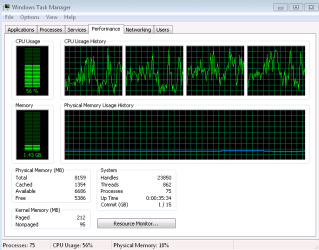
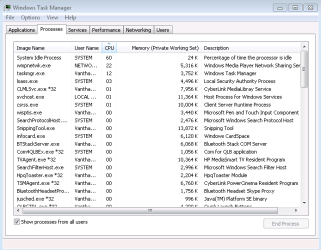
After laptop is on for about 5-10 minutes I start getting insane lag doing anything.
Just trying to get screenshots and typing this in is taking 30 minutes.
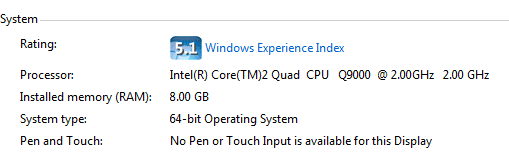
Hopefully screenshots can explain better.:mad:
 

Attachments

  • performance.PNG
    performance.PNG
    9.8 KB · Views: 1,516
  • process.PNG
    process.PNG
    13 KB · Views: 4,190
  • system.PNG
    system.PNG
    4.2 KB · Views: 682

My Computer

Computer type
PC/Desktop
Computer Manufacturer/Model Number
PC
OS
window 7 ult 64bit
CPU
i7 920 2.67GHz
Motherboard
EX58-UD3R
Memory
6GB
Graphics Card(s)
ATI Saphire HD4870 1GB
Hard Drives
ST31000333AS ATA
WDC WD 10EARS-22Y5B1 ATA
PSU
850W
Internet Speed
25-50MB/s
Antivirus
Norton Internet Security 2013
Browser
IE and Google Chrome
You want system idle process to be high. That means the processor is looking for work. 99 is better than 60. What is that 22% process--it is running at 0% on my PC.
 

My Computer

Computer type
PC/Desktop
Computer Manufacturer/Model Number
Ignatz Special; 4 speed manual gearbox; factory air conditioning; one of one
OS
Windows 7 Home Premium SP1, 64-bit
CPU
Intel Skylake i5-6600K, not overclocked
Motherboard
AsRock Z170M Extreme 4, micro ATX
Memory
8 GB HyperX DDR4-2666 (2 x 4 GB)
Graphics Card(s)
none; graphics are integrated on CPU
Sound Card
onboard: Realtek ALC1150; external: USB Behringer UF0-202
Monitor(s) Displays
Dell S2340M 23 inch IPS
Screen Resolution
1600 x 900
Hard Drives
System: Crucial MX100 series SSD, 128 GB;
Data: Samsung Spinpoint 103SJ, 1 TB;
Backup: WD Caviar Green WD30EZRX-00D8PB0, 3 TB
PSU
Rosewill SilentNight 500 watt fanless, semi-modular
Case
Antec Solo II
Cooling
Noctua NH-U12S; Noctua F12 intake, Noctua S12A exhaust
Keyboard
Microsoft 200 6JH-00001 USB
Mouse
Dell or Microsoft optical wired; USB
Antivirus
Microsoft Security Essentials and Malwarebytes Premium
Browser
Pale Moon
Other Info
All fans PWM; speeds at idle: CPU circa 500 rpm; intake circa 600 rpm; exhaust circa 600 rpm; CPU temps 27 idle and 47 C load in a warm room (27 C/81 F) when running Intel Extreme Tuning Utility stress test.
That is the Windows Media Player sharing network. It needs to be nuked unless you want to play media on other computers in the network, and even then will run high CPU unless you keep it turned off in Network & SHaring Center>Advanced Settings>Media Streaming and in Services.

In fact there is popular batch file that turns it off in almost all the places it can turn itself back on. Set a restore point in case you don't like it: View attachment wmpnscfg_disable.bat
 
got that done thank you.
 

My Computer

Computer type
PC/Desktop
Computer Manufacturer/Model Number
PC
OS
window 7 ult 64bit
CPU
i7 920 2.67GHz
Motherboard
EX58-UD3R
Memory
6GB
Graphics Card(s)
ATI Saphire HD4870 1GB
Hard Drives
ST31000333AS ATA
WDC WD 10EARS-22Y5B1 ATA
PSU
850W
Internet Speed
25-50MB/s
Antivirus
Norton Internet Security 2013
Browser
IE and Google Chrome
ok now im gettign the same issue again.
every time the cpu usage jumps through different tasks.

all im doing is using internet explorer and its lagging like crazy.

now my question is, can i uninstall windows 7 and still be able to use the key later when it isnt so crappy?
 

My Computer

Computer type
PC/Desktop
Computer Manufacturer/Model Number
PC
OS
window 7 ult 64bit
CPU
i7 920 2.67GHz
Motherboard
EX58-UD3R
Memory
6GB
Graphics Card(s)
ATI Saphire HD4870 1GB
Hard Drives
ST31000333AS ATA
WDC WD 10EARS-22Y5B1 ATA
PSU
850W
Internet Speed
25-50MB/s
Antivirus
Norton Internet Security 2013
Browser
IE and Google Chrome
Better to fix it in-place if possible.

If you think it might be helped by a reinstall (and it might) then do a repair install from the deskstop, which saves programs/files/settings but reinstalls the OS and reconfigures the boot correctly.

Run the Win7 DVD and select Upgrade. Select "stay connected to internet through install" and plug into wired connection.

If it missed any incompatibilities during original install, it will also find them now when first assessing the Upgrade as it runs the compatibility wizard.
 
it's not the same issue with the media network. i turned that off already.

its jsut that whenever I start up any program my cpu usage starts spiking.

what sthe poitn of a quad core if windows 7 eats everything when i try to do sumthing.
i never had this problem with vista. i was able to play world of warcraft just fine.

but now just trying to do research with internet explorer it takes forever to get anywhere. and when im watchingit with task manager, getting spikes all 4(8) layers

why im reluctant to do the upgrade (again) is because it took over 4 hours the first time.
 

My Computer

Computer type
PC/Desktop
Computer Manufacturer/Model Number
PC
OS
window 7 ult 64bit
CPU
i7 920 2.67GHz
Motherboard
EX58-UD3R
Memory
6GB
Graphics Card(s)
ATI Saphire HD4870 1GB
Hard Drives
ST31000333AS ATA
WDC WD 10EARS-22Y5B1 ATA
PSU
850W
Internet Speed
25-50MB/s
Antivirus
Norton Internet Security 2013
Browser
IE and Google Chrome
You did an in-place Upgrade to begin with? That is your problem. There are all kinds of problems with high performance machines with in-place Upgrades. That it took 4 hours means it was struggling.

The solution (as always) is a formatted clean install. Boot from the Win7 DVD, plug ethernet so you can "Stay Connected to Internet During Install", Select Custom, Advanced Drive tools then format before install.

Of course you have to reinstall your programs and files, but it will be a clean install without corruption carried over from the (IMO) worst OS ever into the best OS ever.
 
can i reinstall with the same key?

or shoudl i say would there be issues with installing with the same key
 

My Computer

Computer type
PC/Desktop
Computer Manufacturer/Model Number
PC
OS
window 7 ult 64bit
CPU
i7 920 2.67GHz
Motherboard
EX58-UD3R
Memory
6GB
Graphics Card(s)
ATI Saphire HD4870 1GB
Hard Drives
ST31000333AS ATA
WDC WD 10EARS-22Y5B1 ATA
PSU
850W
Internet Speed
25-50MB/s
Antivirus
Norton Internet Security 2013
Browser
IE and Google Chrome
can i reinstall with the same key?

or shoudl i say would there be issues with installing with the same key

You can always reinstall with the same key.

If it's an Upgrade key, don't preformat as the DVD will scan your system at bootup and detect Windows to allow it to accept Upgrade key.

Plug an ethernet wire so it can stay online to get latest installer updates.

Then select Custom install, Advanced drive tools and Format to get the cleanest possible install.

The installer is nearly driver-complete, with newer ones coming in quickly on Windows Updates. You may need to find some apps/drivers on your Support Downloads page for your model. If you have wireless, keep your Vista/WIn7 LAN driver handy just in case so you can get online right away to get Updates.
 

My Computer

Computer type
PC/Desktop
Computer Manufacturer/Model Number
Home built
OS
Windows 7 Ult, Windows 8.1 Pro,
CPU
Q9650-4.275GHz, E8600 4.5GHz, E6750-3.8GHz
Motherboard
Evga 780i FTW
Memory
G.Skill PC2 9600 1200Mhz 5 5 5 15 2T
Graphics Card(s)
GTX480
Sound Card
Asus Xonar D2
Monitor(s) Displays
HannsG
Screen Resolution
1680X1050
Hard Drives
GSkill Phoenix Pro 120GB SSD
PSU
ThermalTake Toughpower 1000Watt modular
Case
ThermalTake XaserV
Cooling
Xigmatek S1283
Keyboard
Logitech G15
Mouse
Logitech G9
Internet Speed
T1
Did you try uninstalling your antivirus (or other security software) for the time being?
 

My Computer

Computer type
PC/Desktop
Computer Manufacturer/Model Number
Alienware Aurora ALX R4
OS
Windows 10 Pro (x64)
CPU
Intel Core i7-3930K (3.2GHz - 4.5GHz)
Motherboard
Alienware Aurora-R4 x79
Memory
4x Samsung 4GB PC3-12800 DDR3 (16GB 1600MHz)
Graphics Card(s)
Nvidia Geforce GTX 690
Sound Card
SteelSeries Siberia Elite
Monitor(s) Displays
Dell UltraSharp U3011
Screen Resolution
2560x1600
Hard Drives
Samsung 850 Pro 256 GB, Seagate 1TB Desktop Hybrid HDD, 2x Western Digital 4TB Green HDD
PSU
875W Some Dell PSU <.<
Case
Alienware Aurora ALX
Cooling
Custom Liquid Cooling (EK CPU & GPU blocks) dual EK 480RAD
Keyboard
Logitech G710+ Mechanical
Mouse
Logitech G700s
Internet Speed
Verizon Fios (50 mbps average)
Other Info
Server: Intel NUC D54250WYK: i5-4250U, 16GB, 256 GB mSATA, Windows Server 2012 R2
ok so i finished a clean install this morning, and now am in teh process of installing all of my old softwares, drivers, antivirus, etc.

the major problem i now face is that I forgot to get the keys for my microsoft office 2007. I know I have one mroe install available, but cannot find where I kept the key. Is there anyway to contact microsoft for it if I had registered it?

O and the laptop is running extremely smoothly. even memory usage is lower <3
 

My Computer

Computer type
PC/Desktop
Computer Manufacturer/Model Number
PC
OS
window 7 ult 64bit
CPU
i7 920 2.67GHz
Motherboard
EX58-UD3R
Memory
6GB
Graphics Card(s)
ATI Saphire HD4870 1GB
Hard Drives
ST31000333AS ATA
WDC WD 10EARS-22Y5B1 ATA
PSU
850W
Internet Speed
25-50MB/s
Antivirus
Norton Internet Security 2013
Browser
IE and Google Chrome
Back
Top