System Restore failed

This Thread is very Old.. Why is this not solved ? and Why are people still answering it ?
 

My Computer

Computer type
PC/Desktop
Computer Manufacturer/Model Number
Dell optiplex 740
OS
Win 7 Home Premium SP1 32 bit
CPU
AMD Athlon 64 X2 5000B
Motherboard
Dell Inc. 0YP696 (Socket M2 )
Memory
4.00 GB Dual-Channel DDR2 @ 370MHz (6-6-6-18)
Graphics Card(s)
Acer E181H (1366x768@60Hz) 64MB GeForce 6150 LE (Dell)
Sound Card
SigmaTel High Definition Audio CODEC
Monitor(s) Displays
Acer E181H (1366x768@60Hz) 64MB GeForce 6150 LE (Dell)
Hard Drives
699GB Seagate ST375064 0NS SCSI Disk Device (ATA)
Case
Mini tower
Internet Speed
Ping 36 ms, Download 57.71 mbps , Upload 11.79mbps
Antivirus
Free Avast. Pro paid Mbam , Free Sas
Browser
Palemoon .
Sure, GTXND. Forgive me if I oversimplify but I'll include each step in case you're not familiar with navigating command lines (I was a tech support guy in college 20 years ago; old habits die hard). Also, changing registry files can be VERY DANGEROUS... I would only do it as a last resort before reinstalling Windows 7.

I first booted from the Windows 7 install disc to get to the system recovery console. I then selected Command Line. From there, I had to change from the X: drive to the C: drive by typing "C:". I then typed "cd \windows\system32\config" to get to the registry file directory. By typing "dir" I could see that two of the five hive files (default, sam, security,software, and system) had recent copies with an "rmbak" extension: default.rmbak and software.rmbak. I then executed the following commands:

ren software software.bak
copy software.rmbak software

ren default default.bak
copy default.rmbak default

I would suggest you execute the "ren" then "copy" commands as above for any other hives that have "rmbak" backups with the same date/time stamp. This ensures your registry remains in sync. You can now reboot and see if your computer comes up.

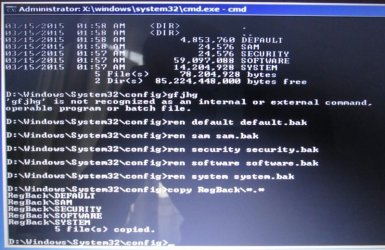
Here is an alternative suggestion if you don't have these "rmbak" files (if the above worked, don't do these steps; these would be a last-last resort before reinstalling Windows 7). From where we left off above type "dir RegBack". See what the time/date stamp is on the hive files there. If recent (use your judgment; mine is a couple days old so I would have probably used it had I not had the rmbak files, as I hadn't installed much in that time), you could do the following to restore that backup registry:

ren default default.bak
ren sam sam.bak
ren security security.bak
ren software software.bak
ren system system.bak
copy RegBack\*.*

Reboot and see what happens. If this worked, you may have to reinstall any software that was installed after the time/date stamps of the files in the RegBack directory.

One final note: I did try to restore to an earlier restore point once I made the above fixes. It kept coming up with an error. Therefore, I suggest creating a new restore point once the computer recovers, just so you have a clean one.

I need to add my name to the list of people that this worked for. Never would have thought that this would have fixed my issue but the next step was OS reinstall. I had a c000021a BSOD on boot. After running a CHKDSK, SFC (from WINRE without success). I was able to run the alternate method which had a backup from 2 prior to it happening. I printed this out and it is already in my Tech Cookbook for future use.
I appreciate the post my good friend!:D
 

My Computer

OS
Win7
jbaileyn - I hope you check this thread occasionally...

...to see how many people you've helped over the years :)
Add me to the list! Great job. THANK YOU for saving me from a reinstall.
 

My Computer

Computer type
PC/Desktop
Computer Manufacturer/Model Number
custom built
OS
Win 7 HP 64bit
CPU
Intel E8400
Motherboard
Asus P5E
Memory
4GB PC2-1066
Graphics Card(s)
Nvidia GTX 560 sc
Antivirus
Windows
Browser
Chrome
Jbaileyn, thank you so much! You introduced a young 'un to the world of command prompt, and saved my computer!
 

My Computer

Computer type
PC/Desktop
OS
Windows 7 home premium 32 bit
Hallo guys,
I just joined cause I have problems with this blue screen. I made bootable USB with my Windows 7 64 bit and I tried to apply jbaileyn's solution but I can't change X:\Sources> to any other letter. Also, my Windows is on D partition, not on C.
System Recovery Options recognized Windows 7 on D partition but when I try to do System Restore, I get that "You must enable System Protection for this drive." message and it is related to C drive (again, my Windows 7 is on D)

I remember the cause: I did a registry clean with one old software that does not support 64bit systems. And now I feel so stupid.

Anybody has an idea what to do?

Again, I would like to apply jbaileyn's solution but when I type C: or D: it says "The syntax of the command is incorrect." and it goes back to X:\Sources>

Thanks for any suggestions!
 

My Computer

Computer type
PC/Desktop
OS
Windows 7 Home Premium 64bit
Successful!

Thanks a lot, it worked out! :party:

IMG_0356.jpg

Avoided new clean installation of Win7. Huuhhh :)
Thanks a lot!!!
 

My Computer

Computer type
PC/Desktop
OS
Windows 7 Home Premium 64bit
Thank you jbaileyn!! You, sir/madam, win the Internet... the whole thing! Struggled through a bunch of things until I found this thread. Worked first time. (Once I realized my primary hdd was actually D:, not C:, spazzed out for a second.)

:D:cool:
 

My Computer

Computer type
PC/Desktop
OS
Windows 7 Home Premium 64-bit
Here is an alternative suggestion if you don't have these "rmbak" files (if the above worked, don't do these steps; these would be a last-last resort before reinstalling Windows 7). From where we left off above type "dir RegBack". See what the time/date stamp is on the hive files there. If recent (use your judgment; mine is a couple days old so I would have probably used it had I not had the rmbak files, as I hadn't installed much in that time), you could do the following to restore that backup registry:

ren default default.bak
ren sam sam.bak
ren security security.bak
ren software software.bak
ren system system.bak
copy RegBack\*.*

Reboot and see what happens. If this worked, you may have to reinstall any software that was installed after the time/date stamps of the files in the RegBack directory.

One final note: I did try to restore to an earlier restore point once I made the above fixes. It kept coming up with an error. Therefore, I suggest creating a new restore point once the computer recovers, just so you have a clean one.


Spent 12 hours straight, trying to fix this :mad: laptop again. Tried every trick in the book. I will put Linux on when the warranty expires next year.

I ran my main Linux server for a week with no valid partition table, fat thumbed a command and destroyed it. The OS did not care if I killed the table, so I mirrored a drive, set-up grub and rebooted, like new again. It is a critical system with 32TB of storage on it -- has all my backups and data for a dozen years.

When it comes to the laptop, it seems I do more work keeping Windows 8.1 running than I do getting work done with it. Your post saved me! Worked like a charm. Cannot thank you enough.
 

My Computer

Computer type
Laptop
Computer Manufacturer/Model Number
HP DV7 7212NR
OS
Windows 8.1 Professional x64
CPU
Intel Core I7-3630QM @ 24 GHz --4 Cores, 8 Logical Procs.
Motherboard
Intel 7 Series/C216
Memory
16GB
Graphics Card(s)
NVidia GeoForce GT 650M, Intel HD Graphics 4000
Hard Drives
Two 1TB Seagate Barracuda SSD Accelerated drives in RAID1 configuration.
32GB SSD used as accelerated raid 0.
Antivirus
ZoneAlarm Exterme Security.
Browser
FireFox.
DavePHL's is the preferred solution but jbailey's should work for most.
 

My Computer

Computer type
PC/Desktop
OS
Windows 7 Home Premium x64
System Startup

Having spend the last several days in an endless loop of Startup>Automatic Repairs not working to solve a BSOD, I want to publicly give a huge THANK YOU to jbaileyn for his solution after I had run Norton Registry Clean-up that resulted in the BSOD and no amount of solutions would fix the problem. Just like faceman had reported in his later post, my problem arose immediately after running the Norton registry clean-up process which end in a "please restart your computer" - that when the mess begins. My advice is DO NOT RUN NORTON CLEAN-UP under any circumstances. Also, I must report that my experience after contact with Norton Support (who caused the problem) was absolutely abysmal - their advice was to contact either the manufacturer or Microsoft. When I asked them to explain to me where the registry back-up file was kept - they couldn't or wouldn't. (I knew there must be a backup somewhere because the message generated before running Registry Clean-up is along the lines of "creating registry backup"). I then demanded that they either escalate the matter to a higher level or let me talk to a Manager. The response - you'll have to call back!!!
To jbaileyn you answered the questioned that Norton wouldn't - again a huge thank you to you and forums like Seven Forum for providing many many solutions to user's problems and filling a space that the big guys like MS and Norton refuse to without charging an arm and a leg.
:)
 

My Computer

Computer type
Laptop
Computer Manufacturer/Model Number
Lenovo
OS
Windows 10 Home
Who is still having this problem with Windows 10 1607 in the year 2016? THANK YOU to jbaileyn. Your idea worked. Going back to the previously saved registry was a huge time saver. Trying your solution was the last stand before I had to reinstall Windows. Window's System restore, reset, repair didn't work at all.
 

My Computer

Computer type
PC/Desktop
OS
Windows 10
Back
Top