Sure, GTXND. Forgive me if I oversimplify but I'll include each step in case you're not familiar with navigating command lines (I was a tech support guy in college 20 years ago; old habits die hard). Also, changing registry files can be VERY DANGEROUS... I would only do it as a last resort before reinstalling Windows 7.
I first booted from the Windows 7 install disc to get to the system recovery console. I then selected Command Line. From there, I had to change from the X: drive to the C: drive by typing "C:". I then typed "cd \windows\system32\config" to get to the registry file directory. By typing "dir" I could see that two of the five hive files (default, sam, security,software, and system) had recent copies with an "rmbak" extension: default.rmbak and software.rmbak. I then executed the following commands:
ren software software.bak
copy software.rmbak software
ren default default.bak
copy default.rmbak default
I would suggest you execute the "ren" then "copy" commands as above for any other hives that have "rmbak" backups with the same date/time stamp. This ensures your registry remains in sync. You can now reboot and see if your computer comes up.
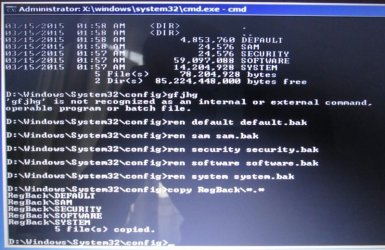
Here is an alternative suggestion if you don't have these "rmbak" files (if the above worked, don't do these steps; these would be a last-last resort before reinstalling Windows 7). From where we left off above type "dir RegBack". See what the time/date stamp is on the hive files there. If recent (use your judgment; mine is a couple days old so I would have probably used it had I not had the rmbak files, as I hadn't installed much in that time), you could do the following to restore that backup registry:
ren default default.bak
ren sam sam.bak
ren security security.bak
ren software software.bak
ren system system.bak
copy RegBack\*.*
Reboot and see what happens. If this worked, you may have to reinstall any software that was installed after the time/date stamps of the files in the RegBack directory.
One final note: I did try to restore to an earlier restore point once I made the above fixes. It kept coming up with an error. Therefore, I suggest creating a new restore point once the computer recovers, just so you have a clean one.




 laptop again. Tried every trick in the book. I will put Linux on when the warranty expires next year.