
System Restore How far back is ok?

bru

New member
Pro User
Local time
8:18 PM
Messages
417
Location
A suburb of Chicago
I have a system restore point from 24-June. It shows the restore point but that is also from when my system image was taken so not sure which would take precedence.

I would first try system restore rather than reinstalling the image. Is it safe to restore from that far back? Someone here mentioned anything over a month and it could be trouble.

I am still trying to figure out my folder displaying contents wacky behavior

http://www.sevenforums.com/general-discussion/172409-folders-desktop-not-showing-whats-inside.html

http://www.sevenforums.com/general-...ons-about-how-folders-contents-displayed.html

and that is as far back as I can (maybe) restore. XP used to have months of restore points but I guess my allotted space limits it to about a month.
 

Attachments
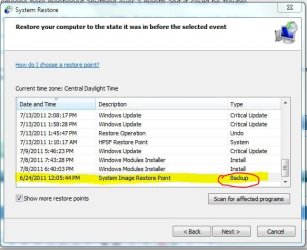
  • res.JPG
    res.JPG
    50.6 KB · Views: 13

My Computer My Computer

At a glance

Win 7 Home Premium x64Intel Core i3-540 3.07 GHz4 GB (2 X 2) Dual-Channel PC-10600 DDR3 @ 665...Integrated Intel H57
Computer Manufacturer/Model Number
HP p6608f
OS
Win 7 Home Premium x64
CPU
Intel Core i3-540 3.07 GHz
Motherboard
MS-7613 (Iona-GL8E)
Memory
4 GB (2 X 2) Dual-Channel PC-10600 DDR3 @ 665MHz (9-9-9-24)
Graphics Card(s)
Integrated Intel H57
Sound Card
Integrated Realtek ALC888S Audio
Monitor(s) Displays
17" SDM-HS73 (a vestige from my old computer)
Screen Resolution
1280 X 1024
Hard Drives
750GB SATA 7200 RPM
PSU
250W
Keyboard
HP USB keyboard
Mouse
HP USB optical mouse
Internet Speed
15Mbps/1Mbps
Hello Bru,

It just really depends on how far back you need to go to undo whatever issue you are having before it happened.

You could use step 9 in the tutorial below to see what drivers and programs would be affected and needed to be reinstalled if you were to finish the system restore. Windows updates that were installed after the date of the restore point would also need to be reinstalled through Windows Updates again.

The contents of your user folders will not be affected though.

http://www.sevenforums.com/tutorials/700-system-restore.html

Hope this helps some,
Shawn
 

My Computer My Computer

At a glance

64-bit Windows 11 Pro for WorkstationsIntel i7-8700K OC'd to 5 GHz64 GB (4x16GB) G.SKILL TridentZ RGB DDR4 3600...ASUS ROG-STRIX-GTX1080TI-O11G-GAMING
Computer type
PC/Desktop
Computer Manufacturer/Model Number
Self built custom
OS
64-bit Windows 11 Pro for Workstations
CPU
Intel i7-8700K OC'd to 5 GHz
Motherboard
ASUS ROG Maximus XI Formula Z390
Memory
64 GB (4x16GB) G.SKILL TridentZ RGB DDR4 3600 MHz
Graphics Card(s)
ASUS ROG-STRIX-GTX1080TI-O11G-GAMING
Sound Card
Integrated
Monitor(s) Displays
2 x Samsung Odyssey G7 27"
Screen Resolution
2560x1440
Hard Drives
1TB Samsung 990 PRO M.2,
4TB Samsung 990 PRO PRO M.2,
TerraMaster F8 SSD Plus NAS
PSU
Seasonic Prime Titanium 850W
Case
Thermaltake Core P3
Cooling
Corsair Hydro H115i
Keyboard
Logitech wireless K800
Mouse
Logitech MX Master 4
Internet Speed
2 Gb/s Download and 100 Mb/s Upload
Antivirus
Malwarebyte Anti-Malware Premium
Browser
Google Chrome
Other Info
Logitech Z625 speaker system,
Logitech BRIO 4K Pro webcam,
HP Color LaserJet Pro MFP M477fdn,
APC SMART-UPS RT 1000 XL - SURT1000XLI,
Galaxy S23 Plus phone

My Computer My Computer

At a glance

Windows 7 Ultimate x64Intel C2D E8400@4Ghz OC4x2GB Kingston HyperX 8500@1066MhzNvidia GTS450 OC
Computer Manufacturer/Model Number
Custom/DIY
OS
Windows 7 Ultimate x64
CPU
Intel C2D E8400@4Ghz OC
Motherboard
ASUS P5Q-E, bios 2101
Memory
4x2GB Kingston HyperX 8500@1066Mhz
Graphics Card(s)
Nvidia GTS450 OC
Sound Card
Onboard SoundMax
Monitor(s) Displays
Samsung Syncmaster 17"
Screen Resolution
1280x1024
Hard Drives
WD6402AAEX-640GB(system), WD10EALX-1TB(storage), other external disks & docking stations
PSU
Corsair TX-750 V2
Case
Custom Tower
Cooling
Air: Arctic Cooling 2xF8 & F12; Akasa AK-968, 2xAK-HD-BL
Mouse
Gigabyte M6900
Internet Speed
10M/1M

My Computer My Computer

At a glance

Windows 7 Ultimate SP1 64-BitIntel Core i7 870 @ 2.93GHz8Gb Dual-Channel DDR3 @ 664MHznVidia GeForce GTX 460 1024MB dedicated RAM
Computer Manufacturer/Model Number
HP Pavilion Elite 495UK
OS
Windows 7 Ultimate SP1 64-Bit
CPU
Intel Core i7 870 @ 2.93GHz
Motherboard
MSI 2A9C (CPU1)
Memory
8Gb Dual-Channel DDR3 @ 664MHz
Graphics Card(s)
nVidia GeForce GTX 460 1024MB dedicated RAM
Sound Card
Realtek HD Audio
Monitor(s) Displays
HP2310i
Screen Resolution
1920 x 1080
Hard Drives
1x1954GB Hitachi HDS22020ALA 330 (RAID), 1x1954GB Hitachi External for backup and storage
PSU
460W
Case
HP Elite
Cooling
Air cooled
Keyboard
Logitech K750 solar-powered keyboard
Mouse
Logitech Wireless M180 mouse
Internet Speed
2Mb
Other Info
Pure Avanti Flow Internet Radio with iPod Dock, 64Gb iPod, HP USB Speakers, Sony MDR-V500 Headphones, Sony Vaio F-Series Laptop
I did the Sys Restore and AFAICT it didn't solve my issue. I wanted to undo it but it didn't give the undo option which I thought was strange. So I restored it to the undo point which I suppose is the same thing.

I have to say WIn 7 has not been kind to me. I think I've used System Restore more times in six months than I did in six years with XP.

Why my folders are acting this way is really frustrating. Beyond frustrating. Essentially I don't get one of the main functionalities of Win 7. I'm a MSFT supporter, even have owned their stock for over a decade to the point of losing quite a lot of it's value. But this experience has really disappointed me. I'm sure it is probably something stupid, something ticked when it shouldn't or vice versa. But I can't keep stressing over it. Time to move on. I really only use my computer for the Internet and Music. I don't do 1% of what most here do. But I can't even get my music folders to display properly and it makes me sad. Rant off.
 

My Computer My Computer

At a glance

Win 7 Home Premium x64Intel Core i3-540 3.07 GHz4 GB (2 X 2) Dual-Channel PC-10600 DDR3 @ 665...Integrated Intel H57
Computer Manufacturer/Model Number
HP p6608f
OS
Win 7 Home Premium x64
CPU
Intel Core i3-540 3.07 GHz
Motherboard
MS-7613 (Iona-GL8E)
Memory
4 GB (2 X 2) Dual-Channel PC-10600 DDR3 @ 665MHz (9-9-9-24)
Graphics Card(s)
Integrated Intel H57
Sound Card
Integrated Realtek ALC888S Audio
Monitor(s) Displays
17" SDM-HS73 (a vestige from my old computer)
Screen Resolution
1280 X 1024
Hard Drives
750GB SATA 7200 RPM
PSU
250W
Keyboard
HP USB keyboard
Mouse
HP USB optical mouse
Internet Speed
15Mbps/1Mbps
Back
Top