System Restore not working (0x8000ffff); neither is Macrium Reflect

sspohl

New member
Local time
7:19 AM
Messages
14
My computer has been shutting itself off for no reason that I can tell, although it usually seems to happen when I am away from it rather than right while I am doing something. Tried changing power management to never go to sleep, but that doesn't stop it from occurring.

Also got a message that regular weekly backup did not occur. I think the backup problem was a space issue on the external HDD, so I freed up some space and tried to re-run backup. But it takes a long time to run and ends up shutting off before it completes, so I don't have much faith that the backups it has been trying to make the last couple days are worth anything. On the plus side, I made my own backup of all data files on two separate portable HDDs so I believe I'm safe.

Today I decided to run a system restore, picking a point before where I thought problems had started. I do have restore points available, one before a windows critical update on 4/15 and one before installing turbo tax on 4/13. I get an error message for either one, System Restore did not complete successfully, failed to extract the file (C:\) from the restore point. An unspecified error occurred 0x8000ffff. There are other restore points dating back to December, but System Restore apparently can't find them to use.

Next I decided to restore image using Macrium Reflect free edition from an image that was created 8/17/14 after following tutorials Clean Reinstall - Factory OEM Windows 7 and Clean Up Factory Bloatware -- the image that was to be my gold standard for starting over. When I start Macrium Reflect, I can see my clean image stored on my G drive, a second HDD mounted inside the computer, but I can't restore the image because of a message that says it is unable to lock the drive. Then I try to boot from the rescue media created when the Reflect image was created, but when I do that it can't see the G drive to find the image that I want to restore.

Clearly I don't know what I'm doing and would appreciate any assistance that could be offered.
 

My Computer My Computer

At a glance

Windows 7 Home Premium (x64) SP1 (build 7601)3.50 GHz AMD FX-6120 Six-Core10006 Mb Usable Installed Memory (DIMM2=4096;...AMD Radeon HD 7450 [Display adapter] ; Dell 1...
Computer type
PC/Desktop
Computer Manufacturer/Model Number
Hewlett-Packard h8-1234
OS
Windows 7 Home Premium (x64) SP1 (build 7601)
CPU
3.50 GHz AMD FX-6120 Six-Core
Motherboard
Gigabyte 2AC8 1.2
Memory
10006 Mb Usable Installed Memory (DIMM2=4096;3=2048;4=4096)
Graphics Card(s)
AMD Radeon HD 7450 [Display adapter] ; Dell 1905FP Monitor
Hard Drives
Hitachi HDS721010DLE630 SCSI Disk Device (1000.00 GB)
999.89 Gigabytes Usable Hard Drive Capacity
920.48 Gigabytes Hard Drive Free Space
Drive 0; Status Healthy

Hitachi HDT721064SLA360 SCSI Disk Device
fixed hard disk media; 1 partitio
Antivirus
Norton Internet Security
Browser
IE 11 Version 11.0.9600.17207
Is this internal G drive accessible and usable at all as of now?

Can you copy a file to it? Save a file to it? View it and navigate it in Explorer? Open a Word or JPG file on it? View it in Windows Disk Management?

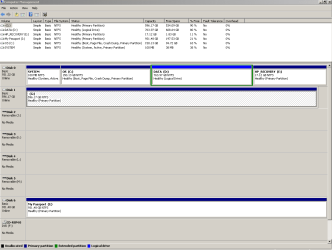
Post a screen shot of Window Disk Management showing all internal and external drives if possible.
 

My Computer My Computer

At a glance

Windows 7 Home Premium SP1, 64-bitIntel Skylake i5-6600K, not overclocked8 GB HyperX DDR4-2666 (2 x 4 GB)none; graphics are integrated on CPU
Computer type
PC/Desktop
Computer Manufacturer/Model Number
Ignatz Special; 4 speed manual gearbox; factory air conditioning; one of one
OS
Windows 7 Home Premium SP1, 64-bit
CPU
Intel Skylake i5-6600K, not overclocked
Motherboard
AsRock Z170M Extreme 4, micro ATX
Memory
8 GB HyperX DDR4-2666 (2 x 4 GB)
Graphics Card(s)
none; graphics are integrated on CPU
Sound Card
onboard: Realtek ALC1150; external: USB Behringer UF0-202
Monitor(s) Displays
Dell S2340M 23 inch IPS
Screen Resolution
1600 x 900
Hard Drives
System: Crucial MX100 series SSD, 128 GB;
Data: Samsung Spinpoint 103SJ, 1 TB;
Backup: WD Caviar Green WD30EZRX-00D8PB0, 3 TB
PSU
Rosewill SilentNight 500 watt fanless, semi-modular
Case
Antec Solo II
Cooling
Noctua NH-U12S; Noctua F12 intake, Noctua S12A exhaust
Keyboard
Microsoft 200 6JH-00001 USB
Mouse
Dell or Microsoft optical wired; USB
Antivirus
Microsoft Security Essentials and Malwarebytes Premium
Browser
Pale Moon
Other Info
All fans PWM; speeds at idle: CPU circa 500 rpm; intake circa 600 rpm; exhaust circa 600 rpm; CPU temps 27 idle and 47 C load in a warm room (27 C/81 F) when running Intel Extreme Tuning Utility stress test.
Yes to all of your questions about whether G is useable. Screenshot attached.
 

Attachments

  • Disk Management.PNG
    Disk Management.PNG
    17 KB · Views: 6

My Computer My Computer

At a glance

Windows 7 Home Premium (x64) SP1 (build 7601)3.50 GHz AMD FX-6120 Six-Core10006 Mb Usable Installed Memory (DIMM2=4096;...AMD Radeon HD 7450 [Display adapter] ; Dell 1...
Computer type
PC/Desktop
Computer Manufacturer/Model Number
Hewlett-Packard h8-1234
OS
Windows 7 Home Premium (x64) SP1 (build 7601)
CPU
3.50 GHz AMD FX-6120 Six-Core
Motherboard
Gigabyte 2AC8 1.2
Memory
10006 Mb Usable Installed Memory (DIMM2=4096;3=2048;4=4096)
Graphics Card(s)
AMD Radeon HD 7450 [Display adapter] ; Dell 1905FP Monitor
Hard Drives
Hitachi HDS721010DLE630 SCSI Disk Device (1000.00 GB)
999.89 Gigabytes Usable Hard Drive Capacity
920.48 Gigabytes Hard Drive Free Space
Drive 0; Status Healthy

Hitachi HDT721064SLA360 SCSI Disk Device
fixed hard disk media; 1 partitio
Antivirus
Norton Internet Security
Browser
IE 11 Version 11.0.9600.17207
Hmm.....curious.

G has about 61 GB used. What size is the Macrium image on this disc, the mrimg file?

When you first made that Macrium restore disc, did you check at the time to see if you could boot from it and see the image file you might want to restore---which you can't see now? I'm just wondering if this is new behavior or has been true all along, although you didn't know it.

You say "There are other restore points dating back to December, but System Restore apparently can't find them to use". If System Restore "apparently can't find them", why do you think they exist? Are they listed in System Restore, but fail when you actually try to restore to them?

Open a command prompt and run sfc /scannow

If it corrects any system file errors, run it again until it reports no errors.
 

My Computer My Computer

At a glance

Windows 7 Home Premium SP1, 64-bitIntel Skylake i5-6600K, not overclocked8 GB HyperX DDR4-2666 (2 x 4 GB)none; graphics are integrated on CPU
Computer type
PC/Desktop
Computer Manufacturer/Model Number
Ignatz Special; 4 speed manual gearbox; factory air conditioning; one of one
OS
Windows 7 Home Premium SP1, 64-bit
CPU
Intel Skylake i5-6600K, not overclocked
Motherboard
AsRock Z170M Extreme 4, micro ATX
Memory
8 GB HyperX DDR4-2666 (2 x 4 GB)
Graphics Card(s)
none; graphics are integrated on CPU
Sound Card
onboard: Realtek ALC1150; external: USB Behringer UF0-202
Monitor(s) Displays
Dell S2340M 23 inch IPS
Screen Resolution
1600 x 900
Hard Drives
System: Crucial MX100 series SSD, 128 GB;
Data: Samsung Spinpoint 103SJ, 1 TB;
Backup: WD Caviar Green WD30EZRX-00D8PB0, 3 TB
PSU
Rosewill SilentNight 500 watt fanless, semi-modular
Case
Antec Solo II
Cooling
Noctua NH-U12S; Noctua F12 intake, Noctua S12A exhaust
Keyboard
Microsoft 200 6JH-00001 USB
Mouse
Dell or Microsoft optical wired; USB
Antivirus
Microsoft Security Essentials and Malwarebytes Premium
Browser
Pale Moon
Other Info
All fans PWM; speeds at idle: CPU circa 500 rpm; intake circa 600 rpm; exhaust circa 600 rpm; CPU temps 27 idle and 47 C load in a warm room (27 C/81 F) when running Intel Extreme Tuning Utility stress test.
Something is wrong with that G drive. Try another disk or fix the G drive (chkdsk and clean and redefine a partition).
 

My Computer My Computer

At a glance

Vista, Windows7, Mint Mate, Zorin, Windows 8from 1.6GHz Duo to i7
Computer Manufacturer/Model Number
HP, Dell, Gateway, Toshiba - 4 laptops and 2 desktops
OS
Vista, Windows7, Mint Mate, Zorin, Windows 8
CPU
from 1.6GHz Duo to i7
Monitor(s) Displays
2x HP w2207
Hard Drives
5x HDD, 7x SSD, 12x Externals
Keyboard
with trackball - no mices
Mouse
Trackball mice
Internet Speed
DSL 6000
the only thing on G are two separate macrium images, the one i'm trying to use is 31.9213 gb, plus a couple random files i just copied there to be sure the drive works. no problems using G, and when i start macrium and browse to the image located there, it looks perfectly fine and useable.

i did not try to boot from the disk when i made it. poor planning, i know. also around the same time i made a windows 7 repair disk and a boot disk for windows 7 clean install, neither of which i tried to use.

in system restore, there are about four points over the last couple days, all of which i know the machine crashed while they were in progress so i don't think they are good, plus they are after the crashing problem started. the two points in april i mentioned in my original post don't work. then there is a gap before weekly restore points from 12/28 and prior all the way back to setting up a regular backup system last august. none of those december and prior points work, they all say the selected backup could not be found; system restore is looking for a restore point that is on your backup. the gap between the april and december restore points has me puzzled... guessing my backup has not been working for a while. did have a problem in first week of january where i was able to use a system restore and get running again, maybe something happened then.

sfc /scannow ran and did not find any errors.
 

My Computer My Computer

At a glance

Windows 7 Home Premium (x64) SP1 (build 7601)3.50 GHz AMD FX-6120 Six-Core10006 Mb Usable Installed Memory (DIMM2=4096;...AMD Radeon HD 7450 [Display adapter] ; Dell 1...
Computer type
PC/Desktop
Computer Manufacturer/Model Number
Hewlett-Packard h8-1234
OS
Windows 7 Home Premium (x64) SP1 (build 7601)
CPU
3.50 GHz AMD FX-6120 Six-Core
Motherboard
Gigabyte 2AC8 1.2
Memory
10006 Mb Usable Installed Memory (DIMM2=4096;3=2048;4=4096)
Graphics Card(s)
AMD Radeon HD 7450 [Display adapter] ; Dell 1905FP Monitor
Hard Drives
Hitachi HDS721010DLE630 SCSI Disk Device (1000.00 GB)
999.89 Gigabytes Usable Hard Drive Capacity
920.48 Gigabytes Hard Drive Free Space
Drive 0; Status Healthy

Hitachi HDT721064SLA360 SCSI Disk Device
fixed hard disk media; 1 partitio
Antivirus
Norton Internet Security
Browser
IE 11 Version 11.0.9600.17207
I agree with WHS.

Run checkdisk on it.

If it passes, copy whatever is on G to some other drive, maybe D.

Then wipe and reformat G.

Then copy the stuff back to G and see if things catch fire when you try to restore that image.

I'm not sure about your original problem--spontaneous shutdowns. That could be hardware--PSU or motherboard.
 

My Computer My Computer

At a glance

Windows 7 Home Premium SP1, 64-bitIntel Skylake i5-6600K, not overclocked8 GB HyperX DDR4-2666 (2 x 4 GB)none; graphics are integrated on CPU
Computer type
PC/Desktop
Computer Manufacturer/Model Number
Ignatz Special; 4 speed manual gearbox; factory air conditioning; one of one
OS
Windows 7 Home Premium SP1, 64-bit
CPU
Intel Skylake i5-6600K, not overclocked
Motherboard
AsRock Z170M Extreme 4, micro ATX
Memory
8 GB HyperX DDR4-2666 (2 x 4 GB)
Graphics Card(s)
none; graphics are integrated on CPU
Sound Card
onboard: Realtek ALC1150; external: USB Behringer UF0-202
Monitor(s) Displays
Dell S2340M 23 inch IPS
Screen Resolution
1600 x 900
Hard Drives
System: Crucial MX100 series SSD, 128 GB;
Data: Samsung Spinpoint 103SJ, 1 TB;
Backup: WD Caviar Green WD30EZRX-00D8PB0, 3 TB
PSU
Rosewill SilentNight 500 watt fanless, semi-modular
Case
Antec Solo II
Cooling
Noctua NH-U12S; Noctua F12 intake, Noctua S12A exhaust
Keyboard
Microsoft 200 6JH-00001 USB
Mouse
Dell or Microsoft optical wired; USB
Antivirus
Microsoft Security Essentials and Malwarebytes Premium
Browser
Pale Moon
Other Info
All fans PWM; speeds at idle: CPU circa 500 rpm; intake circa 600 rpm; exhaust circa 600 rpm; CPU temps 27 idle and 47 C load in a warm room (27 C/81 F) when running Intel Extreme Tuning Utility stress test.
Tried to run chkdsk on G, but of course computer crashed before it finished.

Not sure what is fingering G as the problem when the drive is useable for all other purposes and when Macrium sees it when Macrium starts from C?

Also, when I use my Macrium boot disk, it doesn't see the C drive either, the only drive it sees is the portable backup HDD on I. I copied the Macrium image from G to I and booted with the disk... It sees the copied over image just fine but there's nowhere to restore it to... Like C doesn't exist.

And maybe I should be more worried about the spontaneous crashing? Not even sure where to start on that one, I was only guessing that it was because of an update and that's why I was trying to restore to a previous point.

Is it time to wash my hands of this machine entirely? It was just outside of warranty in July last year when it started doing random and frequent BSODs. I learned a lot on sevenforums and by August I had a rational backup plan in place and a factory reinstall cleaned of bloat thanks to tutorials. Things went along just great until January when it started crashing again but Windows restore got me going again really quick. Now for the last ten days it's crashing again. In January and now, crashing = rebooting, not the BSODs of last July.
 

My Computer My Computer

At a glance

Windows 7 Home Premium (x64) SP1 (build 7601)3.50 GHz AMD FX-6120 Six-Core10006 Mb Usable Installed Memory (DIMM2=4096;...AMD Radeon HD 7450 [Display adapter] ; Dell 1...
Computer type
PC/Desktop
Computer Manufacturer/Model Number
Hewlett-Packard h8-1234
OS
Windows 7 Home Premium (x64) SP1 (build 7601)
CPU
3.50 GHz AMD FX-6120 Six-Core
Motherboard
Gigabyte 2AC8 1.2
Memory
10006 Mb Usable Installed Memory (DIMM2=4096;3=2048;4=4096)
Graphics Card(s)
AMD Radeon HD 7450 [Display adapter] ; Dell 1905FP Monitor
Hard Drives
Hitachi HDS721010DLE630 SCSI Disk Device (1000.00 GB)
999.89 Gigabytes Usable Hard Drive Capacity
920.48 Gigabytes Hard Drive Free Space
Drive 0; Status Healthy

Hitachi HDT721064SLA360 SCSI Disk Device
fixed hard disk media; 1 partitio
Antivirus
Norton Internet Security
Browser
IE 11 Version 11.0.9600.17207
Tried to run chkdsk on G, but of course computer crashed before it finished.
That is a sign of pretty serious problems. See whether there are any tools from the disk manufacturer that you can use - e.g. Seatools for Seagate disks.
 

My Computer My Computer

At a glance

Vista, Windows7, Mint Mate, Zorin, Windows 8from 1.6GHz Duo to i7
Computer Manufacturer/Model Number
HP, Dell, Gateway, Toshiba - 4 laptops and 2 desktops
OS
Vista, Windows7, Mint Mate, Zorin, Windows 8
CPU
from 1.6GHz Duo to i7
Monitor(s) Displays
2x HP w2207
Hard Drives
5x HDD, 7x SSD, 12x Externals
Keyboard
with trackball - no mices
Mouse
Trackball mice
Internet Speed
DSL 6000
Off the top of my head, I wouldn't expect "updates" to be the most likely cause of spontaneous shutdowns. Are you referring to Windows updates?

Finding the cause for that can be problematic without a lot of time spent and access to known good replacement parts that could be swapped in for possibly defective parts.

I assume you have no replacement motherboard or power supply you could swap in temporarily.

You could always run memtest86+ to see if you have a RAM issue. I noticed you have 3 sticks of RAM totaling 10 GB. Is that factory-installed RAM or did you change it?

Is this PC overclocked?

Had you opened the case at all around the time this problem developed months ago?

Have you rechecked to confirm all internal cables are seated properly?

How old is the machine and its individual components?

If this problem had never appeared, would you still be thinking about maybe a new PC or total rebuild? I'm just trying to gauge your willingness or unwillingness to spend a lot of hours troubleshooting to no avail versus spending say $500 to rebuild versus continuing living with the frustration of the issue.

It's only speculation that any Macrium image restoration would solve the spontaneous shutdown problem, particularly since you have a history of BSODs dating back nearly a year.
 
Last edited:

My Computer My Computer

At a glance

Windows 7 Home Premium SP1, 64-bitIntel Skylake i5-6600K, not overclocked8 GB HyperX DDR4-2666 (2 x 4 GB)none; graphics are integrated on CPU
Computer type
PC/Desktop
Computer Manufacturer/Model Number
Ignatz Special; 4 speed manual gearbox; factory air conditioning; one of one
OS
Windows 7 Home Premium SP1, 64-bit
CPU
Intel Skylake i5-6600K, not overclocked
Motherboard
AsRock Z170M Extreme 4, micro ATX
Memory
8 GB HyperX DDR4-2666 (2 x 4 GB)
Graphics Card(s)
none; graphics are integrated on CPU
Sound Card
onboard: Realtek ALC1150; external: USB Behringer UF0-202
Monitor(s) Displays
Dell S2340M 23 inch IPS
Screen Resolution
1600 x 900
Hard Drives
System: Crucial MX100 series SSD, 128 GB;
Data: Samsung Spinpoint 103SJ, 1 TB;
Backup: WD Caviar Green WD30EZRX-00D8PB0, 3 TB
PSU
Rosewill SilentNight 500 watt fanless, semi-modular
Case
Antec Solo II
Cooling
Noctua NH-U12S; Noctua F12 intake, Noctua S12A exhaust
Keyboard
Microsoft 200 6JH-00001 USB
Mouse
Dell or Microsoft optical wired; USB
Antivirus
Microsoft Security Essentials and Malwarebytes Premium
Browser
Pale Moon
Other Info
All fans PWM; speeds at idle: CPU circa 500 rpm; intake circa 600 rpm; exhaust circa 600 rpm; CPU temps 27 idle and 47 C load in a warm room (27 C/81 F) when running Intel Extreme Tuning Utility stress test.
Your Windows OS seems to crash on you when running a HDD diagnostics. You can Run Seatools from a DOS bootable CD
SeaTools for DOS tutorial
A full test will take some time.

I am always a little cautious with Windows updates now and always keep an earlier system image that I have actually restored successfully.
 

My Computer My Computer

At a glance

Windows 7x64 Home Premium SP1Intel i7 2600kG.Skill Ripjaws (DDR3-1600) 2x4GBNvidia GeForce GTS 450; Intel HD Graphics 300...
Computer type
PC/Desktop
Computer Manufacturer/Model Number
Own build
OS
Windows 7x64 Home Premium SP1
CPU
Intel i7 2600k
Motherboard
ASUS P8Z68 Deluxe
Memory
G.Skill Ripjaws (DDR3-1600) 2x4GB
Graphics Card(s)
Nvidia GeForce GTS 450; Intel HD Graphics 3000(GT2+)
Monitor(s) Displays
Dell Ultrasharp IPS panel U2311H, Samsung SyncMaster P2350
Screen Resolution
1920x1080
Hard Drives
Samsung 850 Pro SSD 256GB, Samsung SSD 840 120GB, Seagates 1TB Barracuda ST31000528AS x2
PSU
Seasonic M12II 520W
Case
Lian Li Lancool PC-K60
Cooling
Case: 1x120mm, 3x140mm CPU: Hyper 212+
Keyboard
Logitech MK520 (wireless)
Mouse
Logitech MK520
Internet Speed
6-7 Mbps
Antivirus
Norton Security Premium, Malwarebytes on 2 (MSE on 3rd PC)
Browser
FireFox
Other Info
Audio: Logitech Z523 2.1
thanks for the suggestion. the OS was crashing before I even began running any diagnostics. the only thing I could tie it to was that it seemed to happen when I hadn't been on the computer for some time.

I figured out the problem with the macrium boot disk. I made it using windows pe 3.1, which apparently didn't have the right drivers to recognize my two HDDs. this afternoon I made a new one using windows pe 4.0 and it worked like a charm. restored my image to exactly the one I made last august. since then I have been installing updates.

if I still have crashing problems after all this I may try your suggestion.
 

My Computer My Computer

At a glance

Windows 7 Home Premium (x64) SP1 (build 7601)3.50 GHz AMD FX-6120 Six-Core10006 Mb Usable Installed Memory (DIMM2=4096;...AMD Radeon HD 7450 [Display adapter] ; Dell 1...
Computer type
PC/Desktop
Computer Manufacturer/Model Number
Hewlett-Packard h8-1234
OS
Windows 7 Home Premium (x64) SP1 (build 7601)
CPU
3.50 GHz AMD FX-6120 Six-Core
Motherboard
Gigabyte 2AC8 1.2
Memory
10006 Mb Usable Installed Memory (DIMM2=4096;3=2048;4=4096)
Graphics Card(s)
AMD Radeon HD 7450 [Display adapter] ; Dell 1905FP Monitor
Hard Drives
Hitachi HDS721010DLE630 SCSI Disk Device (1000.00 GB)
999.89 Gigabytes Usable Hard Drive Capacity
920.48 Gigabytes Hard Drive Free Space
Drive 0; Status Healthy

Hitachi HDT721064SLA360 SCSI Disk Device
fixed hard disk media; 1 partitio
Antivirus
Norton Internet Security
Browser
IE 11 Version 11.0.9600.17207
Back
Top