System Restore points disappearing

I think I have no other option. As soon I have som more free time I will do so and keep you posted. A lot of work is coming along ...
 

My Computer

Computer Manufacturer/Model Number
HP Pavilion Notebook dv6025
OS
Windows 7 Home Premium 32-bits
CPU
1.6 Ghz AMD Turion
Motherboard
HP ?
Memory
2 GB
Graphics Card(s)
NVIDIA GeForce Go 7200
Sound Card
Conexant Hih Definition Audio
Monitor(s) Displays
pnp original HP monitor
Hard Drives
FUJITSU MHV2100BH - 100 GB
Thanks mate, we'll be here, join us when you're able.
 

My Computer

Computer Manufacturer/Model Number
* BFK Customs *
OS
W 7 64-bit Ultimate
CPU
Intel Q9550 Yorkfield
Motherboard
ASUS P5Q Pro
Memory
8GB Dominator 8500C5D
Graphics Card(s)
ATI : XFX 5870
Sound Card
Realtek HD Audio 7-1
Monitor(s) Displays
1x 47" LCD HDMI & 3x 26" LCD HDMI
Screen Resolution
1920x1080P & 1920x1200
Hard Drives
1x 80GB Intel X25-M G2 SSD : 1x 500GB & 1x 640GB WD Caviar Black(s)
PSU
Corsair 620HX
Case
Cooler Master RC-690
Cooling
Tuniq Tower 120, 2x 140mm and 3x 120mm case fans
Keyboard
Microsoft 500
Mouse
Razer Diamondback 3G
Internet Speed
14 Mb/s
Other Info
1x Koutech 3Gb/s SATA HDD Hot Swap Rack
Hi Barefoot,

I finally managed to come back to you. I am delighted to announce you that the problem is solved with the fresh install of Win 7 on an erased and formatted HDD. I am working further on this base and reinstalled all my applications securing them with a full image backup. Call closed so far.:D

Nevertheless as I am curious to know what happened I did it all over again
restarting from Win XP sp3 and installing win 7. This time I followed strictly the instructions from the installation guide provided by Microsoft: custom install of win 7 over win XP with Microsoft easy transfer tool and windows.old directory.

What I expected arrived: after the first reboot of the installed Win 7 smash, all RP's disappeared. See the volsnap errors in the Eventlog extracts attached.

At that moment not a single user setting nor object of Win XP was recovered. The windows.old file was even not touched. No application nor driver update was installed. Really in the earliest stage the default already existed. It's not a matter of settings nor applications, there must be somewhere a glitch in the installation.

Playing with the VSSMaxsize around 50GB I was able to keep the RP's. Beneeth they were systematically deleted. Just the same as before. (60GB free)

I can't see what is going wrong during the installation. What is different to the clean install is the second small partition that the Win 7 installation software creates when formatting the disk: Called "system partition", invisible during normal operation. There is no such partition when upgrading from win Xp. I presume it is not absolutely necessary to have two partitions to make it work.

I noticed another difference. Is it possible that the installation process forces a dual boot without informing the user? I did not ask for a dual boot nor did I something to install it but at startup I always receive a "Windows Boot Manager" screen where one can choose between "Earlier versions of windows" - "Windows 7" (highlighted) or "Windows XP recovery console". In the clean install I don't see that screen. It is a kind of a dual boot screen. What is the purpose of that choice. Anyway as I never used that option it can't interfer.

So don't you think it would be usefull to tell this to the Microsoft Specialists.:)

Thank you very much for your support, Bare Foot and all the best to all of you !!

 

Attachments

My Computer

Computer Manufacturer/Model Number
HP Pavilion Notebook dv6025
OS
Windows 7 Home Premium 32-bits
CPU
1.6 Ghz AMD Turion
Motherboard
HP ?
Memory
2 GB
Graphics Card(s)
NVIDIA GeForce Go 7200
Sound Card
Conexant Hih Definition Audio
Monitor(s) Displays
pnp original HP monitor
Hard Drives
FUJITSU MHV2100BH - 100 GB
Hello again Fdc.


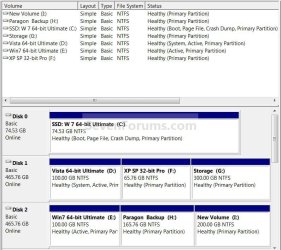
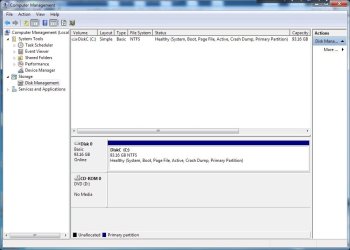
Can you post a snip of the drive map from "Disk Management"? In the Start Menu, right click Computer, select Manage, then upper left pane click Disk Management I'm curious about something; I'll post mine below to give you an idea.

Goof.jpg
 

My Computer

Computer Manufacturer/Model Number
* BFK Customs *
OS
W 7 64-bit Ultimate
CPU
Intel Q9550 Yorkfield
Motherboard
ASUS P5Q Pro
Memory
8GB Dominator 8500C5D
Graphics Card(s)
ATI : XFX 5870
Sound Card
Realtek HD Audio 7-1
Monitor(s) Displays
1x 47" LCD HDMI & 3x 26" LCD HDMI
Screen Resolution
1920x1080P & 1920x1200
Hard Drives
1x 80GB Intel X25-M G2 SSD : 1x 500GB & 1x 640GB WD Caviar Black(s)
PSU
Corsair 620HX
Case
Cooler Master RC-690
Cooling
Tuniq Tower 120, 2x 140mm and 3x 120mm case fans
Keyboard
Microsoft 500
Mouse
Razer Diamondback 3G
Internet Speed
14 Mb/s
Other Info
1x Koutech 3Gb/s SATA HDD Hot Swap Rack
Here is mine:

DiskManagement.jpg
 

My Computer

Computer Manufacturer/Model Number
HP Pavilion Notebook dv6025
OS
Windows 7 Home Premium 32-bits
CPU
1.6 Ghz AMD Turion
Motherboard
HP ?
Memory
2 GB
Graphics Card(s)
NVIDIA GeForce Go 7200
Sound Card
Conexant Hih Definition Audio
Monitor(s) Displays
pnp original HP monitor
Hard Drives
FUJITSU MHV2100BH - 100 GB
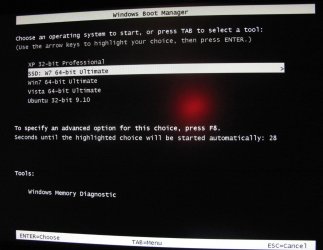
And you're getting a boot menu at startup?

Something silirar to this as the first screen you see when you first start the PC?
(you turn on the PC and get that)

Boot Menu.JPG
 

My Computer

Computer Manufacturer/Model Number
* BFK Customs *
OS
W 7 64-bit Ultimate
CPU
Intel Q9550 Yorkfield
Motherboard
ASUS P5Q Pro
Memory
8GB Dominator 8500C5D
Graphics Card(s)
ATI : XFX 5870
Sound Card
Realtek HD Audio 7-1
Monitor(s) Displays
1x 47" LCD HDMI & 3x 26" LCD HDMI
Screen Resolution
1920x1080P & 1920x1200
Hard Drives
1x 80GB Intel X25-M G2 SSD : 1x 500GB & 1x 640GB WD Caviar Black(s)
PSU
Corsair 620HX
Case
Cooler Master RC-690
Cooling
Tuniq Tower 120, 2x 140mm and 3x 120mm case fans
Keyboard
Microsoft 500
Mouse
Razer Diamondback 3G
Internet Speed
14 Mb/s
Other Info
1x Koutech 3Gb/s SATA HDD Hot Swap Rack
Exactly ... That's the screen I get. It seems like multi boot with the Memory test at the bottom.
 

My Computer

Computer Manufacturer/Model Number
HP Pavilion Notebook dv6025
OS
Windows 7 Home Premium 32-bits
CPU
1.6 Ghz AMD Turion
Motherboard
HP ?
Memory
2 GB
Graphics Card(s)
NVIDIA GeForce Go 7200
Sound Card
Conexant Hih Definition Audio
Monitor(s) Displays
pnp original HP monitor
Hard Drives
FUJITSU MHV2100BH - 100 GB
Do you have another HDD to save the files you don't want to lose to?

What type of Windows 7 do you have, "Retail" or Upgrade"?
 

My Computer

Computer Manufacturer/Model Number
* BFK Customs *
OS
W 7 64-bit Ultimate
CPU
Intel Q9550 Yorkfield
Motherboard
ASUS P5Q Pro
Memory
8GB Dominator 8500C5D
Graphics Card(s)
ATI : XFX 5870
Sound Card
Realtek HD Audio 7-1
Monitor(s) Displays
1x 47" LCD HDMI & 3x 26" LCD HDMI
Screen Resolution
1920x1080P & 1920x1200
Hard Drives
1x 80GB Intel X25-M G2 SSD : 1x 500GB & 1x 640GB WD Caviar Black(s)
PSU
Corsair 620HX
Case
Cooler Master RC-690
Cooling
Tuniq Tower 120, 2x 140mm and 3x 120mm case fans
Keyboard
Microsoft 500
Mouse
Razer Diamondback 3G
Internet Speed
14 Mb/s
Other Info
1x Koutech 3Gb/s SATA HDD Hot Swap Rack
I have the OEM upgrade installation disk, Windows 7 home premium.
I can backup my files to another comp on my home network.
My startup screen layout is as follows :

Windows Boot Manager

Choose an operating system:
- Earlier versions of windows
- Windows 7" (highlighted)
- Windows XP recovery console.

Seconds tic tac

Tools:
Windows memory diagnostic
 

My Computer

Computer Manufacturer/Model Number
HP Pavilion Notebook dv6025
OS
Windows 7 Home Premium 32-bits
CPU
1.6 Ghz AMD Turion
Motherboard
HP ?
Memory
2 GB
Graphics Card(s)
NVIDIA GeForce Go 7200
Sound Card
Conexant Hih Definition Audio
Monitor(s) Displays
pnp original HP monitor
Hard Drives
FUJITSU MHV2100BH - 100 GB
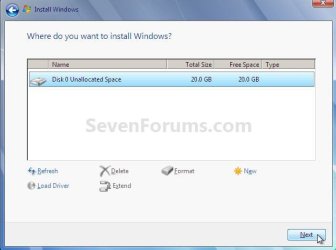
I'm sure you are probably getting tired of installs; you don't have to install XP first to do an "upgrade" to Windows 7, I feel that's causing you untold problems; have a good look at the tutorial at the link below.

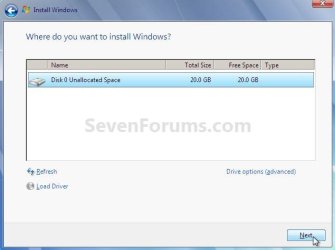
Let me say this, choose the drive options / format option during the install; BE AWARE: if you do this that you have all your important data backed up to an external HDD as it will be lost if you don't.

http://www.sevenforums.com/tutorials/31402-clean-install-upgrade-windows-7-version.html

Select Disk.jpg
HDD Options.jpg
 

My Computer

Computer Manufacturer/Model Number
* BFK Customs *
OS
W 7 64-bit Ultimate
CPU
Intel Q9550 Yorkfield
Motherboard
ASUS P5Q Pro
Memory
8GB Dominator 8500C5D
Graphics Card(s)
ATI : XFX 5870
Sound Card
Realtek HD Audio 7-1
Monitor(s) Displays
1x 47" LCD HDMI & 3x 26" LCD HDMI
Screen Resolution
1920x1080P & 1920x1200
Hard Drives
1x 80GB Intel X25-M G2 SSD : 1x 500GB & 1x 640GB WD Caviar Black(s)
PSU
Corsair 620HX
Case
Cooler Master RC-690
Cooling
Tuniq Tower 120, 2x 140mm and 3x 120mm case fans
Keyboard
Microsoft 500
Mouse
Razer Diamondback 3G
Internet Speed
14 Mb/s
Other Info
1x Koutech 3Gb/s SATA HDD Hot Swap Rack
No problem Bare Foot, I did that already. I followed the clean install tutorial you suggested and I have made an image backup of the working Win7 installation. I can restore it whenever I want and continue on that base. See my previous post. In fact I have no more issues. I just wanted to bring your attention to the upgrade installation from win XP to Win7 and the SR problems occuring.
 

My Computer

Computer Manufacturer/Model Number
HP Pavilion Notebook dv6025
OS
Windows 7 Home Premium 32-bits
CPU
1.6 Ghz AMD Turion
Motherboard
HP ?
Memory
2 GB
Graphics Card(s)
NVIDIA GeForce Go 7200
Sound Card
Conexant Hih Definition Audio
Monitor(s) Displays
pnp original HP monitor
Hard Drives
FUJITSU MHV2100BH - 100 GB
At least we have something sorted out, thanks for the update! :thumbsup:
 

My Computer

Computer Manufacturer/Model Number
* BFK Customs *
OS
W 7 64-bit Ultimate
CPU
Intel Q9550 Yorkfield
Motherboard
ASUS P5Q Pro
Memory
8GB Dominator 8500C5D
Graphics Card(s)
ATI : XFX 5870
Sound Card
Realtek HD Audio 7-1
Monitor(s) Displays
1x 47" LCD HDMI & 3x 26" LCD HDMI
Screen Resolution
1920x1080P & 1920x1200
Hard Drives
1x 80GB Intel X25-M G2 SSD : 1x 500GB & 1x 640GB WD Caviar Black(s)
PSU
Corsair 620HX
Case
Cooler Master RC-690
Cooling
Tuniq Tower 120, 2x 140mm and 3x 120mm case fans
Keyboard
Microsoft 500
Mouse
Razer Diamondback 3G
Internet Speed
14 Mb/s
Other Info
1x Koutech 3Gb/s SATA HDD Hot Swap Rack
Thank you very much for your support, Bare Foot and all the best to you and the team.
 

My Computer

Computer Manufacturer/Model Number
HP Pavilion Notebook dv6025
OS
Windows 7 Home Premium 32-bits
CPU
1.6 Ghz AMD Turion
Motherboard
HP ?
Memory
2 GB
Graphics Card(s)
NVIDIA GeForce Go 7200
Sound Card
Conexant Hih Definition Audio
Monitor(s) Displays
pnp original HP monitor
Hard Drives
FUJITSU MHV2100BH - 100 GB
Thanks mate, we're glad we could help.
 

My Computer

Computer Manufacturer/Model Number
* BFK Customs *
OS
W 7 64-bit Ultimate
CPU
Intel Q9550 Yorkfield
Motherboard
ASUS P5Q Pro
Memory
8GB Dominator 8500C5D
Graphics Card(s)
ATI : XFX 5870
Sound Card
Realtek HD Audio 7-1
Monitor(s) Displays
1x 47" LCD HDMI & 3x 26" LCD HDMI
Screen Resolution
1920x1080P & 1920x1200
Hard Drives
1x 80GB Intel X25-M G2 SSD : 1x 500GB & 1x 640GB WD Caviar Black(s)
PSU
Corsair 620HX
Case
Cooler Master RC-690
Cooling
Tuniq Tower 120, 2x 140mm and 3x 120mm case fans
Keyboard
Microsoft 500
Mouse
Razer Diamondback 3G
Internet Speed
14 Mb/s
Other Info
1x Koutech 3Gb/s SATA HDD Hot Swap Rack
Back
Top