
System Slows After Adding Second Hard Disk

bohq

New member
Local time
5:35 AM
Messages
9
Hi! Can someone help me out? I just installed a second hard disk on my MSI GT780 machine with 8GB of RAM, both drives are detected working perfectly.

The old hdd, a generic 5400 rpm, is mainly for storage and the new one, 7200 rpm is where I installed my OS. Both are 500GB in capacity. The only thing I noticed is that I'm getting some lags, CPU usage would spike up to 90-100%, RAM never goes over 50% while gaming (Batman Arkham City and Battlefield 2).

This never happened before I added the 2nd hdd and before then, I can have 2 games in the background (GTA4 & Battlefield 3) while browsing and music steaming with no problems at all.

I updated the motherboard and VGA drivers after a fresh install on the new hdd.
I'm using a 64bit W7 Ultimate using the same installer I had for the old hd.
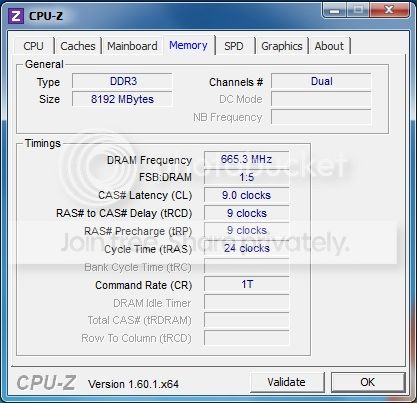

RAM-1.jpg

CPU.jpg


Thanks!
 

My Computer

OS
Windows 7 Home Premiuim x64
CPU
Intel i5
Memory
2G
Graphics Card(s)
ATI Mobility Radeon
Are they both SATA's?
 

My Computer

Computer type
PC/Desktop
Computer Manufacturer/Model Number
Apple 2012 Mac Mini
OS
Mac OS X 10.9
CPU
Intel i7 Ivy Bridge (2.3Ghz)
Motherboard
Apple
Memory
8GB's DDR3 (1333 MHz)
Graphics Card(s)
Intel 4000 (1024MB)
Monitor(s) Displays
HP 23inch LED
Screen Resolution
1920 x 1080
Hard Drives
1TB
Case
Mac Mini Case
Keyboard
Mac Logitech Solar Powered
Mouse
Magic Touch Pad
Internet Speed
About 3.00 MBps
Browser
Chrome
Yes, both SATA's.
 

My Computer

OS
Windows 7 Home Premiuim x64
CPU
Intel i5
Memory
2G
Graphics Card(s)
ATI Mobility Radeon
Do you know the speeds of the SATA?
 

My Computer

Computer type
PC/Desktop
Computer Manufacturer/Model Number
Apple 2012 Mac Mini
OS
Mac OS X 10.9
CPU
Intel i7 Ivy Bridge (2.3Ghz)
Motherboard
Apple
Memory
8GB's DDR3 (1333 MHz)
Graphics Card(s)
Intel 4000 (1024MB)
Monitor(s) Displays
HP 23inch LED
Screen Resolution
1920 x 1080
Hard Drives
1TB
Case
Mac Mini Case
Keyboard
Mac Logitech Solar Powered
Mouse
Magic Touch Pad
Internet Speed
About 3.00 MBps
Browser
Chrome
You mean the cache or rpms? Sorry,I'm kind of a noob.

The new one, which is now my primry, runs at 7200rpm while the older one is at 5200rpms.
 

My Computer

OS
Windows 7 Home Premiuim x64
CPU
Intel i5
Memory
2G
Graphics Card(s)
ATI Mobility Radeon
I mean the interface speed.
 

My Computer

Computer type
PC/Desktop
Computer Manufacturer/Model Number
Apple 2012 Mac Mini
OS
Mac OS X 10.9
CPU
Intel i7 Ivy Bridge (2.3Ghz)
Motherboard
Apple
Memory
8GB's DDR3 (1333 MHz)
Graphics Card(s)
Intel 4000 (1024MB)
Monitor(s) Displays
HP 23inch LED
Screen Resolution
1920 x 1080
Hard Drives
1TB
Case
Mac Mini Case
Keyboard
Mac Logitech Solar Powered
Mouse
Magic Touch Pad
Internet Speed
About 3.00 MBps
Browser
Chrome
Oh, it's 3Gb/s.
 

My Computer

OS
Windows 7 Home Premiuim x64
CPU
Intel i5
Memory
2G
Graphics Card(s)
ATI Mobility Radeon
Look into Device Manager > Properties > Policies and check whether write caching is enabled. Write caching should speed things up.
 

My Computer

Computer Manufacturer/Model Number
HP, Dell, Gateway, Toshiba - 4 laptops and 2 desktops
OS
Vista, Windows7, Mint Mate, Zorin, Windows 8
CPU
from 1.6GHz Duo to i7
Monitor(s) Displays
2x HP w2207
Hard Drives
5x HDD, 7x SSD, 12x Externals
Keyboard
with trackball - no mices
Mouse
Trackball mice
Internet Speed
DSL 6000
Seems it's enabled by default
 

My Computer

OS
Windows 7 Home Premiuim x64
CPU
Intel i5
Memory
2G
Graphics Card(s)
ATI Mobility Radeon
Back
Top