Task Manager not showing applications

mochasoft

New member
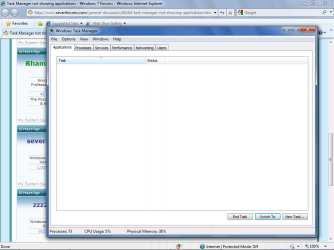
I have a Lenovo ThinkCentre running Window 7 Professional. If I bring up the Task Manager, no applications show in the window, no matter how many I have open. Processes, Services, etc. all look fine, just no apps. Of course this makes it impossible to kill a 'not responding' app.

This is not an issue where the menu doesn't show. Everything looks normal except no apps are listed.

Anyone see this before?
 

My Computer

Computer Manufacturer/Model Number
Lenovo ThinkCentre 7268
OS
Windows 7 Professional
CPU
Intel Core 2 Duo E7500 2.93GHz
Memory
3 GB
Strange, never seen this. Are these common apps, that are installed correctly and have the proper associations in the registry?
 

My Computer

Computer Manufacturer/Model Number
HPE-112y Custom + Custom Build
OS
HP Win7 Pro x64 | Custom Win7 Pro x64
CPU
HP PhII X4 965 Black Ed. 3.4Ghz | PhII X6 1100T 3.3/3.7
Motherboard
OEM HP | ASUS Crosshair IV Extreme 890FX
Memory
8GB DDR3 1333 OC Black Edition x2
Graphics Card(s)
HP XFX Radeon HD4890 1GB | AMD Radeon HD 6990
Sound Card
Realtek 7.1 Digital HDMI x2
Monitor(s) Displays
HP 20" 1680x1050 LCD | Samsung 23" 2ms 1920x1200 LED
Screen Resolution
1680x1050 + 1920x1200 & HDTV for Gaming/TV
Hard Drives
1TB WD "Green" 5,400 RPM SCSI W/ AMD RAID/Xpert
Custom 2x 128GB OCZ Enyo SSD
PSU
Thermaltake Black Widow 850watt Modular x2
Case
HP HPE- 112y OEM Modded | Custom Xclio A380S
Cooling
HP Antec120mm | Custom Antec 360mm/250mm/200mm/120mm
Keyboard
HP G15 | G19
Mouse
G500 x2
Internet Speed
15mb down, 2mb up
Other Info
2x DVD-RAM | 2x BD-ROM
odd... has this been going on from day 1? if so id say its a corrupted install, a Repair Install should fix that
 

My Computer

Computer type
PC/Desktop
Computer Manufacturer/Model Number
Medion Erazer (note to self: insert model number) - with custom additions
OS
Windows 10 Pro x64
CPU
Intel Core i5 7400 @ 3.00GHz
Motherboard
OEM supllied with PC
Memory
8GB 2133Mhz DDR4 (OEM supplied)
Graphics Card(s)
Gygabyte Windforce GTX 1050Ti (Factory Overclocked)
Sound Card
Realtek
Monitor(s) Displays
Acer Al1980 + HKC
Screen Resolution
1360*768(HKC) / 1280*1024(Acer)
Hard Drives
1TB Toshiba
1TB WD Caviar Green
120GB Samsung Evo 840
PSU
OEM supplied (no power rating on case)
Case
OEM Supplied
Cooling
Stock
Keyboard
Logitech Wireless
Mouse
Logitect Wireless
Internet Speed
40Mb/s Down 10Mb/s Up
Antivirus
Defender
Browser
Firefox
Can you post a screenshot?

zzz2496
 

My Computer

Computer Manufacturer/Model Number
Self Built
OS
Windows7 Ultimate 64bit
CPU
Intel Core 2 Quad Q6600
Motherboard
Abit IN9-32X-MMAX
Memory
DDR2 Adata 4GB
Graphics Card(s)
Nvidia GeForce GTX 285 1024 and Nvidia GeForce 8800GT 512
Sound Card
Asus Xonar HDAV 1.3
Monitor(s) Displays
Dell 2407WFP and BenQ 2400v and Philips 150v3
Screen Resolution
3840x1200 and 1024x768
Hard Drives
2 WDC 1TB
1 WDC 1.5TB
1 WDC 640GB
1 WDC 320GB
1 Seagate 200GB
PSU
Corsair TX 850W
Case
Cooler Master HAF932
Cooling
Arctic Cooling Freezer Extreme and plenty of fans...
Keyboard
MicrosoftNaturalKeyboard 4000/Apple Alu keyboard/Dinovo mini
Mouse
Logitech G5/MarbleMouseTrackball/PerformanceMX/SpacePilotPRO
Internet Speed
1.5Mbps down/384Kbps up
Other Info
APC SURT 1000XL
Logitech Z-560
Wiimote
Mikrotik Router
Linksys (now Cisco) SD2008 8 port Gigabit switch
Linksys WRT54G (acting as AP)
Apple wireless Aluminium keyboard
Apple Magic Mouse
Xbox360 wired controller
IBM Lotus Notes client, Windows Live, iSeries Access, Adobe Acrobat Reader, Word, Excel...just your average applications.

The machine came with Windows XP pre-loaded but I installed Windows 7 using the Lenovo recovery CD's that came with the machine. Been running since January but I don't know if the problem existed from the beginning. Since it is a manufacturer's license, Microsoft support won't touch the issue unless I pay. Lenovo did some looking online but then threw up their hands as well.

I've attached a .png with the screen.

I'll save some files off of the machine (just in case) and see if I can do a repair from the recovery CD's.

Thanks.
 

Attachments

  • Task Manager screenshot.png
    Task Manager screenshot.png
    132.8 KB · Views: 158

My Computer

Computer Manufacturer/Model Number
Lenovo ThinkCentre 7268
OS
Windows 7 Professional
CPU
Intel Core 2 Duo E7500 2.93GHz
Memory
3 GB
I agree with severedsolo, if its happening from the first day then perhaps re-install.

It might be worth while creating a new user (an administrator) and logging in just to tripple check its not a profile level corruption (its something easy to check).

The only other thing that springs to mind is to check your event log for errors and services that are not running.

These are only suggestions to attempt before a re-install.

Cheers
Rob
 

My Computer

OS
Windows 7
I logged on with two other different accounts, one local and one from my network, and applications show on both. Looks like it's my profile. I'll delete and recreate when time permits.

Thanks for the tip, Rob!
 

My Computer

Computer Manufacturer/Model Number
Lenovo ThinkCentre 7268
OS
Windows 7 Professional
CPU
Intel Core 2 Duo E7500 2.93GHz
Memory
3 GB
I logged on with two other different accounts, one local and one from my network, and applications show on both. Looks like it's my profile. I'll delete and recreate when time permits.

Thanks for the tip, Rob!

See, you just troubleshot your own issue! Good work!
 

My Computer

Computer Manufacturer/Model Number
HP Pavilion dv7
OS
Windows 7
CPU
Core i7
Memory
8 GB
Graphics Card(s)
ATI FireGL
Monitor(s) Displays
Secondary is an HP L1940T
Screen Resolution
1680x1050
Hard Drives
160 GB SSD and 500 GB SATA
Keyboard
G11 Logitech
Mouse
G7 Logitech
Internet Speed
Fiber
Other Info
My rig smegging rules!
Problem solved.

Just a follow-up. I did recreate my profile and the apps now show up in the task manager.
 

My Computer

Computer Manufacturer/Model Number
Lenovo ThinkCentre 7268
OS
Windows 7 Professional
CPU
Intel Core 2 Duo E7500 2.93GHz
Memory
3 GB
Glad to hear you are good to go. Thanks for reporting.
 

My Computer

Computer Manufacturer/Model Number
Home built
OS
Windows 7 Ultimate 32 bit
CPU
Intel(R) Pentium(R) 4 CPU 3.00GHz
Motherboard
ASUS P4P800-VM Motherboard Chipset: Intel 865G + ICH5
Memory
2.50 GB RAM
Graphics Card(s)
NVIDIA GeForce 7600 GS
Sound Card
SoundMax Integrated Digital Audio (Chip)
Monitor(s) Displays
ViewSonic VX 1962 wm
Screen Resolution
1680 X 1050
Hard Drives
Seagate Barracuda 7200.10 80 GB
ST380215A ATA Device 18.6 GB
Western Digital "My Book" external hard drive 750 GB
Cooling
Fan based
Keyboard
Microsoft Comfort Curve Keyboard 2000 v10 USB
Mouse
Logitec optic USB
Internet Speed
3.01 Mb/s download 0.64 Mb/s upload
Here's an odd update. The machine has been working fine for months but then the issue just re-occured. I do a CTL-ALT-DLT and no apps show. If I right-click on the task bar and select Start Task Manager, the apps show. I would have assumed they would be calling the same process.

I'm not going to spend any time trying to figure out why but I thought I would share that observation as a work-around in case anyone else runs into this issue.
 

My Computer

Computer Manufacturer/Model Number
Lenovo ThinkCentre 7268
OS
Windows 7 Professional
CPU
Intel Core 2 Duo E7500 2.93GHz
Memory
3 GB
Hi, following the initial query. I have window 7 and my window (i2, dual core, 64 bit) suddenly started to use lots of RAM. without any application it using 2.2 GB RAM with cpu uses almost 50%. The problem is that the task manager is not showing any such operation with such a high use of memory.
I tried
1. restarting my machine
2. cleaning registry by ccleaner
3. closing all application that started during startup.
None of these has helped yet. My questions are:
1. Is there any way to look at complete distribution of RAM uses, I meant if my laptop is using 2 GB ram, then there should be a way to see the split of ram uses across different applications.
Other than that, What do you think can be the problem and fix of this problem?
 
Last edited:

My Computer

OS
window 7 professional x32
Apps don't show in task manager

Bring up task mgr (alt clt del) then while holding down the shift/ctl key, click on "start task manager" with your mouse,, should restore your apps

sometimes I amaze myself
 

My Computer

Computer type
PC/Desktop
OS
7 32bit
Wow, the hold Shift-Ctrl then Task Manager works for me!! but not all of the time. What in the world could be causing this? And it's across all profiles on two computer in a domain environment. Both Win 7 pro x64 fully updated.
 

My Computer

Computer type
PC/Desktop
OS
I'm an IT Admin, 7x64, 8.1x64, 10x64
Back
Top