- Local time
- 12:12 PM
- Messages
- 1,308
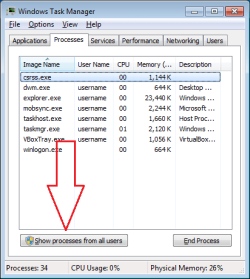
... unusually high cpu activity during 'idle'. Is there an alternate that will tell me what is happening? I have the CPU Usage gadget that shows me cpu activity, temperatures, ram, etc. Typically when the computer is idle the graphs are low. On rare occasions the graph will peak and temps will rise dramatically for no reason. Being a novice, all I know is to fire up the task manager, go to Process tab, clik 'show all users' and look for a process that is showing mega numbers in the memory column and finding nothing 'out-of-the-ordinary' in this situation. The only way I have solved/'fixed' this is to shutdown and restart the computer. Perhaps this is not the way to troubleshoot this and there exists a more precise method?
-thx
-thx
My Computer
- Computer type
- PC/Desktop
- Computer Manufacturer/Model Number
- HP (HP-P6212F)
- OS
- Microsoft Windows 7 Home Premium 64-bit 7601 Multiprocessor Free Service Pack 1
- CPU
- Pentium(R) Dual-Core CPU E5300 @ 2.60GHz
- Motherboard
- PEGATRON CORPORATION Benicia
- Memory
- 6.00 GB
- Graphics Card(s)
- Intel(R) G33/G31 Express Chipset Family
- Sound Card
- Realtek High Definition Audio
- Monitor(s) Displays
- 24'' HP WS LCD
- Screen Resolution
- 1920 x 1080 x 32 bits (4294967296 colors) @ 60 Hz
- Hard Drives
- (1) ATA Hitachi HDT72106 SCSI Disk Device (2) Generic- Compact Flash USB Device (3) Generic- MS/MS-Pro USB Device (4) Generic- SD/MMC USB Device (5) Generic- SM/xD-Picture USB Device (6) Verbatim STORE N GO USB Device
- Keyboard
- Logitech G510s
- Mouse
- Logitech Trackball M570
- Antivirus
- Microsoft Security Essentials / Malwarebytes
- Browser
- IE / Firefox / Chrome