
You are using an out of date browser. It may not display this or other websites correctly.
You should upgrade or use an alternative browser.
You should upgrade or use an alternative browser.
Taskbar Active Highlight Appears Behind Wrong Icon
- Thread starter pcdragin
- Start date

NoN
New member
Every time I open windows explorer, the active application highlight appears behind the Control Panel icon instead of the Explorer icon.
Is there a way to fix this?
Thanx,
Randy
Can you provide a screenshot...i do not image it entirely
My Computer
- Computer type
- PC/Desktop
- Computer Manufacturer/Model Number
- Custom Build
- OS
- Windows 7 Professional SP1 - x64 [Non-UEFI Boot]
- CPU
- Ivy Bridge Core i5 3570K (Delidded)
- Motherboard
- Asus P8Z77-V LE PLUS
- Memory
- G.Skill "Ares" DDR3 PC3-12800 - 1600MHz (16Gb)
- Graphics Card(s)
- Asus Dual-RX480-O4G
- Sound Card
- Creative Sound Blaster Z w/5.1 sound system
- Monitor(s) Displays
- Asus IPS 23"
- Screen Resolution
- 16/9
- Hard Drives
- Internal:
500Go Sata 6Gb/s (x2)
500Go Sata 3Gb/s (x2)
SSD 60Go Sata 6Gb/s
- PSU
- In Win C 900W Series 80+ Platinum
- Case
- Thermaltake Chaser A71
- Cooling
- Custom Water Cooling Loop
- Keyboard
- Cooler Master QuickFire XTi
- Mouse
- Razer Imperator 2012 (4G)
- Antivirus
- MSE
- Browser
- IE 11.0.xxx Rtm
- Other Info
- "Raid0" with Intel Smart Response Technology (HDD/SSD)


WindowsStar
New member
I am completely confused as to what is the problem here. Are you able to explain it better?
My Computer
- Computer type
- PC/Desktop
- Computer Manufacturer/Model Number
- Dell OP7010
- OS
- Windows 7 Enterprise (x64); Windows Server 2008 R2 (x64)
- Memory
- 16GB
- Monitor(s) Displays
- 4 Dell 24" LCD
- Screen Resolution
- 1280x1024
- Keyboard
- Dell
- Mouse
- Dell Optical
- Internet Speed
- 40meg
NoN
New member
Here is the screen capture that you requested: (Please see the attachment).

Do you mean it's more like transparancy than the other one?
It is pretty normal, when you swap to the other open window it will do the same effect.
or
You might open the Control Panel instead of Explorer...are you sure? I've never seen this on my computer yet, when openning Explorer or Control Panel that they do swap Icons.
PS: I do not know if it related but maybe a clean of Icons stream could do it.
I have attached .reg for you, merge it and reboot, see if it the same.
Attachments
My Computer
- Computer type
- PC/Desktop
- Computer Manufacturer/Model Number
- Custom Build
- OS
- Windows 7 Professional SP1 - x64 [Non-UEFI Boot]
- CPU
- Ivy Bridge Core i5 3570K (Delidded)
- Motherboard
- Asus P8Z77-V LE PLUS
- Memory
- G.Skill "Ares" DDR3 PC3-12800 - 1600MHz (16Gb)
- Graphics Card(s)
- Asus Dual-RX480-O4G
- Sound Card
- Creative Sound Blaster Z w/5.1 sound system
- Monitor(s) Displays
- Asus IPS 23"
- Screen Resolution
- 16/9
- Hard Drives
- Internal:
500Go Sata 6Gb/s (x2)
500Go Sata 3Gb/s (x2)
SSD 60Go Sata 6Gb/s
- PSU
- In Win C 900W Series 80+ Platinum
- Case
- Thermaltake Chaser A71
- Cooling
- Custom Water Cooling Loop
- Keyboard
- Cooler Master QuickFire XTi
- Mouse
- Razer Imperator 2012 (4G)
- Antivirus
- MSE
- Browser
- IE 11.0.xxx Rtm
- Other Info
- "Raid0" with Intel Smart Response Technology (HDD/SSD)
WindowsStar,
Please see the screen capture in this thread. The only programs open are Firefox & Windows Explorer. The Firefox highlight appears behind the Firefox icon as it should. However, no highlight appears behind the Windows Explorer icon; instead one shows behind the Control Panel icon.
Thanx,
Randy
Please see the screen capture in this thread. The only programs open are Firefox & Windows Explorer. The Firefox highlight appears behind the Firefox icon as it should. However, no highlight appears behind the Windows Explorer icon; instead one shows behind the Control Panel icon.
Thanx,
Randy
My Computer
- Computer Manufacturer/Model Number
- Dell Inspiron D530
- OS
- Windows 7
WindowsStar
New member
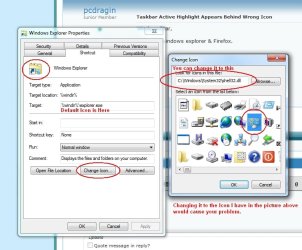
Ok, I think I get it, what is really open? Windows Explorer?
My Computer
- Computer type
- PC/Desktop
- Computer Manufacturer/Model Number
- Dell OP7010
- OS
- Windows 7 Enterprise (x64); Windows Server 2008 R2 (x64)
- Memory
- 16GB
- Monitor(s) Displays
- 4 Dell 24" LCD
- Screen Resolution
- 1280x1024
- Keyboard
- Dell
- Mouse
- Dell Optical
- Internet Speed
- 40meg
WindowsStar
New member

My Computer
- Computer type
- PC/Desktop
- Computer Manufacturer/Model Number
- Dell OP7010
- OS
- Windows 7 Enterprise (x64); Windows Server 2008 R2 (x64)
- Memory
- 16GB
- Monitor(s) Displays
- 4 Dell 24" LCD
- Screen Resolution
- 1280x1024
- Keyboard
- Dell
- Mouse
- Dell Optical
- Internet Speed
- 40meg
No, I didn't change the icon. When I click on the Windows Explorer Icon, it does open Windows Explorer. However, after minimizing Windows Explorer I have to click on the control Panel Icon to re-open it. It does not open the Control Panel.
Thanx,
Randy
Thanx,
Randy
My Computer
- Computer Manufacturer/Model Number
- Dell Inspiron D530
- OS
- Windows 7
NoN
New member
Any software you used sometimes to tweak 7 interface?
Could it be a malware trying taking control?
Worth a try to SFC/Scannow the computer and a full scan for virus....
Could it be a malware trying taking control?
Worth a try to SFC/Scannow the computer and a full scan for virus....
My Computer
- Computer type
- PC/Desktop
- Computer Manufacturer/Model Number
- Custom Build
- OS
- Windows 7 Professional SP1 - x64 [Non-UEFI Boot]
- CPU
- Ivy Bridge Core i5 3570K (Delidded)
- Motherboard
- Asus P8Z77-V LE PLUS
- Memory
- G.Skill "Ares" DDR3 PC3-12800 - 1600MHz (16Gb)
- Graphics Card(s)
- Asus Dual-RX480-O4G
- Sound Card
- Creative Sound Blaster Z w/5.1 sound system
- Monitor(s) Displays
- Asus IPS 23"
- Screen Resolution
- 16/9
- Hard Drives
- Internal:
500Go Sata 6Gb/s (x2)
500Go Sata 3Gb/s (x2)
SSD 60Go Sata 6Gb/s
- PSU
- In Win C 900W Series 80+ Platinum
- Case
- Thermaltake Chaser A71
- Cooling
- Custom Water Cooling Loop
- Keyboard
- Cooler Master QuickFire XTi
- Mouse
- Razer Imperator 2012 (4G)
- Antivirus
- MSE
- Browser
- IE 11.0.xxx Rtm
- Other Info
- "Raid0" with Intel Smart Response Technology (HDD/SSD)
WindowsStar
New member
I just enabled "God Mode" & put it on the taskbar. Could that be it?
Thanx,
Randy
Yes that is it! Remove it from the taskbar and put the normal Windows Explorer on the taskbar.
My Computer
- Computer type
- PC/Desktop
- Computer Manufacturer/Model Number
- Dell OP7010
- OS
- Windows 7 Enterprise (x64); Windows Server 2008 R2 (x64)
- Memory
- 16GB
- Monitor(s) Displays
- 4 Dell 24" LCD
- Screen Resolution
- 1280x1024
- Keyboard
- Dell
- Mouse
- Dell Optical
- Internet Speed
- 40meg
WindowsStar
New member
You are welcome. I am glad we could help.
My Computer
- Computer type
- PC/Desktop
- Computer Manufacturer/Model Number
- Dell OP7010
- OS
- Windows 7 Enterprise (x64); Windows Server 2008 R2 (x64)
- Memory
- 16GB
- Monitor(s) Displays
- 4 Dell 24" LCD
- Screen Resolution
- 1280x1024
- Keyboard
- Dell
- Mouse
- Dell Optical
- Internet Speed
- 40meg