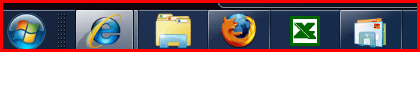
Taskbar Pin feature

weirddave

New member
Local time
11:36 PM
Messages
11
I hate the new 'Pin' feature. I use multiple instances if IE, as soon as I launch the first one, my pin for it disappears. To get my second instance I need to go into the start menu and run it from there.
I prefer the old toolbar method, but even that has been altered, It seems to only sit on the right side of the taskbar, I want it on the left!
 

My Computer

OS
Windows 7
Hi weirddave,

You can just right click on the IE tab on the taskbar and click "Internet Explorer" and it will open up a new seperate window. Or you can right click on the taskbar and go to properties and set Taskbar Buttons to "Always Combine, Hide Labels". But you'll still have to right click on the teaskbar icon and click IE to open a new window.

View attachment 3620
 

My Computer

Computer type
PC/Desktop
Computer Manufacturer/Model Number
Airbot 2.0
OS
Windows 7 Ultimate x64 SP1
CPU
Core i7 920 (D0) @ 4Ghz, *26c idle *65c full load on air
Motherboard
Asus P6X58D Premium - Sata 6Gb/s - USB 3.0
Memory
12GB DDR3 Corsair Dominator -CMD12GX3M6A1600C8 at 1600MHz
Graphics Card(s)
Zotac Geforce GTX 770
Sound Card
ASUS Xonar D2X
Monitor(s) Displays
1 LG 24" Flatron W2453V-PF 1 Samsung 24" P2450H both 2ms RT
Screen Resolution
1920x1080@60hz
Hard Drives
1 Samsung 250GB 840 Evo SSD
1 OCZ Vertex2 180GB SSD
1 TB Samsung Spinpoint F1 7200RPM 32MB cache
2 500GB WD Caviar Blacks 7200RPM 32MB cache (WD5001AALS)

Pioneer DVD Burner DVR-S18M
PSU
Corsair HX1000W
Case
Cooler Master HAF 932
Cooling
Case Fans *3 230mm, *1 140mm/CPU - *Tuniq Tower 120 Extreme
Keyboard
Logitech Wireless MK700
Mouse
Logitech Wireless MK700
Internet Speed
DL 15 Mbps UL 0.98 Mbps
Antivirus
None
Browser
Firefox Nightly
Other Info
Processor-7.7 *RAM- 7.9 *Graphics-7.9 *Gaming Graphics- 7.9 *SSD- 7.8 W.E.I final score= 7.7
*Phone- LG Nexus 5
Yes, it opens a new window, but not as a completely separate process, if any one of them crashes, they all go, this is why I have to launch them separately.
 

My Computer

OS
Windows 7
Yes, it opens a new window, but not as a completely separate process, if any one of them crashes, they all go, this is why I have to launch them separately.

Hello weirddave,

Welcome to the Seven Forums.

Are you sure about that. I use right click as Airbot suggests or shift+click icon to open a second instance of IE and in task manager it shows both a new app running and new processes running. This seems to be the case for 64 & 32 bit IE. Firefox on the other hand does not show a new process, but does show a second instance in Applications.

Gary
 

My Computer

Computer Manufacturer/Model Number
Dell XPS420
OS
Vista Ult 64 bit Seven Ult RTM x64
CPU
Intel Core2 Quad Q6600 2.40 gigahertz
Memory
Crucial Ballistix 4x2GB PC2 6400
Graphics Card(s)
NVIDIA GeForce 8600 GTS 256 MB
Sound Card
Creative SB X-Fi audio
Monitor(s) Displays
HP w2207 + HPvs15
Screen Resolution
1680x1050 + 1024x768
Hard Drives
2-WD5000AAKS-500 GB
WD5000AAV-500 GB external
Keyboard
Microsoft Comfort Curve
Mouse
MX Revolution
Other Info
Wacom Intuos 2 Graphics Tablet
Experience Index=5.5
There is also a handy shortcut to open new instances of pinned taskbar items.
Counting them from the start orb as 1, 2, 3..etc, you can use the Win key plus the position number of the pinned object to open a new instance.

So if IE is the first icon you hit Win + 1 to open a new instance, if Explorer is the second then Win + 2 opens that.
Also if you guys are like me I don't like the Explorer icon to open the Libraries folder, I asked Brink to make a Tutorial on how to change that to open My Computer (as the old Explorer in Vista would do) instead.
http://www.sevenforums.com/tutorials/2863-windows-explorer-taskbar-icon-change-open-target.html
 

My Computer

Computer Manufacturer/Model Number
Personal Build
OS
Vista Ult 64bit - Windows 7 Ult 7264 64bit
CPU
Intel Core 2 Duo E6750
Motherboard
Asus Commando
Memory
4 G's Crucial Ballistix Tracer
Graphics Card(s)
BFG Nvidia 8800 GTS 340
Sound Card
Creative Sound Blaster X-FI Platinum FATAL1TY
Monitor(s) Displays
2-22" HP W2207 LCD
Screen Resolution
1920 x 1080
Hard Drives
3 x 500G WD Caviar SATA II
PSU
Enermax Noise Taker II 600W
Case
NZXT Lexa Classic (dual doored & windowed)
Cooling
Zalman 9700 CPU cooler - 4 x 120mm, 1 x 90mm fans
Keyboard
Logitech MX 5500
Mouse
Logitech MX Revolution
Internet Speed
Blazing...
Gary,

I did originally do as you suggest, then had a browser crash and all my open IE windows went, this doesn't happen if I launch multiple IE from a shortcut.
There's something odd/new about the process list for IE, I get multiples of it even when I only have one window open. Could be one per tab but I admit I didn't check that. This could be part of the solution for its attempt to recover my sessions after a crash.

Chappy,

I didn't know about that. Problem is, once a pinned program is launched, the pin isn't visible anymore, so you'd have to remember its position. I will try it tonight after work and see what happens.
 

My Computer

OS
Windows 7
Chappy,

I didn't know about that. Problem is, once a pinned program is launched, the pin isn't visible anymore, so you'd have to remember its position. I will try it tonight after work and see what happens.

Are you saying that once you open a program, the Icon for the program vanishes? If so there is something wrong there. If I launch a program that is pinned, the icon gets a new background to show it's active, but it doesn't vanish.

icons.PNG

IE is open and active. IE also gets a little stripe to the right for each additional tab. Firefox and mail are open but not active, so they have a box and the light gradient area on upper left of the box. If I pass the mouse over the icon it gets a gradient over the entire box.

Gary
 

My Computer

Computer Manufacturer/Model Number
Dell XPS420
OS
Vista Ult 64 bit Seven Ult RTM x64
CPU
Intel Core2 Quad Q6600 2.40 gigahertz
Memory
Crucial Ballistix 4x2GB PC2 6400
Graphics Card(s)
NVIDIA GeForce 8600 GTS 256 MB
Sound Card
Creative SB X-Fi audio
Monitor(s) Displays
HP w2207 + HPvs15
Screen Resolution
1680x1050 + 1024x768
Hard Drives
2-WD5000AAKS-500 GB
WD5000AAV-500 GB external
Keyboard
Microsoft Comfort Curve
Mouse
MX Revolution
Other Info
Wacom Intuos 2 Graphics Tablet
Experience Index=5.5
The small pin icon changes to the standard taskbar window button, I'm using the 'never combine' option.
I just tried the always combine option, I get a stripe for one or more tabs, not one for each.
I don't see gradients either, but then I have all the fancy stuff turned off, W98 style :D
 

My Computer

OS
Windows 7
I changed the taskbar to never combine and can still open a second instance of IE or FF with shift+click. Doesn't work with Windows Explorer or games, but does work with notepad. So need to figure which ones work. Might have to do with turning off all the fancy stuff. I have about half of it turned off. I have my doubts about that having anything to do with it, but you might turn it all back on and see what happens. If nothing changes you can turn it all off again. If it does then turn them off one at a time until it stops working again and you'll know which one you need.

Gary
 

My Computer

Computer Manufacturer/Model Number
Dell XPS420
OS
Vista Ult 64 bit Seven Ult RTM x64
CPU
Intel Core2 Quad Q6600 2.40 gigahertz
Memory
Crucial Ballistix 4x2GB PC2 6400
Graphics Card(s)
NVIDIA GeForce 8600 GTS 256 MB
Sound Card
Creative SB X-Fi audio
Monitor(s) Displays
HP w2207 + HPvs15
Screen Resolution
1680x1050 + 1024x768
Hard Drives
2-WD5000AAKS-500 GB
WD5000AAV-500 GB external
Keyboard
Microsoft Comfort Curve
Mouse
MX Revolution
Other Info
Wacom Intuos 2 Graphics Tablet
Experience Index=5.5
Ah, I did mis-read about the shift clicking. Bit of a pain when your left hand is covered is snack food bits....
 

My Computer

OS
Windows 7
Back
Top